
Our Short List of 3

- Best for: A living room where 4K streaming shares the evening with gaming.
- Dual-band WiFi 6 with speeds up to 5700 Mbps
- 2.0 GHz quad-core CPU
- 2.5G port plus a dedicated gaming port
- Mobile Game Mode for low-latency mobile play

- Best for: Large homes where the television sits several rooms from the router.
- Dual-band WiFi 6 with speeds up to 5400 Mbps
- Six antennas with beamforming and 4T4R on the 5 GHz band
- HE160 for a 4.8 Gbps link on the 5 GHz band
- OFDMA and MU-MIMO for higher device capacity

- Best for: Smaller homes that want easy 4K streaming without extra fuss.
- Dual-band AX3000 WiFi 6, 2402 Mbps on 5 GHz and 574 Mbps on 2.4 GHz
- Gigabit Ethernet ports
- OFDMA and MU-MIMO
- EasyMesh compatible
All 5 Picks at a Glance
| Product | Specs | Action |
|---|---|---|
| ASUS RT-AX86U Pro AX5700 Dual Band WiFi 6 Gaming Router |
| Check price on Amazon |
| TP-Link AX5400 WiFi 6 Router (Archer AX73) |
| Check price on Amazon |
| TP-Link Archer AX55 |
| Check price on Amazon |
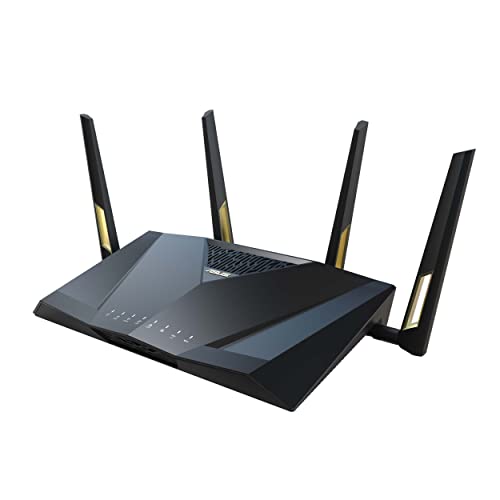 ASUS RT-AX88U Pro AX6000 Dual Band WiFi 6 Router |
| Check price on Amazon |
 TP-Link Archer BE230 BE3600 Dual-Band Wi-Fi 7 Router |
| Check price on Amazon |
Our Top Picks
A movie night falls apart when the picture freezes, the audio slips out of sync, or the stream drops to a blurry feed right at the best scene. The router sits at the center of that problem, because every television, tablet, and phone in the house pulls its picture through the same box. Picking the right one means weighing signal reach, steady throughput on the 5 GHz band, and enough capacity to keep several screens playing at once without a stutter.
This roundup suits households that watch in 4K, families with many devices online at the same time, and anyone whose television sits far from the router. The five routers below were picked from their names and listed features on Amazon, with an eye on dual-band and Wi-Fi 7 radios, multi-gig ports, mesh expansion, and tools that give video traffic priority. Each one handles a different home, from a small apartment to a large house full of screens.
Quick Picks
As an Amazon Associate we earn from qualifying purchases
| Product | Best for | Key spec from title |
|---|---|---|
| ASUS RT-AX86U Pro AX5700 Dual Band WiFi 6 Gaming Router | Steady 4K streaming with a wired gaming setup nearby | AX5700 dual-band WiFi 6 |
| TP-Link AX5400 WiFi 6 Router (Archer AX73) | Long-range coverage for a large living room | AX5400 dual-band WiFi 6 |
| TP-Link Archer AX55 | Simple everyday streaming in a smaller home | AX3000 dual-band WiFi 6 |
| ASUS RT-AX88U Pro AX6000 Dual Band WiFi 6 Router | Many wired devices plus heavy evening streaming | AX6000 dual-band WiFi 6 |
| TP-Link Archer BE230 BE3600 Dual-Band Wi-Fi 7 Router | A forward-looking pick for Wi-Fi 7 devices | BE3600 dual-band Wi-Fi 7 |
How to Choose
Match the router to your home size
Signal fades through walls, floors, and furniture, so a router that shines in a studio can leave a bedroom television buffering. Count the rooms between the router and the farthest screen, and note how many walls the signal must cross. Larger homes benefit from six or more antennas, beamforming, and the option to add a mesh node later. A compact apartment needs far less reach, and a smaller router can still deliver a clean 4K picture to every corner. Place the router high, out in the open, and away from thick metal objects for the best reach in any home.
Give video traffic priority
When several people stream, game, and video call at the same time, the network must decide which packets go first. Quality of service tools, called QoS, let the router put video ahead of background downloads and software updates. Adaptive QoS on some ASUS models reads the traffic type and adjusts on its own, while TP-Link routers offer similar controls through their apps. Without this kind of priority, a single large download can freeze a movie for everyone. Check that the router you pick offers QoS, then turn it on and point it at your television and streaming devices.
Look at ports and wired options
A wired connection still beats wireless for a television that never moves. A 2.5G port gives the router a wider pipe to the modem, and extra gigabit LAN ports let you wire the television, a console, and a streaming box without a separate switch. Households with many wired devices should favor routers with four or more LAN ports, while a home with one television can manage with fewer. USB ports add a bonus, letting the router share a drive across the network. Match the port count to the devices you plan to plug in, not just the ones you own today.
Plan for the next few years
Routers live in a home for years, so a pick that only fits today can feel thin tomorrow. Wi-Fi 7 models add multi-link operation and 4K-QAM, which help when newer phones, laptops, and televisions arrive with Wi-Fi 7 radios. Wi-Fi 6 remains a solid choice for homes whose devices are mostly Wi-Fi 6 or older, and it handles 4K streaming with room to spare. Mesh support matters too, since a single router that can join a mesh system grows with a move to a larger home. Buy the radio generation that matches the devices you expect to own soon, not only the ones on the shelf now.
The 5 Best Options
ASUS RT-AX86U Pro AX5700 Dual Band WiFi 6 Gaming Router
- Best for: A living room where 4K streaming shares the evening with gaming.
- Dual-band WiFi 6 with speeds up to 5700 Mbps
- 2.0 GHz quad-core CPU
- 2.5G port plus a dedicated gaming port
- Mobile Game Mode for low-latency mobile play
A living room where 4K streaming shares the evening with gaming.
Its gaming features add setup options that casual viewers may never open.
The RT-AX86U Pro pairs a 2.0 GHz quad-core processor with an AX5700 dual-band radio, so it keeps a 4K stream steady even while other devices crowd the network. Its 2.5G port gives the modem link extra headroom, and the dedicated gaming port gives one wired device priority without any setup fuss. Mobile Game Mode helps phones hold a low-lag link, and AiMesh lets the router join a wider mesh system if the home grows. Subscription-free security and VPN support round out a router that suits a living room where streaming and gaming share the same evening.
TP-Link AX5400 WiFi 6 Router (Archer AX73)
- Best for: Large homes where the television sits several rooms from the router.
- Dual-band WiFi 6 with speeds up to 5400 Mbps
- Six antennas with beamforming and 4T4R on the 5 GHz band
- HE160 for a 4.8 Gbps link on the 5 GHz band
- OFDMA and MU-MIMO for higher device capacity
Large homes where the television sits several rooms from the router.
Its wide body and tall antennas need a clear shelf with room to breathe.
The Archer AX73 covers a large home with six antennas and beamforming, pushing a strong signal into rooms far from the router. Its AX5400 dual-band radio moves up to 5400 Mbps across the two bands, so several 4K streams can run at once without a stutter. OFDMA and MU-MIMO raise capacity for homes full of phones, tablets, and smart devices, while OneMesh lets the router link with range extenders for seamless whole-home coverage. HomeShield guards the network, and the USB 3.0 port shares a drive across every device in the house.
TP-Link Archer AX55
- Best for: Smaller homes that want easy 4K streaming without extra fuss.
- Dual-band AX3000 WiFi 6, 2402 Mbps on 5 GHz and 574 Mbps on 2.4 GHz
- Gigabit Ethernet ports
- OFDMA and MU-MIMO
- EasyMesh compatible
Smaller homes that want easy 4K streaming without extra fuss.
Its gigabit LAN ports fill up quickly in a home with many wired devices.
The Archer AX55 keeps things simple, pairing an AX3000 dual-band radio with gigabit ports in a compact body. Its 5 GHz band reaches 2402 Mbps with HE160, which is more than enough for smooth 4K streaming on the main television, while the 2.4 GHz band covers phones and smart devices around the house. OFDMA and MU-MIMO share the airtime fairly when several people watch at once. EasyMesh support leaves room to grow, VPN tools cover remote access, and the USB 3.0 port lets the household share files without a separate drive enclosure.
ASUS RT-AX88U Pro AX6000 Dual Band WiFi 6 Router
- Best for: A busy household with many wired devices and heavy evening streaming.
- Dual-band WiFi 6 with speeds up to 6000 Mbps
- 1148 Mbps on 2.4 GHz and 4804 Mbps on 5 GHz
- 2.0 GHz quad-core CPU
- Dual 2.5G ports with WAN aggregation
A busy household with many wired devices and heavy evening streaming.
Its wide frame and eight antennas need more shelf space than a compact router.
The RT-AX88U Pro is built for a house full of wired gear, with dual 2.5G ports and eight gigabit LAN ports alongside an AX6000 dual-band radio. Its 2.0 GHz quad-core processor keeps traffic moving when the television, a console, and several phones all pull data at once, while Adaptive QoS gives video a clear lane. WAN aggregation joins two modem links for extra headroom, and AiMesh support lets the router anchor a mesh system later. WPA3 and AiProtection Pro guard the network without a subscription, and parental controls help families set viewing hours.
TP-Link Archer BE230 BE3600 Dual-Band Wi-Fi 7 Router
- Best for: Smaller homes with newer Wi-Fi 7 phones and laptops that stream in 4K.
- Dual-band BE3600 Wi-Fi 7, up to 2882 Mbps on 5 GHz and 688 Mbps on 2.4 GHz
- Multi-Link Operation (MLO) and 4K-QAM
- Two 2.5G ports plus three gigabit ports
- 2.0 GHz quad-core processor
Smaller homes with newer Wi-Fi 7 phones and laptops that stream in 4K.
It has no 6 GHz band, so Wi-Fi 7 devices use only the 2.4 GHz and 5 GHz bands.
The Archer BE230 brings Wi-Fi 7 into reach, with a BE3600 dual-band radio that moves up to 2882 Mbps on 5 GHz and 688 Mbps on 2.4 GHz. Multi-Link Operation lets a Wi-Fi 7 device use more than one band at once, which steadies the stream when the airwaves get crowded. Two 2.5G ports and three gigabit ports cover wired televisions and consoles, while a 2.0 GHz quad-core processor keeps the network responsive. EasyMesh support, HomeShield security, and a USB 3.0 port round out a compact router that suits smaller homes ready for the next wireless generation.
Which One Fits Your Situation
A small apartment with one television
The Archer BE230 or the Archer AX55 fits here, since a single room needs range less than steady throughput. Place the router near the television, wire it with an Ethernet cable when the set never moves, and let the 5 GHz band carry the 4K stream. Both routers set up through a phone app in minutes, and neither crowds a small shelf. Add a mesh node only if a bedroom screen still drops out.
A large house with screens in many rooms
The Archer AX73 leads here, with six antennas and OneMesh support that stretch coverage across floors and far bedrooms. Pair it with a mesh node if one corner still lags, and keep the router high and central rather than tucked behind the television. The AX88U Pro suits the same house when many devices also need wires, since its eight LAN ports cover consoles, televisions, and streaming boxes without a switch.
A household that streams and games at the same time
The RT-AX86U Pro fits this mix, since its dedicated gaming port and Mobile Game Mode keep play smooth while the television streams in 4K. Turn on Adaptive QoS and point it at the television first, so a download never freezes the movie. The RT-AX88U Pro is the stronger pick when the same household also wires many devices, thanks to its dual 2.5G ports and wide LAN count.
A home buying for the next wireless generation
The Archer BE230 is the natural pick here, since Wi-Fi 7 radios already ship in newer phones, laptops, and televisions. Its Multi-Link Operation steadies streams when the airwaves crowd, and its 2.5G ports keep the wired side ready for faster modem speeds. Homes with mostly older devices can stay with Wi-Fi 6 for now, then move to Wi-Fi 7 when the next phone or laptop arrives.
Common Mistakes
- Hiding the router inside a cabinet or behind the television, where walls and metal choke the signal before it reaches the far rooms.
- Joining the 2.4 GHz band for a 4K stream when the 5 GHz band sits free, since the slower band shares airtime with every smart device in the house.
- Placing the router on the floor in a corner, which cuts range in half before the signal even leaves the room.
- Leaving QoS switched off, so a software update or a large download can freeze the movie for everyone.
- Buying a tri-band router for a home whose devices all use two bands, when the money could go toward a mesh node or a wired link to the television.
Frequently Asked Questions
Can a Wi-Fi 6 router stream Netflix in 4K?
Yes. A Wi-Fi 6 router moves far more data than a 4K stream needs, so the picture stays sharp when the signal is strong and the 5 GHz band is free. Buffering usually comes from a weak signal, a crowded band, or a slow modem link rather than the router standard itself. Keep the router close to the television or wire it for the steadiest result.
Should the television use Wi-Fi or a cable?
A cable wins when the television never moves, since it dodges interference from neighbors and thick walls entirely. Wi-Fi suits wall-mounted sets and rooms where a cable would cross a walkway. When the set sits near the router, a short Ethernet cable gives the most reliable 4K picture. When it sits far away, the 5 GHz band is the next best link.
Do I need Wi-Fi 7 for Netflix today?
No. Netflix in 4K runs well on Wi-Fi 6, and most televisions and streaming sticks still use Wi-Fi 6 or older radios. Wi-Fi 7 helps in homes with many newer devices sharing the airwaves, since Multi-Link Operation steadies each connection. Buy Wi-Fi 7 when the household owns Wi-Fi 7 devices or plans to add them soon, not for a single television alone.
Why does Netflix buffer at night?
Evening is when the whole street streams at once, so the modem link and the local network both carry their heaviest load. A router with QoS can put the television ahead of background downloads, which often ends the freezing. Check that the television uses the 5 GHz band, move the router out of a cabinet, and wire the set when the room allows it.
FAQ
Can a Wi-Fi 6 router stream Netflix in 4K?
Should the television use Wi-Fi or a cable?
Do I need Wi-Fi 7 for Netflix today?
Why does Netflix buffer at night?
More from Amazon
Programs that pair well with the guide above. Offers and eligibility are set by Amazon and may change.
Free shipping on eligible items, Prime Video and more. Eligible new members can start with a free trial.
Start a Prime free trialAd-free music streaming. Eligible new subscribers can start with a free trial.
Try Music Unlimited freeA Prime membership for ages 18-24 with a trial period. Eligibility is set by Amazon.
See Prime for Young AdultsAudiobooks and podcasts to listen to on the go. Eligible new members can start with a free trial.
Try Audible freeAs an Amazon Associate we earn from qualifying purchases.
