Our Top Picks


Buying your first gaming keyboard and mouse is really a decision about removing friction. A matched combo arrives in one box, plugs into the same kind of ports, and shares one design language, so a new player spends the first evening playing instead of comparing connector types and return windows. The forgiving part matters too: entry-level sets keep layouts standard, which means the keys and buttons sit where tutorials and game guides expect them to be while you build basic muscle memory.
This roundup serves three kinds of beginners: players setting up a first PC, families equipping a shared machine, and laptop owners who want a proper desk setup for longer sessions. Every set below includes both a keyboard and a mouse, and each pick was chosen from the names, layouts, switch types, and sensor figures printed on its Amazon listing, favoring standard full-size boards, clearly stated DPI ranges, and connections a first-time buyer can verify at a glance.
Quick Picks
As an Amazon Associate we earn from qualifying purchases
| Product | Best for | Key spec from title |
|---|---|---|
| Redragon S101-3 PRO Gaming Keyboard and Mouse Combo | A first wired setup with backlighting and macro keys | Programmable keyboard, mouse up to 7200 DPI |
| Havit Mechanical Keyboard and Mouse Combo | Learning on real mechanical switches from day one | 104 keys with blue switches, mouse up to 4800 DPI |
| RedThunder K10 Wireless Gaming Keyboard and Mouse Combo | A tidy laptop or dorm desk with no cables | 2.4G wireless, rechargeable batteries in both pieces |
| MageGee K1 Gaming Keyboard and Mouse Combo | A gentle, software-free start in a white finish | 104-key RGB keyboard, mouse up to 3200 DPI |
How to Choose
Combo or Separate Pieces for a First Setup
A combo guarantees the keyboard and mouse arrive together, speak the same design language, and usually share one support channel when something misbehaves. Separate pieces let you chase a specific switch or sensor, but they also multiply the decisions a beginner has to make before playing anything. For a first desk, the matched set wins on simplicity: one order, one unboxing, and no risk that a chosen mouse dwarfs a compact keyboard. Players who already own a decent mouse are the exception, because then a keyboard-only upgrade makes more sense than paying for a second pointer.
Wired Simplicity or Wireless Tidiness
Wired sets ask for nothing beyond two free USB ports. There are no batteries to drain mid-match, no receiver to misplace, and no pairing menu to learn, which is why three of the four picks here use cables. A wireless combo such as the RedThunder K10 clears the desk and suits a laptop that travels between rooms, but it adds charging habits and a small USB receiver that must stay plugged in. Beginners who play at one fixed desk rarely miss wireless freedom, while anyone gaming from a couch or a cramped dorm tray will feel the cable drag immediately.
Keyboard Size and Switch Feel While Learning
Full-size boards keep the number pad and a normal F-key row, so key legends match what games and guides describe. That familiarity helps during the first months, when looking down at the keys is still common. Switch feel is the other half of the choice. Membrane keys, like those on the Redragon S101-3 PRO and the MageGee K1, feel soft and stay quiet in shared rooms. The Havit set uses blue mechanical switches that click audibly with every press, giving clear feedback while typing practice builds, though housemates may vote against them at night.
Mouse Shape and Weight for New Players
Every mouse in this roundup uses a conventional right-handed shape with two side buttons, which is the safest starting point because most games map those buttons the same way. Weight deserves a quick thought as well. Heavier mice feel planted during slow, careful aiming in strategy titles, while lighter ones are kinder during fast flicks in shooters. Beginners should also look for a DPI button on top of the shell, since stepping sensitivity up or down without opening software makes early experimentation painless. All four mice here adjust DPI in fixed steps printed on their listings.
The 4 Best Options
Redragon S101-3 PRO Gaming Keyboard and Mouse Combo

The Redragon S101-3 PRO suits a beginner who wants one box to end the gear hunt entirely. Its full-size keyboard carries RGB backlighting and dedicated macro record keys, so a new player can store a simple key sequence without learning separate software first, although Redragon does offer software support for programming. The matching mouse adjusts up to 7200 DPI, which leaves generous headroom as aim improves across different genres. Because both pieces are wired and full-size, the set behaves predictably on any Windows PC, and the shared black finish keeps a first desk looking coordinated rather than assembled from leftovers.
Specs
- Includes: full-size RGB backlit keyboard and gaming mouse
- Keyboard: programmable, with independent macro record keys
- Mouse: adjustable DPI up to 7200
- Connectivity: wired USB
- Model number: S101-3
- Item weight: 0.98 kg
Best for: first-time PC builders who want backlighting and macros in a single wired box.
Watch out for: the keyboard uses membrane keys rather than mechanical switches, so check that the softer key feel suits you before ordering.
ASIN: B00NLZUM36
Havit Mechanical Keyboard and Mouse Combo
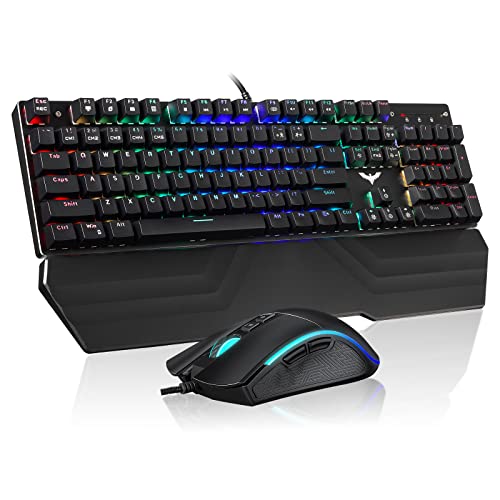
Beginners curious about mechanical keyboards usually face a wall of switch charts, and this Havit combo cuts through it by simply including real blue switches in the box. Each of the 104 keys has its own switch with full n-key rollover, so fast typing practice and crowded in-game moments register cleanly. The detachable wrist rest softens long sessions at a desk, and the programmable mouse offers six DPI levels topping out at 4800 for shooters and slower strategy games alike. An all-metal panel gives the board a sturdier feel than most entry-level sets, which helps it survive being moved between rooms.
Specs
- Keyboard: 104 keys with blue mechanical switches and an all-metal panel
- Keyboard backlight: 14 modes; mouse: 7 color effects
- Mouse: programmable, 6 DPI levels from 800 to 4800
- Wrist rest: detachable
- Dimensions: 17 x 8.1 x 2.1 inches
- Item weight: 2.81 pounds
- Compatibility: Windows, Mac, and Linux
Best for: new players who want to learn on genuine mechanical switches from day one.
Watch out for: blue switches click loudly with every press, so confirm the noise is acceptable in a shared bedroom or dorm before buying.
ASIN: B07QS6MG8B
RedThunder K10 Wireless Gaming Keyboard and Mouse Combo
The RedThunder K10 is the cable-free option for beginners whose desk doubles as a workspace, a dining table, or a dorm corner. Both pieces share a single 2.4G USB receiver, so setup means plugging in one small dongle and switching the set on. The keyboard keeps a full 104-key layout with a mechanical feel and anti-ghosting support, while the seven-button mouse reaches 3200 DPI for everyday shooters and slower strategy titles. Rechargeable batteries in both halves remove the disposable-battery routine, and the receiver stores inside the bottom of the mouse when the set travels.
Specs
- Connection: 2.4G wireless through one shared USB receiver
- Keyboard: 104 keys, mechanical feel, anti-ghosting, LED backlit
- Batteries: 3000 mAh in the keyboard, 800 mAh in the mouse, rechargeable
- Mouse: 7 buttons, up to 3200 DPI
- Receiver storage: inside the bottom of the mouse
- Total weight: 950 g
Best for: laptop gamers and dorm setups that need a tidy, movable desk.
Watch out for: the set connects through its USB receiver rather than Bluetooth, so make sure your computer has a free USB-A port.
ASIN: B09BR46F63
MageGee K1 Gaming Keyboard and Mouse Combo
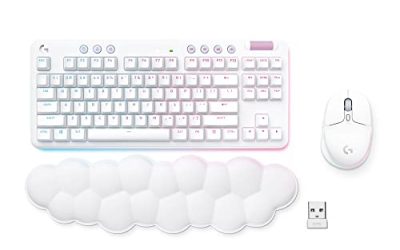
The MageGee K1, in white, is the gentlest starting point in this group. Its 104-key board uses floating keycaps that lift off for cleaning after the inevitable snack-related crumb incident, and the high-low keycap layout follows the natural curve of resting fingers. Lighting runs through eight colors and five modes, enough variety for a first personalized setup without a software suite to learn. The mouse covers six sensitivity steps from 600 to 3200 DPI, which spans slow desktop work and quicker game movement. Everything runs over wired USB with no drivers, so it works the moment it is plugged in.
Specs
- Keyboard: 104 keys with number pad and F-keys, removable floating keycaps
- Backlight: RGB LED with 8 colors and 5 light modes
- Mouse: 6 DPI levels from 600 to 3200, 7 buttons
- Connectivity: wired USB, plug and play with no drivers
- Compatibility: Windows, Mac, and Linux
- Color: white
Best for: younger beginners and tidy white desk setups that need zero software setup.
Watch out for: the full-size board is about 435 mm wide, so measure a small desk or keyboard tray before ordering.
ASIN: B07W6ZTMWP
Which One Fits Your Situation
Your First Gaming PC Just Arrived
Start with the Redragon S101-3 PRO. A brand-new PC deserves gear that simply works when the cables land, and this wired set adds backlighting and recordable macro keys that stay useful as skills grow. The mouse ceiling of 7200 DPI also means the same set still feels adequate when a beginner graduates from casual titles to faster shooters, so there is no early upgrade pressure.
You Want to Learn Mechanical Keys
Choose the Havit combo. Its blue switches deliver the distinct click and bump that mechanical fans describe, and learning that feel early prevents a second purchase a few months later. The detachable wrist rest and metal panel also suit longer practice sessions at a fixed desk, where the wired connection stops being a drawback and becomes one less thing to manage.
Your Desk Is Also a Laptop Dock
Pick the RedThunder K10. One receiver serves both pieces, so a laptop can undock in seconds and the whole set can move to a couch tray or a different room without cable wrestling. Rechargeable batteries keep the routine simple, and the full-size layout means no relearning when switching between homework, browsing, and games on the same machine.
The Setup Is a Gift for a Young Player
Give the MageGee K1 in white. It asks for nothing beyond a free USB port, the floating keycaps pop off for cleaning, and the lighting modes are changed from the keyboard itself rather than through software a child would need help configuring. The moderate mouse ceiling of 3200 DPI is also a sensible match for the slower-paced games most young beginners start with.
Common Mistakes
- Buying a keyboard and mouse separately, then discovering the mouse shape fights the keyboard size on a small desk.
- Chasing the highest advertised DPI figure, when most beginners play comfortably in the lower steps a mouse offers.
- Picking clicky mechanical switches for a shared room without asking the people who will hear them every evening.
- Forgetting to count free USB ports, especially with a wireless set that needs one port for its receiver.
- Choosing a compact keyboard before learning the standard layout, then struggling to follow key references in game guides.
Frequently Asked Questions
Do beginners need a mechanical keyboard right away?
No. A membrane set such as the Redragon S101-3 PRO or the MageGee K1 covers movement, menus, and chat perfectly well while basic skills form. Mechanical switches become worth considering once a player knows they enjoy the hobby and wants a specific key feel, which is exactly the upgrade path the Havit combo offers inside this same price-minded category.
Is a wired or wireless combo better for a first setup?
Wired is simpler for most beginners because nothing needs charging and nothing can be lost. Wireless earns its place when the computer moves around, like a laptop carried between a desk and a couch. The RedThunder K10 shows the trade clearly: one receiver and rechargeable batteries buy freedom, at the cost of a charging routine.
What DPI should a beginner actually use?
Start near the middle steps of whatever mouse you buy and adjust in small increments over several sessions. Every mouse here offers fixed steps between 600 and 7200 DPI, and most new players settle somewhere in the lower half of that span. Changing one step at a time keeps aim predictable while muscle memory develops, instead of resetting it daily.
Will these combos work with a laptop as well as a desktop?
Yes. The wired sets plug into standard USB ports found on both, and the RedThunder K10 receiver works the same way on either machine. The main check is physical space: full-size keyboards are wide, so laptop users should confirm the desk or tray fits a 104-key board before choosing any of the four sets listed here.
FAQ
Do beginners need a mechanical keyboard right away?
Is a wired or wireless combo better for a first setup?
What DPI should a beginner actually use?
Will these combos work with a laptop as well as a desktop?
More from Amazon
Programs that pair well with the guide above. Offers and eligibility are set by Amazon and may change.
Free shipping on eligible items, Prime Video and more. Eligible new members can start with a free trial.
Start a Prime free trialAd-free music streaming. Eligible new subscribers can start with a free trial.
Try Music Unlimited freeA Prime membership for ages 18-24 with a trial period. Eligibility is set by Amazon.
See Prime for Young AdultsAudiobooks and podcasts to listen to on the go. Eligible new members can start with a free trial.
Try Audible freeAs an Amazon Associate we earn from qualifying purchases.