Our Top Picks
Pros & cons
- Up to 250 hours of play on a single AA battery
- Lightweight 3.4-ounce body aids fast, precise movement
- Built-in receiver storage keeps the dongle from getting lost
- Relies on a AA battery rather than a built-in rechargeable cell
- Endurance mode trade-off needed to stretch battery life further
 Razer Orochi V2 Wireless Gaming Mouse4.26 x 1.52 inch (Pack of 1)4.26 x 1.52 x 2.47 inches0.13 poundsCheck on Amazon
 Razer Basilisk V3 X HyperSpeed Customizable Wireless GamingStandard5.12 x 2.96 x 1.67 inches0.2 poundsCheck on Amazon

The hard part of buying a cheap wireless gaming mouse is not finding one with a big DPI number on the box. It is working out which corners the low price actually cut. Some entry-level wireless mice keep a proper gaming sensor and a fast 2.4GHz link, then save money on the shell, the feet or the battery system. Others look fine in photos but rely on a Bluetooth-only connection that was never meant for fast games. Getting that call right matters more than any single spec.
This guide is for three kinds of buyers: first-time PC builders who want to drop the cable without emptying the parts budget, laptop gamers who need a mouse that travels, and anyone replacing a worn-out office mouse with something that can also hold up in shooters. Every pick below is a wireless gaming mouse from the entry-level tier, chosen from the product names and specifications on its Amazon listing, and each one keeps a genuine gaming sensor at its core.
Quick Picks
As an Amazon Associate we earn from qualifying purchases.
| Product | Best for | Key spec from title |
|---|---|---|
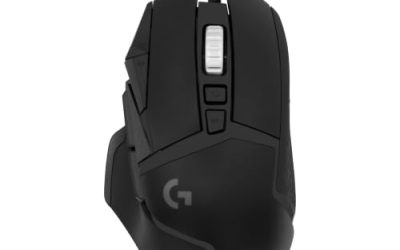
| Logitech G305 LIGHTSPEED | Most budget desktop builds | HERO sensor, 12,000 DPI |
| Razer Orochi V2 | Laptop bags and smaller hands | Under 60 g, 18K DPI optical sensor |
| Razer Basilisk V3 X HyperSpeed | Palm grip with extra controls | 9 programmable controls, 18K sensor |
| Corsair Harpoon RGB Wireless | Players who prefer recharging | Slipstream wireless, 10,000 DPI |
How to Choose
Start with the wireless link, not the sensor headline
A cheap wireless mouse lives or dies by its connection. A 2.4GHz USB receiver link, such as Logitech LIGHTSPEED, Razer HyperSpeed or Corsair Slipstream, reports at gaming speed and feels wired in practice. Bluetooth is the slower, battery-sipping mode meant for office work and travel. The strongest budget picks, like the Orochi V2 and Basilisk V3 X below, offer both: the receiver for ranked sessions at your desk, Bluetooth for a laptop on the move. A mouse that only offers Bluetooth is a productivity mouse wearing gaming clothes, so check the connection line of the listing before anything else.
Decide how you want to feed it power
Entry-level wireless mice split into two camps. AA-powered models such as the G305 and Orochi V2 run for months on one cell and are back in the game with a ten-second battery swap, but you carry the ongoing cost and weight of disposable batteries. Rechargeable models like the Harpoon RGB Wireless plug in over USB and double as a wired mouse while they charge, which suits a fixed desk. Neither system is better in the abstract. Pick the one that matches how you actually play: swappable cells for low-maintenance marathon use, a built-in battery for a tidy single-desk setup.
Read the sensor line properly
Every mouse here advertises a five-figure DPI ceiling, and almost none of that number will ever be used in a real match, where most players sit far lower. What separates a good cheap sensor from a weak one is clean tracking at ordinary speeds: no smoothing that smears small corrections, no spinning out during fast swipes. Established optical sensors, the HERO in the G305 or the 5G Advanced units in the two Razer picks, have long track records in exactly this tier. Treat headline DPI as a tiebreaker at most, and give more weight to a named sensor with a history.
Match the shell to your hand and grip
Shape is where budget mice quietly differ the most. The Orochi V2 is a compact, low shell built for fingertip and claw grips and smaller hands, and it will feel cramped under a large palm. The Basilisk V3 X is a taller right-handed shape with a thumb rest, made for palm-grip players. The G305 sits between them with a safe, symmetrical body. Weight follows the same pattern, from under 60 grams before its battery on the Orochi to around 99 grams on the G305 and Harpoon. Measure your current mouse, note your grip, and buy the shell that fits both.
The 4 Best Options
Logitech G305 LIGHTSPEED
The G305 is the default answer in this tier for a reason: it pairs Logitech’s HERO sensor with the LIGHTSPEED receiver link and asks for very little money or maintenance in return. The symmetrical shell suits claw and fingertip grips, the six programmable buttons cover the essentials for shooters and MOBA titles, and a single AA battery keeps it running for up to 250 hours in performance mode. There is no Bluetooth and no RGB, and that focus is exactly why it works as a first wireless gaming mouse for a budget desktop build.
Specs
- Sensor: HERO optical sensor
- Max sensitivity: 12,000 DPI
- Connection: LIGHTSPEED wireless via USB receiver, 1 ms report rate
- Buttons: 6 programmable buttons
- Battery: 1 AA battery, up to 250 hours in Performance mode
- Weight: 99 g
- Memory: 1 on-board profile
- Compatibility: PC and Mac
Best for: Budget desktop builders who want the safest all-round wireless pick.
Watch out for: No Bluetooth, so a laptop with no free USB port cannot use it; the AA battery also makes it heavier than newer ultralight rivals.
ASIN: B07CMS5Q6P
Razer Orochi V2
The Orochi V2 is the travel mouse of this group, a compact shell that weighs under 60 grams before its battery goes in. Its hybrid battery slot is the clever part: run a AA cell for maximum runtime, up to 950 hours over Bluetooth or 425 hours on HyperSpeed, or drop in a lighter AAA to trim weight further. The 5G Advanced optical sensor reaches 18,000 DPI, the second-generation mechanical switches are rated for 60 million clicks, and full PTFE feet keep the glide smooth on a bare desk or a hotel mousepad.
Specs
- Sensor: Razer 5G Advanced optical sensor
- Max sensitivity: 18,000 DPI
- Connection: Razer HyperSpeed Wireless (2.4GHz) and Bluetooth
- Buttons: 6 programmable buttons
- Battery: 1 AA or 1 AAA battery (hybrid slot), up to 950 hours on Bluetooth
- Weight: under 60 g excluding battery
- Switches: 2nd-gen Razer Mechanical Switches, rated for 60 million clicks
- Feet: PTFE mouse feet
Best for: Laptop gamers, smaller hands, and claw or fingertip grips on the move.
Watch out for: The small, low shell will frustrate large-handed palm-grip players, and there is no wired mode if the battery dies mid-session.
ASIN: B0916N2LPZ
Razer Basilisk V3 X HyperSpeed
Where the Orochi trims everything down, the Basilisk V3 X spends the budget on comfort and controls. The right-handed ergonomic shell has a proper thumb rest for long sessions, nine programmable controls for ability-heavy games, and Razer Chroma RGB if your setup already leans that way. Underneath it runs the same 5G Advanced 18,000 DPI optical sensor as its smaller sibling, with HyperSpeed wireless for gaming and Bluetooth for everything else. Battery life stretches to 285 hours on the receiver link and up to 535 hours over Bluetooth from one AA cell.
Specs
- Sensor: Razer 5G Advanced optical sensor
- Max sensitivity: 18,000 DPI
- Connection: Razer HyperSpeed Wireless (2.4GHz) and Bluetooth
- Controls: 9 programmable controls
- Battery: 1 AA battery, up to 285 hours on HyperSpeed, up to 535 hours on Bluetooth
- Switches: Razer Mechanical Switches Gen-2, rated for 60 million clicks
- Lighting: Razer Chroma RGB
- Shape: Right-handed ergonomic with thumb rest
Best for: Palm-grip players who want extra buttons and all-day comfort on a budget.
Watch out for: The AA-powered body is noticeably heavier than the ultralight picks here, and the shape is right-handed only, with no wired fallback.
ASIN: B0BXBC26X8
Corsair Harpoon RGB Wireless

The Harpoon RGB Wireless is the pick for buyers who dislike disposable batteries. Its built-in rechargeable cell runs up to 60 hours depending on mode and lighting, and when it runs low you plug in the USB cable and keep playing wired. Corsair’s Slipstream link gives it a sub-1ms wireless connection alongside Bluetooth for a second device, and the 10,000 DPI optical sensor is honest, proven hardware for this tier. Six programmable buttons, Omron switches and iCUE software support round out a compact mouse that also lists console compatibility on its product page.
Specs
- Sensor: Optical sensor
- Max sensitivity: 10,000 DPI
- Connection: Slipstream Wireless (sub-1 ms), Bluetooth, and USB wired
- Buttons: 6 programmable buttons
- Battery: Rechargeable, up to 60 hours depending on mode and lighting
- Weight: 99 g
- Switches: Omron switches
- Software: Corsair iCUE support
- Compatibility: PC, Mac, PS5, PS4 and Xbox (per listing)
Best for: Fixed-desk players who want one mouse that recharges and works wired.
Watch out for: The 10,000 DPI ceiling is the lowest here, and the compact shell suits smaller hands; confirm the listing is the RGB Wireless model, not the cheaper wired Harpoon.
ASIN: B07KQWR72Z
Which One Fits Your Situation
You are building your first gaming PC on a tight budget
Start with the Logitech G305 LIGHTSPEED. It asks for the least compromise: a proven sensor, a fast receiver link, months of runtime from one AA battery and a shape that offends almost nobody. It leaves more of your parts budget for the GPU, which is where a first build should spend.
You game on a laptop in more than one place
Take the Razer Orochi V2. It disappears into a laptop sleeve, sips power over Bluetooth during work hours, then switches to HyperSpeed when the match starts. The choice of AA or AAA battery lets you trade runtime against weight, which no other mouse in this roundup offers.
You play long sessions with a palm grip
The Razer Basilisk V3 X HyperSpeed is shaped for you. The taller shell and thumb rest support a relaxed full-hand grip, the nine controls keep abilities under your thumb, and the long Bluetooth runtime means battery swaps stay rare even if you also use it for work.
Your desk is permanent and you hate battery swaps
Choose the Corsair Harpoon RGB Wireless. It lives on one desk, recharges over USB, and never fully leaves you stuck because the same cable turns it into a wired mouse. Bluetooth covers a second machine, so it can serve a gaming PC and a work laptop without a second purchase.
Common Mistakes
- Buying a Bluetooth-only mouse for competitive games, then blaming the sensor for input lag that the connection caused.
- Comparing mice by maximum DPI alone, when tracking quality at everyday settings is what actually decides aim feel.
- Ignoring the battery system: AA models need spare cells on hand, rechargeable models need a charging habit.
- Ordering a compact travel mouse like the Orochi V2 for a large palm grip, then fighting the shape for months.
- Forgetting the receiver: dongle mice need a free USB port and a safe place to store the receiver when travelling.
Frequently Asked Questions
Is a cheap wireless mouse fast enough for FPS games?
Yes, as long as it uses a 2.4GHz receiver link. LIGHTSPEED, HyperSpeed and Slipstream all report at wired-class speed, which is why every pick here includes one. The lag horror stories come from Bluetooth mode, which is fine for strategy games and desktop work but should not be your connection for a shooter.
Should I choose AA batteries or a rechargeable mouse?
AA models such as the G305 and Orochi V2 run for months and revive instantly with a swap, at the cost of buying cells and carrying their weight. A rechargeable mouse like the Harpoon RGB Wireless removes the battery shopping but needs regular cable time. Pick based on whether you value instant swaps or a cleaner routine.
Can these mice work without a free USB port?
Two of them can. The Orochi V2 and Basilisk V3 X both pair over Bluetooth, so they work with port-starved laptops and tablets. The G305 is receiver-only, and the Harpoon needs either its receiver or a cable. If your laptop has one working port, put a dual-mode model at the top of your list.
Do budget wireless gaming mice work on Mac or consoles?
Some do, within limits. The G305 lists PC and Mac support, while the Harpoon RGB Wireless lists PC, Mac, PS5, PS4 and Xbox on its product page. Console support also depends on the game allowing mouse input at all, so check your title first rather than assuming the mouse is the problem.
FAQ
Is a cheap wireless mouse fast enough for FPS games?
Should I choose AA batteries or a rechargeable mouse?
Can these mice work without a free USB port?
Do budget wireless gaming mice work on Mac or consoles?
More from Amazon
Programs that pair well with the guide above. Offers and eligibility are set by Amazon and may change.
Free shipping on eligible items, Prime Video and more. Eligible new members can start with a free trial.
Start a Prime free trialAd-free music streaming. Eligible new subscribers can start with a free trial.
Try Music Unlimited freeA Prime membership for ages 18-24 with a trial period. Eligibility is set by Amazon.
See Prime for Young AdultsAudiobooks and podcasts to listen to on the go. Eligible new members can start with a free trial.
Try Audible freeAs an Amazon Associate we earn from qualifying purchases.