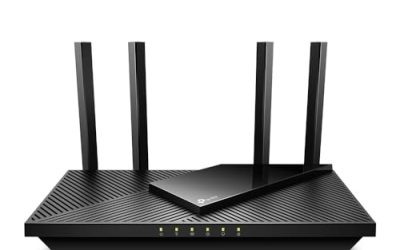
Key takeaways
- Compare 5 VPN routers for small business with IPsec, OpenVPN and WireGuard support, multi-WAN failover and remote access for staff.
A small business picking a VPN router is really deciding how staff will reach the office network when they are not in the building. The wrong box either caps the number of remote workers it can handle or slows the whole office down the moment a few tunnels open, and swapping a gateway later means reconfiguring every remote laptop and branch connection from scratch. Getting the choice right the first time protects both the daily workflow and the files that should never travel over an open connection.
This guide is for owners of small offices, studios and shops with a handful of remote workers or a second location to link. Every router below was chosen from the name and specifications shown on its Amazon product page, with attention to VPN protocol support, simultaneous tunnel counts, WAN options and the management tools a small team can actually run.
Quick Picks
As an Amazon Associate we earn from qualifying purchases
| Product | Best for | Key spec from title |
|---|---|---|
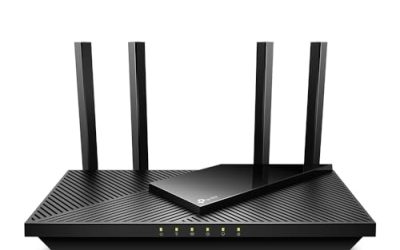
| TP-Link ER605 | Small office needing affordable multi-WAN VPN | Up to 3 WAN Ethernet ports + 1 USB WAN, Omada SDN integrated |
| TP-Link ER7206 | Growing office needing more WAN capacity | Multi-WAN professional wired gigabit VPN router, SPI firewall |
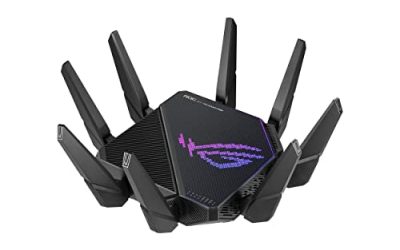
| GL.iNet GL-MT6000 Flint 2 | Small team wanting fast WireGuard and Wi-Fi 6 | WiFi 6 AX6000, 2 x 2.5G Ethernet ports, Rapid OpenVPN and WireGuard |
| Synology RT6600ax | Office wanting VPN plus network segmentation | Tri-band Wi-Fi 6, 2.5Gbps Ethernet, VLAN segmentation, VPN |
| Ubiquiti UniFi Dream Machine Pro | Office building a managed UniFi network | Enterprise security gateway, 10G SFP+, dual WAN ports |
How to Choose
Count the VPN tunnels before anything else
A router that handles five tunnels will choke a team of twelve remote workers, so start by adding up everyone who connects from home, plus any branch office or contractor who needs a permanent link. The ER605 lists up to 20 LAN-to-LAN IPsec tunnels alongside 16 OpenVPN, 16 L2TP and 16 PPTP connections, which covers a modest team with room to spare. Check whether the number quoted is for one protocol or combined across all of them, because a combined figure can hide a much smaller limit per protocol. If the headcount is likely to double within a year, buy the headroom now rather than replacing the gateway mid-growth.
Match the VPN protocols to the devices staff use
Not every laptop, phone and branch router speaks the same VPN language, and a gateway that only offers one protocol can leave part of the team locked out. IPsec suits site-to-site links between offices, OpenVPN and WireGuard work well for individual remote workers, and L2TP remains useful for older devices that cannot run a modern client. The GL-MT6000 advertises rapid OpenVPN and WireGuard support, while the Synology RT6600ax covers OpenVPN, L2TP/IPsec, PPTP, SSTP and SSL VPN through its VPN Plus package. Confirm the client software exists for the operating systems in use, and test one connection from each device type before rolling the setup out to the whole team.
Look for a second WAN connection and failover
A single internet line is a single point of failure, and a VPN is useless if the office connection drops while staff are working from home. Multi-WAN routers let a second line take over automatically, so tunnels stay up during an outage on the primary connection. The ER605 offers up to three WAN Ethernet ports plus a USB WAN for a mobile modem, and the ER7206 adds SFP WAN ports for fibre connections alongside its Ethernet ports. Weigh whether the business needs load balancing across two lines every day or simple failover only when the main line fails, then check that the router supports the mode intended.
Check management tools and ongoing licence needs
A VPN router that needs a specialist to change one user account will cost more in time than a slightly dearer box with a clear dashboard. Cloud-managed models such as the TP-Link Omada pair and the UniFi Dream Machine Pro let an owner or a part-time IT helper manage users and tunnels from one screen, which matters when nobody on staff is a network engineer. Some security features arrive with a bundled licence period and then need renewal, so read the listing for what is included and what becomes a subscription later. A router with a free, built-in VPN server avoids the surprise of paying per remote user each year.
The 5 Best Options
TP-Link ER605

The ER605 is the sensible starting point for a small office that needs proper VPN support without a rack of enterprise hardware. Its five gigabit ports can be split between WAN and LAN duties, so a second internet line or a USB mobile modem can stand by as backup while the main connection carries daily traffic. Omada SDN integration means the router can be managed alongside TP-Link access points and switches from one controller, which keeps a growing network tidy. Setup is wired-only, so a separate access point is needed if the office also wants Wi-Fi from the same purchase.
Specs
- Up to 3 WAN Ethernet ports + 1 USB WAN
- 5 gigabit ports: 1 WAN port, 2 WAN/LAN ports, 2 LAN ports
- SPI firewall SMB router with Omada SDN integration
- Up to 20 LAN-to-LAN IPsec, 16 OpenVPN, 16 L2TP and 16 PPTP VPN connections
- Load balance and lightning protection
Best for: A small office with up to a dozen remote workers that wants multi-WAN backup on a modest gateway.
Watch out for: It has no built-in Wi-Fi, so wireless coverage needs a separate access point.
TP-Link ER7206

The ER7206 steps up from the ER605 with greater network capacity for offices that run more simultaneous connections or heavier traffic across their tunnels. Its metal chassis and rackmount brackets suit a small server cupboard, and the SFP WAN ports give fibre-connected offices a direct link without an extra media converter. Omada SDN integration again keeps management centralised, and the SPI firewall plus load balancing handle the day-to-day protection and traffic sharing. It remains a wired gateway, so Wi-Fi still comes from access points added separately.
Specs
- Multi-WAN professional wired gigabit VPN router
- Increased network capacity with SPI firewall
- SFP WAN ports plus gigabit Ethernet ports
- Omada SDN integrated with load balance
- Lightning protection and rackmount brackets included
Best for: A growing office on a fibre connection that needs more WAN capacity and a rack-mounted gateway.
Watch out for: The higher capacity is wasted on a very small team, and setup assumes some networking knowledge.
GL.iNet GL-MT6000 Flint 2

The Flint 2 is the pick for a small team that wants modern VPN speed and Wi-Fi in one box rather than a separate gateway and access point. Its WireGuard performance stands out among routers in this group, which keeps remote workers on fast, low-overhead tunnels instead of slower legacy protocols. Two 2.5G Ethernet ports suit offices with a multi-gigabit internet plan, and the OpenWrt-based firmware gives confident users deeper control over routing and VPN policies. The interface packs in a lot of options, so first-time setup takes longer than on the simpler TP-Link models.
Specs
- WiFi 6 AX6000 with 2.4 GHz and 5 GHz bands
- 2 x 2.5G Ethernet ports and 4 x 1G Ethernet ports
- Rapid OpenVPN and WireGuard VPN support
- Quad-core 2.0 GHz processor with 1 GB RAM and 8 GB eMMC storage
- USB 3.0 port and multi-WAN failover and load balancing
Best for: A small team that needs fast WireGuard tunnels and strong Wi-Fi from a single router.
Watch out for: The advanced settings can overwhelm buyers who want a plain plug-and-play gateway.
Synology RT6600ax

The RT6600ax suits an office that wants VPN access wrapped in broader network control, including separate networks for staff, guests and business devices. Its tri-band Wi-Fi 6 radio and 2.5Gbps Ethernet port handle a busy office floor, while VLAN segmentation and multiple SSIDs keep traffic separated without extra hardware. VPN Plus Server covers site-to-site tunnels, SSL VPN, WebVPN and remote desktop access, with up to 20 site-to-site tunnels and 40 client VPN licences according to Synology. Threat Prevention adds intrusion blocking, though tuning it takes some patience.
Specs
- Tri-band 4×4 160 MHz Wi-Fi router with 2.5Gbps Ethernet
- VLAN segmentation and multiple SSIDs
- VPN Plus Server with site-to-site, SSL VPN, WebVPN and remote desktop
- Up to 20 site-to-site VPN tunnels and 40 client VPN access licences
- Parental controls and Threat Prevention with WPA3 security
Best for: An office that wants VPN access plus guest and staff network separation in one device.
Watch out for: The feature set is deep, so expect a longer first setup than a basic VPN gateway needs.
Ubiquiti UniFi Dream Machine Pro

The Dream Machine Pro is the choice for an office already running, or planning to run, UniFi switches and access points under one controller. It combines gateway, security and network management in a rackmount unit, with 10G SFP+ connectivity for offices whose internal traffic outgrows gigabit links. Dual WAN ports provide failover for the internet connection, and the built-in drive bay supports UniFi Protect camera recording alongside the network duties. It is the most involved option here, and it works best when the buyer commits to the UniFi ecosystem rather than mixing brands.
Specs
- Enterprise security gateway and network appliance with 10G SFP+
- 1.7 GHz quad-core processor
- Dual WAN ports for failover
- 3.5-inch HDD bay for UniFi Protect recording
- UniFi OS console for network, Protect, Talk and Access
Best for: A small business standardising on UniFi gear that wants one managed gateway for routing and security.
Watch out for: It is overkill for a single-room office, and it pairs best with other UniFi hardware.
Which One Fits Your Situation
A tiny team with one office and a few remote workers
Choose the TP-Link ER605. Its tunnel counts cover a handful of remote staff, the multi-WAN ports give the office a backup connection, and the wired-only design keeps the setup simple. Add a basic access point later if Wi-Fi is needed, rather than paying for wireless features the office does not use yet.
A growing office adding staff and a second site
Choose the TP-Link ER7206. The extra WAN capacity and SFP fibre ports handle heavier traffic and a permanent site-to-site link, while Omada management keeps the gateway and any future access points under one controller. It gives the business room to grow without another gateway swap in a year, and the rackmount design fits a proper equipment cupboard as the network expands.
A team that works from home most days and needs fast tunnels
Choose the GL.iNet GL-MT6000 Flint 2. Its WireGuard support keeps remote connections quick, and the built-in Wi-Fi 6 covers the office floor without extra hardware. The 2.5G ports also suit teams on faster broadband plans who would otherwise bottleneck at gigabit, and the single-box setup avoids juggling a separate gateway and access point.
An office that also needs separate guest and staff networks
Choose the Synology RT6600ax or the Ubiquiti UniFi Dream Machine Pro. The Synology fits a standalone office that wants VLANs, multiple SSIDs and VPN Plus in one box, while the Dream Machine Pro fits a business already building a UniFi network with managed switches and cameras. Pick the Synology for a single-device setup and the UniFi for a wider managed system.
Common Mistakes
- Buying a router with too few VPN tunnels, then discovering remote staff cannot all connect at once on a busy morning.
- Choosing a consumer router with only a VPN client and no VPN server, which cannot accept incoming connections from staff at all.
- Ignoring the second WAN port and leaving the whole office offline when the main internet line fails.
- Forgetting that some security features and extra VPN licences need renewal after the bundled period ends.
- Skipping a test connection from each device type staff use, then finding one laptop or phone cannot run the chosen protocol.
Frequently Asked Questions
What is a VPN router for a small business?
A VPN router is a gateway that creates encrypted tunnels so remote workers and branch offices can reach the company network safely over the internet. Unlike a VPN app on one laptop, it protects every device behind it and accepts incoming connections from staff working elsewhere. Small business models add multi-WAN failover, a firewall and enough simultaneous tunnels for a whole team.
How many VPN connections does a small business need?
Count every remote worker, contractor and branch office that connects at the same time, then add a few spare tunnels for growth. A team of five remote workers needs at least five client tunnels plus any site-to-site links, so a router rated for 16 or more connections leaves comfortable headroom. Buying below the real peak count means someone gets locked out on the busiest day.
Do VPN routers slow down the internet?
Encryption adds processing work, so VPN throughput is usually lower than the router’s headline internet speed, especially on older protocols. WireGuard and hardware-accelerated IPsec lose less speed than PPTP or software-only OpenVPN on the same box. Check the VPN throughput figure on the product page rather than the WAN speed, and match it to the office’s real remote-working load.
Can a VPN router replace a separate firewall?
Most small business VPN routers include a SPI firewall, VLAN support and intrusion features that cover basic office needs, so a separate firewall box is often unnecessary. Larger offices with strict compliance rules or heavy inspection needs may still want a dedicated security appliance. For a typical small team, a VPN router with a firewall and regular firmware updates is a reasonable single device.
FAQ
What is a VPN router for a small business?
How many VPN connections does a small business need?
Do VPN routers slow down the internet?
Can a VPN router replace a separate firewall?
More from Amazon
Programs that pair well with the guide above. Offers and eligibility are set by Amazon and may change.
Free shipping on eligible items, Prime Video and more. Eligible new members can start with a free trial.
Start a Prime free trialAd-free music streaming. Eligible new subscribers can start with a free trial.
Try Music Unlimited freeA Prime membership for ages 18-24 with a trial period. Eligibility is set by Amazon.
See Prime for Young AdultsAudiobooks and podcasts to listen to on the go. Eligible new members can start with a free trial.
Try Audible freeAs an Amazon Associate we earn from qualifying purchases.