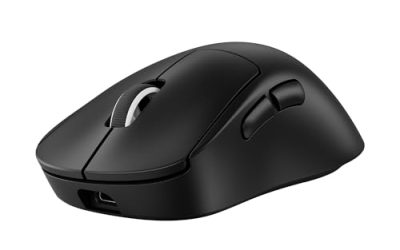
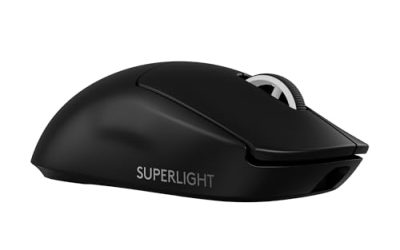
Our Short List of 3

- Best for: Right-handed players who want a light ergonomic mouse for palm or relaxed claw grip.
- Brand: Razer
- Weight: 63g Ultra Lightweight
- Sensor: Focus Pro 30K Optical Sensor
- Switches: Fast Optical Switches Gen-3

- Best for: Players who want an ergonomic all-rounder with a tilt wheel and extra programmable controls.
- Brand: Razer
- Sensor: 30K DPI Optical Sensor
- Switches: Gen-3 Optical Switches
- Wheel: HyperScroll Tilt Wheel

- Best for: MMO players who need interchangeable side plates for different ability layouts.
- Brand: Razer
- Type: Wireless MMO Gaming Mouse
- Controls: 19+1 Programmable Buttons w/Swappable Side Plates
- Wheel: HyperScroll Pro Wheel
All 4 Picks at a Glance
| Product | Specs | Action |
|---|---|---|
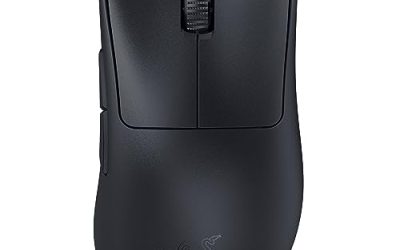
| Razer DeathAdder V3 Pro |
| Check price on Amazon |
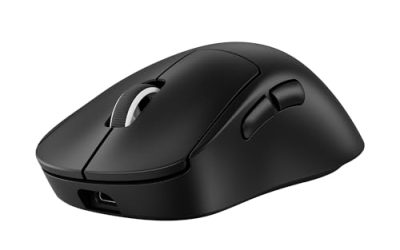
| Razer Basilisk V3 Pro |
| Check price on Amazon |
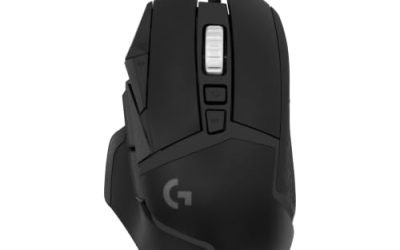
| Razer Naga V2 Pro |
| Check price on Amazon |
 Razer Cobra Pro |
| Check price on Amazon |
Key takeaways
- Find the best Razer gaming mouse for your grip and genre, comparing ultralight FPS shapes, ergonomic models and an MMO mouse with swappable plates.
Choosing a Razer mouse is not really about finding the highest sensor number, because every model in this guide already uses a 30K or 35K optical sensor. The real decision is shape, weight, and buttons: a symmetrical ultralight shell rewards fast flicks and fingertip control, an ergonomic shell supports a relaxed palm through longer sessions, and a multi-button MMO shell trades lightness for immediate access to many abilities without reaching for the keyboard.
This guide is for PC players who have already decided on Razer and now need to pick between its main wireless families. Each product below was selected from its own Amazon listing, using only the name, shape description, and specifications stated on that page, so the differences described here reflect what the listing itself confirms rather than assumed extras or bundled accessories.
Quick Picks
As an Amazon Associate we earn from qualifying purchases
| Product | Best for | Key spec from title |
|---|---|---|
| Razer Viper V3 Pro | Competitive FPS players who want the lightest symmetrical option here | 54g Lightweight – 8K Polling |
| Razer DeathAdder V3 Pro | Right-handed players who want a light ergonomic shape for palm or relaxed claw grip | 63g Ultra Lightweight |
| Razer Basilisk V3 Pro | Players who want an ergonomic mouse with a tilt wheel and many controls | HyperScroll Tilt Wheel – 30K DPI Optical Sensor |
| Razer Naga V2 Pro | MMO and MOBA players who need many side buttons for abilities and macros | 19+1 Programmable Buttons w/Swappable Side Plates |
| Razer Cobra Pro | Players who want a compact mouse with RGB lighting and long Bluetooth runtime | 30K Optical Sensor – Up to 170 Hr Battery |
How to Choose
Shape and Grip Fit
Start with the shell, because no sensor setting can fix a shape your hand dislikes. The Viper V3 Pro is listed as symmetrical, which suits fingertip and claw players who steer mainly with their fingers and wrist. The DeathAdder V3 Pro and Basilisk V3 Pro use right-handed ergonomic shapes that fill the palm more fully, which many palm-grip players find less tiring over long sessions. The Cobra Pro sits in a smaller, more compact class, useful for smaller hands or travel setups. Measure your current mouse, compare its length and height honestly, and prioritise a similar footprint if that shape already works for you.
Weight and How You Aim
Weight changes how a mouse starts and stops, especially during repeated flicks in shooters. At 54g in black, the Viper V3 Pro is the lightest model in this guide, followed by the DeathAdder V3 Pro at 63g, while the Cobra Pro is listed at 77g in its own comparison table and the Basilisk and Naga models are substantially heavier designs built around extra controls and wheels. Lighter does not automatically mean better: some players prefer a little more mass for steadier tracking in slower-paced games. If you play low sensitivity with large arm movements, lighter usually helps; if you play high sensitivity with small movements, the difference narrows.
Buttons, Wheels, and Your Genre
Count the controls your games actually use, then match the mouse to that number instead of buying the largest layout by default. The DeathAdder V3 Pro lists 5 programmable buttons and the Viper V3 Pro lists 8 programmable buttons, which covers shooters and most action games comfortably. The Cobra Pro lists 10 customizable controls and the Basilisk V3 Pro lists 13 programmable controls, adding flexibility for MOBAs, strategy shortcuts, and productivity macros. The Naga V2 Pro goes furthest, with swappable side plates that change the side-button layout for different genres. Wheels matter too: the Basilisk and Naga models add tilt or pro scroll wheels that the lighter FPS models leave out.
Connection Modes and Battery Life
All five mice here are wireless, but their connection options and stated battery figures differ in ways that affect daily use. The Basilisk V3 Pro lists 3 connection modes, and the Cobra Pro lists 2.4GHz, Bluetooth, and USB Type C, which helps if you switch between a gaming PC and a laptop. Stated battery life also varies widely, from 90 hours for the DeathAdder V3 Pro and 95 hours for the Viper V3 Pro to 170 hours for the Cobra Pro and 300 hours for the Naga V2 Pro in their listing titles. Remember that higher polling settings typically reduce runtime, so check which mode a battery figure assumes before comparing numbers directly.
The 5 Best Options
Razer Viper V3 Pro
This is the clearest pick for competitive shooter players who use a fingertip or claw grip and want the lightest symmetrical shell in this guide. Its listing emphasises esports use, an 8K polling option, and a 54g weight in black, a combination aimed at fast, repeated corrections rather than comfort features or lighting. If you play tactical or arena shooters, use a low-to-medium sensitivity, and rarely need more than a handful of side-button commands, this layout keeps the focus on aim, glide, and a shape that does not force your hand into a fixed palm position.
Specs
- Brand: Razer
- Shape: Symmetrical
- Weight: 54g Lightweight, Black
- Polling: 8K Polling
- Sensor: 35K DPI Optical Sensor
- Switches: Gen3 Optical Switches
- Controls: 8 Programmable Buttons
- Battery: 95 Hr Battery
Best for: FPS players who want the lightest symmetrical Razer option for fingertip or claw grip.
Watch out for: Confirm you are ordering the Black version if the 54g figure matters to you, because the listing separates colours and editions into different listings with different weights and identifiers.
Razer DeathAdder V3 Pro
- Best for: Right-handed players who want a light ergonomic mouse for palm or relaxed claw grip.
- Brand: Razer
- Weight: 63g Ultra Lightweight
- Sensor: Focus Pro 30K Optical Sensor
- Switches: Fast Optical Switches Gen-3
Right-handed players who want a light ergonomic mouse for palm or relaxed claw grip.
Check handedness before ordering, because this ergonomic shape is for right-handed use, and also confirm the exact listing variant, since a separate bundle version with a HyperPolling dongle is sold under a different identifier.
Choose this model if you like an ergonomic, right-handed shape but do not want the weight that usually comes with one. The listing puts it at 63g, pairs that shell with HyperSpeed Wireless, and keeps the button layout simple at 5 programmable buttons, which suits shooters, action games, and everyday play where two side buttons are enough. It fits medium to larger hands that rest more of the palm on the mouse, and players who found symmetrical mice cramping during longer sessions often prefer this kind of sculpted support, provided they are right-handed.
Watch out for: Check handedness before ordering, because this ergonomic shape is for right-handed use, and also confirm the exact listing variant, since a separate bundle version with a HyperPolling dongle is sold under a different identifier.
Razer Basilisk V3 Pro
- Best for: Players who want an ergonomic all-rounder with a tilt wheel and extra programmable controls.
- Brand: Razer
- Sensor: 30K DPI Optical Sensor
- Switches: Gen-3 Optical Switches
- Wheel: HyperScroll Tilt Wheel
Players who want an ergonomic all-rounder with a tilt wheel and extra programmable controls.
Do not confuse this 30K model with the separate Basilisk V3 Pro 35K listing, because they are different listings with different sensors and identifiers, so check the sensor wording in the title matches the version you intend to buy.
This model suits players who split time between games and desktop work and actually use wheel and button features rather than treating them as decoration. Its listing highlights a HyperScroll Tilt Wheel, 13 programmable controls, and 13-Zone Chroma RGB, in an ergonomic shell with 3 connection modes for moving between machines. That makes it a sensible choice for action RPGs, MOBAs, and mixed gaming and productivity setups where horizontal scrolling, extra thumb commands, and lighting customisation matter more to you than shaving the last grams from the shell for competitive shooters.
Watch out for: Do not confuse this 30K model with the separate Basilisk V3 Pro 35K listing, because they are different listings with different sensors and identifiers, so check the sensor wording in the title matches the version you intend to buy.
Razer Naga V2 Pro
- Best for: MMO players who need interchangeable side plates for different ability layouts.
- Brand: Razer
- Type: Wireless MMO Gaming Mouse
- Controls: 19+1 Programmable Buttons w/Swappable Side Plates
- Wheel: HyperScroll Pro Wheel
MMO players who need interchangeable side plates for different ability layouts.
Confirm which side plate is fitted when you start playing and store the unused plates safely, and check that you are not ordering the separate bundle listing that includes a charging dock under a different identifier.
Pick the Naga V2 Pro if your limiting factor is ability access, not aim speed. Built and listed as a wireless MMO gaming mouse, it centres on swappable side plates, so you can change the side-button arrangement instead of committing to one fixed grid for every game. Its listing states 19+1 programmable buttons with those plates, a HyperScroll Pro Wheel, and a long 300-hour battery figure. That combination fits MMO, MOBA, and macro-heavy play where keeping rotations and utility skills under your thumb reduces keyboard reach, even though the larger, control-dense shell is not aimed at ultralight shooter play.
Watch out for: Confirm which side plate is fitted when you start playing and store the unused plates safely, and check that you are not ordering the separate bundle listing that includes a charging dock under a different identifier.
Razer Cobra Pro
- Best for: Players with smaller hands who want a compact mouse with RGB lighting and flexible connections.
- Brand: Razer
- Controls: 10 Customizable Controls
- Lighting: Chroma RGB Lighting
- Sensor: 30K Optical Sensor
Players with smaller hands who want a compact mouse with RGB lighting and flexible connections.
Check the colour variant carefully, because black and white versions are sold as separate listings, and note that wireless charging accessories mentioned on the page are sold separately rather than included with the mouse itself.
The Cobra Pro fits players who want a smaller wireless mouse with visible customisation rather than a stripped-down esports tool. Its listing highlights Chroma RGB lighting, 10 customizable controls, and three ways to connect, with a stated battery figure that stretches much longer on Bluetooth than the FPS-focused models above. That makes it a good match for smaller hands, mixed PC and laptop use, and players who enjoy lighting effects and onboard profiles for different games, while still keeping a 30K optical sensor and Gen-3 optical switches shared with the rest of this Razer line-up.
Watch out for: Check the colour variant carefully, because black and white versions are sold as separate listings, and note that wireless charging accessories mentioned on the page are sold separately rather than included with the mouse itself.
Which One Fits Your Situation
You Play Competitive Shooters Most Nights
Choose the Razer Viper V3 Pro if ranked shooters are your main use and you grip with your fingertips or claw. Its symmetrical shape, 54g black weight, and 8K polling option are the most aim-focused combination in this guide. The DeathAdder V3 Pro is the alternative within this list only if a symmetrical shell feels unstable in your hand and you need ergonomic support instead.
Your Hand Aches During Long Sessions
Look first at the Razer DeathAdder V3 Pro, whose ergonomic right-handed shell supports a more relaxed palm position while still staying light at 63g. If you also rely on many shortcuts or horizontal scrolling for work between games, step across to the Basilisk V3 Pro instead, accepting its feature-led design in exchange for the tilt wheel and additional programmable controls.
You Raid, Rotate Abilities, and Use Macros
The Razer Naga V2 Pro is the only model here designed around swappable side plates, so it is the natural fit for MMO rotations and macro-heavy builds. Set up the plate that matches your current game rather than forcing one layout onto everything. No other mouse in this guide offers that interchangeable side-button approach, which is why genre, not sensor numbers, should drive this particular choice.
You Switch Between a Gaming PC and a Laptop
Consider the Razer Cobra Pro or the Basilisk V3 Pro, because both list multiple connection options that make moving between machines simpler. The Cobra Pro is the better fit for a smaller hand and longer Bluetooth use away from your desk, while the Basilisk suits a larger ergonomic grip at a main desk. Either way, confirm your laptop ports and dongle placement before ordering.
Common Mistakes
- Buying by sensor number alone, when every mouse here already lists a 30K or 35K optical sensor and shape fit will affect your aim far more day to day.
- Ignoring colour and edition variants, which for Razer mice are often separate listings with different weights, identifiers, and included dongles, so the specification you read may not match the variant in your basket.
- Choosing an ergonomic right-handed model for a left-handed user, or assuming a symmetrical listing means every grip style will feel equally comfortable at every hand size.
- Comparing battery figures without checking the connection or polling mode behind them, because a long Bluetooth figure and a high-polling wireless figure describe very different ways of using the same mouse.
- Expecting charging docks, extra dongles, or grip accessories to be included when the listing describes them as sold separately or only includes them in a different bundle listing.
Frequently Asked Questions
Is the Viper V3 Pro or the DeathAdder V3 Pro better for shooters?
Both target shooter players, so the deciding factor is shape rather than sensor performance. The Viper V3 Pro is symmetrical and lighter, suiting fingertip and claw grips, while the DeathAdder V3 Pro is ergonomic and right-handed, suiting palm support. Choose the shell that matches how you already hold your current mouse.
Do I need swappable side plates for an MMO?
Only if you regularly use enough abilities that a fixed two-button side layout forces constant keyboard reaching. The Naga V2 Pro lets you change its side plate to match different games and layouts. If you play an MMO casually with a small rotation, the Basilisk V3 Pro and its programmable controls may already cover your needs.
Does a higher polling rate change battery life?
Expect runtime to fall when you select higher polling settings, because the mouse reports its position more frequently over the wireless connection. The battery figures in listing titles describe specific modes, so treat them as mode-dependent rather than guaranteed for every setting. If long intervals between charges matter most, use a standard polling setting for everyday play.
Can I use one of these mice with both a PC and a laptop?
Yes, if you choose a model that lists multiple connection modes. The Basilisk V3 Pro lists 3 connection modes, and the Cobra Pro lists 2.4GHz, Bluetooth, and USB Type C, which makes switching between a desktop and a laptop more practical. Check port availability on both machines before deciding which connection mix you need.
FAQ
Is the Viper V3 Pro or the DeathAdder V3 Pro better for shooters?
Do I need swappable side plates for an MMO?
Does a higher polling rate change battery life?
Can I use one of these mice with both a PC and a laptop?
More from Amazon
Programs that pair well with the guide above. Offers and eligibility are set by Amazon and may change.
Free shipping on eligible items, Prime Video and more. Eligible new members can start with a free trial.
Start a Prime free trialAd-free music streaming. Eligible new subscribers can start with a free trial.
Try Music Unlimited freeA Prime membership for ages 18-24 with a trial period. Eligibility is set by Amazon.
See Prime for Young AdultsAudiobooks and podcasts to listen to on the go. Eligible new members can start with a free trial.
Try Audible freeAs an Amazon Associate we earn from qualifying purchases.