Key takeaways
- Looking for the best lte routers? Compare four cellular routers with dual SIM slots, Wi-Fi 6, Gigabit ports and failover for home, rural and RV internet.
A cable or fibre line is not available everywhere, and even where it is, a single wired connection can go down at the worst moment. An LTE router turns a mobile signal into home Wi-Fi, so a house, a cabin or a camper can get online with nothing more than a SIM card and a power outlet. The choice comes down to how fast the mobile connection needs to be and how many devices will share it.

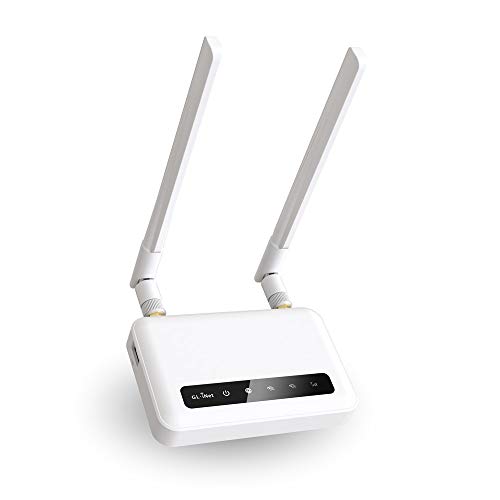
This guide is for rural households, remote workers and travellers who need dependable internet where wired broadband falls short. Every router below was chosen from the names and specifications on its Amazon page, with the modem type, Wi-Fi standard, ports and SIM options that decide whether a cellular connection feels like a real home network. The four routers below cover 5G home internet, portable 5G, budget 4G broadband and basic rural use.
Quick Picks
As an Amazon Associate we earn from qualifying purchases
| Product | Best for | Key spec from title |
|---|---|---|
| GL.iNet GL-X3000 (Spitz AX) | 5G home and RV internet | 5G NR, Wi-Fi 6 AX3000 |
| NETGEAR Nighthawk M6 MR6150 | Portable 5G on the go | 5G, Wi-Fi 6, up to 32 devices |
| TP-Link Archer MR600 | 4G home broadband on a budget | 4G+ Cat6, AC1200 |
| GL.iNet GL-X750V2 (Spitz) | Basic 4G at a cabin or rural site | 4G LTE Cat 4, AC750 |
How to Choose
4G, 5G, or Both
A 4G router is enough for browsing, email, video calls and streaming on a few devices, and it works on the widest range of networks. A 5G router costs more but handles heavier use, such as several video streams at once or large downloads, and it stays useful longer as carriers expand their 5G coverage. Check which networks reach your address before deciding, because a 5G router on a weak 5G signal is no faster than a 4G router on a strong one. If your area has solid 5G, the faster modem is worth it; if it does not, a good 4G router saves money.
Carrier Compatibility and SIMs
Not every router works on every carrier, so confirm that the model supports the bands your carrier uses in your area. Some routers carry certification for specific carriers, which makes activation simpler and avoids a SIM that the network refuses. A dual-SIM router lets you keep a second carrier ready as a backup, which matters when one network drops out or when you travel between coverage areas. Also check whether the router takes a standard, micro or nano SIM, and whether your carrier allows the plan you want to be used in a router rather than a phone.
Wi-Fi, Ports, and Device Count
The Wi-Fi standard sets the ceiling for everything in the house: Wi-Fi 6 handles many devices at once with less waiting, while older Wi-Fi is fine for a handful of light users. Count the devices that will connect, including phones, laptops, televisions and smart home gear, and match that number to the router’s stated device limit. Wired ports matter too, because a desktop, a console or a work computer runs better on Ethernet than on Wi-Fi. A router with a Gigabit WAN port can also take a wired connection as a backup when one is available.
Antennas and Placement
A cellular router is only as good as the signal it receives, so antennas and placement deserve real attention. Detachable antennas let you move the antennas toward a window or swap them for higher-gain ones, which can make the difference between a usable connection and a stalled one in a weak-signal area. Place the router high up and near a window facing the nearest tower, and avoid basements, metal cabinets and thick walls. A router with an Ethernet port also lets you put the unit where the signal is best and run a cable to the rest of the house.
The 4 Best Options
GL.iNet GL-X3000 (Spitz AX)
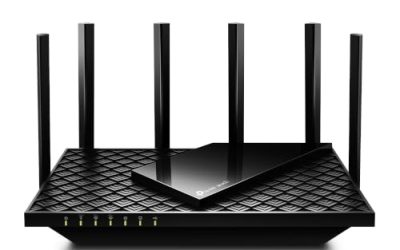
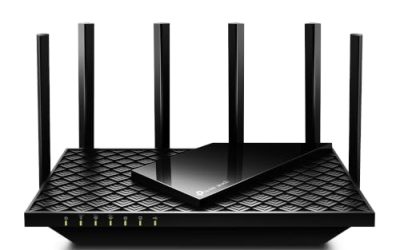
The GL-X3000 is the strongest fixed cellular router here, built around a 5G modem and Wi-Fi 6 for a household that wants cellular internet to feel like a normal broadband connection. Its six detachable antennas pull in a weak signal better than the compact models, and the dual-SIM slots give you a second carrier to fall back on when the first one falters. OpenWrt software and built-in VPN support make it a natural fit for remote workers who want control over their network.
- Specs: 5G NR cellular gateway, Wi-Fi 6 AX3000, dual nano-SIM slots, 2.5G WAN port, 6 detachable antennas, OpenWrt, OpenVPN and WireGuard, T-Mobile and AT&T IoT device certified
- Best for: A rural home or RV that needs fast 5G internet every day
- Watch out for: Needs a 5G data plan and a decent 5G signal to show its full speed
NETGEAR Nighthawk M6 MR6150
The Nighthawk M6 MR6150 is a portable 5G hotspot that works as a pocket router for travel and as a backup connection at home. Its touchscreen makes it easy to check the signal, the network name and how much data has been used, and the built-in battery keeps it running away from an outlet. Wi-Fi 6 supports up to 32 devices at once, so a whole family can share one connection from a car, a hotel room or a job site.
- Specs: 5G mobile hotspot, Wi-Fi 6, up to 2.5Gbps 5G speed, up to 32 devices, 1 Gigabit Ethernet port, touchscreen display, built-in rechargeable battery, unlocked for Verizon, AT&T and T-Mobile
- Best for: Travellers and remote workers who need 5G away from home
- Watch out for: A small hotspot is not a replacement for a fixed router with external antennas in a weak-signal area
TP-Link Archer MR600
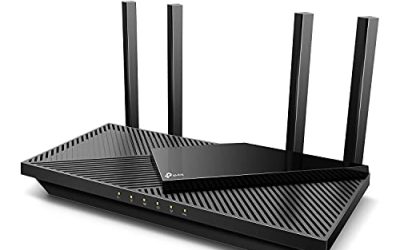
The Archer MR600 is a straightforward 4G router for a household that wants home broadband over a SIM card without paying for 5G hardware. Its Cat6 modem bonds two LTE bands for faster downloads than a basic 4G router, and the AC1200 dual-band Wi-Fi covers a small home with room for phones, laptops and a television. Four Gigabit ports give wired devices a stable connection, and the router can fall back to a wired WAN line when one is available.
- Specs: 4G+ Cat6 LTE router, up to 300 Mbps LTE, AC1200 dual-band Wi-Fi, 4 Gigabit LAN ports plus 1 WAN port, micro SIM slot, OneMesh support, up to 64 devices, 2 detachable antennas
- Best for: A small home that needs dependable 4G broadband at a modest cost
- Watch out for: No 5G support, so it cannot use faster 5G networks as they expand
GL.iNet GL-X750V2 (Spitz)
The GL-X750V2 is a compact 4G router for light use at a cabin, a camera site or a rural outbuilding where the internet only needs to cover a few devices. Its Cat4 modem and AC750 Wi-Fi are modest, but the OpenWrt software, VPN support and microSD slot give it far more control than a basic hotspot. Two external antennas help it hold a signal, and its small size and low power draw make it easy to leave running around the clock.
- Specs: 4G LTE Cat 4 router, AC750 dual-band Wi-Fi, micro SIM slot, microSD card slot, 1 WAN and 1 LAN 10/100 Mbps port, 2 external antennas, OpenWrt, VPN client and server
- Best for: A cabin, workshop or camera site with light 4G internet needs
- Watch out for: Only 10/100 Mbps wired ports, so wired devices cannot exceed that speed
Which One Fits Your Situation
A Rural Home With No Cable
The GL-X3000 is the pick when a rural house depends on cellular internet every day. Its 5G modem and six antennas squeeze the most from a distant tower, and the dual-SIM slots let you keep a second carrier ready. Pair it with a data plan that fits your household’s streaming and work habits, and place it near a window facing the tower for the strongest signal.
Internet on the Road
The Nighthawk M6 MR6150 suits travellers, because it fits in a bag, runs on its own battery and shows the connection on a touchscreen. It covers a family in a car or a hotel room, and it doubles as a backup at home when the main connection drops. Remember that a hotspot shares one battery and one modem, so it suits travel better than a fixed household setup.
A Small Office That Cannot Drop Offline
The Archer MR600 works well as a failover router for a small office, since its WAN port takes the main wired line and the 4G connection steps in when that line fails. Its Gigabit ports keep office computers wired and steady, and the Cat6 modem is fast enough for email, calls and cloud apps while the main line is down.
A Cabin or Camera Site on a Budget
The GL-X750V2 is the right choice for a site that only needs basic internet, such as a cabin or a remote camera. It sips power, runs quietly around the clock and gives you VPN and OpenWrt control for remote access. Keep expectations modest: it covers browsing and light streaming, not a house full of 4K video.
Common Mistakes
- Buying a 5G router for an area with no 5G coverage and expecting faster speeds.
- Choosing a data plan meant for a phone and finding the carrier blocks router use.
- Hiding the router in a basement or metal cabinet where the signal cannot reach it.
- Ignoring the device limit and overloading a small router with dozens of connected gadgets.
- Picking a router without checking that it supports your carrier’s LTE bands.
Frequently Asked Questions
Do LTE routers need a SIM card?
Yes, an LTE router needs a SIM card with a data plan, just like a phone. You insert the SIM into the router, and it shares that connection over Wi-Fi and Ethernet. Some routers take two SIM cards, which lets you switch carriers or keep a backup ready. Check that your carrier allows the plan to be used in a router.
Can an LTE router replace home broadband?
It can, when the mobile signal is strong and the data plan fits your usage. A good LTE router handles browsing, calls, streaming and remote work for a household, but heavy use such as constant 4K streaming or large downloads can run through a capped plan quickly. Homes with a strong signal and an unlimited plan get the best results.
What speeds can I expect from an LTE router?
Speeds depend on the modem, the signal and how busy the tower is. A 4G router typically delivers enough for streaming and video calls, while a 5G router on a strong signal can feel close to wired broadband. Real speeds vary through the day, so place the router where the signal is strongest and test it at different times.
Do I need an external antenna?
Not always, but an external antenna helps in weak-signal areas. Routers with detachable antennas let you aim them toward the nearest tower or swap in higher-gain antennas, which can turn an unstable connection into a steady one. If your signal is already strong, the built-in antennas are usually enough, and placement near a window matters more.
FAQ
Do LTE routers need a SIM card?
Can an LTE router replace home broadband?
What speeds can I expect from an LTE router?
Do I need an external antenna?
More from Amazon
Programs that pair well with the guide above. Offers and eligibility are set by Amazon and may change.
Free shipping on eligible items, Prime Video and more. Eligible new members can start with a free trial.
Start a Prime free trialAd-free music streaming. Eligible new subscribers can start with a free trial.
Try Music Unlimited freeA Prime membership for ages 18-24 with a trial period. Eligibility is set by Amazon.
See Prime for Young AdultsAudiobooks and podcasts to listen to on the go. Eligible new members can start with a free trial.
Try Audible freeAs an Amazon Associate we earn from qualifying purchases.