Our Short List of 3

- Wi-Fi standard: Wi-Fi 6E (802.11ax), tri-band
- Rated throughput: AXE5400, up to 5,400 Mbps combined in the listing
- Bands: 2.4 GHz, 5 GHz and 6 GHz, with 160 MHz channel support
- Processor and memory: 1.7 GHz quad-core processor, 512 MB RAM

- Wi-Fi standard: Wi-Fi 6 (802.11ax), dual-band 2.4 GHz and 5 GHz
- Speed rating: AX5700, up to 5,700 Mbps combined in the listing
- Processor and memory: 2.0 GHz quad-core processor, 1 GB RAM
- Wired ports: a 2.5G port, gigabit LAN ports and USB ports for sharing
- Wi-Fi standard: Wi-Fi 6E, tri-band 2.4 GHz, 5 GHz and 6 GHz
- Speed rating: AXE5400, up to 5,400 Mbps combined in the listing
- Coverage: up to 5,500 square feet for the 2-pack
- Device support: up to 200 devices
All 3 Picks at a Glance
| Product | Specs | Action |
|---|---|---|
| 2. TP-Link Archer AXE75 — best standalone Wi-Fi 6E router |
| Check price on Amazon |
| 3. ASUS RT-AX86U Pro — best for a wired Mac desk |
| Check price on Amazon |
| 4. TP-Link Deco XE75, 2-pack — best mesh for a larger home |
| Check price on Amazon |
Our Top Picks
- TP-Link AXE5400 Tri-Band WiFi 6E RouterWiFi 6E, Tri-Band AXE540012.91 x 10.43 x 4.72 inches1.5 poundsCheck on Amazon
- TP-Link Deco XE75 AXE5400 Tri-Band WiFi 6E Mesh2 Pack4.13 x 4.13 x 6.67 inches2.69 poundsCheck on Amazon
As an Amazon Associate we earn from qualifying purchases.
A Mac does not need a special router, and it does not need one made by Apple. Every MacBook, iMac, Mac mini and Mac Studio connects over the same standard Wi-Fi that any modern router broadcasts, and Apple stopped selling its own AirPort routers years ago. So the best mac routers are really about fit: a current Wi-Fi standard that matches the Macs you own, a clean 5 GHz or 6 GHz band for fast local work, WPA3 security that macOS and iOS support, and a setup app that runs well on an iPhone or iPad so day-to-day changes never require a Windows laptop.
That framing stops two common mistakes: paying for gaming features you will never open, and assuming a smart-home label means a router works inside the Apple Home app. None of the routers here is presented as a HomeKit Secure Router, because none of their listings makes that claim. HomeKit accessories still join these networks as ordinary Wi-Fi devices, but router-level HomeKit controls are a separate feature, and this guide does not invent it.
The four picks below cover the main shapes an Apple home takes: a Wi-Fi 6E mesh node, a standalone Wi-Fi 6E router, a dual-band Wi-Fi 6 router built around a wired Mac desk, and a two-pack Wi-Fi 6E mesh system for larger homes.
Disclosure: This article contains affiliate links. If you buy through a link on this page, we may earn a commission at no extra cost to you.
Quick picks
- Best mesh for most Mac homes: Amazon eero Pro 6E — Tri-band Wi-Fi 6E mesh with the eero app on iOS, a 6 GHz band, and one 2.5 gigabit Ethernet port per unit.
- Best standalone Wi-Fi 6E router: TP-Link Archer AXE75 — AXE5400 tri-band Wi-Fi 6E, a 1.7 GHz quad-core processor, OneMesh support and setup through the TP-Link Tether app.
- Best for a wired Mac desk: ASUS RT-AX86U Pro — Dual-band Wi-Fi 6 rated AX5700, a 2.5G port, AiMesh support and management through the ASUS Router app.
- Best mesh for a larger home: TP-Link Deco XE75, 2-pack — AXE5400 tri-band Wi-Fi 6E mesh rated to cover up to 5,500 square feet, managed through the Deco app on iOS.
1. Amazon eero Pro 6E — best mesh for most Mac homes
The eero Pro 6E is the pick for an Apple household that wants the network to disappear into the background. It is a tri-band Wi-Fi 6E mesh router, which means a Mac that supports the 6 GHz band can use that quieter band, while older Macs, iPhones, iPads and smart-home devices use the 5 GHz and 2.4 GHz bands under a single network name. You start with one unit and add more eero nodes later if a room turns out to be weak, rather than replacing the whole system.
Control is the real reason it suits Mac users. Setup and management run through the eero app on iOS, so you can build the network from an iPhone, check connected devices, share guest access and let automatic updates handle firmware.
Key specs
- Wi-Fi standard: Wi-Fi 6E, tri-band 2.4 GHz, 5 GHz and 6 GHz
- Speed rating: AX5400, with network speeds up to 2.3 Gbps in the listing
- Coverage: up to 2,000 square feet for a single unit
- Device support: 100 or more connected devices
- Wired ports: one auto-sensing 2.5 gigabit Ethernet port and one auto-sensing 1 gigabit Ethernet port per unit
- Processor and memory: 1 GHz dual-core processor, 1 GB RAM, 4 GB flash storage
- Smart-home radios: built-in Zigbee smart home hub, Thread border router support and Bluetooth Low Energy 5.0
- Security: WPA3 listed as an eero Labs feature, alongside WPA2, profiles and guest access
For a Mac desk, the 2.5 gigabit port is the useful detail. Wire a Mac mini, a docked MacBook or a small switch into it and that machine gets a stable path that does not compete with wireless traffic. The trade-off is port count: with only two Ethernet ports per unit, a desk with several wired devices will need that switch.
Pros
- Wi-Fi 6E gives compatible Macs a 6 GHz option away from crowded bands
- iOS app handles setup, device lists, guest access and updates
- Mesh system grows by adding nodes instead of starting again
- 2.5 gigabit port suits a fast internet plan or a wired backhaul link
- Zigbee and Thread radios help a mixed smart home
Cons
- Only two Ethernet ports per unit
- No HomeKit Secure Router support is listed for this model, so do not buy it for Apple Home router controls
- Some advanced features are tied to an optional eero service
Check it on Amazon: Amazon eero Pro 6E (ASIN: B091G64P3T)
2. TP-Link Archer AXE75 — best standalone Wi-Fi 6E router
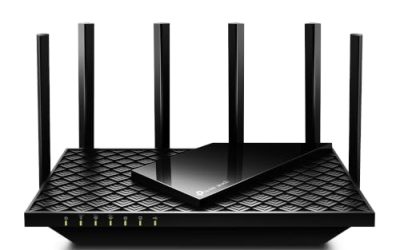
- Wi-Fi standard: Wi-Fi 6E (802.11ax), tri-band
- Rated throughput: AXE5400, up to 5,400 Mbps combined in the listing
- Bands: 2.4 GHz, 5 GHz and 6 GHz, with 160 MHz channel support
- Processor and memory: 1.7 GHz quad-core processor, 512 MB RAM
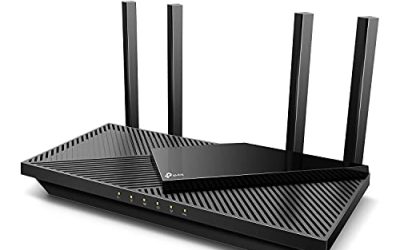
The Archer AXE75 is the straightforward standalone choice: one router, three bands and no mesh nodes to place. It is an AXE5400 tri-band Wi-Fi 6E router, splitting its rated throughput across 2.4 GHz, 5 GHz and the newer 6 GHz band, with 160 MHz channels and six external antennas. For a flat or a small house where one central router can reach every room, that is simpler to own than a mesh kit.
Mac compatibility here is about standards and software. Recent Macs that support Wi-Fi 6E can use the 6 GHz band, older Apple devices fall back to 5 GHz or 2.4 GHz, and WPA3 is supported for the connection security macOS and iOS expect. Setup runs through the TP-Link Tether app on iPhone, and OneMesh support means a compatible TP-Link extender can be added later if a far corner stays weak.
Key specs
At a desk, this suits a MacBook that spends most of its life docked. Keep the router central and elevated, and wire anything fixed through a dock or adapter. The limit is the one that applies to every single router: walls and distance still decide the far rooms.
Pros
Cons
3. ASUS RT-AX86U Pro — best for a wired Mac desk
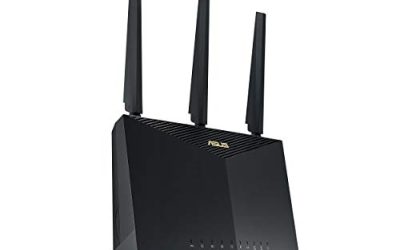
- Wi-Fi standard: Wi-Fi 6 (802.11ax), dual-band 2.4 GHz and 5 GHz
- Speed rating: AX5700, up to 5,700 Mbps combined in the listing
- Processor and memory: 2.0 GHz quad-core processor, 1 GB RAM
- Wired ports: a 2.5G port, gigabit LAN ports and USB ports for sharing
The RT-AX86U Pro takes a different route. It is a dual-band Wi-Fi 6 router rather than a Wi-Fi 6E model, so there is no 6 GHz band. What it offers instead is a strong 5 GHz radio, a 2.5G port and a feature set aimed at people who wire their main machine and care about control. For an iMac or Mac Studio that sits in one place, that trade can make more sense than chasing a band the desk machine will rarely use wirelessly.
The listing rates it at AX5700, with combined speeds up to 5,700 Mbps, 160 MHz channels on Wi-Fi 6, a 2.0 GHz quad-core processor and 1 GB of RAM. AiMesh support lets it pair with other compatible ASUS routers to form a mesh later, and AiProtection Pro and WPA3 cover network security. Management is available through the ASUS Router app on iOS as well as the web interface, so an iPhone is enough for routine checks and changes.
Key specs
Choose this one when your priority Mac is wired. Skip it if your newest MacBook supports Wi-Fi 6E and you specifically want the 6 GHz band, because this hardware does not have that radio.
Pros
Cons
4. TP-Link Deco XE75, 2-pack — best mesh for a larger home
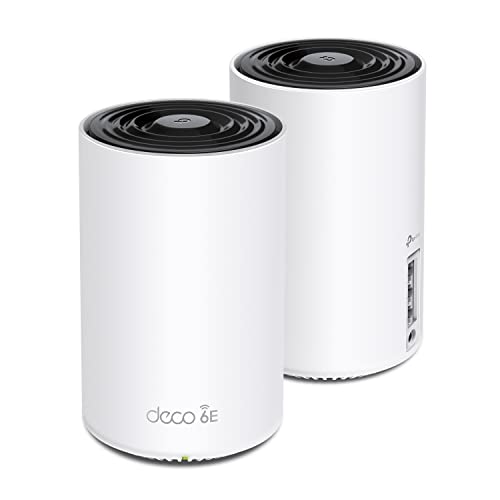
- Wi-Fi standard: Wi-Fi 6E, tri-band 2.4 GHz, 5 GHz and 6 GHz
- Speed rating: AXE5400, up to 5,400 Mbps combined in the listing
- Coverage: up to 5,500 square feet for the 2-pack
- Device support: up to 200 devices
The Deco XE75 two-pack is built for the homes where a single router leaves a bedroom or office stranded. It is an AXE5400 tri-band Wi-Fi 6E mesh system rated to cover up to 5,500 square feet, with the two units working under one network name and an AI-driven mesh design that steers devices between nodes as you move. Each room gets the same network, and a MacBook can walk from desk to sofa without a manual reconnect.
Like the other mesh pick, management is app-first. The Deco app on iOS handles setup, device lists and settings, which fits a household where the nearest computer is often a phone. The 6 GHz band is part of the system, so Wi-Fi 6E Macs can use it for a cleaner link, while the mesh itself keeps older devices connected on 5 GHz and 2.4 GHz. The listing also names WPA3 security and support for up to 200 devices across the system.
Key specs
Placement decides how well any mesh works. Put the second unit where the signal from the main unit is still decent, not in the dead room itself, and keep both nodes out in the open rather than inside a cabinet.
Pros
Cons
How to choose a router for a Mac home
Start with the Wi-Fi standard your Macs actually support. A Mac with Wi-Fi 6E can use a 6 GHz band; an older Mac cannot, and it will simply use 5 GHz or 2.4 GHz on the same router. There is no harm in buying Wi-Fi 6E for a mixed home, because the router serves every generation at once, but there is little reason to pay for 6 GHz if every device you own stops at Wi-Fi 6 and you plan to keep them for years.
Decide between one router and a mesh system by layout, not by room count alone. A compact flat with a central router position usually does well with a single unit like the Archer AXE75. A long, split-level or thick-walled home usually does better with mesh, because a second node placed halfway to the weak area fixes coverage in a way a stronger single router cannot.
Check the wired ports against your desk. A Mac that lives at a desk benefits from Ethernet through its own port, a dock or an adapter. If your internet plan is faster than gigabit, look for a 2.5 gigabit port on the router so the wired side is not the bottleneck, and count the remaining LAN ports before you assume every fixed device can plug in.
Confirm the management app before you buy. Every pick here can be set up and managed from an iPhone app, which is the practical meaning of Mac-friendly for most homes. If you prefer a full browser interface with deeper settings, a traditional standalone router such as the ASUS or TP-Link Archer models will feel more familiar than an app-first mesh system.
Treat smart-home claims literally. A built-in Zigbee hub or Thread border router, as listed for the eero Pro 6E, is a real and separate feature from HomeKit router support. If Apple Home router controls are essential to you, verify that exact feature on the exact model before ordering, because it is not listed for any router in this guide.
Keep security simple and current. Turn on WPA3 where your devices support it, enable automatic firmware updates when available, and give guests their own network name so visitors never need your main password.
FAQs
Do Macs need an Apple router to work well?
No. Apple no longer sells its own routers, and Macs use standard Wi-Fi. Any modern router with a current Wi-Fi standard, WPA3 support and a good setup app will work with a MacBook, iMac, iPhone and iPad.
Is Wi-Fi 6E worth it for a Mac home?
It is worth it when at least one important Mac supports Wi-Fi 6E, because that machine can use the cleaner 6 GHz band for fast local transfers and busy-hour reliability. In a home where every device stops at Wi-Fi 6, a strong Wi-Fi 6 router such as the RT-AX86U Pro can be the more sensible buy.
Can I set these routers up without a Windows computer?
Yes. Each pick here offers an iPhone app for setup and management: eero, TP-Link Tether, ASUS Router and TP-Link Deco. The standalone TP-Link and ASUS models also provide a browser interface you can open from Safari on a Mac.
Will HomeKit devices work on these routers?
HomeKit accessories join as ordinary Wi-Fi devices and work on these networks. What is not listed for any pick here is HomeKit Secure Router support, which is the separate feature that adds router-level controls inside the Apple Home app, so do not choose a model expecting that specific feature.
Should my main Mac use Wi-Fi or Ethernet?
Use Ethernet for a Mac that never moves, if a cable run or a nearby mesh node makes it practical. A wired connection removes wireless congestion from the equation for large file transfers, backups and video calls, and it frees the wireless bands for the devices that truly need them.
How many mesh nodes do I need?
Start with the pack sized for your home in the listing, and add a node only if a room stays weak after you have tried a better position. More nodes placed badly can perform worse than fewer nodes placed well.
Conclusion
The best mac routers are not Apple-branded, and they do not need to be. They are the routers whose Wi-Fi standard matches your newest Mac, whose coverage shape matches your home, and whose app makes the network easy to run from an iPhone. Choose the eero Pro 6E for the simplest mesh start, the Archer AXE75 for one strong Wi-Fi 6E router, the RT-AX86U Pro for a wired Mac desk with deeper controls, or the Deco XE75 two-pack when a larger home needs coverage in every room. Check the band support on your own Macs, count your wired devices, and pick the shape that fits, and your Apple gear will connect as smoothly as it was designed to.
More from Amazon
Programs that pair well with the guide above. Offers and eligibility are set by Amazon and may change.
Free shipping on eligible items, Prime Video and more. Eligible new members can start with a free trial.
Start a Prime free trialAd-free music streaming. Eligible new subscribers can start with a free trial.
Try Music Unlimited freeA Prime membership for ages 18-24 with a trial period. Eligibility is set by Amazon.
See Prime for Young AdultsAudiobooks and podcasts to listen to on the go. Eligible new members can start with a free trial.
Try Audible freeAs an Amazon Associate we earn from qualifying purchases.