Our Short List of 3

- Best for: Players who want a proven wireless mouse with very long battery life and a compact shape.
- HERO sensor with up to 12,000 DPI sensitivity
- LIGHTSPEED wireless with 1 ms report rate
- Up to 250 hours of continuous gameplay on one AA battery
- 6 programmable buttons

- Best for: Players who want Bluetooth as well as a dedicated wireless link in one mainstream mouse.
- 10,000 DPI optical sensor
- Low-latency Bluetooth connection
- SLIPSTREAM wireless technology
- 6 programmable buttons

- Best for: FPS players who want a very light wireless mouse with a clean, open shell design.
- Ultra lightweight design at 61g
- 100 hour battery life
- 2.4 GHz wireless connection
- Honeycomb shell with hex design
All 3 Picks at a Glance
| Product | Specs | Action |
|---|---|---|
| Logitech G305 LIGHTSPEED |
| Check price on Amazon |
| Corsair Harpoon RGB Wireless |
| Check price on Amazon |
| HyperX Pulsefire Haste Wireless |
| Check price on Amazon |
Key takeaways
- Find the best wireless gaming mouse under 100 for FPS, everyday play, and travel, with proven sensors, long battery life, and comfortable mainstream shapes.
Choosing a wireless gaming mouse in the mainstream range is less about chasing the highest number on the box and more about finding a shape, connection, and battery routine that fits the way you actually play. A mouse that feels right during a long evening session matters far more than a feature you will never open, and a connection that stays steady matters far more than a specification you will never notice in a match.
This guide is for PC players who want wireless freedom without moving into flagship territory, including FPS players, casual players, laptop players, and anyone replacing a wired mouse for the first time. Every model below was selected from its Amazon listing, using the sensor, connection, battery, weight, and button details shown there, and the listing shown on the product page can change over time, so check the current listing before ordering.
Quick Picks
As an Amazon Associate we earn from qualifying purchases.
| Product | Best for | Key spec from title |
|---|---|---|
| Logitech G305 LIGHTSPEED | Reliable everyday wireless play with very long battery life | HERO 12K sensor, 12,000 DPI, 250h battery life |
| Corsair Harpoon RGB Wireless | Switching between a gaming PC and other devices | 10,000 DPI, low-latency Bluetooth, 6 programmable buttons |
| SteelSeries Rival 3 Wireless | Long sessions away from a charger and dual-device use | 18,000 CPI TrueMove Air sensor, 400+ hour battery life |
| HyperX Pulsefire Haste Wireless | Fast, light movement in FPS games | 61g, up to 16,000 DPI, 100 hour battery life |
How to Choose
Wireless connection and latency
A gaming mouse needs a connection that responds at the moment you move it, so look first at how the mouse talks to your PC. A dedicated 2.4 GHz receiver is the usual choice for gaming because it gives a fast, steady link, while Bluetooth is useful for a laptop, a second machine, or travel, even though it is generally the slower mode. Some models here offer both, which lets you use the receiver at your desk and Bluetooth elsewhere. Before ordering, confirm that the receiver has a safe place to live, inside the mouse or in a USB port you can leave alone, because a tiny receiver is easy to lose.
Battery life and charging
Battery life decides how often the mouse interrupts your routine, so match the power design to your habits rather than chasing the largest number alone. Mice that use a single AA battery can keep going for months of ordinary play and can be revived in seconds with a fresh cell, which suits players who dislike cables and charging docks. Rechargeable models remove the need for spare cells, yet they need a cable or a regular charging habit, and a flat battery mid-session is far more annoying than a low battery warning the day before. Check whether the listing describes a rechargeable cell or a replaceable AA battery, and keep a spare cell or cable within reach if you play daily.
Sensor and DPI range
The sensor is the part that turns hand movement into cursor movement, so it deserves more attention than the maximum DPI figure printed in large type. Most players use a far lower sensitivity than the maximum, which means tracking steadiness, a clean response to fast flicks, and the absence of unwanted acceleration matter more than a headline number. A sensor rated at 10,000 DPI or higher already gives ample room for low, medium, and high sensitivity settings, and the models below range from 10,000 DPI to 18,000 CPI. Choose a sensor from a known gaming line, set your sensitivity in the mouse software or in your game, and give yourself a few sessions to settle before changing it again.
What mainstream models leave out
Mainstream wireless mice keep the parts that affect play and remove extras that raise complexity and weight, so it helps to know what you are giving up before you buy. You may find fewer side buttons than on a specialised MMO mouse, no charging dock in the box, a simpler shell without extensive lighting, and a polling rate fixed at the standard level. None of those omissions stops the mouse from tracking well in ordinary play, yet they matter if you rely on many macros, want a dock, or prefer a very light shell. Read the listing for button count, lighting, and accessories, then decide which omissions you can live with.
The 4 Best Options
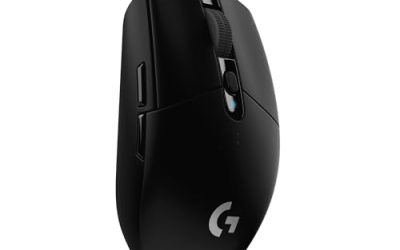
Logitech G305 LIGHTSPEED
- Best for: Players who want a proven wireless mouse with very long battery life and a compact shape.
- HERO sensor with up to 12,000 DPI sensitivity
- LIGHTSPEED wireless with 1 ms report rate
- Up to 250 hours of continuous gameplay on one AA battery
- 6 programmable buttons
Players who want a proven wireless mouse with very long battery life and a compact shape.
The mouse uses a single AA battery rather than a built-in rechargeable cell, and there is no Bluetooth mode, so check that the receiver arrangement suits your setup.
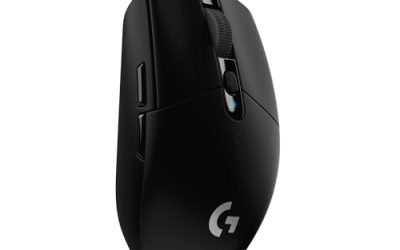
The Logitech G305 LIGHTSPEED suits players who want wireless gaming to feel simple and dependable, with no cable to manage and no charging routine to remember. Its compact, symmetrical shape works well for claw and fingertip grips, and the single AA battery design means a long stretch of play between battery changes. The HERO sensor covers a wide sensitivity range, the LIGHTSPEED link is built for responsive play, and the six programmable buttons give enough room for common actions without crowding the shell.
Watch out for: The mouse uses a single AA battery rather than a built-in rechargeable cell, and there is no Bluetooth mode, so check that the receiver arrangement suits your setup.
Corsair Harpoon RGB Wireless
- Best for: Players who want Bluetooth as well as a dedicated wireless link in one mainstream mouse.
- 10,000 DPI optical sensor
- Low-latency Bluetooth connection
- SLIPSTREAM wireless technology
- 6 programmable buttons
Players who want Bluetooth as well as a dedicated wireless link in one mainstream mouse.
Because this is a rechargeable model, plan a charging routine and check the cable connection listed on the product page before ordering.
The Corsair Harpoon RGB Wireless suits players who move between machines or who want one mouse for gaming and everyday use. Its dual connection gives you a low-latency wireless link for play and Bluetooth for a laptop or another device, while the contoured shape supports a relaxed palm or claw grip during longer sessions. The optical sensor covers a useful sensitivity range, the six programmable buttons handle common commands, and the RGB lighting can be adjusted through the companion software if you want the mouse to match the rest of your desk.
Watch out for: Because this is a rechargeable model, plan a charging routine and check the cable connection listed on the product page before ordering.
SteelSeries Rival 3 Wireless
The SteelSeries Rival 3 Wireless suits players who want a mouse that keeps working for a very long time between battery changes. Its headline battery figure is the longest in this guide, and the dual wireless design lets you switch between a 2.4 GHz link for gaming and Bluetooth 5.0 for a laptop or a second device. The TrueMove Air sensor covers a wide sensitivity range, the shell uses a familiar right-handed shape, and the long-life design makes it a strong choice for a shared desk, a dorm room, or a setup where charging is easy to forget.
Specs
- 18,000 CPI TrueMove Air optical sensor
- 400+ hour battery life
- Dual wireless 2.4 GHz and Bluetooth 5.0
- 60 million click durability
- Wireless gaming mouse design
Best for: Players who want the longest battery life in this guide and a mouse that can move between two devices.
Watch out for: The listing describes a very long battery life rather than a rechargeable dock setup, so confirm the battery type and the receiver storage on the product page before ordering.
HyperX Pulsefire Haste Wireless
- Best for: FPS players who want a very light wireless mouse with a clean, open shell design.
- Ultra lightweight design at 61g
- 100 hour battery life
- 2.4 GHz wireless connection
- Honeycomb shell with hex design
FPS players who want a very light wireless mouse with a clean, open shell design.
The honeycomb shell has open sections, so players who dislike that texture or who play in a dusty room should look closely at the listing images first.
The HyperX Pulsefire Haste Wireless suits FPS players who notice every gram when they flick, track, and reset their aim. At 61 grams, it is the lightest mouse in this guide, and its honeycomb shell is part of how it reaches that weight without losing its shape. The sensor covers a wide sensitivity range, the 2.4 GHz wireless link is built for gaming, and the six programmable buttons cover the actions most FPS players need. Its long battery life also means fewer interruptions during a week of regular play.
Watch out for: The honeycomb shell has open sections, so players who dislike that texture or who play in a dusty room should look closely at the listing images first.
Which One Fits Your Situation
You play FPS games and want fast, light movement
Choose the HyperX Pulsefire Haste Wireless if low weight is your first concern, because its 61 gram shell and wide sensor range suit quick flicks and repeated aim resets. Pair it with a sensitivity you can control across a full match, keep the receiver close to the mouse, and give the honeycomb grip a few sessions before judging it, since the texture feels different from a solid shell at first.
You want wireless play with the least upkeep
Choose the Logitech G305 LIGHTSPEED if you want to set the mouse up and then forget about it for a long stretch. Its single AA battery lasts for a very long time in ordinary use, its compact shape suits smaller hands and claw grips, and its receiver stores inside the mouse when you travel, which removes one more small part to track.
You switch between a gaming PC and a laptop
Choose the SteelSeries Rival 3 Wireless or the Corsair Harpoon RGB Wireless, because both offer a dedicated wireless link and Bluetooth in the same mouse. Use the dedicated link at your desk for gaming, switch to Bluetooth on the laptop, and keep the receiver in a fixed USB port so you always know where it is when you return to your main machine.
You want a comfortable all-rounder for long evenings
Choose the Corsair Harpoon RGB Wireless if comfort and flexibility matter more than chasing the lightest shell. Its contoured shape supports a relaxed grip, its rechargeable design removes the need to keep spare cells nearby, and its Bluetooth mode makes it easy to move the same mouse to another device when the gaming session ends.
Safety Notes
Keep batteries and charging within the guidance shown on the product page and in the manual that comes with the mouse. Use the cable or cell type the maker describes, keep the mouse away from heat and moisture, and stop using a swollen, leaking, or damaged battery. For rechargeable models, unplug the cable once charging is complete rather than leaving it connected for long stretches, and keep small receivers and spare cells away from young children.
Common Mistakes
- Choosing a mouse by maximum DPI alone instead of checking shape, grip, and connection first.
- Assuming every wireless mouse has Bluetooth when some models use a dedicated receiver only.
- Forgetting to check whether the mouse uses a replaceable AA battery or a built-in rechargeable cell.
- Setting sensitivity far too high on the first day and then blaming the sensor for poor aim.
- Losing the tiny USB receiver because it was left in a bag, a laptop, or a desk drawer without a storage slot.
Frequently Asked Questions
Is a wireless gaming mouse fast enough for FPS games?
Yes, a modern wireless gaming mouse with a dedicated 2.4 GHz receiver is built for responsive play, and many players cannot feel a meaningful difference from a wired mouse in ordinary matches. Keep the receiver close to the mouse, avoid placing it behind metal or thick obstacles, and use the dedicated wireless mode rather than Bluetooth when you want the most responsive link.
How long does the battery last on a wireless gaming mouse?
Battery life varies widely by model, connection mode, and lighting, so the listing figure is a guide rather than a promise for every setup. The models in this guide range from 100 hours to more than 400 hours on a single charge or cell, and Bluetooth mode usually lasts longer than the dedicated gaming link. Keep a spare cell or a charging cable nearby if you play daily.
Should I choose Bluetooth or a 2.4 GHz receiver for gaming?
Choose the 2.4 GHz receiver for gaming because it is designed for a fast, steady link between the mouse and your PC. Choose Bluetooth for a laptop, a second machine, or travel, where convenience matters more than the fastest possible response. A mouse with both modes gives you the simplest answer, since you can switch modes without changing hardware.
Does a lighter mouse always improve aim?
No, a lighter mouse helps with fast flicks and long sessions, yet it does not fix aim on its own, and some players aim more steadily with a little extra weight. Shape, grip, sensitivity, and practice matter at least as much as weight, so choose a shell that fits your hand and give yourself time to adjust before changing sensitivity again.
FAQ
Is a wireless gaming mouse fast enough for FPS games?
How long does the battery last on a wireless gaming mouse?
Should I choose Bluetooth or a 2.4 GHz receiver for gaming?
Does a lighter mouse always improve aim?
More from Amazon
Programs that pair well with the guide above. Offers and eligibility are set by Amazon and may change.
Free shipping on eligible items, Prime Video and more. Eligible new members can start with a free trial.
Start a Prime free trialAd-free music streaming. Eligible new subscribers can start with a free trial.
Try Music Unlimited freeA Prime membership for ages 18-24 with a trial period. Eligibility is set by Amazon.
See Prime for Young AdultsAudiobooks and podcasts to listen to on the go. Eligible new members can start with a free trial.
Try Audible freeAs an Amazon Associate we earn from qualifying purchases.