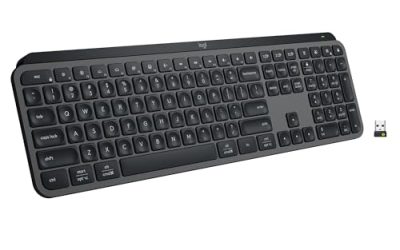
Our Short List of 3

- Wired USB connection; full-size layout with number pad; spill-resistant design; curved space bar; low-profile quiet keys; compatible with Windows and PC laptops; black finish.

- Wired USB connection; full-size layout with number pad; chiclet-style keys; multimedia hot keys for volume and playback; slim low-profile design; black finish.

- Wired USB connection; full-size layout with number pad; quiet membrane keys; RGB LED lighting with five zones and a signature light bar; dedicated media controls; spill-resistant design; compatible with Windows 10, 8.1, 8, and 7; black finish.
All 4 Picks at a Glance
| Product | Specs | Action |
|---|---|---|
| 1. Logitech K120 — Best Simple Wired Keyboard |
| Check price on Amazon |
| 2. Dell KB216 — Best Budget Office Keyboard |
| Check price on Amazon |
| 4. HyperX Alloy Core RGB — Best Entry Level Gaming Keyboard |
| Check price on Amazon |
 5. Logitech MK270 — Best Entry Level Wireless Set |
| Check price on Amazon |
Our Top Picks

The best entry level keyboards do one job well: they let you type comfortably without making you learn anything new. A first keyboard should have a familiar layout, keys that feel good under your fingers, and a connection that just works. It should not ask you to install software, memorise layers of shortcuts, or pay for features you will never use.
This guide is for first desks, students, new PC owners, and anyone replacing a worn-out keyboard on a modest setup. It compares five entry level keyboards, from a simple wired board to a backlit gaming model, and explains the seven things that matter when you buy your first one: layout, switch type, connection, build, extra keys, size, and compatibility. Every pick below is a keyboard, and each one suits a different kind of first-time buyer.
How to Choose
1. Layout
Layout is the first thing to get right. A full-size keyboard has a number pad, arrow keys, and a function row, which helps with spreadsheets, data entry, and general work. A tenkeyless board drops the number pad and saves desk space, which suits smaller desks and gaming setups. If you type numbers often, choose full-size. If your desk is tight or you want the mouse closer to your body, consider tenkeyless. Check that the layout matches your language, because the position of a few keys changes between US, UK, and other layouts, and a mismatched layout is annoying every single day.
2. Switch and Key Feel
Keyboards use two main kinds of keys. Membrane keyboards use a rubber layer under the keys, which makes them quiet, soft, and cheap to build. Mechanical keyboards use a separate switch under each key, which gives a crisper press, a clearer sound, and a longer life. For a first keyboard, membrane boards are the safe choice: they are quiet, forgiving, and easy to type on. Mechanical boards feel more responsive and are popular with gamers, but the click can be loud and the keys can feel unfamiliar at first. If you can, try both kinds in a shop before you decide.
3. Connection
Wired keyboards plug into a USB port and work immediately, with no battery and no pairing. Wireless keyboards use a small USB receiver or Bluetooth, which keeps the desk tidy and lets you type from further away, but they need batteries or charging. For a first desk setup, a wired keyboard is the simplest choice, because there is nothing to charge and nothing to lose. A wireless board suits living rooms, shared desks, and anyone who hates cables. If you choose wireless, check whether it uses a USB receiver or Bluetooth, and make sure your computer supports it.
4. Build and Durability
A first keyboard should survive daily use. Look for a solid frame, keys that sit firmly, and feet that hold the board steady on the desk. Spill resistance is a useful bonus, because accidents happen, and a keyboard that resists a splash of water lasts longer than one that does not. Heavier boards tend to stay put while you type, while very light boards can slide around. A keyboard that feels flimsy in the hand will usually feel flimsy on the desk too.
5. Extra Keys and Lighting
Extra keys are handy but not essential. Media keys control volume and playback without leaving your work, and shortcut keys open search, email, or a calculator. Backlighting helps in dim rooms and looks good on a gaming desk, but it adds cost and uses power. For a first keyboard, a few media keys are worth having, and backlighting is a nice bonus rather than a must. Avoid boards covered in buttons you will never press, because they clutter the layout and raise the learning curve.
6. Size and Desk Space
Measure your desk before you buy. A full-size keyboard is about 45 centimetres wide, and it needs room for a mouse beside it. A compact board fits smaller desks and leaves more room for a notebook or a game controller. If you share a desk, a smaller board keeps the peace. If you have a large desk and type numbers all day, the full-size layout earns its space. Remember to leave room for the cable to reach the computer without pulling tight.
7. Compatibility
Most keyboards work with Windows and macOS, but a few details matter. Check that the board lists your operating system, and that any special keys match it. Some keyboards need software for lighting or macros, and that software may only run on Windows. If you use a Mac, look for a board with Mac-friendly key legends or a layout that matches Apple’s. Chromebooks and Linux machines work with most standard USB and Bluetooth keyboards, but it is worth checking the listing before you order.
Top Picks
1. Logitech K120 — Best Simple Wired Keyboard
- Wired USB connection; full-size layout with number pad; spill-resistant design; curved space bar; low-profile quiet keys; compatible with Windows and PC laptops; black finish.
Logitech K120 Wired Keyboard for Windows
The Logitech K120 is the classic first keyboard. It is a full-size wired board with a standard layout, a number pad, and a curved space bar, and it plugs into a USB port and works straight away. The keys are quiet and low-profile, the board is spill-resistant, and the thin design sits comfortably on a desk. There is nothing to install, nothing to charge, and nothing to learn, which is exactly what a first keyboard should do.
Who it is for: New PC owners, students, and office workers who want a dependable, no-fuss keyboard for typing, study, and everyday computer use.
Caveats: It has no backlight, no media keys, and no wireless option, so it suits a fixed desk rather than a living room or a shared space. The cable is fixed, so check that it reaches your computer comfortably.
2. Dell KB216 — Best Budget Office Keyboard
- Wired USB connection; full-size layout with number pad; chiclet-style keys; multimedia hot keys for volume and playback; slim low-profile design; black finish.
Dell KB216 Wired Multimedia Keyboard
The Dell KB216 is a slim wired keyboard with chiclet-style keys and a set of multimedia hot keys for volume, mute, play, pause, and skipping tracks. The full-size layout includes a number pad, the keys are quiet and low-profile, and the board is light enough to move between desks but steady enough to type on all day. It is a good match for home offices and study desks where the keyboard stays in one place and gets used for hours at a time.
Who it is for: Home office workers and students who want a quiet, slim keyboard with handy media controls for a first or second desk.
Caveats: It has no backlight and no wireless option, and the chiclet keys feel different from a traditional board, so they take a day or two to get used to. It is a Windows-focused board, so Mac users should check the key legends before ordering.
3. Redragon K552 — Best Entry Level Mechanical Keyboard
Redragon K552 Mechanical Gaming Keyboard
The Redragon K552 is the most approachable way to try a mechanical keyboard. It is a compact tenkeyless board with 87 keys, red linear switches that press smoothly and quietly for a mechanical board, and RGB backlighting with several lighting modes. The metal frame gives it a solid, planted feel, the keys are anti-ghosting so fast key presses register cleanly in games, and the detachable USB cable makes it easy to pack and carry. For a first gaming keyboard, it gives a real mechanical feel without the complexity of a high-end board.
Specs
- Wired USB connection with detachable cable; 87-key tenkeyless layout; red linear mechanical switches; RGB LED backlighting; metal frame; full-key anti-ghosting; compatible with Windows PC and Mac.
Who it is for: New gamers and first-time mechanical keyboard buyers who want a compact, backlit board with a solid build and a responsive key feel.
Caveats: It has no number pad, which matters if you type numbers often, and the red switches are linear, so there is no tactile bump to tell you when a key has registered. The backlighting is RGB rather than single-colour, so the board looks busy on a plain office desk. Note that a different K552 variant with brown switches has been listed as unavailable, so stick to the black red-switch version linked here.
4. HyperX Alloy Core RGB — Best Entry Level Gaming Keyboard
- Wired USB connection; full-size layout with number pad; quiet membrane keys; RGB LED lighting with five zones and a signature light bar; dedicated media controls; spill-resistant design; compatible with Windows 10, 8.1, 8, and 7; black finish.
HyperX Alloy Core RGB Membrane Gaming Keyboard
The HyperX Alloy Core RGB is a full-size gaming keyboard with quiet membrane keys, RGB lighting, and dedicated media buttons. It is built for people who want a gaming look and feel without moving to mechanical switches: the keys are soft and silent, the board is spill-resistant, and the signature light bar along the top edge adds a glow to the desk. Dedicated media keys control volume and playback, quick-access buttons adjust brightness and lighting modes, and a keyboard lock mode stops accidental key presses during games.
Who it is for: New gamers who want a full-size backlit keyboard with media controls and a sturdy frame, but who prefer quiet membrane keys over clicky mechanical switches.
Caveats: The keys are membrane, so they feel softer and less crisp than a mechanical board, and the lighting is zoned rather than per-key, so you cannot light each key on its own. It is a Windows-focused board, so check compatibility if you use a Mac.
5. Logitech MK270 — Best Entry Level Wireless Set
- 2.4 GHz wireless connection with a single USB receiver; full-size keyboard with number pad; eight multimedia and shortcut keys; compact wireless mouse included; long battery life for keyboard and mouse; compatible with Windows PC and laptop; black finish.
Logitech MK270 Wireless Keyboard and Mouse Combo
The Logitech MK270 is a wireless keyboard and mouse set built around a full-size entry level keyboard. The keyboard itself is the heart of the set: a full-size board with a number pad, eight multimedia and shortcut keys, and a quiet, comfortable key feel, connected by a single tiny USB receiver. The bundled mouse is a compact wireless mouse that shares the same receiver, so one port covers both devices. The keyboard runs for months on its batteries, and the set is a quick way to equip a first desk with both input devices at once.
Who it is for: First-time desk builders who need a keyboard and a mouse together, and anyone who wants a tidy wireless setup without buying two separate devices.
Caveats: The set includes a mouse as well as a keyboard, so if you already own a mouse you like, a keyboard-only board may suit you better. The board has no backlight, and the wireless receiver uses one USB port, so keep a spare port in mind if your computer has few.
Comparison Table
| Keyboard | Connection | Layout | Key Type | Backlit |
|---|---|---|---|---|
| Logitech K120 | Wired USB | Full-size | Membrane | No |
| Dell KB216 | Wired USB | Full-size | Chiclet membrane | No |
| Redragon K552 | Wired USB | Tenkeyless, 87 keys | Mechanical, red linear | Yes, RGB |
| HyperX Alloy Core RGB | Wired USB | Full-size | Membrane | Yes, RGB |
| Logitech MK270 | 2.4 GHz wireless | Full-size | Membrane | No |
Which One Is Right for You?
Start with how you will use the keyboard. For plain typing, study, and office work, the Logitech K120 is the simplest choice, and the Dell KB216 adds media keys and a slimmer shape for a home office. If you want a wireless desk, the Logitech MK270 covers the keyboard and mouse in one set, which is handy for a first setup.
For gaming, the choice is between feel and size. The Redragon K552 gives you a real mechanical board in a compact tenkeyless size, which suits smaller desks and faster games. The HyperX Alloy Core RGB keeps the full-size layout, adds RGB lighting and media controls, and uses quiet membrane keys that suit shared rooms and late-night sessions. If you type numbers often, pick a full-size board. If your desk is small, pick the tenkeyless K552. And if you are unsure, start simple: a wired board like the K120 is cheap to replace later, and it teaches you what you actually want from a keyboard before you spend more.
Frequently Asked Questions
What is the difference between membrane and mechanical keyboards?
Membrane keyboards use a rubber layer under the keys, which makes them quiet, soft, and affordable. Mechanical keyboards use a separate switch under each key, which gives a crisper press and a longer life, but they cost more and can be louder. For a first keyboard, membrane is the safe and comfortable choice. Mechanical suits gamers and heavy typists who want a more responsive feel and are willing to pay a little more for it.
Do I need a number pad on my first keyboard?
It depends on what you type. A number pad helps with spreadsheets, data entry, and accounting, and it is worth having if you work with numbers daily. If you mostly write, browse, and play games, a tenkeyless board without a number pad saves desk space and brings the mouse closer to your body. Four of the five picks in this guide are full-size, and only the Redragon K552 drops the number pad.
Are wireless keyboards good for beginners?
Yes, as long as you keep the receiver safe and remember the batteries. A wireless keyboard keeps the desk tidy and works from further away, which suits living rooms and shared desks. A wired keyboard is simpler, because there is nothing to charge and nothing to lose. For a first desk that never moves, wired is the easiest choice. For a desk you share or rearrange often, wireless is worth it.
How long should an entry level keyboard last?
A well-made entry level keyboard should last several years of daily use. Membrane boards wear out gradually, with keys becoming less responsive over time, while mechanical boards tend to last longer because each switch is rated for many millions of presses. Spills, dust, and heavy use shorten any keyboard’s life, so keep drinks away from the desk and wipe the board down now and then. If a key stops working, check the cable or receiver first, because a loose connection is a common cause.
Disclosure: As an Amazon Associate, we may earn from qualifying purchases.
FAQ
Which One Is Right for You?
What is the difference between membrane and mechanical keyboards?
Do I need a number pad on my first keyboard?
Are wireless keyboards good for beginners?
How long should an entry level keyboard last?
More from Amazon
Programs that pair well with the guide above. Offers and eligibility are set by Amazon and may change.
Free shipping on eligible items, Prime Video and more. Eligible new members can start with a free trial.
Start a Prime free trialAd-free music streaming. Eligible new subscribers can start with a free trial.
Try Music Unlimited freeA Prime membership for ages 18-24 with a trial period. Eligibility is set by Amazon.
See Prime for Young AdultsAudiobooks and podcasts to listen to on the go. Eligible new members can start with a free trial.
Try Audible freeAs an Amazon Associate we earn from qualifying purchases.