Our Short List of 3
All 4 Picks at a Glance
| Product | Specs | Action |
|---|---|---|
 Logitech POP Keys in Heartbreaker Rose | Check price on Amazon | |
 Logitech POP ICON Keys in Graphite and Green | Check price on Amazon | |
 MOFII Wireless Keyboard and Mouse Combo in Pink Colorful | Check price on Amazon | |
 YUNZII B75 Pro in Cocoa Cream V2 | Check price on Amazon |
Key takeaways
- Find the best cute keyboards for a desk that makes you smile. Pastel colors, round keys, and playful designs compared in one friendly guide.
The best cute keyboards prove that a desk accessory can be both practical and genuinely delightful. A keyboard is one of the few objects you touch for hours every day, so there is no reason it should look dull. The right cute keyboard pairs soft pastel colors, rounded keycaps, or playful details with a typing feel you can live with, turning an ordinary workspace into a place you actually enjoy sitting down at.
Cute does not have to mean flimsy. The keyboards in this guide come from established brands with real wireless connectivity, multi-device pairing, and layouts that work for everyday typing, study sessions, and long gaming nights.
This guide compares four keyboards that earn their place on looks and on substance.
How to Choose
1. Decide what cute means to you
Cute covers a wide range of styles, and naming yours first makes the choice much easier. Pastel keyboards in pink, lilac, mint, or cream give a soft, dreamy look that suits a light and airy desk. Bold color-blocked boards with bright accent keys feel playful and energetic. Retro typewriter-style keyboards with round keycaps lean vintage and charming. Kawaii-inspired boards add hearts, animal motifs, or food-themed legends. Before you shortlist anything, picture the desk you want: the color of your monitor stand, your mouse, your lamp, and your chair all matter, because a cute keyboard looks best when it belongs with the rest of the setup rather than clashing with it.
2. Mechanical or membrane feel
The feel under your fingers matters as much as the look. Mechanical keyboards use individual switches beneath each key, giving a bouncy, tactile response and a satisfying sound with every press. They tend to last longer and many let you swap keycaps later, which is a real advantage if you want to change the look down the line. Membrane keyboards use a rubber layer beneath the keys, so they are quieter, lighter, and usually slimmer. The round-key retro boards in this guide are membrane designs, and they trade some typing precision for charm and quiet operation. If you type all day for work or study, try to favor a board whose key travel and spacing suit long sessions. If you mostly browse, chat, and play casually, the feel matters less and the look can lead.
3. Layout and size
Cute keyboards come in nearly every layout. Full-size boards include a number pad, which is handy for spreadsheets and data entry but takes up a lot of desk space. Tenkeyless boards drop the number pad and keep the function row, striking a balance between space and completeness. Compact 75 percent boards squeeze the function row and navigation keys into a smaller frame, while 60 percent boards drop even more. A smaller board leaves room for a mouse, a notebook, or a cup of tea, and it travels well in a bag. A larger board keeps every key within reach. Think about what you actually press: if you never touch the number pad, a compact board gives you a cleaner desk without any real sacrifice.
4. Connection and multi-device support
Most cute keyboards are wireless, connecting over Bluetooth or a small USB receiver. Bluetooth lets you pair with a laptop, tablet, or phone without using a USB port, and many boards pair with up to three devices at once, switching between them with a single keypress. A USB receiver usually gives a steadier connection for a desktop and works instantly on machines where Bluetooth is switched off or unavailable. Some boards offer both, which is the most flexible arrangement. Check that the board supports your operating system, whether that is Windows, macOS, ChromeOS, or a tablet platform, because a few cute boards are tuned for one system and feel awkward on another.
5. Battery life and charging
Wireless keyboards run on disposable batteries or a built-in rechargeable cell. Battery-powered boards can run for many months on a set of cells and never need a cable, though you will need spares on hand. Rechargeable boards charge over USB-C and spare you the battery hunt, but they need topping up every few weeks depending on backlight use. Backlighting is worth a special note: an RGB glow looks wonderful in photos, but it drains a rechargeable battery quickly, so many owners run their boards with the lights off during the day and switch them on in the evening. If long battery life matters to you, favor a board without a backlight or one that lets you turn it off entirely.
6. Keycap quality and cleanability
Pastel and white keycaps show dust, crumbs, and finger marks sooner than dark ones, so think about upkeep. Keycaps made from thicker plastic resist shine and wear better over months of daily use. Removable keycaps are a plus, because you can lift them off and clean underneath, or swap in a new color set when your taste changes. Round keycaps look adorable but can trap dust around their edges, so a quick weekly wipe keeps them looking fresh. A keyboard cover or a small brush helps too. None of this is hard work, but it is worth knowing before you commit to a pale cream board.
7. Noise level
A cute keyboard that clicks loudly can be a problem in a shared room, a library, or a late-night gaming session. Mechanical boards with tactile switches produce a noticeable sound, while linear switches and membrane boards are quieter. If you share your space, look for boards described as quiet or low-profile, and consider that a slim membrane board is usually the gentlest neighbor. Your own tolerance matters as well: some typists love a cheerful clack, others find it tiring after an hour. There is no wrong answer, only a match between the board and the room it lives in.
Top Picks
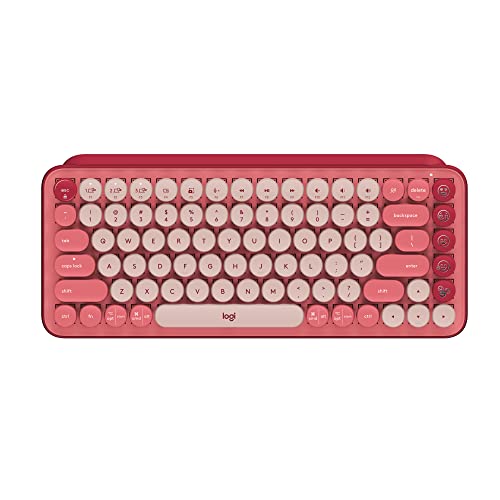
Logitech POP Keys in Heartbreaker Rose
Logitech POP Keys in Heartbreaker Rose
The Logitech POP Keys in Heartbreaker Rose is the most expressive keyboard in this guide, and the one that most directly answers the idea of a cute keyboard. Its colorway blends neon coral with crushed raspberry, its keys have a scooped typewriter shape, and it ships with eight swappable emoji keys plus a dedicated emoji menu key. Those emoji keys can be customized through Logitech software on Windows and macOS, so the board doubles as a shortcut panel for reactions, symbols, or app launches.
Under the playful shell, this is a serious wireless mechanical keyboard. It uses tactile mechanical switches, connects over Bluetooth or the included Logi Bolt USB receiver, and pairs with up to three devices with easy switching between them. The compact layout skips the number pad, which keeps the footprint small on a crowded desk. Battery life is rated for up to three years on two AAA cells, and the keys are rated for up to 50 million presses, so the board is built to stay on your desk for a long time rather than serve as a short-lived novelty.
Who it is for: anyone who wants a bold, colorful centerpiece and enjoys customizing keys. It suits content creators, students, and home office workers who type on a laptop and a tablet and want one board for both.
Caveats: the compact layout means no number pad, so spreadsheet-heavy work needs an external pad or a different board. Emoji customization requires Logitech software, which runs on Windows and macOS only. The bright coral and raspberry palette is a statement, so it works best on a desk that welcomes strong color.
Logitech POP ICON Keys in Graphite and Green
Logitech POP ICON Keys in Graphite and Green
The Logitech POP ICON Keys takes the same playful spirit in a quieter, more modern direction. Instead of typewriter-style caps, it uses low-profile rounded keys with a comfortable, laptop-like feel, and it comes in a range of colorways that mix a neutral base with a vivid accent color. The Graphite and Green version pairs a dark body with fresh green keys, while sibling versions offer pastel pink, soft blue, lilac, and off-white combinations, so the line covers both bold and gentle tastes.
This is a Bluetooth wireless keyboard built for comfort and flexibility. It pairs with up to three devices, switches between them with dedicated Easy-Switch keys, and works with laptops, tablets, and desktop PCs. The keys are programmable through Logitech software, letting you assign shortcuts and actions to keys you use often. Its slim profile slips easily into a bag, making it a good companion for a laptop that moves between rooms, a library, and a coffee shop.
Who it is for: typists who want a cute keyboard that stays quiet and understated, and anyone who carries a keyboard between home and elsewhere. It also suits a shared workspace, where a slim, soft-sounding board is kinder to the people nearby.
Caveats: this is a low-profile membrane-style board, so it does not give the bouncy mechanical feel of the POP Keys. There is no number pad, and the programming features need Logitech software on a computer. Buyers who want a specific pastel colorway should check the exact color name on the listing, because each colorway carries its own listing.
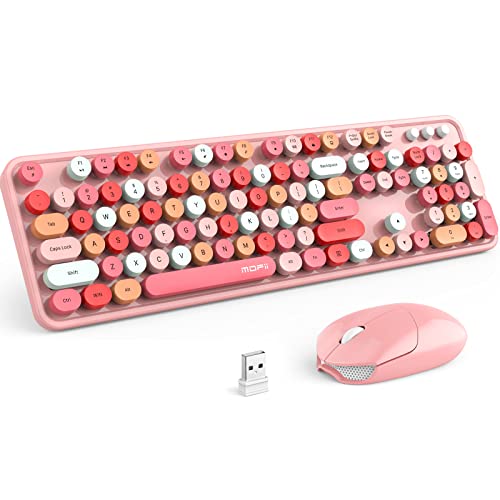
MOFII Wireless Keyboard and Mouse Combo in Pink Colorful
MOFII Wireless Keyboard and Mouse Combo in Pink Colorful
The MOFII combo is the most unapologetically cute pick in this guide. Its full-size keyboard wears a rainbow of pastel shades across round, typewriter-style keycaps, and it arrives with a matching wireless mouse in the same pink and multicolor scheme. The round keys, the candy colors, and the coordinated mouse make the whole set feel like a matched outfit rather than a single accessory, which is exactly the point for a desk built around a cute theme.
Functionally, this is a full-size 2.4GHz wireless set. The keyboard includes a number pad and multimedia function keys, so it covers office work, study, and casual browsing without compromise. A single USB receiver connects both the keyboard and the mouse, so setup is a matter of plugging in the receiver and switching both pieces on. The round keycaps give a retro typing feel with a soft, crisp sound, and the full-size layout keeps every key you expect from a desktop board within reach.
Who it is for: anyone building a coordinated pastel desk on a modest budget, especially students and home office workers who want a full-size board with a number pad. It is also a natural gift pick for someone who loves cute desk accessories, because the matching mouse completes the look in one box.
Caveats: this is a combo, so the keyboard and mouse arrive together and share one receiver; buyers who only want a keyboard should note that the mouse is part of the set. The round keycaps look wonderful but offer a different typing feel from standard square caps, so touch typists may need a short adjustment period. The set is designed for Windows, so Mac users should confirm the layout and function keys behave as expected before settling in.
YUNZII B75 Pro in Cocoa Cream V2
YUNZII B75 Pro in Cocoa Cream V2
The YUNZII B75 Pro in Cocoa Cream V2 is the pick for buyers who want cute and mechanical in equal measure. Its cream and cocoa colorway is soft and warm, like a cafe palette, and the 75 percent layout keeps the board compact while retaining the function row and navigation keys. A rotary knob on the corner handles volume, and the gasket-mounted design gives the board a softer, more cushioned typing feel than a rigid tray-mounted board.
This is a wireless mechanical keyboard with three connection modes: Bluetooth, 2.4GHz wireless, and wired USB-C. It uses hot-swappable switches, so you can change the switches later without soldering, and the keycaps can be swapped too, which makes the board easy to restyle over time. The Cocoa Cream V2 version pairs its warm keycaps with smooth-feeling switches, and the board supports RGB backlighting for evening use. For a cute desk that also needs to perform during long typing or gaming sessions, this combination of looks and mechanical substance is hard to beat.
Who it is for: mechanical keyboard fans who want a pastel-adjacent board without giving up switch choice, wireless flexibility, or a volume knob. It suits a main desk setup where the keyboard stays put and gets used for hours each day.
Caveats: as a 75 percent board it has no number pad, so number-heavy work needs a separate pad. The backlight drains the rechargeable battery faster when left on, so owners who want long battery life should use it sparingly. The Cocoa Cream V2 colorway is one of several, and each colorway carries its own listing, so confirm the exact color name before ordering.
Comparison Table
| Keyboard | Layout | Connection | Switch type | Number pad | Standout feature |
|---|---|---|---|---|---|
| Logitech POP Keys Heartbreaker Rose | Compact | Bluetooth, Logi Bolt USB | Mechanical tactile | No | Swappable emoji keys |
| Logitech POP ICON Keys Graphite and Green | Compact | Bluetooth | Low-profile | No | Quiet, slim, multi-device |
| MOFII Combo Pink Colorful | Full-size | 2.4GHz USB receiver | Membrane, round caps | Yes | Matching mouse included |
| YUNZII B75 Pro Cocoa Cream V2 | 75 percent | Bluetooth, 2.4GHz, USB-C | Mechanical, hot-swappable | No | Volume knob, gasket mount |
Which One Is Right for You?
Start with the look you want, then let the layout decide. If you want the boldest cute statement and you love the idea of emoji keys, the Logitech POP Keys in Heartbreaker Rose is the obvious centerpiece, and its long battery life and three-device pairing make it easy to live with. If you prefer something quieter and slimmer that still has personality, the Logitech POP ICON Keys gives you the same brand reliability in a gentler package, with a range of pastel colorways to choose from.
If your desk needs a number pad and you want the whole setup to match, the MOFII combo is the only pick here that includes one, and the matching mouse means the cute theme extends across the desk in a single purchase. If you type for hours and care about switch feel, hot-swappable parts, and a volume knob, the YUNZII B75 Pro in Cocoa Cream V2 is the most capable board of the four, and its warm cream palette keeps it firmly in cute territory.
A good final check is to measure your desk. A full-size board needs noticeably more width than a compact one, and a board that crowds your mouse will annoy you long after the novelty of the color wears off. Match the board to the space, match the color to the room, and the cute choice becomes the practical one too.
Frequently Asked Questions
Are cute keyboards good for everyday typing?
Yes, when you choose one with a layout and switch feel that suit your hands. The boards in this guide come from established brands and are designed for daily use, not just display. The main trade-off is usually layout: compact cute boards drop the number pad, so if you type numbers all day, a full-size option like the MOFII combo fits better. Try to prioritize comfort and connection type alongside color, and a cute keyboard can be your only keyboard without any compromise.
What is the difference between the Logitech POP Keys and the POP ICON Keys?
The POP Keys is a mechanical keyboard with typewriter-style keys, swappable emoji keys, and a bouncy tactile feel. The POP ICON Keys is a slim, low-profile keyboard with rounded chiclet-style keys, quieter typing, and a more modern look. Both pair with up to three devices and come in playful colorways. Choose the POP Keys if you love mechanical typing and bold color, and the POP ICON Keys if you want a quiet, portable board with a softer presence.
Do round-key keyboards type differently?
Round keycaps feel slightly different from standard square caps because the top surface is smaller and more domed. Most people adjust within a day or two, and the typing action underneath is what matters most for speed and comfort. Round-key boards like the MOFII combo are membrane designs, so they feel softer and quieter than a mechanical board. If you touch type at high speed, give yourself a short adjustment period before judging the feel.
How do I keep a pastel keyboard clean?
A weekly wipe with a slightly damp, lint-free cloth keeps pastel keycaps looking fresh, and a small soft brush clears dust from between the keys. Avoid harsh cleaners, which can dull printed legends, and wash your hands before long typing sessions if you want white or cream caps to stay bright. Boards with removable keycaps can be lifted off for a deeper clean a few times a year, which keeps the board looking new far longer.
Disclosure: As an Amazon Associate, we may earn from qualifying purchases.
FAQ
Which One Is Right for You?
Are cute keyboards good for everyday typing?
What is the difference between the Logitech POP Keys and the POP ICON Keys?
Do round-key keyboards type differently?
How do I keep a pastel keyboard clean?
More from Amazon
Programs that pair well with the guide above. Offers and eligibility are set by Amazon and may change.
Free shipping on eligible items, Prime Video and more. Eligible new members can start with a free trial.
Start a Prime free trialAd-free music streaming. Eligible new subscribers can start with a free trial.
Try Music Unlimited freeA Prime membership for ages 18-24 with a trial period. Eligibility is set by Amazon.
See Prime for Young AdultsAudiobooks and podcasts to listen to on the go. Eligible new members can start with a free trial.
Try Audible freeAs an Amazon Associate we earn from qualifying purchases.