Our Short List of 3

- Best for: Flats surrounded by competing networks, where moving key devices onto 6 GHz removes the evening slowdown.
- Tri-band Wi-Fi 6E, AXE5400 class (574 + 2,402 + 2,402 Mbps)
- Dedicated 6 GHz band with 160 MHz channels
- 1.7 GHz quad-core processor
- Six external antennas

- Best for: Tenants on fast fibre plans who want the newest standard without buying a whole mesh system.
- Dual-band Wi-Fi 7, BE6500 class, up to 6.5 Gbps
- Coverage rated up to 2,500 sq ft
- Supports up to 80 connected devices
- One 2.5 Gig internet port plus three gigabit LAN ports

- Best for: Renters who value a ten-minute setup and the option to expand later over manual channel control.
- Dual-band Wi-Fi 6 mesh router, 1-pack
- Supports internet plans up to Gigabit speed
- Coverage up to 1,500 sq ft per unit
- Connects 75 or more devices
All 4 Picks at a Glance
| Product | Specs | Action |
|---|---|---|
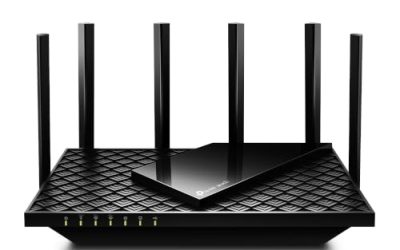
| TP-Link Archer AXE75 |
| Check price on Amazon |
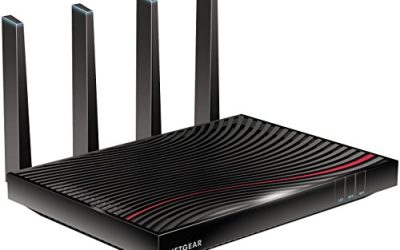
| NETGEAR Nighthawk RS200 |
| Check price on Amazon |
| Amazon eero 6+ (1-pack) |
| Check price on Amazon |
 TP-Link Archer AX55 |
| Check price on Amazon |
Our Top Picks
- TP-Link AXE5400 Tri-Band WiFi 6E RouterWiFi 6E, Tri-Band AXE540012.91 x 10.43 x 4.72 inches1.5 poundsCheck on Amazon
An apartment router does not fail because it is slow. It fails because forty neighbouring networks are shouting on the same three 2.4 GHz channels, and your evening video call is queued behind all of them. The buying decision is therefore not raw speed but escape routes: a band your neighbours are not using, channel controls that let you dodge the crowded parts of the spectrum, and a box sized for one flat rather than a detached house.
This shortlist is for tenants in studios and one- or two-bedroom flats, for renters who cannot drill walls or run cable, and for anyone whose current router tests fine at noon and collapses at eight in the evening. Every model below was picked from its Amazon listing title and stated specifications, with the emphasis on band options and small-space fit instead of maximum coverage claims.
Quick Picks
As an Amazon Associate we earn from qualifying purchases.
| Product | Best for | Key spec from title |
|---|---|---|
| TP-Link Archer AXE75 | Escaping crowded bands entirely | Tri-band Wi-Fi 6E with a dedicated 6 GHz band |
| NETGEAR Nighthawk RS200 | Newest standard in a small flat | Dual-band Wi-Fi 7, BE6500, 2.5 Gig internet port |
| Amazon eero 6+ (1-pack) | Renters who want zero fuss | Dual-band Wi-Fi 6 mesh, covers up to 1,500 sq ft |
| TP-Link Archer AX55 | A compact wired-friendly setup | AX3000 Wi-Fi 6 with USB 3.0 and VPN support |
How to Choose
Get a band your neighbours are not on
The 2.4 GHz band has only three channels that do not overlap, and in a large block every one of them is shared with dozens of networks. Moving your important devices to 5 GHz helps, but the cleanest exit is the 6 GHz band on Wi-Fi 6E or Wi-Fi 7 hardware, which most neighbouring flats still do not use. Check that your phone and laptop support 6 GHz before paying for it; older devices will simply never see that network name.
Let OFDMA and channel width do the quiet work
Apartment traffic is many small requests from many devices rather than one huge download, and that is exactly the pattern OFDMA was built for, letting one transmission serve several devices at once. Wide 160 MHz channels are a double-edged tool in a dense block: they raise your ceiling on a clear band, yet they also swallow more of the shared spectrum on 5 GHz. Prefer routers that let you set channel width manually instead of forcing the widest option.
Size the coverage to the flat, not the building
Coverage figures on router boxes assume open suburban floor plans. In a flat of 500 to 900 square feet, a single well-placed unit reaches every corner, and an oversized system bought for a house can actually hurt, because its signal spills into neighbouring flats and invites the same interference back. One strong unit near the centre of the flat, raised off the floor and away from the microwave, beats a three-node mesh stacked in a corridor.
Plan around rental restrictions
Tenants usually cannot mount hardware, run Ethernet through walls, or move the incoming line from the hallway cupboard where the provider left it. That makes compact hardware, app-based setup and mesh expansion without cables genuinely useful rather than decorative. It also means counting the wired ports before you buy: a console, a work laptop dock and a network drive can exhaust a small router’s LAN sockets faster than its wireless capacity.
The 4 Best Options
TP-Link Archer AXE75
- Best for: Flats surrounded by competing networks, where moving key devices onto 6 GHz removes the evening slowdown.
- Tri-band Wi-Fi 6E, AXE5400 class (574 + 2,402 + 2,402 Mbps)
- Dedicated 6 GHz band with 160 MHz channels
- 1.7 GHz quad-core processor
- Six external antennas
Flats surrounded by competing networks, where moving key devices onto 6 GHz removes the evening slowdown.
Devices without Wi-Fi 6E radios cannot see the 6 GHz band at all, so check your phone and laptop first.
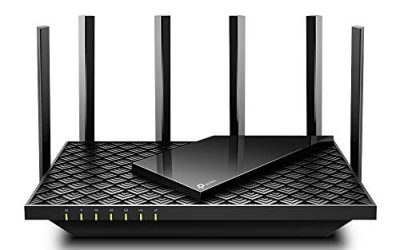
The Archer AXE75 answers the apartment problem directly by adding a third band at 6 GHz, a stretch of spectrum that surrounding flats largely have not discovered yet. Your newest laptop and phone can sit on that quiet band while the television, bulbs and older gadgets share the conventional two. Six external antennas and a quad-core processor give it the headroom to manage a busy small network, and OneMesh support means a compatible extender can be added later if a bedroom turns out to be a dead corner behind concrete.
NETGEAR Nighthawk RS200
- Best for: Tenants on fast fibre plans who want the newest standard without buying a whole mesh system.
- Dual-band Wi-Fi 7, BE6500 class, up to 6.5 Gbps
- Coverage rated up to 2,500 sq ft
- Supports up to 80 connected devices
- One 2.5 Gig internet port plus three gigabit LAN ports
Tenants on fast fibre plans who want the newest standard without buying a whole mesh system.
There is no 6 GHz band, so the escape route here is Wi-Fi 7 efficiency on 5 GHz rather than empty spectrum.
The RS200 brings Wi-Fi 7 into a footprint and device count that suit a flat rather than a family house. Its dual-band design skips the 6 GHz band, but Wi-Fi 7 features such as wider channels and more efficient scheduling still help when the 5 GHz band around you is busy, and the 2.5 Gig internet port means a fast fibre plan is not throttled at the door. NETGEAR rates it for up to 80 devices, which is generous headroom for a smart flat full of bulbs, plugs and speakers.
Amazon eero 6+ (1-pack)
- Best for: Renters who value a ten-minute setup and the option to expand later over manual channel control.
- Dual-band Wi-Fi 6 mesh router, 1-pack
- Supports internet plans up to Gigabit speed
- Coverage up to 1,500 sq ft per unit
- Connects 75 or more devices
Renters who value a ten-minute setup and the option to expand later over manual channel control.
Advanced settings are limited compared with traditional routers, and some features sit inside an optional subscription.
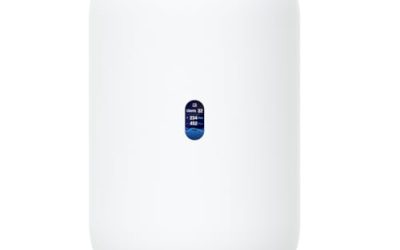
A single eero 6+ is the quiet option for renters who want the router to disappear. The listing rates one unit for up to 1,500 square feet, which maps neatly onto most flats, and the TrueMesh system means a second unit can join wirelessly later if you move somewhere larger, with no cables and nothing screwed to a wall. Setup and management run through an app, the unit doubles as a Zigbee smart home hub, and its plain white shell attracts less landlord attention than a forest of antennas in the hallway.
TP-Link Archer AX55
- Best for: Small flats with a wired desk setup that still need dependable Wi-Fi for everything else.
- AX3000 dual-band Wi-Fi 6 (2.4 GHz and 5 GHz)
- 160 MHz channel width on the 5 GHz band
- OFDMA and MU-MIMO
- USB 3.0 port
Small flats with a wired desk setup that still need dependable Wi-Fi for everything else.
With no 6 GHz band, your defence against neighbour congestion is channel choice and 5 GHz placement, not empty spectrum.
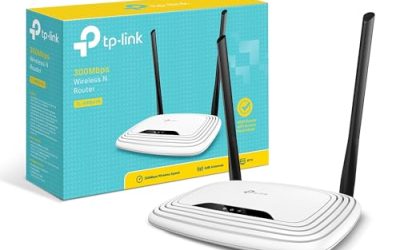
The Archer AX55 is the straightforward dual-band choice for a small flat with a desk that still runs on cables. It covers the apartment essentials without pretending to be a flagship: OFDMA and MU-MIMO for a crowd of small devices, a USB 3.0 port for sharing a drive across the flat, and both VPN server and client functions for working from home. EasyMesh compatibility leaves a door open if you later add a compatible extender, and HomeShield provides the built-in security layer without extra hardware.
Which One Fits Your Situation
Your Wi-Fi collapses every evening
Congestion that follows the neighbours’ schedule is a band problem, not a speed problem. The Archer AXE75 is the fix aimed at exactly that pattern, because its 6 GHz band gives your main devices a network that most of the building cannot join or interfere with. If none of your devices support 6 GHz, the RS200’s Wi-Fi 7 scheduling on 5 GHz is the fallback.
You rent and cannot modify anything
Choose the eero 6+ single pack. It needs no mounting, no cabling beyond the incoming line, and no technical setup session, and it can grow into a multi-unit mesh if you move to a bigger place. Its 1,500 square foot rating is honestly matched to flat sizes instead of house marketing.
You work from home in a one-bedroom flat
The Archer AX55 suits a desk-centred routine: plug the work machine into a gigabit port, let the VPN functions handle the office connection, and leave the wireless bands for calls and everything else. Its AX3000 rating is ample for one flat, and the USB port covers light file sharing without a separate NAS.
Your building just got fast fibre
If your plan outruns gigabit, the router’s internet port becomes the bottleneck. The RS200’s 2.5 Gig port removes that ceiling while its Wi-Fi 7 radio serves the flat, making it the pick for new fibre installs in smaller homes where a full mesh kit would be wasted.
Common Mistakes
- Buying a whole-house mesh kit for a one-bedroom flat, then wondering why interference got worse instead of better.
- Judging a router by its headline speed class while ignoring which bands it actually offers.
- Leaving the router in the hallway cupboard beside the fuse box because that is where the line enters, then blaming the hardware for weak bedroom signal.
- Keeping every device on 2.4 GHz out of habit, including the laptop used for video calls.
- Forgetting that neighbouring networks are half the problem, so the router’s channel and band controls matter as much as its antennas.
Frequently Asked Questions
Is Wi-Fi 6E worth it in an apartment if my devices are older?
Only the devices with 6E or Wi-Fi 7 radios can use the 6 GHz band, so the benefit arrives with your newest phone and laptop first. If everything you own is Wi-Fi 5 or early Wi-Fi 6, a good dual-band model such as the Archer AX55 or RS200 serves you now, and the band upgrade can wait for your next device cycle.
Will a stronger router overpower my neighbours’ networks?
Not in the way most people hope. Raising your own output does not silence the dozens of networks sharing your channels, and regulations cap transmit power anyway. What works is moving to a less crowded band, choosing cleaner channels, and placing the router centrally, which is why band options outrank raw power in a dense block.
One router or a mesh kit for a two-bedroom flat?
Start with one well-placed unit. Most two-bedroom flats sit well inside the coverage a single router on this list claims, and concrete walls are the usual reason for a dead room rather than distance. If one room still struggles, add a mesh node or compatible extender from the same system instead of replacing everything.
Does a router help if the building’s shared internet is slow?
A router cannot add capacity to the line entering your flat, so if the connection itself is saturated before it reaches you, no hardware here fixes that. What a better router does fix is everything on your side of the wall: local congestion, weak coverage in back rooms, and older Wi-Fi standards slowing your own devices down.
FAQ
Is Wi-Fi 6E worth it in an apartment if my devices are older?
Will a stronger router overpower my neighbours’ networks?
One router or a mesh kit for a two-bedroom flat?
Does a router help if the building’s shared internet is slow?
More from Amazon
Programs that pair well with the guide above. Offers and eligibility are set by Amazon and may change.
Free shipping on eligible items, Prime Video and more. Eligible new members can start with a free trial.
Start a Prime free trialAd-free music streaming. Eligible new subscribers can start with a free trial.
Try Music Unlimited freeA Prime membership for ages 18-24 with a trial period. Eligibility is set by Amazon.
See Prime for Young AdultsAudiobooks and podcasts to listen to on the go. Eligible new members can start with a free trial.
Try Audible freeAs an Amazon Associate we earn from qualifying purchases.