Our Short List of 3

- Best for: presenters and streamers who move around and want voice control plus the largest sensor.
- Video resolution: 4K, with 60 FPS support stated in the listing
- Sensor: 1/1.5-inch CMOS
- Movement: motorised PTZ gimbal with AI tracking, multi-mode
- Controls: voice control and gesture control

- Best for: online teachers and reviewers who switch between face camera, whiteboard and desk shots.
- Video resolution: 4K at up to 30 fps, 1080p at up to 60 fps
- Sensor: 1/2-inch CMOS
- Movement: two-axis motorised gimbal with AI tracking
- Controls: gesture control and smartphone remote control

- Best for: professionals and teachers who want genuine motorised tracking for daily meetings without the flagship feature set.
- Video resolution: 4K at 30 fps and 1080p at 60 fps
- Sensor: 1/2-inch CMOS
- Movement: two-axis motorised PTZ gimbal with AI tracking
- Controls: gesture control, customisable preset modes
All 3 Picks at a Glance
| Product | Specs | Action |
|---|---|---|
| OBSBOT Tiny 2 |
| Check price on Amazon |
| Insta360 Link 2 |
| Check price on Amazon |
| OBSBOT Tiny 2 Lite |
| Check price on Amazon |
Key takeaways
- Compare the best pan tilt zoom webcams with real motorised gimbals, AI tracking and 4K sensors, and learn how mechanical PTZ differs from digital ePTZ framing.
A pan tilt zoom webcam makes one decision for you over and over during a call: where to point. If you teach standing up, walk through product demos, or move around a desk while streaming, a fixed camera either crops you out or forces you to sit still. A motorised gimbal camera physically turns to follow you, which is a different tool from a standard webcam that only zooms into a still frame.
This shortlist is for presenters, online teachers, streamers and meeting-heavy professionals who move while they talk. Every camera below has a real two-axis motorised gimbal, confirmed from its Amazon listing title and details, and each pick was chosen from the specifications printed on that listing rather than from marketing roundups.
Quick Picks
As an Amazon Associate we earn from qualifying purchases.
| Product | Best for | Key spec from title |
|---|---|---|
| OBSBOT Tiny 2 | Presenters who want the largest sensor and voice control | 4K PTZ webcam with 1/1.5″ sensor and AI tracking |
| Insta360 Link 2 | Teachers who use whiteboards and desk demonstrations | PTZ 4K webcam with 1/2″ sensor and gesture control |
| OBSBOT Tiny 2 Lite | Buyers who want motorised tracking for meetings and classes | 4K PTZ webcam with 1/2″ sensor and gesture control |
How to Choose
Mechanical PTZ versus ePTZ framing
The most important distinction in this category is how the camera moves. A mechanical PTZ webcam has a motorised gimbal, so the lens itself pans and tilts and the full sensor resolution stays available wherever it points. An ePTZ camera never moves; software crops into a wide image and shifts that crop window, which discards pixels and cannot see beyond the original frame edges. If a listing says PTZ but describes only auto-framing software, treat it as ePTZ. All three cameras in this guide use real two-axis gimbals, so their tracking works even when you walk toward the edge of the room.
Sensor size and low-light behaviour
Tracking is useless if the picture falls apart under room lighting. Sensor size is the listing figure that matters most here: the Tiny 2 uses a 1/1.5-inch sensor, while the Link 2 and Tiny 2 Lite use 1/2-inch sensors, all larger than the small sensors in ordinary laptop cameras. A bigger sensor collects more light per pixel, which keeps faces cleaner in the evening lighting most home offices actually have. Check the sensor size printed in the listing title before comparing headline resolution, because two 4K cameras with different sensors do not perform alike after sunset.
Tracking modes and control methods
Look at how tracking starts and stops. The Tiny 2 adds voice control on top of gesture control, so you can start tracking or zoom without touching the desk setup. The Link 2 and Tiny 2 Lite rely on hand gestures and their companion apps. Group tracking, upper-body modes and preset positions also vary by model, and the listings describe them differently. Decide whether you present alone or with a second person on camera, then match the mode list on the listing to that habit instead of assuming every AI tracking label means the same behaviour.
Zoom type and connection requirements
Every camera here zooms digitally, up to 4x on the models that state a figure, which means zooming crops the image rather than magnifying it optically. At 4K that crop still leaves usable detail for a head-and-shoulders frame, but it is not free resolution. Also confirm the connection: these are USB webcams for PC and Mac, and some features, such as app-based preset control or certain modes, depend on the maker’s software being installed. Check the listing’s stated compatibility with your meeting apps, such as Zoom, Teams or Twitch, before ordering.
The 3 Best Options
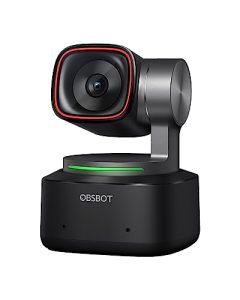
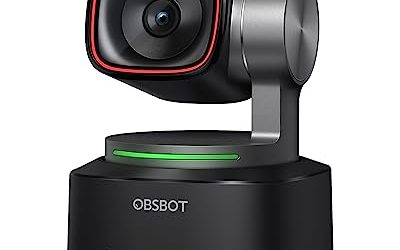
OBSBOT Tiny 2
- Best for: presenters and streamers who move around and want voice control plus the largest sensor.
- Video resolution: 4K, with 60 FPS support stated in the listing
- Sensor: 1/1.5-inch CMOS
- Movement: motorised PTZ gimbal with AI tracking, multi-mode
- Controls: voice control and gesture control
presenters and streamers who move around and want voice control plus the largest sensor.
the zoom is digital rather than optical, so heavy zooming softens the image; confirm the exact bundle contents on the listing, since remote and tripod bundles use different listings.
The Tiny 2 is the pick for presenters who want the strongest imaging hardware in a gimbal body. Its 1/1.5-inch sensor is the largest in this guide, which helps in dim rooms, and it is the only model here whose listing leads with voice control alongside gesture control, so tracking and zoom can be triggered hands-free mid-presentation. AI tracking offers multiple modes and auto focus, and the camera records at up to 60 frames per second in its lower resolutions for smoother motion during fast-paced demos or streams.
Insta360 Link 2
- Best for: online teachers and reviewers who switch between face camera, whiteboard and desk shots.
- Video resolution: 4K at up to 30 fps, 1080p at up to 60 fps
- Sensor: 1/2-inch CMOS
- Movement: two-axis motorised gimbal with AI tracking
- Controls: gesture control and smartphone remote control
online teachers and reviewers who switch between face camera, whiteboard and desk shots.
the listing states it is not compatible with ARM-based Windows systems or Windows Hello face recognition, so check your machine before buying.
The Link 2 suits teachers and demonstrators because its listing builds the product around teaching modes rather than tracking alone. The two-axis gimbal physically pans and tilts to follow you, and the stated modes include DeskView, which tilts the camera down to show paperwork or a product on the desk, and a whiteboard mode that squares up a board. Its 1/2-inch sensor, phase detection auto focus and AI noise-canceling microphone round out a package aimed at lessons, tutorials and client calls where you alternate between your face and your work surface.
OBSBOT Tiny 2 Lite
- Best for: professionals and teachers who want genuine motorised tracking for daily meetings without the flagship feature set.
- Video resolution: 4K at 30 fps and 1080p at 60 fps
- Sensor: 1/2-inch CMOS
- Movement: two-axis motorised PTZ gimbal with AI tracking
- Controls: gesture control, customisable preset modes
professionals and teachers who want genuine motorised tracking for daily meetings without the flagship feature set.
several bundle variants exist on Amazon, including tripod combos with different listings, so confirm you are ordering the standard camera listing and not a bundle or a renewed unit.
The Tiny 2 Lite keeps the parts of the Tiny 2 formula that matter for meetings and classes: the same style of two-axis motorised gimbal, AI tracking with multiple modes, gesture control and a 1/2-inch sensor, in a listing aimed at teaching and video calls. It streams 4K at 30 frames per second and 1080p at 60, includes dual microphones with noise cancelling, and supports preset positions you can return to. OBSBOT streamlined some extras from the full Tiny 2, such as voice control, which is exactly the trade-off to check if hands-free commands matter to you.
Which One Fits Your Situation
You present standing up or walk through demos
Choose the OBSBOT Tiny 2. The motorised gimbal follows you across the room, voice control lets you start tracking or adjust zoom without walking back to the desk, and the larger 1/1.5-inch sensor holds up better when room lighting is uneven. It is the most forgiving option here for energetic presenters who rarely sit in one spot during a session.
You teach with a whiteboard and desk work
Choose the Insta360 Link 2. Its DeskView and whiteboard modes are built for exactly this pattern: face the class, turn to the board, then tilt down to show written work. Gesture control keeps the flow going without a mouse, and the noise-canceling microphone helps when you talk while facing away from the camera toward the board.
You want tracking for ordinary meetings on a sensible budget
Choose the OBSBOT Tiny 2 Lite. It delivers the core benefit, a real gimbal that keeps you framed while you shift in your chair or stand to stretch, with preset positions for your usual desk arrangement. You give up voice control and some shooting modes, which most meeting-only users will never miss.
You never leave your chair during calls
Skip PTZ entirely and buy a good fixed 4K webcam instead. A gimbal only earns its place when your body actually moves; seated callers gain nothing from motors and pay for moving parts they will not use. Spend the same money on a larger sensor and better microphones in a fixed body, and revisit PTZ if your presenting style changes.
Common Mistakes
- Assuming any webcam labelled PTZ has motors, when many listings describe software-only ePTZ cropping that loses resolution and cannot track beyond the frame.
- Comparing headline 4K resolution while ignoring sensor size, even though the sensor decides how clean the image looks in real room lighting.
- Forgetting that the zoom on these cameras is digital, so planning to present from far across a room leads to a soft, cropped picture.
- Ordering a bundle variant or renewed listing by accident, since the same model name appears on several Amazon listings with different contents.
- Skipping the compatibility notes on the listing, such as operating system limits or the maker’s app being required for presets and tracking modes.
Frequently Asked Questions
What is the difference between PTZ and ePTZ in a webcam?
A PTZ webcam has a motorised gimbal that physically pans and tilts the lens, keeping full sensor resolution wherever it points. An ePTZ camera is fixed and simulates movement by cropping and shifting a window inside a wide image, which reduces detail. If you walk around while presenting, only true mechanical PTZ can follow you beyond the original frame.
Is the zoom on these webcams optical?
No. The OBSBOT and Insta360 models in this guide use digital zoom, up to 4x where the listing states a figure. Digital zoom crops into the image, so a 4K sensor still yields a usable picture at moderate zoom, but fine detail drops as you push further. Position the camera closer to your presenting area instead of relying on maximum zoom.
Do PTZ webcams work with Zoom, Teams and streaming software?
Yes, as standard USB webcams they appear as a camera source in Zoom, Microsoft Teams, Twitch workflows and similar apps, as the listings state. However, advanced features such as tracking modes, preset positions and gesture settings are configured in the maker’s own app, so install that software as well to get the full feature set the listing describes.
Can a PTZ webcam track more than one person?
It depends on the model and mode. The listings describe multi-mode AI tracking, and the Link 2 supports tracking a group as well as an individual through its app settings. Tracking a group usually means framing everyone rather than following one speaker, so if two-person presentations are your main use, read the tracking section of the listing carefully before choosing.
FAQ
What is the difference between PTZ and ePTZ in a webcam?
Is the zoom on these webcams optical?
Do PTZ webcams work with Zoom, Teams and streaming software?
Can a PTZ webcam track more than one person?
More from Amazon
Programs that pair well with the guide above. Offers and eligibility are set by Amazon and may change.
Free shipping on eligible items, Prime Video and more. Eligible new members can start with a free trial.
Start a Prime free trialAd-free music streaming. Eligible new subscribers can start with a free trial.
Try Music Unlimited freeA Prime membership for ages 18-24 with a trial period. Eligibility is set by Amazon.
See Prime for Young AdultsAudiobooks and podcasts to listen to on the go. Eligible new members can start with a free trial.
Try Audible freeAs an Amazon Associate we earn from qualifying purchases.