Our Short List of 3

- Best for: households with dozens of WiFi 6 and older devices that slow down at peak hours.
- WiFi class: AX5400 dual-band WiFi 6, up to 5400 Mbps combined
- Multi-device features stated: MU-MIMO and OFDMA, up to 4x more capacity
- Antennas: 6 antennas with beamforming and 4T4R on 5 GHz
- Ports: gigabit LAN ports and 1x USB 3.0 for sharing

- Best for: homes with a few WiFi 6E devices plus a large tail of older smart-home gear.
- WiFi class: AXE5400 tri-band WiFi 6E (6 GHz: 2402 Mbps; 5 GHz: 2402 Mbps; 2.4 GHz: 574 Mbps)
- Multi-device features stated: OFDMA technology for simultaneous transmission to more devices
- Processor and memory: 1.7 GHz quad-core CPU, 512 MB RAM
- Ports: 2.5 Gbps WAN port, gigabit LAN ports, USB port

- Best for: gaming homes that mix wired consoles and PCs with a large wireless device count.
- WiFi class: AX5700 dual-band WiFi 6 (5 GHz: up to 4804 Mbps; 2.4 GHz: up to 861 Mbps)
- Processor and memory: 2.0 GHz quad-core processor, 1 GB RAM
- Multi-device features stated: MU-MIMO and OFDMA support
- Ports: one 2.5G port, four gigabit LAN ports including a dedicated gaming port, USB ports
All 4 Picks at a Glance
| Product | Specs | Action |
|---|---|---|
| TP-Link Archer AX73 |
| Check price on Amazon |
| TP-Link Archer AXE75 |
| Check price on Amazon |
| ASUS RT-AX86U Pro |
| Check price on Amazon |
 TP-Link Archer BE550 |
| Check price on Amazon |
Our Top Picks
- TP-Link AXE5400 Tri-Band WiFi 6E RouterWiFi 6E, Tri-Band AXE540012.91 x 10.43 x 4.72 inches1.5 poundsCheck on Amazon
A router for multiple devices is not really chosen on top speed. The real decision is how the router shares airtime when thirty or forty devices compete at once: phones, laptops, consoles, smart TVs, plugs, cameras and doorbells all asking for attention in the same second. Routers that handle this well use scheduling technologies such as OFDMA, MU-MIMO and, on WiFi 7 models, Multi-Link Operation to serve several devices simultaneously instead of making them queue.
This guide is for busy households, shared flats and home offices where slowdowns appear at peak hours even though the internet plan itself is fast. Each router below was picked because its Amazon listing explicitly names a multi-device technology or capacity feature, and the specifications quoted come from those listings, not from general product knowledge.
Quick Picks
As an Amazon Associate we earn from qualifying purchases.
| Product | Best for | Key spec from title |
|---|---|---|
| TP-Link Archer AX73 | Device-heavy homes that want proven WiFi 6 capacity | AX5400 router with MU-MIMO and OFDMA for more devices |
| TP-Link Archer AXE75 | Homes with WiFi 6E devices that need a third band | AXE5400 tri-band WiFi 6E router with OFDMA |
| ASUS RT-AX86U Pro | Gaming households mixing wired and wireless devices | AX5700 gaming router with 2.5G port and AiMesh support |
| TP-Link Archer BE550 | Early WiFi 7 adopters planning a multi-gig home | BE9300 tri-band WiFi 7 router with full 2.5G ports |
How to Choose
The technologies that actually serve many devices
Three listing terms matter. OFDMA splits one channel into sub-channels so a single transmission can carry data for several devices at once, which is ideal for many small smart-home packets. MU-MIMO lets the router talk to multiple devices simultaneously on separate streams. WiFi 7 adds Multi-Link Operation, which lets a compatible device use two bands at the same time. When a listing names these features, it is describing real capacity engineering; when it only quotes a big combined speed number, it is describing ideal conditions that a crowded home rarely sees.
Count devices honestly, including the quiet ones
Most buyers count phones and laptops and stop there. A realistic inventory adds the television, streaming sticks, consoles, tablets, smart speakers, plugs, bulbs, cameras, a doorbell, a printer and the thermostat, which easily doubles the total. Routers in this guide are chosen for that full load, not the flattering partial count. If your home passes forty connected devices, favour the models whose listings stress capacity features and stronger processors, because the router’s CPU and memory handle the device table, address assignments and security filtering for every client at once.
Bands, streams and wired ports as pressure valves
Extra bands and wired ports relieve wireless congestion. A tri-band router can park smart-home gadgets on 2.4 GHz, keep laptops on 5 GHz and reserve 6 GHz for the newest devices, so they stop competing. Wired connections help even more: every console, desktop or TV you plug into a LAN port is one less device fighting for airtime. Note the port speeds on the listing, since full 2.5G ports, like those on the Archer BE550, suit multi-gig internet plans and fast local transfers, while gigabit ports cap each wired device at that rate.
Mesh expansion and management features
If dead zones force devices onto weak signals, they retransmit and waste everyone’s airtime. Check whether the listing supports a mesh ecosystem, such as OneMesh, EasyMesh or AiMesh, so you can add a node later under one network name. Also look at the management layer named on the listing: security suites, parental controls and quality-of-service tools decide which devices get priority when the network is saturated. For a gaming household, per-device QoS is often worth more than a higher headline speed class.
The 4 Best Options
TP-Link Archer AX73
- Best for: households with dozens of WiFi 6 and older devices that slow down at peak hours.
- WiFi class: AX5400 dual-band WiFi 6, up to 5400 Mbps combined
- Multi-device features stated: MU-MIMO and OFDMA, up to 4x more capacity
- Antennas: 6 antennas with beamforming and 4T4R on 5 GHz
- Ports: gigabit LAN ports and 1x USB 3.0 for sharing
households with dozens of WiFi 6 and older devices that slow down at peak hours.
there is no 6 GHz band, so WiFi 6E and WiFi 7 devices cannot use their fastest radio with this router.
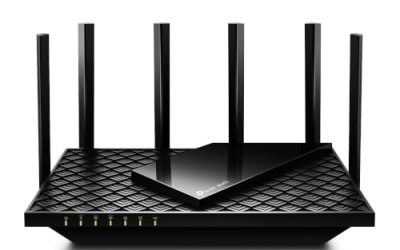
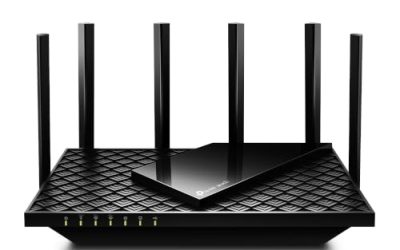
The Archer AX73 is the straightforward answer for a crowded WiFi 6 home. Its listing leads with the exact promise this category cares about: MU-MIMO and OFDMA combine to give up to four times more capacity, handling dozens of devices streaming and gaming at the same time. Six antennas, beamforming and a 4T4R structure on the 5 GHz band support that claim with coverage hardware, and the USB 3.0 port covers light media sharing. It is a dual-band design, so it lacks a 6 GHz escape lane, but for homes whose devices are mostly WiFi 5 and WiFi 6 it covers the brief directly.
TP-Link Archer AXE75
- Best for: homes with a few WiFi 6E devices plus a large tail of older smart-home gear.
- WiFi class: AXE5400 tri-band WiFi 6E (6 GHz: 2402 Mbps; 5 GHz: 2402 Mbps; 2.4 GHz: 574 Mbps)
- Multi-device features stated: OFDMA technology for simultaneous transmission to more devices
- Processor and memory: 1.7 GHz quad-core CPU, 512 MB RAM
- Ports: 2.5 Gbps WAN port, gigabit LAN ports, USB port
homes with a few WiFi 6E devices plus a large tail of older smart-home gear.
the 6 GHz band has shorter range than 5 GHz, so distant rooms may fall back to the crowded bands unless you add a mesh node.
The Archer AXE75 adds the band that relieves the most congestion: 6 GHz. Its listing describes true tri-band operation with OFDMA increasing capacity so more devices transmit simultaneously, and the clean 6 GHz band gives WiFi 6E laptops and phones a lane with almost no legacy traffic. A 1.7 GHz quad-core processor and 512 MB of memory handle the device load, and OneMesh support lets you extend coverage later. For a home mixing old smart gadgets with a few new flagship devices, splitting them across three bands is a practical, listing-backed way to stop the evening slowdown.
ASUS RT-AX86U Pro
- Best for: gaming homes that mix wired consoles and PCs with a large wireless device count.
- WiFi class: AX5700 dual-band WiFi 6 (5 GHz: up to 4804 Mbps; 2.4 GHz: up to 861 Mbps)
- Processor and memory: 2.0 GHz quad-core processor, 1 GB RAM
- Multi-device features stated: MU-MIMO and OFDMA support
- Ports: one 2.5G port, four gigabit LAN ports including a dedicated gaming port, USB ports
gaming homes that mix wired consoles and PCs with a large wireless device count.
it is a dual-band WiFi 6 model with no 6 GHz band, and only one port is 2.5G, so choose in advance which device gets the fast wired link.
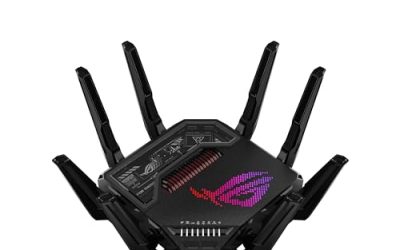
The RT-AX86U Pro is the gaming household’s option, built around a 2.0 GHz quad-core processor and 1 GB of RAM that keep management responsive when the device table gets long. Its listing highlights a dedicated gaming port and a 2.5G port, so the main console or PC can take a fast wired path while everything else shares the wireless bands. AiMesh compatibility means it can anchor or join an ASUS mesh instead of being replaced when coverage needs grow, and AiProtection Pro adds subscription-free network security for the many unmanaged IoT devices a busy home accumulates.
TP-Link Archer BE550
- Best for: homes upgrading to WiFi 7 devices on a multi-gig internet plan.
- WiFi class: BE9300 tri-band WiFi 7 (6 GHz: 5760 Mbps; 5 GHz: 2880 Mbps; 2.4 GHz: 574 Mbps)
- Multi-device features stated: Multi-Link Operation, Multi-RUs, 4K-QAM, 320 MHz channels
- Ports: full 2.5G ports (one WAN and four LAN), USB 3.0 port
- Coverage stated: up to 2,000 sq ft, 6 internal antennas
homes upgrading to WiFi 7 devices on a multi-gig internet plan.
confirm the exact listing variant before ordering, because a renewed version of this router is sold under a separate listing.
The Archer BE550 is the forward-looking pick, a WiFi 7 router whose listing names the technologies designed for dense device environments: Multi-Link Operation, Multi-RUs, 4K-QAM and 320 MHz channels across three bands. Every Ethernet port is 2.5G, which removes the wired bottleneck for multi-gig plans and fast device-to-device traffic, and six internal antennas keep the unit compact. EasyMesh support lets you add compatible nodes for larger homes. The honest caveat is that WiFi 7 features only benefit WiFi 7 clients; your older devices will use it as a capable tri-band router and nothing more.
Which One Fits Your Situation
A family home where evenings mean four screens at once
Start with the Archer AX73. Its listing is explicit about handling dozens of simultaneous devices through MU-MIMO and OFDMA, which matches the homework-plus-streaming-plus-gaming pile-up that defines family evenings. Six antennas and beamforming help spread that load across a typical house without stepping into newer, pricier standards your current phones, laptops and consoles cannot use yet anyway.
A smart home with forty or more connected gadgets
Choose between the Archer AXE75 and the Archer BE550 by the age of your gear. The AXE75 gives WiFi 6E devices a clean 6 GHz lane today, while the BE550’s Multi-Link Operation suits a home already buying WiFi 7 phones and laptops. Both keep the 2.4 GHz crowd of plugs, bulbs and cameras away from your main devices.
A gaming flat where one person plays competitively
Take the ASUS RT-AX86U Pro. Wire the gaming machine into the dedicated gaming port, let adaptive QoS protect match traffic when housemates start streaming, and rely on the quad-core processor and larger memory to keep the router responsive. AiMesh support also means a future node can fix a weak bedroom signal without replacing the router.
A large house with dead zones, not just congestion
Prioritise the mesh path. The BE550 with EasyMesh, the AXE75 with OneMesh and the RT-AX86U Pro with AiMesh can all grow into multi-node systems under one network name. Pick the ecosystem first, because nodes only pair within their own family, then add nodes until weak-signal rooms stop dragging down the whole network.
Common Mistakes
- Judging a router by its combined speed class, which adds all bands together, instead of by the OFDMA, MU-MIMO or MLO features that decide performance under load.
- Counting only phones and laptops when estimating device load and forgetting the smart TV, plugs, cameras and speakers that stay connected all day.
- Buying a WiFi 7 router expecting older devices to speed up, when only WiFi 7 clients can use Multi-Link Operation and 320 MHz channels.
- Leaving consoles and desktop PCs on WiFi when a cable would remove them from the shared airtime entirely.
- Mixing mesh ecosystems, since OneMesh, EasyMesh and AiMesh nodes do not interoperate, and discovering the mismatch after buying the second node.
Frequently Asked Questions
How many devices can these routers actually handle?
The listings avoid promising a single universal number, because a camera sending small packets is not the same load as a laptop streaming video. The Archer AX73 listing describes handling dozens of devices streaming and gaming at the same time through MU-MIMO and OFDMA. In practice, homes with thirty to sixty mixed devices are the design target for this class of router.
Does OFDMA or MU-MIMO matter more for a crowded home?
They solve different halves of the problem. OFDMA shines with many small, frequent transmissions, which is exactly what smart-home devices generate. MU-MIMO helps when several larger devices, like laptops and TVs, need full streams at once. The routers in this guide list one or both, and busy mixed households benefit from having both working together.
Will a WiFi 7 router make my WiFi 6 devices faster?
Only indirectly. Your WiFi 6 devices cannot use Multi-Link Operation or the widest channels, but moving WiFi 7 devices onto their own fast lanes frees capacity on the bands your older gear uses. The Archer BE550 also brings full 2.5G wired ports, which helps any device connected by cable regardless of its WiFi generation.
Should I choose a single router or a mesh system for many devices?
If your problem is congestion in one area, a stronger single router with the right multi-device features is enough. If devices also drop to weak signals in far rooms, those weak links waste airtime for everyone, and a mesh-ready model from this guide, expanded with a node from the same ecosystem, is the better long-term answer.
FAQ
How many devices can these routers actually handle?
Does OFDMA or MU-MIMO matter more for a crowded home?
Will a WiFi 7 router make my WiFi 6 devices faster?
Should I choose a single router or a mesh system for many devices?
More from Amazon
Programs that pair well with the guide above. Offers and eligibility are set by Amazon and may change.
Free shipping on eligible items, Prime Video and more. Eligible new members can start with a free trial.
Start a Prime free trialAd-free music streaming. Eligible new subscribers can start with a free trial.
Try Music Unlimited freeA Prime membership for ages 18-24 with a trial period. Eligibility is set by Amazon.
See Prime for Young AdultsAudiobooks and podcasts to listen to on the go. Eligible new members can start with a free trial.
Try Audible freeAs an Amazon Associate we earn from qualifying purchases.