Our Short List of 3

- Best for: A laptop-first home office where one cable should dock the machine and drive both screens.
- 27-inch IPS Black panel, 3840 x 2160 resolution, 60 Hz refresh
- 5 ms gray-to-gray response, 400 nits brightness, 2000:1 contrast
- 100 percent sRGB, 100 percent Rec.709, 98 percent DCI-P3, DisplayHDR 400
- USB-C with 90W power delivery, DisplayPort 1.4 in and out, HDMI 2.0

- Best for: A home office that wants two sharp 4K screens with one-cable laptop docking at a lower outlay than a full hub monitor.
- 27-inch UltraFine 4K UHD IPS panel, 3840 x 2160 resolution, 60 Hz refresh
- DCI-P3 95 percent colour gamut, DisplayHDR 400
- USB-C with 90W power delivery, DisplayPort, HDMI
- Built-in speaker with Maxx Audio

- Best for: Colour-sensitive work where two screens must agree on how an image looks.
- 27-inch 4K HDR IPS panel, UHD 3840 x 2160 resolution, 60 Hz refresh
- 99 percent DCI-P3, 99 percent Adobe RGB, colour accuracy Delta E under 2
- Calman Verified, VESA DisplayHDR 400
- USB-C with 96W power delivery, DisplayPort with daisy-chain, HDMI
All 5 Picks at a Glance
| Product | Specs | Action |
|---|---|---|
| Dell UltraSharp U2723QE |
| Check price on Amazon |
| LG UltraFine 27UP850K-W |
| Check price on Amazon |
| ASUS ProArt Display PA279CRV |
| Check price on Amazon |
 BenQ GW2790QT |
| Check price on Amazon |
 ASUS VA27EHF |
| Check price on Amazon |
Key takeaways
- Two matching screens change home office work. Compare five monitors built for dual setups, from 4K USB-C hub displays to a frameless 1080p pair.
Setting up two monitors at home sounds simple until the pair actually sits on the desk. One screen runs brighter than the other, text looks a different size on each, and the seam between them keeps catching your eye every time you drag a window across. The real decision is not which single monitor looks best in isolation. It is which monitor you would happily buy twice, because a home office pair only feels like one workspace when both screens share the same size, resolution, height, and colour behaviour.
This guide is for remote workers, writers, analysts, and anyone who keeps documents, calls, and reference material open at the same time. Every pick below is a single monitor chosen from its Amazon listing name and specifications, and each one is meant to be bought as an identical pair. Thin bezels, VESA mounting, and stands that adjust to matching heights mattered more here than gaming extras, because a second screen should disappear into the work, not demand attention.
Quick Picks
As an Amazon Associate we earn from qualifying purchases
| Product | Best for | Key spec from title |
|---|---|---|
| Dell UltraSharp U2723QE | A laptop-first desk that needs a hub | 27-inch 4K IPS Black USB-C hub monitor |
| LG UltraFine 27UP850K-W | Sharp 4K text with one-cable laptop docking | 27-inch UltraFine 4K UHD IPS DisplayHDR 400 monitor |
| ASUS ProArt Display PA279CRV | Colour-sensitive work across two screens | 27-inch 4K HDR professional monitor |
| BenQ GW2790QT | Long video-call days with built-in audio | 27-inch 1440p IPS productivity monitor |
| ASUS VA27EHF | A low-cost identical pair for basic office work | 27-inch 1080p IPS frameless 100Hz monitor |
How to Choose
Buy two identical screens
The easiest way to get a comfortable dual setup is to buy the same monitor twice. Identical panels match in brightness, colour, height, and bezel width, so windows keep their size as they cross from one screen to the other and your eyes stop noticing the join. Mixing a tall 27-inch screen with a shorter 24-inch one creates a step at the top edge that distracts you all day, and different panel types can render the same document in visibly different tones. If budget forces a mixed pair, keep the main screen and the secondary screen at the same resolution and pixel density, and mount both on arms so you can line up their top edges exactly.
Match resolution to your viewing distance
Resolution decides how sharp text looks at your normal sitting distance, and a dual setup doubles the cost of getting it wrong. A 27-inch 4K panel packs text tightly enough that two documents sit side by side without strain, which suits writers and spreadsheet work. A 27-inch 1440p panel is the middle ground: noticeably crisper than 1080p, yet large enough that interface elements stay readable without scaling. A 27-inch 1080p panel is the softest option here, so it fits a secondary screen or a desk where you sit close and keep windows large. Decide the resolution before the brand, because it shapes every hour you spend reading.
Check bezels, stands, and VESA mounting
Physical details decide whether two monitors feel like one wide desk or two separate boxes. Thin bezels narrow the gap in the middle, which matters every time you move the cursor across, while thick frames create a visible dead zone. Stands that adjust height, tilt, swivel, and pivot let you align both screens precisely, and pivot matters if one screen will stand upright for documents or code. A VESA mount pattern opens the door to a dual monitor arm, which frees desk space and makes alignment far easier than juggling two factory stands. Measure your desk width first, because two 27-inch screens need far more room than one.
Count ports and plan the cable path
Two screens mean twice the cables, so the ports on the back of each monitor deserve a close look before you order. A USB-C port with power delivery lets a laptop dock with a single cable, charging the machine while it drives the display, and a DisplayPort output on the first monitor can daisy-chain the second from one connection. Check how much power the USB-C port delivers, since a port that supplies too little will not keep a larger laptop charged through a full day. A built-in KVM switch is worth having if one pair of screens serves both a work laptop and a personal desktop, because it swaps keyboard and mouse between machines without replugging.
The 5 Best Options
Dell UltraSharp U2723QE
- Best for: A laptop-first home office where one cable should dock the machine and drive both screens.
- 27-inch IPS Black panel, 3840 x 2160 resolution, 60 Hz refresh
- 5 ms gray-to-gray response, 400 nits brightness, 2000:1 contrast
- 100 percent sRGB, 100 percent Rec.709, 98 percent DCI-P3, DisplayHDR 400
- USB-C with 90W power delivery, DisplayPort 1.4 in and out, HDMI 2.0
A laptop-first home office where one cable should dock the machine and drive both screens.
Confirm it is still sold before buying. The hub features add cost, so it is overkill if both screens will only ever connect to a desktop with spare ports.
This is the monitor to build a dual setup around when a laptop is the main machine. Its IPS Black panel gives deeper blacks than a standard IPS screen, so long documents and dark interfaces look calmer across two panels, and the built-in hub turns the first monitor into a docking station. A USB-C port carries video and charging, a DisplayPort output daisy-chains the second screen, and the KVM switch shares one keyboard and mouse between two computers. The stand adjusts in every direction, which makes lining up a matching pair straightforward.
Watch out for: Confirm it is still sold before buying. The hub features add cost, so it is overkill if both screens will only ever connect to a desktop with spare ports.
LG UltraFine 27UP850K-W
- Best for: A home office that wants two sharp 4K screens with one-cable laptop docking at a lower outlay than a full hub monitor.
- 27-inch UltraFine 4K UHD IPS panel, 3840 x 2160 resolution, 60 Hz refresh
- DCI-P3 95 percent colour gamut, DisplayHDR 400
- USB-C with 90W power delivery, DisplayPort, HDMI
- Built-in speaker with Maxx Audio
A home office that wants two sharp 4K screens with one-cable laptop docking at a lower outlay than a full hub monitor.
Confirm it is still sold before buying. It has no built-in KVM switch, so sharing the pair between two computers needs a separate switch or cable swapping.
The LG is the value route to the same sharp 4K text as the premium picks, which matters when you are buying two of them. Its 27-inch IPS panel covers a wide colour range and carries DisplayHDR 400, so documents, photos, and video calls all look clean, and the USB-C port delivers charging power to a laptop over the same cable that carries the picture. Built-in speakers handle calls without extra desk clutter, and the stand adjusts for height, tilt, and pivot. Two of these give a dual 4K desk for far less than two hub monitors.
Watch out for: Confirm it is still sold before buying. It has no built-in KVM switch, so sharing the pair between two computers needs a separate switch or cable swapping.
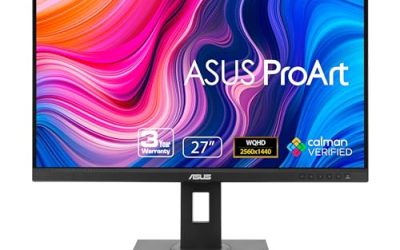
ASUS ProArt Display PA279CRV
- Best for: Colour-sensitive work where two screens must agree on how an image looks.
- 27-inch 4K HDR IPS panel, UHD 3840 x 2160 resolution, 60 Hz refresh
- 99 percent DCI-P3, 99 percent Adobe RGB, colour accuracy Delta E under 2
- Calman Verified, VESA DisplayHDR 400
- USB-C with 96W power delivery, DisplayPort with daisy-chain, HDMI
Colour-sensitive work where two screens must agree on how an image looks.
Confirm it is still sold before buying. Its colour accuracy is wasted on plain document work, and the panel runs at 60 Hz, so fast motion is not its strength.
When both screens carry design, photo, or video work, colour agreement between the pair becomes the priority, and this ProArt monitor is built for exactly that. Its 27-inch 4K IPS panel covers 99 percent of DCI-P3 and 99 percent of Adobe RGB, with factory calibration and a Delta E under 2, so the same image looks the same on the left screen and the right screen. USB-C power delivery charges a laptop, DisplayPort daisy-chaining links the second monitor, and the slim profile keeps two panels from crowding a desk. The ergonomic stand adjusts to match heights precisely.
Watch out for: Confirm it is still sold before buying. Its colour accuracy is wasted on plain document work, and the panel runs at 60 Hz, so fast motion is not its strength.
BenQ GW2790QT
- Best for: A call-heavy home office that wants clear audio, comfortable reading, and simple one-cable laptop connection.
- 27-inch 1440p IPS panel, 2560 x 1440 resolution, 75 Hz refresh
- 99 percent sRGB colour coverage
- Brightness Intelligence Gen2, eye-care technology
- Noise-cancelling microphone and built-in speakers
A call-heavy home office that wants clear audio, comfortable reading, and simple one-cable laptop connection.
Confirm it is still sold before buying. Its 65W USB-C charging may not keep a large laptop topped up under heavy load, so check your laptop’s charging needs first.
The BenQ is the pick for people who spend their day on video calls with documents open beside them. Its 27-inch 1440p IPS panel is sharp enough for long reading sessions without the scaling quirks of 4K, and the eye-care features, including Brightness Intelligence, adjust the screen to room light so your eyes tire more slowly. A noise-cancelling microphone and built-in speakers mean calls work straight out of the box, while USB-C charging and daisy-chain support keep the cable count low. The white finish and ergonomic stand suit a bright home office.
Watch out for: Confirm it is still sold before buying. Its 65W USB-C charging may not keep a large laptop topped up under heavy load, so check your laptop’s charging needs first.
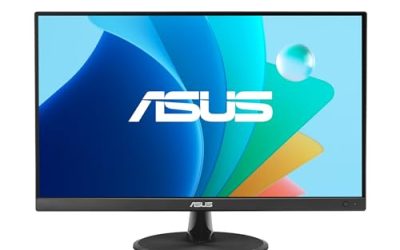
ASUS VA27EHF
- Best for: A low-cost identical pair for documents, email, and calls, especially mounted on a dual monitor arm.
- 27-inch Full HD IPS panel, 1920 x 1080 resolution, 100 Hz refresh
- 1 ms MPRT response, Adaptive-Sync
- Frameless design, 178-degree wide viewing angle
- Low Blue Light, Flicker Free
A low-cost identical pair for documents, email, and calls, especially mounted on a dual monitor arm.
Confirm it is still sold before buying. Text looks softer than on the 1440p and 4K picks at this size, and the tilt-only stand cannot adjust height without an arm.
This is the honest budget way to get two matching screens on a desk. The 27-inch Full HD IPS panel runs at 100 Hz, so scrolling through long documents feels smoother than on a standard office monitor, and the frameless design narrows the gap where the two screens meet. Low blue light and flicker-free certification help during long reading sessions, Adaptive-Sync keeps motion steady, and the VESA mount pattern means both panels can go on a single dual arm. It gives up USB-C and height adjustment, but as a second screen or a basic pair it covers the essentials.
Watch out for: Confirm it is still sold before buying. Text looks softer than on the 1440p and 4K picks at this size, and the tilt-only stand cannot adjust height without an arm.
Which One Fits Your Situation
One laptop drives both screens
Choose the Dell UltraSharp U2723QE for the first monitor and match it with a second identical unit. Its USB-C hub charges the laptop, its DisplayPort output daisy-chains the second screen, and the built-in KVM shares your keyboard and mouse if a desktop joins the desk later. The LG UltraFine 27UP850K-W is the fallback when the hub is more than you need, since it still docks a laptop over one cable.
A small desk with two screens
Choose the ASUS VA27EHF pair on a dual VESA arm. The frameless panels sit close together, the arm lifts both screens off the desktop, and the 1080p resolution keeps windows large and readable on a shallow desk. If the desk can take 4K, the LG pair is the sharper version of the same idea, though each screen needs the same arm or matching stands.
Colour work spread across two panels
Choose the ASUS ProArt Display PA279CRV twice. Factory calibration and wide gamut coverage mean an image looks the same on both screens, which is the whole point of a matched pair for design and photo work. The BenQ GW2790QT is the alternative when colour matters less than comfortable reading and call audio.
A tight budget for the whole pair
Choose two ASUS VA27EHF monitors and spend the saving on a dual monitor arm. You get matching size, matching colour, and smooth 100 Hz scrolling for basic office work such as calls, email, and documents. Move up to the BenQ GW2790QT pair when sharper text and USB-C docking are worth the step up.
Common Mistakes
- Buying two different monitors and expecting them to match in brightness, colour, and height without adjustment.
- Choosing 27-inch 1080p panels for fine text work and then sitting too far back to read them comfortably.
- Forgetting to measure desk width, then discovering two 27-inch screens plus their stands do not fit.
- Assuming every USB-C port charges a laptop, when some deliver far less power than a larger machine needs.
- Placing the second screen at a different height and angle, which turns every glance sideways into neck strain.
Frequently Asked Questions
Should both monitors in a home office pair be identical?
Yes, almost always. Two identical monitors share the same size, resolution, brightness, and colour behaviour, so windows keep their proportions as you drag them across and your eyes stop adjusting at the seam. A mixed pair can work when both panels share the same resolution and pixel density, but matching heights and colours then takes careful adjustment, and the result rarely feels as settled as two of the same model.
Is 4K worth it for a dual home office setup?
It is worth it when you read small text or keep two documents open on each screen, because 4K packs more words without softening them. It is less important when your work is calls, email, and large windows, where a 1440p pair reads comfortably and costs less. It comes down to viewing distance: sit close and 4K shines, sit far back and the extra sharpness is harder to notice.
Can one USB-C cable drive two monitors?
It can when the first monitor supports DisplayPort daisy-chaining or a built-in hub, as the Dell and ASUS ProArt picks do. The laptop connects to the first screen over USB-C, and a DisplayPort cable links the first screen to the second. Check that your laptop supports DisplayPort output over USB-C and that the monitors list daisy-chain support, because a plain USB-C port without it will only drive one display.
Do I need a monitor arm for a dual setup?
You do not need one, but an arm solves the two hardest problems in a dual setup: matching screen heights and reclaiming desk space from two stands. Two monitors on their stands can work when the stands adjust height and the desk is wide enough. An arm is the better choice on a narrow desk, for a pivoted screen, or when the stands cannot line the top edges up.
FAQ
Should both monitors in a home office pair be identical?
Is 4K worth it for a dual home office setup?
Can one USB-C cable drive two monitors?
Do I need a monitor arm for a dual setup?
More from Amazon
Programs that pair well with the guide above. Offers and eligibility are set by Amazon and may change.
Free shipping on eligible items, Prime Video and more. Eligible new members can start with a free trial.
Start a Prime free trialAd-free music streaming. Eligible new subscribers can start with a free trial.
Try Music Unlimited freeA Prime membership for ages 18-24 with a trial period. Eligibility is set by Amazon.
See Prime for Young AdultsAudiobooks and podcasts to listen to on the go. Eligible new members can start with a free trial.
Try Audible freeAs an Amazon Associate we earn from qualifying purchases.