Our Short List of 3

- Best for: Home office workers, students, and anyone who wants a sharp 4K display with simple laptop connectivity.
- Screen size: 27 inches
- Panel: IPS LCD
- Resolution: 3840 x 2160 (4K UHD)
- Refresh rate: 60Hz

- Best for: Photo editors, video creators, designers, and laptop users who want a color-accurate 4K display with single-cable docking.
- Screen size: 27 inches
- Panel: IPS LCD
- Resolution: 3840 x 2160 (4K UHD)
- Refresh rate: 60Hz

- Best for: PC gamers who want a fast, smooth QHD display that also handles everyday computing well.
- Screen size: 27 inches
- Panel: Fast IPS LCD
- Resolution: 2560 x 1440 (QHD)
- Refresh rate: 180Hz
All 5 Picks at a Glance
| Product | Specs | Action |
|---|---|---|
| 1. Dell S2722QC — Best 27 Inch 4K LCD Monitor for Work |
| Check price on Amazon |
| 2. LG UltraFine 27UP850N-W — Best 27 Inch LCD Monitor for Creators |
| Check price on Amazon |
| 3. ASUS TUF Gaming VG27AQ3A — Best 27 Inch QHD LCD Monitor for Gaming |
| Check price on Amazon |
 4. Acer Nitro KG271U N3bmiipx — Best Value 27 Inch QHD Gaming LCD Monitor |
| Check price on Amazon |
 5. MSI G272 — Best Affordable 27 Inch LCD Monitor for Everyday Gaming |
| Check price on Amazon |
Our Top Picks
- ASUS TUF Gaming VG27AQ3A 27 Inch 1440p 180Hz14.4" x 24.2" x 2.1"24.2 x 8.4 x 17.9 inches10.1 poundsCheck on Amazon
- Acer Nitro 27in QHD 2560x1440 IPS 180Hz Gaming27-inch8.28 x 24.2 x 18.14 inches12.1 poundsCheck on Amazon
A 27 inch LCD monitor sits in a sweet spot that is hard to beat: large enough for comfortable multitasking, sharp enough for detailed work, and compact enough to fit on a standard desk. Whether you are building a home office or upgrading a gaming setup, the best 27 inch LCD monitors offer a practical balance of screen space, image quality, and everyday usability.
Modern LCD panels, especially IPS variants, deliver wide viewing angles, accurate colors, and reliable brightness for long sessions. Unlike OLED panels, LCD monitors do not carry the same risk of permanent image retention from static elements such as taskbars and toolbars, which makes them a sensible choice for office work, coding, and browsing.
This guide compares five 27 inch LCD monitors covering the main use cases: sharp 4K displays for productivity and creative work, fast QHD panels for gaming, and an affordable Full HD option for everyday computing. Every pick is listed on Amazon US, with its ASIN shown so you can find the exact model.
How to Choose a 27 Inch LCD Monitor
Start with how you will use it most of the time.
Resolution: 4K, QHD, or Full HD
At 27 inches, the three common resolutions are Full HD at 1920 x 1080, QHD at 2560 x 1440, and 4K UHD at 3840 x 2160. A 4K panel gives you the sharpest text and the most room for windows side by side, ideal for video editing, photo work, and design, though 4K panels usually run at 60Hz in this size range and demand more from your graphics card in games.
QHD is the middle ground and, for many buyers, the best compromise at 27 inches: noticeably sharper text than Full HD, room for two documents side by side, and much easier for a mid-range graphics card to drive. Many QHD monitors also offer refresh rates of 144Hz or higher, which makes motion look smoother. Full HD is the most affordable option, but text can look softer at 27 inches.
Panel Type and Color
Most of the best 27 inch LCD monitors use IPS panels. IPS technology provides wide viewing angles, so colors stay consistent even when you view the screen from the side, and it generally offers better color accuracy than older TN panels. All five picks in this guide use IPS panels.
If you edit photos or video, look for wide color coverage, such as 95 percent DCI-P3 or close to 100 percent sRGB. Entry-level HDR, such as VESA DisplayHDR 400, improves brightness and contrast modestly, so treat it as a bonus rather than the main reason to buy.
Refresh Rate and Response Time
Refresh rate, measured in hertz, tells you how many times per second the screen updates its image. A 60Hz monitor is fine for office work, video, and casual use. A 144Hz or 180Hz monitor refreshes much more often, which makes fast motion in games look smoother and reduces blur. If you play fast-paced games, a higher refresh rate is one of the most noticeable upgrades you can make. If you mainly work with documents, 60Hz is adequate. Response time, quoted in milliseconds, describes how quickly a pixel can change color; lower numbers generally mean less ghosting.
Connectivity and Ergonomics
Most 27 inch LCD monitors include at least one HDMI port and one DisplayPort input. DisplayPort is usually best for high refresh rates at QHD, while HDMI suits laptops, consoles, and media devices. USB-C is valuable if you use a modern laptop: a USB-C port that carries video, data, and power delivery lets you connect your laptop with a single cable and charge it at the same time. The two 4K picks in this guide both offer USB-C, with 65 watts of power delivery on the Dell and 90 watts on the LG.
A monitor you use for eight hours a day should adjust to you. Height, tilt, swivel, and pivot let you set the screen at eye level and reduce neck strain. VESA mounting support is worth checking if you plan to use a monitor arm.
Top Picks: The Best 27 Inch LCD Monitors
1. Dell S2722QC — Best 27 Inch 4K LCD Monitor for Work
- Best for: Home office workers, students, and anyone who wants a sharp 4K display with simple laptop connectivity.
- Screen size: 27 inches
- Panel: IPS LCD
- Resolution: 3840 x 2160 (4K UHD)
- Refresh rate: 60Hz
Home office workers, students, and anyone who wants a sharp 4K display with simple laptop connectivity.
The Dell S2722QC is a strong all-rounder for anyone who wants a sharp 4K workspace without moving to a larger screen. Its 27 inch IPS LCD panel displays 3840 x 2160 resolution, giving you crisp text and plenty of room for multiple windows. The 60Hz refresh rate is standard for a productivity-focused 4K display, and the 8 millisecond response time suits office work, streaming, and light gaming.
Its standout feature is connectivity. A USB-C port with 65 watt power delivery lets you connect a compatible laptop with a single cable for video and charging, while two HDMI ports and a USB-A port cover a desktop or console. Built-in dual 3 watt speakers handle video calls, and the stand adjusts for height, tilt, swivel, and pivot. Color coverage is rated at 99 percent sRGB, and AMD FreeSync support helps smooth out video playback and casual gaming.
Key specifications:
Pros: Sharp 4K IPS panel with crisp text; single-cable USB-C connection with laptop charging; height, tilt, swivel, and pivot adjustments; built-in speakers for calls and casual use.
Cons: 60Hz refresh rate is not ideal for competitive gaming; 8 ms response time is slower than dedicated gaming panels.
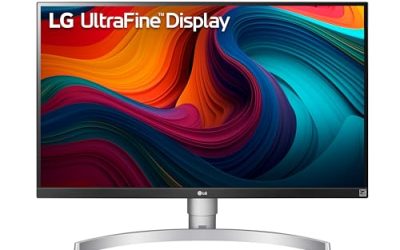
2. LG UltraFine 27UP850N-W — Best 27 Inch LCD Monitor for Creators
- Best for: Photo editors, video creators, designers, and laptop users who want a color-accurate 4K display with single-cable docking.
- Screen size: 27 inches
- Panel: IPS LCD
- Resolution: 3840 x 2160 (4K UHD)
- Refresh rate: 60Hz
Photo editors, video creators, designers, and laptop users who want a color-accurate 4K display with single-cable docking.
The LG UltraFine 27UP850N-W is aimed at creators and professionals who need accurate color in a 27 inch 4K LCD monitor. Its IPS panel covers 95 percent of the DCI-P3 color gamut, a wider color space than standard sRGB that is useful for photo and video work. VESA DisplayHDR 400 certification adds improved brightness and contrast for HDR content, and the 4K resolution keeps fine details visible when you zoom into images or timelines.
USB-C with 90 watt power delivery charges many laptops while carrying the video signal, making this monitor a natural partner for a MacBook or a modern Windows ultrabook. HDMI and DisplayPort inputs cover desktops, and built-in 5 watt stereo speakers with MaxxAudio sound better than the basic speakers on many office monitors. The stand adjusts for height, tilt, and pivot, and the panel supports VESA mounting. At 60Hz it is not built for competitive gaming, but for color-critical work, image quality comes first.
Key specifications:
Pros: Wide DCI-P3 color coverage for creative work; USB-C with 90W power delivery for laptops; DisplayHDR 400 support; stronger built-in speakers than most office monitors.
Cons: 60Hz refresh rate limits fast-paced gaming; white finish may show dust and marks more readily than black.
3. ASUS TUF Gaming VG27AQ3A — Best 27 Inch QHD LCD Monitor for Gaming
- Best for: PC gamers who want a fast, smooth QHD display that also handles everyday computing well.
- Screen size: 27 inches
- Panel: Fast IPS LCD
- Resolution: 2560 x 1440 (QHD)
- Refresh rate: 180Hz
PC gamers who want a fast, smooth QHD display that also handles everyday computing well.
The ASUS TUF Gaming VG27AQ3A is the pick for gamers who want smooth motion and sharp QHD detail without paying for a 4K gaming setup. Its 27 inch Fast IPS LCD panel runs at 2560 x 1440 resolution and a 180Hz refresh rate, with a 1 millisecond response time. That combination makes fast movement look clearer and reduces the blur that can make it hard to track opponents in competitive games.
Color coverage is rated at 130 percent sRGB, giving games and media a vivid look. Extreme Low Motion Blur Sync works with variable refresh rate technology to reduce blur while keeping gameplay free of tearing, and the monitor is compatible with both AMD FreeSync Premium and NVIDIA G-SYNC. Built-in speakers cover casual audio, and the stand offers height, tilt, swivel, and pivot adjustments.
Key specifications:
Pros: Fast 180Hz QHD panel with 1 ms response time; strong color coverage for vivid games and media; FreeSync Premium and G-SYNC Compatible support; full ergonomic stand adjustments.
Cons: QHD resolution is less sharp than 4K for detailed creative work; no USB-C input for single-cable laptop use.
4. Acer Nitro KG271U N3bmiipx — Best Value 27 Inch QHD Gaming LCD Monitor
- Best for: Budget-conscious gamers who want 180Hz QHD performance and a versatile multi-device setup.
- Screen size: 27 inches
- Panel: IPS LCD
- Resolution: 2560 x 1440 (QHD)
- Refresh rate: Up to 180Hz via DisplayPort, 144Hz via HDMI
Budget-conscious gamers who want 180Hz QHD performance and a versatile multi-device setup.
The Acer Nitro KG271U N3bmiipx offers much of the gaming performance of the ASUS pick in a more affordable package. Its 27 inch IPS LCD panel delivers QHD resolution at up to 180Hz over DisplayPort, with 144Hz over HDMI, and a response time of up to 0.5 milliseconds. That makes it a capable choice for fast-paced games, while the QHD resolution keeps text and images sharper than a Full HD panel at the same size.
Color coverage is rated at 95 percent DCI-P3, generous for a gaming monitor in this class, and HDR10 support is included. AMD FreeSync helps prevent screen tearing when your frame rate varies. The monitor includes one DisplayPort 1.2 input and two HDMI 2.0 ports, so you can connect a PC and a console at the same time. The tilt-adjustable stand offers less ergonomic adjustment than premium models, so consider a VESA arm if you need height adjustment.
Key specifications:
Pros: High refresh rate QHD gaming at a value-oriented position; wide DCI-P3 color coverage; two HDMI ports plus DisplayPort for multiple devices; very fast response time for competitive play.
Cons: Limited ergonomic adjustment compared with premium models; no USB-C input.
5. MSI G272 — Best Affordable 27 Inch LCD Monitor for Everyday Gaming
- Best for: Casual gamers, students, and everyday users who want a big, smooth screen at an accessible outlay.
- Screen size: 27 inches
- Panel: IPS LCD with LED backlight
- Resolution: 1920 x 1080 (Full HD)
- Refresh rate: 144Hz
Casual gamers, students, and everyday users who want a big, smooth screen at an accessible outlay.
The MSI G272 is the most affordable pick in this guide and the right choice if you want a large 27 inch screen for everyday use and casual gaming without a premium outlay. Its IPS LCD panel displays Full HD resolution at 1920 x 1080, with a 144Hz refresh rate and a 1 millisecond response time. That refresh rate is a meaningful step up from a standard 60Hz office monitor and makes scrolling, casual games, and fast video look smoother.
The IPS panel provides wide 178 degree viewing angles, and AMD FreeSync support helps keep gameplay smooth when frame rates fluctuate. Connectivity includes HDMI and DisplayPort, and the monitor tilts and supports VESA mounting. The frameless design on three sides also works well in a dual-monitor setup. The main compromise is resolution: at 27 inches, Full HD pixels are visible up close, so this monitor suits gaming, streaming, and general use better than detailed design work.
Key specifications:
Pros: Affordable way to get a large 27 inch high refresh rate screen; smooth 144Hz motion for casual and competitive games; wide IPS viewing angles; good option for modest graphics cards and dual-monitor setups.
Cons: Full HD resolution looks softer than QHD or 4K at 27 inches; no built-in speakers listed as a headline feature; no USB-C input.
Comparison Table
| Monitor | Resolution | Refresh Rate | Panel | Best For | ASIN |
|---|---|---|---|---|---|
| Dell S2722QC | 4K UHD 3840 x 2160 | 60Hz | IPS LCD | Office work and USB-C laptop setups | B09DTDRJWP |
| LG UltraFine 27UP850N-W | 4K UHD 3840 x 2160 | 60Hz | IPS LCD | Creators and color-accurate work | B0B195FXTD |
| ASUS TUF Gaming VG27AQ3A | QHD 2560 x 1440 | 180Hz | Fast IPS LCD | PC gaming and vivid everyday use | B0BZR9TMBJ |
| Acer Nitro KG271U N3bmiipx | QHD 2560 x 1440 | Up to 180Hz | IPS LCD | Value gaming and multi-device setups | B0D8LH2VSP |
| MSI G272 | Full HD 1920 x 1080 | 144Hz | IPS LCD | Affordable everyday gaming | B095J8PRCW |
Which 27 Inch LCD Monitor Should You Buy?
Match the resolution and refresh rate to your main activity. Office workers and creators should prioritize 4K resolution and color accuracy, gamers should prioritize refresh rate and response time, and everyday users should prioritize screen size and comfort.
Choose the Dell S2722QC for a clean 4K office setup with single-cable USB-C laptop charging. Choose the LG UltraFine 27UP850N-W if color accuracy is your top priority and you edit photos or video. Choose the ASUS TUF Gaming VG27AQ3A if you play PC games regularly and want the smoothest QHD experience here. Choose the Acer Nitro KG271U for similar QHD gaming performance with a value focus. Choose the MSI G272 for a large, smooth screen at the lowest outlay.
Also consider your desk and your computer. A 27 inch monitor needs roughly 60 centimeters of desk width and an arm’s length of viewing distance. DisplayPort is the safest choice for high refresh rates, while HDMI is fine for 4K at 60Hz and for console connections.
Frequently Asked Questions
Is a 27 inch LCD monitor good for work?
Yes. A 27 inch LCD monitor is one of the best sizes for office work because it shows two documents side by side without making text too small. A 4K or QHD panel is preferable for reading and multitasking, since sharper text reduces eye strain.
Is QHD or 4K better at 27 inches?
It depends on your priorities. 4K is sharper and gives you more usable workspace, which suits creative work, coding, and multitasking. QHD is easier for a graphics card to drive, pairs well with high refresh rates for gaming, and still looks noticeably sharper than Full HD. If you mainly game, QHD at 144Hz or above is usually the better balance.
Are LCD monitors better than OLED monitors for office use?
For office use, LCD monitors have practical advantages. They are generally more affordable, brighter in well-lit rooms, and do not carry the same risk of image retention from static elements such as taskbars and toolbars that stay on screen for hours. OLED monitors offer deeper blacks and higher contrast, but LCD remains the sensible default for mixed work and long desktop sessions.
What refresh rate do I need in a 27 inch LCD monitor?
For office work, browsing, and video, 60Hz is enough. For gaming, 144Hz or higher makes motion look smoother and can improve your experience in fast-paced titles. The difference between 60Hz and 144Hz is easy to notice. If you do not play fast games, spend your budget on resolution, color, or connectivity instead.
Can I use a 27 inch LCD monitor with a laptop and a desktop at the same time?
Yes, in most cases. Connect the laptop and the desktop to different inputs, such as USB-C and HDMI or DisplayPort, then switch inputs from the monitor’s menu or buttons. The picks in this guide all offer at least two inputs.
Conclusion
The best 27 inch LCD monitors prove that you do not need a larger screen or a more exotic panel technology to get a great everyday display. A 27 inch IPS LCD panel hits the right balance of size, sharpness, and comfort for work, gaming, and general use.
For a sharp office setup, the Dell S2722QC and the LG UltraFine 27UP850N-W stand out, with the Dell offering a practical single-cable USB-C workspace and the LG offering wider color coverage for creative work. For gaming, the ASUS TUF Gaming VG27AQ3A and the Acer Nitro KG271U deliver fast QHD performance. For everyday use on a tighter budget, the MSI G272 gives you a large, smooth 144Hz screen.
Before you order, confirm the ASIN matches the exact model you want, check your desk space and your computer’s outputs, and decide whether resolution, refresh rate, or color accuracy matters most to you.
Disclosure: As an Amazon Associate, we earn from qualifying purchases.
FAQ
Which 27 Inch LCD Monitor Should You Buy?
Is a 27 inch LCD monitor good for work?
Is QHD or 4K better at 27 inches?
Are LCD monitors better than OLED monitors for office use?
What refresh rate do I need in a 27 inch LCD monitor?
Can I use a 27 inch LCD monitor with a laptop and a desktop at the same time?
More from Amazon
Programs that pair well with the guide above. Offers and eligibility are set by Amazon and may change.
Free shipping on eligible items, Prime Video and more. Eligible new members can start with a free trial.
Start a Prime free trialAd-free music streaming. Eligible new subscribers can start with a free trial.
Try Music Unlimited freeA Prime membership for ages 18-24 with a trial period. Eligibility is set by Amazon.
See Prime for Young AdultsAudiobooks and podcasts to listen to on the go. Eligible new members can start with a free trial.
Try Audible freeAs an Amazon Associate we earn from qualifying purchases.