Our Short List of 3

- Best for: A Roku setup that may grow into a mesh network later.
- AX3000 dual-band Wi-Fi 6 extendable router
- 4096-QAM with 20, 40, 80, and 160MHz channel widths
- AiMesh compatible, with Instant Guard and built-in VPN
- Parental control scheduling for connected devices

- Best for: A budget router for one Roku and a small number of other devices.
- AX1500 dual-band Wi-Fi 6, with 1201 Mbps on 5GHz and 300 Mbps on 2.4GHz
- OFDMA and MU-MIMO for several devices at once
- Beamforming to focus the signal toward connected devices
- One gigabit WAN port and three gigabit LAN ports

- Best for: A future-proof router for 4K Roku streaming in a busy household.
- BE3600 dual-band Wi-Fi 7 router, 4-stream
- Two 2.5G ports and three 1G ports, plus a USB 3.0 port
- Quad-core 2.0GHz processor with four antennas
- Multi-link operation, VPN support, and EasyMesh compatibility
All 3 Picks at a Glance
| Product | Specs | Action |
|---|---|---|
| ASUS RT-AX3000S |
| Check price on Amazon |
| TP-Link Archer AX12 |
| Check price on Amazon |
| TP-Link Archer BE230 |
| Check price on Amazon |
Our Top Picks
A Roku only connects over Wi-Fi, so the router decides whether a movie night runs smoothly or stalls halfway through a scene. The real decision is not raw speed on a box, but whether the 5GHz signal stays steady at the TV, through walls and past the other devices in the house. A router that looks fast beside the modem can still leave a Roku buffering if its signal fades at distance or if a phone backup or a game download steals the airtime at the wrong moment.
This guide is for Roku owners who want a reliable connection for a Stick, an Express, an Ultra, or a Roku TV, whether the set sits in the next room or at the far end of a large house. It also suits households that share one connection between streaming, work calls, and gaming. Every pick below was chosen from the name and specifications on its Amazon listing, with a focus on dual-band Wi-Fi, steady coverage, and simple setup.
Quick Picks
As an Amazon Associate we earn from qualifying purchases.
| Product | Best for | Key spec from title |
|---|---|---|
| ASUS RT-AX57 | A single Roku TV with strong security features | AX3000 dual-band Wi-Fi 6 router with AiMesh |
| ASUS RT-AX3000S | A Roku setup that may later join a mesh network | AX3000 dual-band Wi-Fi 6 extendable router |
| TP-Link Archer AX12 | A budget router for one Roku and light use | AX1500 dual-band Wi-Fi 6 router with MU-MIMO |
| TP-Link Deco X20 3-Pack | A large home with a Roku far from the modem | AX1800 Wi-Fi 6 mesh system, 3-pack |
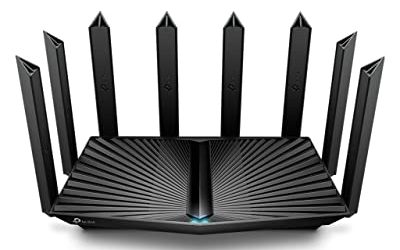
| TP-Link Archer BE230 | A future-proof router for 4K Roku streaming | BE3600 dual-band Wi-Fi 7 router with 2.5G ports |
How to Choose
Put the 5GHz band first
A Roku streams video over Wi-Fi, and the 5GHz band carries that stream with less crowding than the 2.4GHz band, which is why it should be the first thing you check on any router for a Roku. Look for a router that names a clear 5GHz speed and supports modern Wi-Fi 6 or Wi-Fi 7, because those standards handle several devices at once far better than older Wi-Fi 5 hardware. Keep the Roku on the 5GHz network when the TV sits within a reasonable distance of the router, and save the 2.4GHz band for devices farther away. A wide 160MHz channel also helps a 4K stream hold its quality during busy evenings.
Match coverage to the distance to the TV
The distance between the router and the TV decides how much coverage you need, and it matters more than the top speed printed on the box. A single router with four antennas covers a flat or a small house well, as long as the Roku sits within one or two rooms. A larger house, a thick wall, or a TV on a different floor calls for a mesh system, where a second node sits near the TV and gives the Roku a short, strong hop instead of a long, weak one. Check the coverage figure, then place the router or the nearest mesh node in the open, away from metal shelves and thick furniture that block the signal.
Look for traffic priority for streaming
A Roku shares the network with phones, laptops, game consoles, and smart home gear, so a router that can give streaming traffic priority keeps the picture smooth when the house gets busy. Some routers call this quality of service, while others build it into a gaming or streaming mode, and either approach works as long as you can turn it on and point it at the Roku. A router with a fast multi-core processor also helps here, because it sorts the traffic of many devices without slowing down. If the household streams in 4K while someone else plays games online, this kind of priority matters more than a small difference in the headline speed of the router.
Keep setup simple and the router separate from the modem
A router for a Roku should be easy to set up, because setup should be a quick path from the box to the TV screen. Look for a router with a phone app that walks through setup in a few steps, so you can name the network, set a password, and place the Roku on the 5GHz band without a web page full of settings. Choose a standalone router rather than a modem and router combined, because a separate router works with any internet provider and can move with you if the provider changes. Also check for enough wired ports for a TV or a console, since a wired link frees up wireless airtime for the Roku.
The 5 Best Options
ASUS RT-AX57
The RT-AX57 fits a Roku owner who wants a solid single router with security features built in and no monthly subscription attached to them. Its AX3000 dual-band Wi-Fi 6 radio gives the 5GHz band plenty of room for a 4K stream, while the four external antennas help the signal reach a TV in the next room. The router also supports AiMesh, so it can join a mesh network later if the house grows or the Roku moves farther from the modem. Setup runs through the ASUS app, and the built-in VPN and parental controls add value for a shared household without adding cost beyond the router itself.
Specs
- AX3000 dual-band Wi-Fi 6, with 2402 Mbps on 5GHz and 574 Mbps on 2.4GHz
- Four external antennas with OFDMA and MU-MIMO
- Quad-core 1.7GHz processor with 1024-QAM and 160MHz channel width
- One gigabit WAN port and four gigabit LAN ports
- AiMesh compatible, with built-in VPN and AiProtection network security
- Subscription-free network security and advanced parental controls
Best for: A single Roku TV in a small to medium home where security features matter.
Watch out for: Check the listing title and model name before ordering, since a retailer question thread mixes this model up with a similar ASUS model.
ASUS RT-AX3000S
- Best for: A Roku setup that may grow into a mesh network later.
- AX3000 dual-band Wi-Fi 6 extendable router
- 4096-QAM with 20, 40, 80, and 160MHz channel widths
- AiMesh compatible, with Instant Guard and built-in VPN
- Parental control scheduling for connected devices
A Roku setup that may grow into a mesh network later.
Confirm the listing names the RT-AX3000S model, since ASUS sells several routers with similar AX3000 branding.
The RT-AX3000S suits a Roku owner who wants a straightforward router today with a clear path to a mesh network tomorrow. Its AX3000 dual-band Wi-Fi 6 radio handles a 4K stream on the 5GHz band, and its operating modes cover router, access point, AiMesh node, and repeater use, so the same box can change roles if the household layout changes. The router includes a built-in VPN and parental control scheduling, which helps a family keep the TV and the other devices on a sensible routine. Its wide channel support keeps the stream steady during busy evenings when several devices compete for airtime.
Watch out for: Confirm the listing names the RT-AX3000S model, since ASUS sells several routers with similar AX3000 branding.
TP-Link Archer AX12
- Best for: A budget router for one Roku and a small number of other devices.
- AX1500 dual-band Wi-Fi 6, with 1201 Mbps on 5GHz and 300 Mbps on 2.4GHz
- OFDMA and MU-MIMO for several devices at once
- Beamforming to focus the signal toward connected devices
- One gigabit WAN port and three gigabit LAN ports
A budget router for one Roku and a small number of other devices.
The three LAN ports fill up fast, so count wired devices before choosing this model.
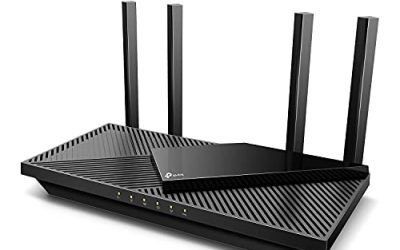
The Archer AX12 is the right pick for a Roku owner on a budget who needs one reliable stream rather than a router for a crowded smart home. Its AX1500 dual-band Wi-Fi 6 radio is more than enough for a single Roku streaming in high definition or 4K, and the beamforming focuses the signal toward the TV instead of spreading it evenly in every direction. Setup runs through the Tether app, which keeps the process short and puts the basic controls on a phone. The router also supports WPA3 security, so the home network gets modern protection without a higher price or a complicated setup.
Watch out for: The three LAN ports fill up fast, so count wired devices before choosing this model.
TP-Link Deco X20 3-Pack
The Deco X20 3-pack fits a large home where the Roku sits far from the modem and a single router cannot hold a steady signal at the TV. One node sits near the modem, a second sits near the TV, and the third covers the remaining rooms, so the Roku gets a short hop to a nearby node instead of a long stretch across the house. The mesh replaces a separate router and extenders with one network name, so the Roku needs no extra network to join. Wired backhaul lets the nodes talk over Ethernet where a cable exists, which keeps more wireless airtime free for the stream.
Specs
- AX1800 dual-band Wi-Fi 6 mesh system, 3-pack
- Covers up to 5,800 square feet with 150 or more connected devices
- Six Ethernet ports in total across the three units
- Supports wired backhaul between nodes
- HomeShield security features and Alexa compatibility
- Replaces a wireless router and separate extenders
Best for: A large home with a Roku far from the modem.
Watch out for: Confirm the listing is the 3-pack, since this mesh system also sells in a 2-pack with less coverage.
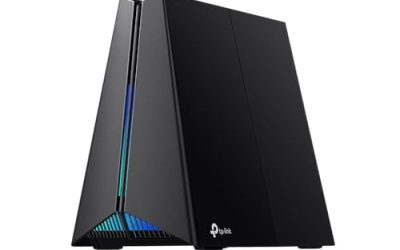
TP-Link Archer BE230
- Best for: A future-proof router for 4K Roku streaming in a busy household.
- BE3600 dual-band Wi-Fi 7 router, 4-stream
- Two 2.5G ports and three 1G ports, plus a USB 3.0 port
- Quad-core 2.0GHz processor with four antennas
- Multi-link operation, VPN support, and EasyMesh compatibility
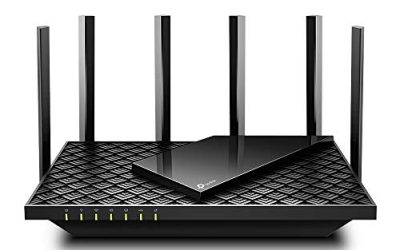
A future-proof router for 4K Roku streaming in a busy household.
Confirm the listing names the Archer BE230, since the BE3600 label also appears on a TP-Link travel router.
The Archer BE230 is the pick for a Roku owner who wants a router that stays useful as streaming quality and household device counts keep rising. Its BE3600 dual-band Wi-Fi 7 radio brings multi-link operation, which lets a device use more than one band at once for a steadier connection, and its two 2.5G ports give a wired TV or console a faster link than a standard gigabit port. The quad-core processor keeps traffic moving when the Roku streams in 4K while other devices work in the background. EasyMesh support also leaves the door open to add another node later if the Roku moves to a room with weaker coverage.
Watch out for: Confirm the listing names the Archer BE230, since the BE3600 label also appears on a TP-Link travel router.
Which One Fits Your Situation
One Roku in a small home
Pick the TP-Link Archer AX12 when a single Roku serves a small home and the budget matters more than extra features. Its AX1500 radio handles one high definition or 4K stream with room to spare, and the Tether app keeps setup short. The Roku gets a steady 5GHz link while the other devices share the remaining capacity. Skip this one only if the home has many connected devices or the TV sits far from the router.
A Roku TV that needs strong security
Pick the ASUS RT-AX57 when the household wants security features built into the router without a subscription. Its AiProtection and parental controls cover the whole network, including the Roku, and the AX3000 radio keeps a 4K stream steady. The four antennas help the signal reach a TV in the next room, and AiMesh support means the router can grow into a mesh setup later instead of being replaced.
A large home with a faraway TV
Pick the TP-Link Deco X20 3-pack when the Roku sits at the far end of a large house and a single router leaves the stream stalling. A node near the TV gives the Roku a short, strong connection, and the single network name means no extra setup on the Roku itself. The three units cover the rest of the house too, so phones and laptops keep a steady signal in every room as well.
A busy household that streams in 4K
Pick the TP-Link Archer BE230 when several people stream, game, and work at the same time and the Roku still needs a smooth 4K picture. Its Wi-Fi 7 radio and quad-core processor handle the traffic of many devices at once, while the 2.5G ports give wired gear a faster link. The ASUS RT-AX3000S is the cheaper fallback here if Wi-Fi 7 is not a priority and a simple dual-band router will do.
Common Mistakes
- Putting the router inside a closed cabinet or behind the TV, where the case and the screen block the signal the Roku needs.
- Leaving the Roku on the 2.4GHz band when the TV sits close enough to use the faster and less crowded 5GHz band.
- Buying a modem and router combined unit when a standalone router would work with any provider and move more easily.
- Judging a router by its headline speed alone instead of checking coverage, antenna design, and how it handles several devices at once.
- Skipping the traffic priority setting, then wondering why the stream stalls when someone else starts a large download.
Frequently Asked Questions
Does a Roku need a special router?
No, a Roku works with any Wi-Fi router, but a dual-band router with a strong 5GHz signal gives a smoother result than an old single-band model. The 5GHz band carries a 4K stream with less interference, while Wi-Fi 6 or Wi-Fi 7 handles several devices at once. Any router in this guide meets those needs, so the choice comes down to home size and budget rather than a Roku-specific feature.
Should the Roku use the 5GHz or the 2.4GHz band?
Use the 5GHz band when the Roku sits close to the router, since it offers more speed and less crowding. Switch to the 2.4GHz band when the TV sits far away or behind thick walls, because that band travels farther though slower. A dual-band router lets the Roku join either network, so test both once and keep the one that holds a steady picture.
Will a mesh system help a Roku in a far room?
Yes, a mesh system helps when the Roku sits far from the modem, because a node near the TV gives the Roku a short and strong connection. A router has to push its signal across the whole house, while a mesh node only covers the room it sits in. The Deco X20 3-pack is built for that layout, and its single network name means the Roku needs no setup.
Can I use a VPN router with a Roku?
Yes, a router with a built-in VPN can cover a Roku, which cannot run VPN software on its own. The ASUS models in this guide list a built-in VPN in their specifications, so the whole network, including the Roku, can use it. Keep in mind that a VPN can slow a stream, so check that the connection still holds a steady picture before leaving it on for everyday viewing.
FAQ
Does a Roku need a special router?
Should the Roku use the 5GHz or the 2.4GHz band?
Will a mesh system help a Roku in a far room?
Can I use a VPN router with a Roku?
More from Amazon
Programs that pair well with the guide above. Offers and eligibility are set by Amazon and may change.
Free shipping on eligible items, Prime Video and more. Eligible new members can start with a free trial.
Start a Prime free trialAd-free music streaming. Eligible new subscribers can start with a free trial.
Try Music Unlimited freeA Prime membership for ages 18-24 with a trial period. Eligibility is set by Amazon.
See Prime for Young AdultsAudiobooks and podcasts to listen to on the go. Eligible new members can start with a free trial.
Try Audible freeAs an Amazon Associate we earn from qualifying purchases.