Our Short List of 3

- Best for: A first Tomato install where community guides and proven builds matter most.
- AC1900 dual-band wireless, 600 Mbps plus 1300 Mbps
- 1 GHz dual-core CPU
- 128 MB flash and 256 MB RAM
- 4 Gigabit LAN ports plus 1 Gigabit WAN port

- Best for: A busy family home that needs wide coverage and steady handling of many devices.
- AC1900 dual-band wireless, 600 Mbps plus 1300 Mbps
- 1 GHz dual-core processor
- 128 MB flash and 256 MB RAM
- 4 Gigabit Ethernet ports plus 2 USB ports

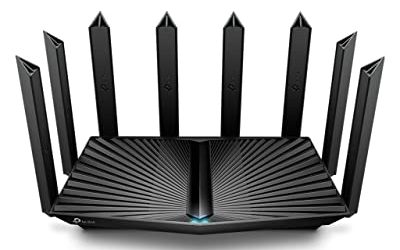
- Best for: A large home where many devices share the network at the same time.
- AC3200 tri-band wireless, up to 3200 Mbps combined
- Coverage for up to 3500 sq ft and 50 devices
- 4 Gigabit Ethernet ports plus 2 USB ports
- 6 high-performance antennas
All 5 Picks at a Glance
| Product | Specs | Action |
|---|---|---|
| ASUS RT-AC68U |
| Check price on Amazon |
| NETGEAR Nighthawk R7000 |
| Check price on Amazon |
| NETGEAR Nighthawk X6 R8000 |
| Check price on Amazon |
 ASUS RT-AC66U B1 |
| Check price on Amazon |
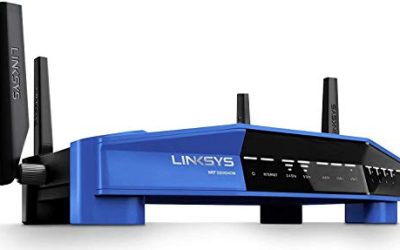
 Linksys EA6900 |
| Check price on Amazon |
Key takeaways
- Pick a router that runs Tomato firmware, from the classic AC1900 workhorses to a tri-band Nighthawk, with the build and hardware checks that matter.
Buying a router for Tomato firmware is not really a speed contest, because the decision that matters comes before any comparison of wireless numbers. Tomato, in its actively maintained FreshTomato form, runs only on a narrow set of Broadcom-based routers, and the wrong model or the wrong hardware revision leaves you with a box that can never take the firmware at all. A fast modern router outside that list is useless for this job, no matter how strong its stock software looks.
This guide is for home network tinkerers who want Tomato’s bandwidth graphs and per-device controls, for gamers who want traffic shaping that keeps latency steady, and for households that want a VPN running at the router level. Every router below appears on FreshTomato support lists or in its user database, and every specification comes from the Amazon listing for that exact model.
Quick Picks
As an Amazon Associate we earn from qualifying purchases
| Product | Best for | Key spec from title |
|---|---|---|
| ASUS RT-AC68U | A first Tomato install on a proven classic | AC1900 dual-band, 1 GHz dual-core CPU |
| NETGEAR Nighthawk R7000 | A busy home that needs strong coverage | AC1900 dual-band, up to 1800 sq ft coverage |
| NETGEAR Nighthawk X6 R8000 | A large home with many devices at once | AC3200 tri-band, up to 3500 sq ft coverage |
| ASUS RT-AC66U B1 | A lower-cost entry point into Tomato | AC1750 dual-band, 1 GHz CPU |
| Linksys EA6900 | A compact dual-band router for a smaller flat | AC1900 dual-band, Smart Wi-Fi app |
How to Choose
Match the exact model and revision first
FreshTomato builds are tied to a chipset family, so the model name alone is not enough to guarantee a flash will work. ASUS sells the same router name across revisions with different internals, and a build made for one revision can brick another, so check the label on the bottom of the unit and the FreshTomato hardware page before you buy. Sellers sometimes list a router by its family name while shipping a later revision, and that mismatch is the most common reason a Tomato project fails on day one. Confirm the revision in writing with the seller when the listing does not spell it out.
Pick ARM over MIPS when you can
Most Tomato users today should aim for an ARM-based router, because the ARM builds carry the newer wireless drivers and handle VPN traffic with less strain than the older MIPS builds. The RT-AC68U, the R7000, and the R8000 all sit in this group, and they cope better with a household full of streaming boxes and game consoles. MIPS models such as the older RT-AC66U and the RT-N66U still run Tomato, yet they suit lighter networks and simpler setups. If your plan includes a router-level VPN, the ARM choice matters even more.
Think about antennas and coverage honestly
Tomato cannot fix weak radio hardware, so the number of antennas and the coverage the listing claims still shape what you will actually get in a real house. Three external antennas cover a flat or a small house well, while six antennas and a tri-band layout help when walls are thick or devices crowd every room. Measure the distance from the router spot to the farthest room you care about, and remember that a 5 GHz signal fades faster through walls than a 2.4 GHz one. Buy for the rooms you use, not for the floor plan you wish you had.
Plan for the flash before you buy
Flashing third-party firmware always carries a small chance of bricking the router, so treat the purchase as the start of a project rather than a simple swap. Download the correct FreshTomato build for your exact model and revision ahead of time, read the flashing notes for that model, and keep a wired connection ready for the install. Have the stock firmware file saved as well, in case you need to go back. A spare evening and a calm approach beat rushing the flash on the night the router arrives.
The 5 Best Options
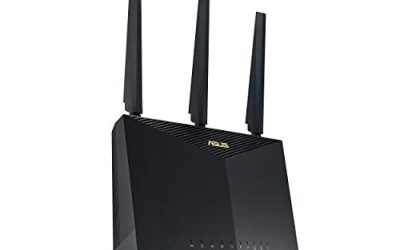
ASUS RT-AC68U
- Best for: A first Tomato install where community guides and proven builds matter most.
- AC1900 dual-band wireless, 600 Mbps plus 1300 Mbps
- 1 GHz dual-core CPU
- 128 MB flash and 256 MB RAM
- 4 Gigabit LAN ports plus 1 Gigabit WAN port
A first Tomato install where community guides and proven builds matter most.
Check the hardware revision before flashing, since builds differ by revision. Confirm it is still sold before buying.
The RT-AC68U is the default answer for Tomato users for a reason, because it pairs a Broadcom ARM chipset with a long record of FreshTomato builds and a large community behind it. Its dual-band wireless covers a typical home without fuss, and the USB ports let Tomato share a drive or a printer across the network. Gamers will like the way its traffic controls keep a download from wrecking a match, and anyone new to custom firmware will find more guides written for this model than for any other router here.
Watch out for: Check the hardware revision before flashing, since builds differ by revision. Confirm it is still sold before buying.
NETGEAR Nighthawk R7000
- Best for: A busy family home that needs wide coverage and steady handling of many devices.
- AC1900 dual-band wireless, 600 Mbps plus 1300 Mbps
- 1 GHz dual-core processor
- 128 MB flash and 256 MB RAM
- 4 Gigabit Ethernet ports plus 2 USB ports
A busy family home that needs wide coverage and steady handling of many devices.
The R7000 name covers several regional variants, so confirm the exact model number. Confirm it is still sold before buying.
The R7000 brings the same Broadcom ARM foundation as the RT-AC68U in a Nighthawk body with three amplified antennas and a layout that suits a busy household. Its coverage reaches further across a larger home, and the dual USB ports give Tomato room for storage sharing alongside the usual routing duties. The interface after flashing is the same clean Tomato view, while the hardware underneath handles more simultaneous devices without slowing down. It is a solid pick when the router has to serve phones, consoles, and streaming boxes all evening.
Watch out for: The R7000 name covers several regional variants, so confirm the exact model number. Confirm it is still sold before buying.
NETGEAR Nighthawk X6 R8000
- Best for: A large home where many devices share the network at the same time.
- AC3200 tri-band wireless, up to 3200 Mbps combined
- Coverage for up to 3500 sq ft and 50 devices
- 4 Gigabit Ethernet ports plus 2 USB ports
- 6 high-performance antennas
A large home where many devices share the network at the same time.
Tri-band gains show up only when devices spread across bands, so plan placement. Confirm it is still sold before buying.
The R8000 is the heavy lifter of this group, with a tri-band layout that splits devices across two 5 GHz bands and one 2.4 GHz band instead of crowding them together. That split matters in a house where a dozen devices compete at once, because Tomato can shape traffic per band and keep a game or a call clear of a big download. Six antennas push the signal further than the dual-band models here, and the extra headroom suits a household that keeps adding smart devices. It is the pick when coverage and capacity both rank above saving space.
Watch out for: Tri-band gains show up only when devices spread across bands, so plan placement. Confirm it is still sold before buying.
ASUS RT-AC66U B1
- Best for: A low-cost first Tomato project or a spare router for testing builds.
- AC1750 dual-band wireless, up to 1750 Mbps combined
- 1 GHz CPU with 3×3 MIMO technology
- 3 external antennas
- Coverage for up to 3,000 square feet
A low-cost first Tomato project or a spare router for testing builds.
Only the B1 revision matches the ARM builds, so avoid the older A1 listing. Confirm it is still sold before buying.
The RT-AC66U B1 is the cheapest way into this list, and it still earns its place because the B1 revision moved to the ARM platform that FreshTomato supports well. Its AC1750 wireless is a step below the AC1900 models, yet it handles a flat or a small house with ease, and its three antennas give a stable signal across a couple of rooms. This is the router to choose when you want to learn Tomato without spending much, or when you need a second router for a lab setup. Keep expectations modest on VPN speed, and it will serve you well.
Watch out for: Only the B1 revision matches the ARM builds, so avoid the older A1 listing. Confirm it is still sold before buying.
Linksys EA6900
- Best for: A smaller flat where a compact Tomato router with wired ports fits best.
- AC1900 dual-band wireless, up to 1900 Mbps combined
- 4 gigabit Ethernet ports
- USB 3.0 port
- Smart Wi-Fi app for remote network control
A smaller flat where a compact Tomato router with wired ports fits best.
The EJ regional variant uses a different listing, so buy the US model. Confirm it is still sold before buying.
The EA6900 rounds out the list as the most compact option here, a Linksys dual-band router with a Broadcom chipset that FreshTomato supports. Its four gigabit ports cover wired consoles and media boxes, and the USB 3.0 port lets Tomato share storage without a separate device on the network. The Smart Wi-Fi app stays useful before you flash, for checking the stock setup and confirming the hardware works. After flashing, Tomato takes over with the same bandwidth graphs and controls as the larger routers here, in a smaller box.
Watch out for: The EJ regional variant uses a different listing, so buy the US model. Confirm it is still sold before buying.
Which One Fits Your Situation
You are flashing Tomato for the first time
Start with the ASUS RT-AC68U, because more guides, forum threads, and build notes exist for it than for any other router on this list. When a step confuses you, someone else has already asked the same question and written down the answer. Its ARM hardware also leaves room to grow into VPN use later, so you will not outgrow it quickly.
Your house is large and always busy
Take the NETGEAR Nighthawk X6 R8000, since its tri-band layout and six antennas handle a crowd of devices better than any dual-band router here. Tomato can shape traffic per band, which keeps a video call clear while someone else streams in another room. The extra coverage also means fewer dead spots at the far end of the house.
You want Tomato on a tight budget
Choose the ASUS RT-AC66U B1, the lowest-cost entry point that still runs a current FreshTomato ARM build. It covers a flat or a small house well and teaches you the whole flashing process without a large outlay. Just confirm the B1 revision on the unit before you start, and keep VPN expectations modest.
You need a compact router for a small space
Pick the Linksys EA6900, which brings AC1900 wireless and four gigabit ports in a smaller body than the Nighthawk models. It suits a flat where the router sits on a shelf near the modem, and its USB port still lets Tomato share a drive. The same Tomato graphs and controls apply, without the bulk.
Common Mistakes
- Buying by the router name alone without checking the hardware revision against the FreshTomato support list
- Picking a router that only supports DD-WRT or OpenWrt and assuming Tomato will run on it too
- Flashing over Wi-Fi instead of a wired connection, which raises the chance of a failed flash
- Skipping the backup of stock firmware before installing a custom build
- Expecting a router-level VPN to run at full line speed on an older MIPS model
Frequently Asked Questions
Is Tomato firmware still maintained?
Yes, FreshTomato is the actively maintained fork of the original Tomato firmware, with recent builds released through 2026 and a user database showing current installs. The original Tomato project itself stopped years ago, so always download FreshTomato builds rather than the old releases. Check the FreshTomato site for the newest build that matches your exact model and revision.
Can I go back to stock firmware after flashing Tomato?
In most cases yes, because the router maker provides a stock firmware file that you can flash back through the Tomato interface or a recovery mode. Keep that file saved before you start, and note the recovery steps for your model in advance. A few models need a specific recovery method, so read the notes for your router first.
Does Tomato make my Wi-Fi faster?
Tomato does not raise the radio speed of your router, since that limit comes from the hardware itself. What it does improve is control, with traffic shaping that keeps latency steady, per-device bandwidth graphs, and a VPN at the router level. If your connection feels slow because one device hogs bandwidth, Tomato can fix that part.
Which router should I buy if I mainly want a VPN at the router level?
Pick an ARM model such as the RT-AC68U, the R7000, or the R8000, because their processors handle VPN encryption with less strain than older MIPS routers. Even then, expect VPN throughput well below your raw line speed, since encryption is heavy work for a router CPU. Test with your VPN provider before relying on it for everything.
FAQ
Is Tomato firmware still maintained?
Can I go back to stock firmware after flashing Tomato?
Does Tomato make my Wi-Fi faster?
Which router should I buy if I mainly want a VPN at the router level?
More from Amazon
Programs that pair well with the guide above. Offers and eligibility are set by Amazon and may change.
Free shipping on eligible items, Prime Video and more. Eligible new members can start with a free trial.
Start a Prime free trialAd-free music streaming. Eligible new subscribers can start with a free trial.
Try Music Unlimited freeA Prime membership for ages 18-24 with a trial period. Eligibility is set by Amazon.
See Prime for Young AdultsAudiobooks and podcasts to listen to on the go. Eligible new members can start with a free trial.
Try Audible freeAs an Amazon Associate we earn from qualifying purchases.