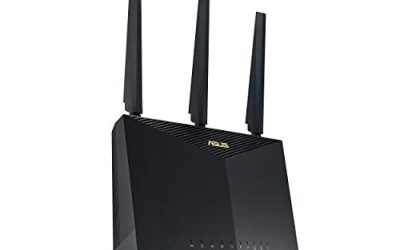
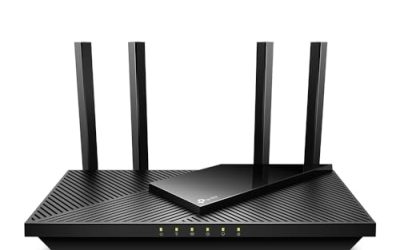
Our Short List of 3
All 5 Picks at a Glance
| Product | Specs | Action |
|---|---|---|
 Linksys WRT3200ACM — the purpose-built flashing platform | Check price on Amazon | |
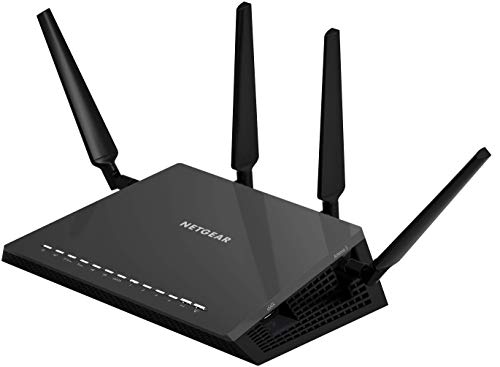 NETGEAR Nighthawk X4S R7800 — the OpenWrt favourite | Check price on Amazon | |
 TP-Link Archer A7 v5 — the low-risk first flash | Check price on Amazon | |
 ASUS RT-AC68U — the DD-WRT pick with a familiar face | Check price on Amazon | |
 NETGEAR Nighthawk R7000 — the end-of-service revival | Check price on Amazon |
Key takeaways
- Five routers confirmed on the official OpenWrt and DD-WRT support lists, with the hardware revisions to check, the real risks of flashing, and full specs.
As an Amazon Associate, we earn from qualifying purchases made through links on this page.
On this page, “flash routers” means one specific thing: routers sold with ordinary closed factory firmware that you can flash yourself with community firmware, namely OpenWrt or DD-WRT. Every pick below appears in the official support lists of at least one of those projects — the OpenWrt Table of Hardware and Firmware Selector, or the DD-WRT supported devices list and wiki. A model name on a box is never enough on its own, because support follows the exact hardware revision printed on the label under the router, so each pick names the revision you need and the ones to avoid.
This is a different buying job from choosing a router that already runs open-source firmware from the factory, such as the GL.iNet line covered in this site’s open source routers guide. Those units need no flashing at all. The routers here are mainstream models from Linksys, NETGEAR, TP-Link and ASUS whose value is that the community firmware path is documented, maintained and reversible in most cases.
Two warnings from the projects themselves belong up front. Flashing third-party firmware can end a manufacturer’s warranty coverage, and an interrupted flash can leave a router unable to boot. Both OpenWrt and DD-WRT say so plainly in their documentation. Read the device page for your exact revision before you download anything, flash over a wired connection, and keep a copy of the factory firmware file so you can go back.
Why flash at all? For a gaming household the practical gains are SQM traffic shaping that tames bufferbloat while someone else downloads, a router-level VPN client or server, VLANs that keep smart home gadgets away from your PC, and security patches that continue after the manufacturer moves a model to end of service. The honest trade-off is age: the deepest community support sits on Wi-Fi 5 hardware, because those chipsets have open drivers. The picks below are the strongest of that proven group.
What to look for in a router you plan to flash
The exact hardware revision. This is the first check and the one that decides everything else. The same model name can hide different chipsets across revisions, and an image built for one revision can fail or brick another. Match the version string on the underside label against the OpenWrt device page or the DD-WRT wiki entry, character for character.
Flash storage and RAM headroom. OpenWrt is a package-based system, so storage fills up as you add tools such as SQM, a VPN client and usage graphs. A 16 MB flash chip is the workable floor and leaves little room to grow; 128 MB or more is comfortable. RAM matters once several services run at once: 128 MB is a sensible minimum, and 256 MB or 512 MB holds up better under a VPN tunnel plus traffic shaping.
Chipset decides which project fits. Qualcomm Atheros and Marvell chipsets have open wireless drivers, so OpenWrt supports their Wi-Fi fully. Broadcom Wi-Fi depends on closed drivers, which is why Broadcom-based routers below are DD-WRT picks: DD-WRT ships those drivers, while OpenWrt on the same hardware leaves parts of the wireless side unsupported. Neither project hides this; both document it per device.
A recovery path you can actually use. Prefer routers with a documented way back: a TFTP recovery mode, a vendor rescue tool, or a dual-partition layout that keeps a second firmware copy on board. The device page for each pick below describes its recovery method, and it is worth reading before the first flash, not after a failed one.
Ports and USB that survive the flash. Gigabit Ethernet is the baseline here. USB ports stay useful under community firmware for shared storage or a printer, and eSATA on two picks below gives an extra storage route. Check the device page for any port that community firmware handles differently from the factory build.
The picks
Linksys WRT3200ACM — the purpose-built flashing platform
See the Linksys WRT3200ACM on Amazon
Linksys built the WRT line for exactly this job and sold this model as open-source ready. The hardware is the strongest here for routing work: a Marvell Armada 385 dual-core processor at 1.8 GHz, 512 MB of RAM and 256 MB of flash storage. Wireless is dual-band AC3200, with 600 Mbps on 2.4 GHz and up to 2,600 Mbps on 5 GHz using Tri-Stream 160, plus MU-MIMO and four detachable antennas. Around the back sit four gigabit LAN ports, one gigabit WAN port, a USB 3.0 port and a combined eSATA and USB 2.0 port.
Firmware status is as good as it gets: the WRT3200ACM sits in the OpenWrt Table of Hardware under the mvebu target with images in current stable branches, and DD-WRT lists full support for it as well. It also carries a safety net most routers lack — two firmware partitions. If a flash goes wrong, the documented power-cycle routine on the OpenWrt device page can boot the router from the other partition, which makes this the most forgiving pick for a first serious flash.
Choose it if you want the most CPU headroom for SQM and a VPN on the same box. The limits are real: it is Wi-Fi 5 only, Linksys has ended the WRT line so Amazon units are remaining and marketplace stock, and the Marvell wireless driver in OpenWrt has documented quirks with a few client devices, all noted on the device page.
NETGEAR Nighthawk X4S R7800 — the OpenWrt favourite
See the NETGEAR Nighthawk X4S R7800 on Amazon
The R7800 is the router OpenWrt users recommend to each other, and the reason is its Qualcomm platform. An IPQ8065 dual-core processor at 1.7 GHz, 512 MB of RAM and 128 MB of flash storage drive a dual-band AC2600 radio setup: 800 Mbps on 2.4 GHz and 1,733 Mbps on 5 GHz, with 4×4 MU-MIMO, 160 MHz channels and four external antennas. Ports are generous: four gigabit LAN, one gigabit WAN, two USB 3.0 and one eSATA.
Its OpenWrt device page, under the ipq806x target, is one of the most actively maintained in the Table of Hardware, and DD-WRT builds exist for it too. NETGEAR documents a TFTP recovery mode for the model, and the OpenWrt wiki walks through it, so a failed flash is usually recoverable at home with a cable and a fixed IP address on your PC.
Choose it as a main home and gaming router when OpenWrt is the plan. Limits: NETGEAR has discontinued the model, so listings are marketplace units rather than fresh retail stock; it remains Wi-Fi 5; and the device page notes points about the ath10k wireless firmware worth reading before you commit.
TP-Link Archer A7 v5 — the low-risk first flash
See the TP-Link Archer A7 on Amazon
The Archer A7 is the gentlest entry point here, provided you get the right revision. The OpenWrt Firmware Selector lists the device as tplink_archer-a7-v5, and project documentation confirms the whole 5.x line uses that image — so the label under the unit must read version 5 or 5.x. Hardware is modest: a Qualcomm QCA9563 processor at 775 MHz, 128 MB of RAM and 16 MB of flash, with dual-band AC1750 wireless (450 Mbps plus 1,300 Mbps), three antennas, four gigabit LAN ports, one gigabit WAN port and a USB 2.0 port.
Installation normally runs through the factory web interface, though the device page notes that some factory firmware builds need the TFTP route instead — another reason to read that page first. DD-WRT publishes beta builds for the A7 v5, and the sibling Archer C7 v5, which shares the platform, has full DD-WRT support with its own image. Do not cross-flash between revisions: the C7 v2, v4 and v5 each take different files.
Choose it as a first flash, a spare router to learn on, or a wired access point with real firmware control. Limits: 16 MB of flash leaves little room for extra packages, the single-core processor caps VPN throughput, and USB is 2.0 only.
ASUS RT-AC68U — the DD-WRT pick with a familiar face
See the ASUS RT-AC68U on Amazon
The RT-AC68U is a Broadcom design, so its community path is DD-WRT rather than OpenWrt, and this guide will not pretend otherwise: OpenWrt’s own documentation warns that Broadcom Wi-Fi lacks full open driver support. DD-WRT lists the RT-AC68U in its supported devices, and its builds install through the factory interface or the ASUS rescue mode. The hardware still holds up: a Broadcom BCM4708 dual-core processor at 800 MHz (some later units run a 1 GHz BCM4709), 256 MB of RAM, 128 MB of flash, dual-band AC1900 wireless at 600 Mbps plus 1,300 Mbps, three antennas, four gigabit LAN ports, one gigabit WAN port, and USB 3.0 plus USB 2.0.
The revision story needs care. Many hardware revisions share this model name, and the DD-WRT wiki build notes apply per revision. There is also a near-twin sold under a carrier name, the TM-AC1900, which shipped with different factory firmware; keep to units sold as the RT-AC68U to stay on the documented path.
Choose it if you want DD-WRT’s single complete image and a web interface that feels close to what you already know. Limits: Wi-Fi 5 only; stock-only features such as AiMesh and AiProtection do not carry over to community firmware; and ASUS itself notes that a USB 3.0 device can disturb the 2.4 GHz band on this design.
NETGEAR Nighthawk R7000 — the end-of-service revival
See the NETGEAR Nighthawk R7000 on Amazon
The R7000 earns its place for a specific reason: NETGEAR has moved it to End of Service, with no further factory security updates planned, and DD-WRT still supports it. Flashing is the remaining update path, which turns a common, capable router into one that can stay patched. Hardware: a Broadcom BCM4709A0 dual-core processor at 1 GHz, 256 MB of RAM, 128 MB of flash, dual-band AC1900 wireless (600 Mbps plus 1,300 Mbps), three detachable antennas, four gigabit LAN ports, one gigabit WAN port, and USB 3.0 at the front with USB 2.0 at the back.
DD-WRT lists the R7000 as supported, and the documented first flash uses a special .chk file through the factory interface before moving to standard builds. OpenWrt lists the model with partial support only — its wiki page states that the Broadcom wireless functions are the unsupported part — so DD-WRT is the sensible route and the one this pick is based on. One more revision note: NETGEAR redesigned the internals in late 2018 under the same model name, so follow the DD-WRT wiki notes for the unit in front of you.
Choose it to give an end-of-service router a second working life, or as a dedicated VPN router behind a newer main unit. Limits: the hardware is end of life, factory app features do not carry over, and as a Broadcom model it shares the driver situation described above.
Comparison table
| Router | Wi-Fi | Processor | RAM / Flash | Firmware path | Ports |
|---|---|---|---|---|---|
| Linksys WRT3200ACM | AC3200 dual-band | Marvell Armada 385, 1.8 GHz dual-core | 512 MB / 256 MB | OpenWrt (Table of Hardware) and DD-WRT | 4 LAN + 1 WAN gigabit, USB 3.0, eSATA/USB 2.0 |
| NETGEAR Nighthawk X4S R7800 | AC2600 dual-band | Qualcomm IPQ8065, 1.7 GHz dual-core | 512 MB / 128 MB | OpenWrt (Table of Hardware) and DD-WRT | 4 LAN + 1 WAN gigabit, 2 USB 3.0, eSATA |
| TP-Link Archer A7 v5 | AC1750 dual-band | Qualcomm QCA9563, 775 MHz | 128 MB / 16 MB | OpenWrt (Firmware Selector, v5 only), DD-WRT beta | 4 LAN + 1 WAN gigabit, USB 2.0 |
| ASUS RT-AC68U | AC1900 dual-band | Broadcom BCM4708, 800 MHz dual-core | 256 MB / 128 MB | DD-WRT (supported devices list) | 4 LAN + 1 WAN gigabit, USB 3.0, USB 2.0 |
| NETGEAR Nighthawk R7000 | AC1900 dual-band | Broadcom BCM4709A0, 1 GHz dual-core | 256 MB / 128 MB | DD-WRT (supported devices list) | 4 LAN + 1 WAN gigabit, USB 3.0, USB 2.0 |
FAQ
Does flashing a router void the warranty?
In most cases, treat it as yes. Manufacturers generally place third-party firmware outside their warranty terms, and both OpenWrt and DD-WRT warn about this in their own documentation. Linksys marketed the WRT line as open-source ready, which makes the WRT3200ACM the friendliest case here, but the safe assumption for every pick is that you flash at your own risk.
How do I check the hardware revision before buying or flashing?
Look at the label on the underside of the router. It prints the model name together with a version string, such as Ver 5.0 on the Archer A7. Match that string against the OpenWrt device page or the DD-WRT wiki entry for the model. If the revision on the label is not the revision on the page, stop and find the correct file or a different unit.
Can I go back to the factory firmware afterwards?
Usually, yes. NETGEAR models have a documented TFTP recovery mode, ASUS provides a rescue mode, and the WRT3200ACM can boot from its second firmware partition. The general pattern is the same: download the factory firmware file for your exact model and revision before you flash anything, and keep it somewhere safe.
OpenWrt or DD-WRT — which one fits my router?
Follow the chipset. On Qualcomm and Marvell hardware, OpenWrt gives full wireless support plus a package manager, so you build the router up in pieces. On Broadcom hardware such as the RT-AC68U and R7000, DD-WRT is the documented route, and it arrives as one complete image with a web interface that will feel familiar. Picking the project your hardware supports well matters more than picking the project with the longer feature list.
What happens if a flash is interrupted?
An interrupted flash can leave the router unable to boot, which is why both projects insist on a wired connection and stable power during the process, and on never flashing over Wi-Fi. If it happens, the recovery methods above are the way back on these five models; a serial cable is the last resort and is documented per device. A router with a known recovery path, like every pick here, is the right kind to learn on.
Conclusion
If you want one router to flash and keep for years, the NETGEAR R7800 is the balanced OpenWrt choice, and the Linksys WRT3200ACM is the pick when processor headroom and a dual-partition safety net matter most. The TP-Link Archer A7 v5 is the gentle first flash, as long as the label confirms the revision. For DD-WRT, the ASUS RT-AC68U is the documented, widely understood route, while the NETGEAR R7000 makes its case as an end-of-service revival. Whichever you choose, the routine is identical: confirm the revision on the label, read the device page end to end, keep the factory firmware file, and flash over a cable.
More from Amazon
Programs that pair well with the guide above. Offers and eligibility are set by Amazon and may change.
Free shipping on eligible items, Prime Video and more. Eligible new members can start with a free trial.
Start a Prime free trialAd-free music streaming. Eligible new subscribers can start with a free trial.
Try Music Unlimited freeA Prime membership for ages 18-24 with a trial period. Eligibility is set by Amazon.
See Prime for Young AdultsAudiobooks and podcasts to listen to on the go. Eligible new members can start with a free trial.
Try Audible freeAs an Amazon Associate we earn from qualifying purchases.