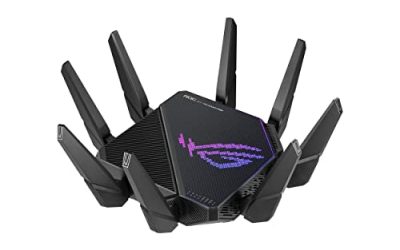
Our Short List of 3

- Best for: Fios households on a gigabit plan making their first move to Wi-Fi 6E.
- AXE5400 tri-band Wi-Fi 6E router
- Speeds up to 5400 Mbps (6 GHz: 2402 Mbps; 5 GHz: 2402 Mbps; 2.4 GHz: 574 Mbps)
- Quad-core CPU
- OneMesh support for adding a TP-Link extender later

- Best for: Gaming households that want a 2.5 Gbps WAN port and strong traffic controls on Fios.
- AX5700 dual-band Wi-Fi 6 router, speeds up to 5700 Mbps
- 2.0 GHz quad-core CPU with 1 GB RAM
- 2.5G WAN/LAN port; supports internet connections up to 2 Gbps
- Dedicated gaming port and Mobile Game Mode

- Best for: Medium homes that want one router with wide stated coverage and no mesh to manage.
- AX5400 dual-band Wi-Fi 6 router, 6-stream
- Wireless speed up to 5.4 Gbps
- Coverage up to 2,500 sq. ft. for up to 25 devices
- Model number RAX50-100NAS
All 5 Picks at a Glance
| Product | Specs | Action |
|---|---|---|
| TP-Link Archer AXE75 |
| Check price on Amazon |
| ASUS RT-AX86U Pro |
| Check price on Amazon |
| NETGEAR Nighthawk RAX50 |
| Check price on Amazon |
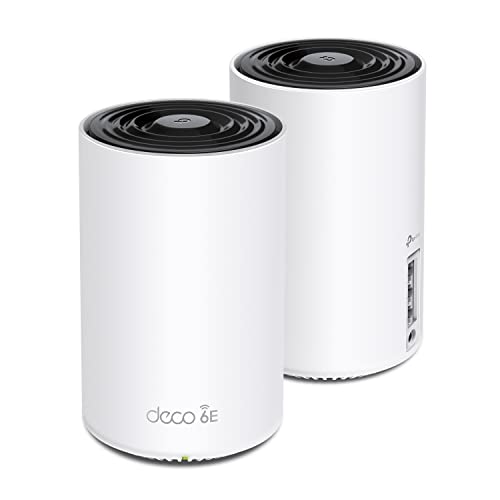 TP-Link Deco XE75 (2-pack) |
| Check price on Amazon |
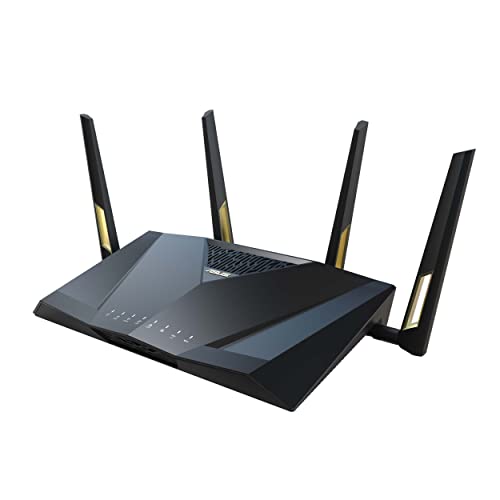 ASUS RT-AX88U Pro |
| Check price on Amazon |
Our Top Picks
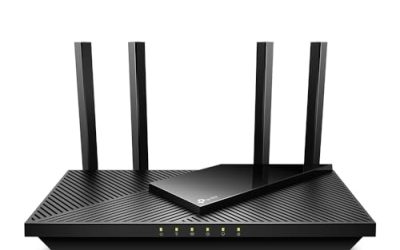
- TP-Link AXE5400 Tri-Band WiFi 6E RouterWiFi 6E, Tri-Band AXE540012.91 x 10.43 x 4.72 inches1.5 poundsCheck on Amazon
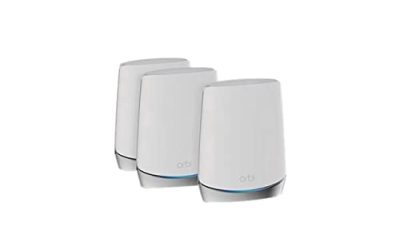
- TP-Link Deco XE75 AXE5400 Tri-Band WiFi 6E Mesh2 Pack4.13 x 4.13 x 6.67 inches2.69 poundsCheck on Amazon
Replacing the Verizon gateway sounds simple until the details show up. The real decision is not which router is fastest on paper. It is whether your fiber connection hands off to the router by Ethernet, whether the router’s WAN port can carry the full speed of your Fios plan, and whether anything else in the house, such as TV equipment, depends on the gateway you are removing. Get those three right and almost any modern router will work. Get one wrong and you can end up with a fast router running at half speed, or dead set-top boxes.
This guide is for Fios internet-only households that want to stop renting the Verizon gateway, for gamers who want stronger traffic controls and lower latency, and for larger homes where a single router cannot reach every room. Each pick below was chosen from the name and specifications on its Amazon listing, with Fios compatibility checked against the ONT Ethernet setup Verizon describes for homes that bring their own router.
Quick Picks
As an Amazon Associate we earn from qualifying purchases.
| Product | Best for | Key spec from title |
|---|---|---|
| TP-Link Archer AXE75 | First Wi-Fi 6E upgrade on a gigabit Fios plan | AXE5400 tri-band Wi-Fi 6E |
| ASUS RT-AX86U Pro | Gaming households on gigabit or 2 Gig Fios | AX5700 with 2.5G port |
| NETGEAR Nighthawk RAX50 | Medium homes wanting wide coverage from one router | AX5400, up to 2,500 sq. ft. |
| TP-Link Deco XE75 (2-pack) | Multi-room homes with dead zones | AXE5400 mesh, up to 5,500 sq. ft. |
| ASUS RT-AX88U Pro | Wired setups and heavy device counts | AX6000 with dual 2.5G ports |
How to Choose
Check how your ONT connects first
Fios reaches your home as fiber and ends at an Optical Network Terminal, a small box Verizon installs on a wall inside or outside the house. The ONT converts the fiber signal, and the connection onward to your router should run over Ethernet. That Ethernet handoff is what makes a third-party router possible, because the router needs no modem and no provider approval. Before buying, look at the cable running from your ONT to the current Verizon gateway. If it is Ethernet, you can swap routers directly. If it is coax, the ONT needs switching to Ethernet output first, which means a call to Verizon or a technician visit before the new router will work.
Match the WAN port to your Fios plan
The WAN port is where the ONT cable plugs in, and its speed is a hard ceiling on your connection. A gigabit WAN port carries a 1 Gbps plan cleanly, but it caps a 2 Gig plan near gigabit speed regardless of the Wi-Fi radios. That is the most common way people waste money on a Fios upgrade: they buy a router with impressive wireless numbers and never notice the wired port underneath. On a gigabit plan, a gigabit WAN port is enough. On a 2 Gig plan, or if you expect to move to one, pick a router with a 2.5 Gbps WAN port so the router never bottlenecks speed you already pay for.
Decide between one router and a mesh system
A single powerful router suits apartments and smaller homes where every device sits within a couple of rooms. It is simpler to set up, simpler to troubleshoot, and usually carries stronger ports and controls for gaming. A mesh system suits larger or multi-story homes where the problem is reach, not speed, with bedrooms or a home office behind thick walls or two floors from the ONT. Mesh nodes spread the signal instead of shouting from one spot. The tradeoff is that each node needs a place with decent signal of its own, and mesh systems often carry fewer wired ports per node, so count the devices you plan to plug in before choosing.
Plan around Fios TV and phone extras
Internet-only Fios is straightforward, but the picture changes when TV enters it. Verizon set-top boxes rely on the gateway for guide data, on-demand features, and in some installs the coax network that links the boxes together. Swapping the gateway for a third-party router can leave those boxes partly working or not working at all. The usual answers are to keep the Verizon router in the chain, run the new router behind it, or use a MoCA adapter to bridge the TV equipment. Check which of your boxes need the gateway before you disconnect anything, and keep the Verizon equipment somewhere safe until the new setup has run for a few days without surprises.
The 5 Best Options
TP-Link Archer AXE75
- Best for: Fios households on a gigabit plan making their first move to Wi-Fi 6E.
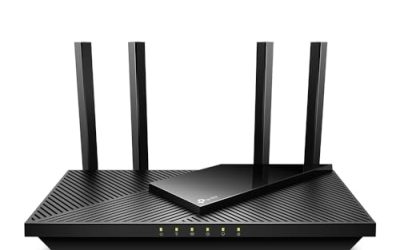
- AXE5400 tri-band Wi-Fi 6E router
- Speeds up to 5400 Mbps (6 GHz: 2402 Mbps; 5 GHz: 2402 Mbps; 2.4 GHz: 574 Mbps)
- Quad-core CPU
- OneMesh support for adding a TP-Link extender later
Fios households on a gigabit plan making their first move to Wi-Fi 6E.
This router suits Fios plans up to 1 Gbps. If you pay for a 2 Gig plan, pick a router with a faster WAN port instead.
The Archer AXE75 is the sensible starting point for a Fios household moving to Wi-Fi 6E. It is a tri-band router, so the 6 GHz band gives newer phones, laptops, and consoles a lane of their own while older devices stay on the familiar 2.4 GHz and 5 GHz bands. Its Amazon listing states that it works with all internet service providers, naming Verizon among them, and the setup is the standard ONT Ethernet connection. A quad-core processor and OneMesh support round out a router that covers the needs of a gigabit Fios plan without asking the buyer to learn advanced networking first.
Watch out for: This router suits Fios plans up to 1 Gbps. If you pay for a 2 Gig plan, pick a router with a faster WAN port instead.
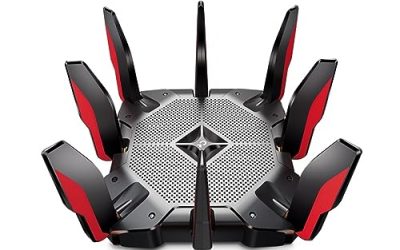
ASUS RT-AX86U Pro
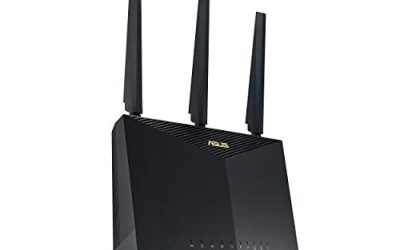
- Best for: Gaming households that want a 2.5 Gbps WAN port and strong traffic controls on Fios.
- AX5700 dual-band Wi-Fi 6 router, speeds up to 5700 Mbps
- 2.0 GHz quad-core CPU with 1 GB RAM
- 2.5G WAN/LAN port; supports internet connections up to 2 Gbps
- Dedicated gaming port and Mobile Game Mode
Gaming households that want a 2.5 Gbps WAN port and strong traffic controls on Fios.
It is a single router, so a very large home may still need a mesh add-on for far rooms.
The RT-AX86U Pro is the pick for a Fios home where gaming and heavy traffic share one connection. Its 2.5 Gbps WAN port means it carries a gigabit plan with room to spare and keeps up with a 2 Gig plan as well, which is the feature that separates it from most Wi-Fi 6 routers in its class. A dedicated gaming port and Mobile Game Mode give consoles and phones a path with less contention, while AiMesh lets you add another ASUS router later. The 2.0 GHz quad-core processor and 1 GB of memory keep the menus responsive when dozens of devices are connected at once.
Watch out for: It is a single router, so a very large home may still need a mesh add-on for far rooms.
NETGEAR Nighthawk RAX50
- Best for: Medium homes that want one router with wide stated coverage and no mesh to manage.
- AX5400 dual-band Wi-Fi 6 router, 6-stream
- Wireless speed up to 5.4 Gbps
- Coverage up to 2,500 sq. ft. for up to 25 devices
- Model number RAX50-100NAS
Medium homes that want one router with wide stated coverage and no mesh to manage.
Confirm the listing sells a new unit before ordering, since renewed units of this model circulate widely.
The Nighthawk RAX50 is the straightforward middle option for a medium home that wants wide coverage from one box. Its six-stream design and AX5400 rating give it room to handle streaming, gaming, and a house full of phones at the same time, and the stated coverage reaches up to 2,500 square feet, which suits a medium to large single home without the complexity of a mesh system. Setup runs through the Nighthawk app, and the router carries the NETGEAR Armor security features across connected devices. It has been on the market since early 2020, so it is a known quantity with a long track record of firmware updates behind it.
Watch out for: Confirm the listing sells a new unit before ordering, since renewed units of this model circulate widely.
TP-Link Deco XE75 (2-pack)
- Best for: Multi-room and multi-story Fios homes where a single router leaves dead zones.
- AXE5400 tri-band Wi-Fi 6E mesh system, 2-pack
- Covers up to 5,500 sq. ft.
- Speeds up to 5400 Mbps (6 GHz: 2402 Mbps; 5 GHz: 2402 Mbps; 2.4 GHz: 574 Mbps)
- AI-driven mesh with 6 GHz band
Multi-room and multi-story Fios homes where a single router leaves dead zones.
Update the firmware when connecting to a Verizon ONT, and note the standard XE75 suits plans up to 1 Gbps; the XE75 Pro is the version for multi-gig plans.
The Deco XE75 is the answer when the problem is reach rather than speed. Two units work as a single mesh network, spreading Wi-Fi 6E across up to 5,500 square feet so bedrooms, a home office, and the far end of the house all stay connected without dead zones. The system replaces a router and extender with one network name, and its AI-driven mesh steering moves devices between bands and nodes as people move around the house. Its Amazon listing states that it works with all internet service providers, including Verizon, and the main unit connects to the ONT by Ethernet just like a standalone router.
Watch out for: Update the firmware when connecting to a Verizon ONT, and note the standard XE75 suits plans up to 1 Gbps; the XE75 Pro is the version for multi-gig plans.
ASUS RT-AX88U Pro
- Best for: Wired-heavy homes and 2 Gig Fios plans that need dual 2.5 Gbps ports.
- AX6000 dual-band Wi-Fi 6 router
- Dual 2.5G ports
- WPA3 security with lifetime internet security
- Adaptive QoS and port forwarding
Wired-heavy homes and 2 Gig Fios plans that need dual 2.5 Gbps ports.
Confirm you are ordering the Pro variant, not the older non-Pro RT-AX88U, since the two models share a similar name.
The RT-AX88U Pro is the heavy lifter here, built for homes where the network carries everything at once. Its AX6000 rating and dual 2.5 Gbps ports give wired devices a fast lane in both directions, and WAN aggregation lets the router combine connections when the setup calls for it. Adaptive QoS, port forwarding, and lifetime internet security give advanced users the controls they expect from an ASUS router, while AiMesh support means it can anchor a larger mesh later. If the house has a wired office, a media server, several consoles, and a 2 Gig Fios plan, this router keeps all of them fed without compromise.
Watch out for: Confirm you are ordering the Pro variant, not the older non-Pro RT-AX88U, since the two models share a similar name.
Which One Fits Your Situation
Apartment or small home on a gigabit plan
Pick the TP-Link Archer AXE75. It brings Wi-Fi 6E to a gigabit Fios connection through a plain Ethernet hookup to the ONT, and its tri-band design keeps newer devices off the crowded bands. If you want more coverage from a single box instead, the Nighthawk RAX50 is the alternative, with its wider stated coverage and longer track record.
Gaming household with consoles and PCs
Pick the ASUS RT-AX86U Pro. The dedicated gaming port, Mobile Game Mode, and traffic controls are built for the moment when a download, a stream, and an online match all compete at once. Its 2.5 Gbps WAN port also means a move to a 2 Gig Fios plan later needs no new router.
Large or multi-story home with weak corners
Pick the TP-Link Deco XE75 2-pack. A single router cannot fix a house where the far bedroom sits two floors from the ONT, and two mesh units spread the signal instead of forcing one box to shout through walls. Place the second unit where the signal starts to fade, not in the dead zone itself.
Wired office or a 2 Gig Fios plan
Pick the ASUS RT-AX88U Pro. Dual 2.5 Gbps ports and WAN aggregation suit a home with wired desktops, a media server, and consoles that all want a fast wired lane. It is more router than a gigabit plan needs, so only choose it when the wired load or the plan speed justifies it.
Common Mistakes
- Buying a modem or a modem-router combo for Fios. The ONT already does the modem’s job, so a router with an Ethernet WAN port is all you need.
- Leaving the ONT on coax output and wondering why the new router gets no connection. The ONT must hand off by Ethernet before a third-party router will work.
- Pairing a gigabit WAN port with a 2 Gig Fios plan. The router caps the connection at gigabit speed and the extra plan speed never arrives.
- Removing the Verizon gateway while Fios TV boxes still depend on it. Set-top boxes can lose guide data and on-demand features without the gateway or a MoCA bridge.
- Hiding the router in a cabinet, a basement corner, or behind the television and blaming Fios for weak Wi-Fi. Placement decides coverage more than any specification does.
Frequently Asked Questions
Can I use my own router with Verizon Fios?
Yes, in most cases. Fios delivers internet through an ONT, and you can connect your own router to it with an Ethernet cable. The ONT must hand off by Ethernet rather than coax, which is how most current installs already work. Verizon does not support third-party routers itself, so you handle setup and troubleshooting, but the connection is a standard Ethernet handoff.
Do I need a modem for Verizon Fios?
No. A modem converts a cable or phone signal for a router, and Fios has no such signal to convert. The ONT converts the fiber signal and hands it to the router over Ethernet. That is why modem-router combos are the wrong purchase for Fios: the modem half has nothing to connect to, and the router half is all you need.
Will my Fios TV still work with a third-party router?
It depends on the TV setup. Fios set-top boxes can rely on the Verizon gateway for guide data, on-demand features, and the coax network between the boxes. Internet-only households have nothing to worry about, but TV households should keep the Verizon router in the chain, run the new router behind it, or use a MoCA adapter. Check your boxes before disconnecting anything.
What speed router do I need for gigabit Fios?
A gigabit WAN port is enough for a 1 Gbps plan, and every router in this guide meets that bar. On a 2 Gig plan, you need a 2.5 Gbps WAN port, such as on the RT-AX86U Pro or RT-AX88U Pro, or the router caps your speed below the plan. Wi-Fi numbers alone do not answer this; the WAN port does.
FAQ
Can I use my own router with Verizon Fios?
Do I need a modem for Verizon Fios?
Will my Fios TV still work with a third-party router?
What speed router do I need for gigabit Fios?
More from Amazon
Programs that pair well with the guide above. Offers and eligibility are set by Amazon and may change.
Free shipping on eligible items, Prime Video and more. Eligible new members can start with a free trial.
Start a Prime free trialAd-free music streaming. Eligible new subscribers can start with a free trial.
Try Music Unlimited freeA Prime membership for ages 18-24 with a trial period. Eligibility is set by Amazon.
See Prime for Young AdultsAudiobooks and podcasts to listen to on the go. Eligible new members can start with a free trial.
Try Audible freeAs an Amazon Associate we earn from qualifying purchases.