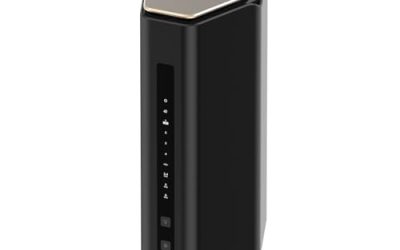
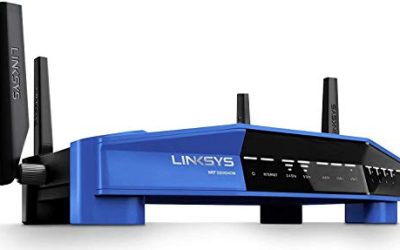
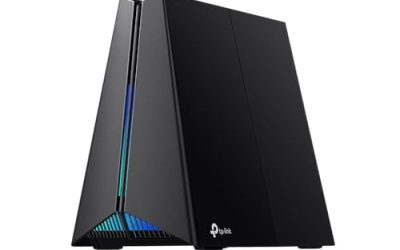
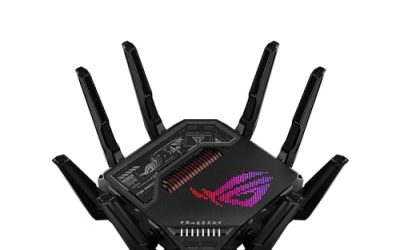
Our Short List of 3

- Best for: A busy flat that needs modern Wi-Fi 6 without a gaming-focused design.
- Dual-band AX3000 Wi-Fi 6 router
- OFDMA and MU-MIMO
- USB 3.0 port
- EasyMesh compatible
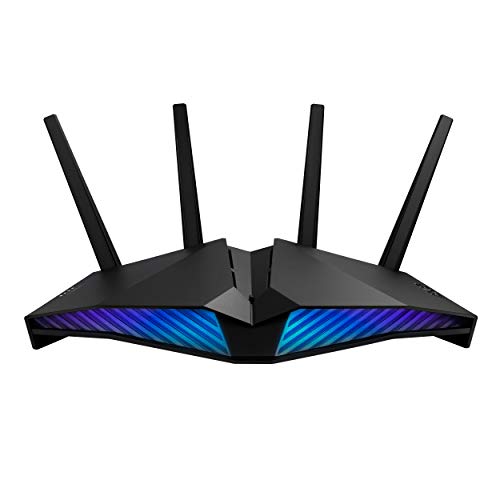
- Best for: Gamers who want one wired device prioritized while phones and streams stay connected.
- AX5400 dual-band Wi-Fi 6 gaming router
- MU-MIMO
- Dedicated gaming port
- Mobile Game Mode

- Best for: Large homes where several people stream, game, and call from different rooms.
- 6-stream AX5400 dual-band Wi-Fi 6 router
- MU-MIMO and Beamforming+
- OFDMA and 1024-QAM
- Smart Connect with one Wi-Fi name
All 4 Picks at a Glance
| Product | Specs | Action |
|---|---|---|
| TP-Link Archer AX55 |
| Check price on Amazon |
| ASUS RT-AX82U |
| Check price on Amazon |
| NETGEAR Nighthawk RAX50 |
| Check price on Amazon |
 TP-Link Archer A8 |
| Check price on Amazon |
Our Top Picks
- TP-Link AC1900 Smart WiFi Router Dual Band RouterWi-Fi 5 AC19009.57 x 6.32 x 1.28 inches0.91 poundsCheck on Amazon
A MIMO router earns its keep on a crowded evening, not on a quiet afternoon. When a gaming PC, a console, two phones, and a streaming TV all want bandwidth at once, the real question is whether the router can serve several of them at the same time or must queue them one by one. Multi-user MIMO opens separate spatial streams to compatible devices, so a busy household feels responsive even while the internet plan stays the same.
This guide is for households where gaming, streaming, and video calls collide, and for anyone replacing an older router that slows down as devices pile on. Every pick below is a Wi-Fi router whose Amazon listing names MU-MIMO outright, with the remaining details drawn from the name and specifications on that same listing. Read the coverage and port notes beside each model before deciding, because the right choice depends on how many devices share your network and on how far each device sits from it.
Quick Picks
As an Amazon Associate we earn from qualifying purchases
| Product | Best for | Key spec from title |
|---|---|---|
| TP-Link Archer AX55 | Everyday Wi-Fi 6 for a busy flat | Dual-Band AX3000 Wi-Fi 6 Router, OFDMA, MU-MIMO |
| ASUS RT-AX82U | Gaming nights with a dedicated port | AX5400 Dual-Band WiFi 6 Gaming Router, MU-MIMO, Aura RGB |
| NETGEAR Nighthawk RAX50 | Large homes needing wide coverage | 6-Stream AX5400 WiFi 6 Router, MU-MIMO, Beamforming+ |
| TP-Link Archer A8 | Older plans and smaller budgets | AC1900 Smart WiFi Router, High Speed MU-MIMO, Dual Band |
How to Choose
Count the streams, not just the speed class
A speed class such as AX3000 or AX5400 adds up the theoretical rates of every band, so it says little about how many devices can talk at once. MU-MIMO is the feature that splits the wireless signal into separate spatial streams, letting the router serve several compatible devices simultaneously instead of cycling through them one at a time. Look for the stream count in the listing, often written as 2×2 or 4×4, and match it to the number of active devices in your home. A household with a gaming PC, a console, and several phones will feel the difference far more than a single laptop ever could.
Match the Wi-Fi generation to your devices
Wi-Fi 6 routers bring OFDMA alongside MU-MIMO, which slices channels into smaller resource units so short messages from smart devices waste less airtime. Wi-Fi 5 models with MU-MIMO still serve several devices at once, and they make sense when most of your gear predates Wi-Fi 6 or your internet plan is modest. Check what your phones, laptops, and consoles actually support before paying for a newer standard they cannot use. A router only delivers its headline features to devices that speak the same wireless language, so the newest box is not automatically the best fit.
Check the wired side before you buy
Wireless streams get the attention, yet a gaming PC or console usually performs best on a cable. Count the gigabit LAN ports and look for a dedicated gaming port that prioritizes whatever is plugged into it, since that one detail can steady latency during a match. A USB port matters too, whether it shares storage, a printer, or a mobile connection as backup during an outage. Also confirm the WAN port matches your internet plan, because a gigabit plan behind a slower WAN port leaves speed on the table before the signal ever reaches your devices.
Size coverage for the whole home
Antennas, beamforming, and transmit power decide whether the signal holds up two rooms away, and a listing that quotes coverage in square feet gives you a starting point rather than a promise. Walls, floors, and interference all shrink real coverage, so a router listed for a large home may still struggle in a long flat with thick walls. Mesh support is the safety net here: EasyMesh, AiMesh, and OneMesh each let you add a compatible node later instead of replacing the router. Buying a model with a mesh path keeps the upgrade cheap when you move or add rooms.
The 4 Best Options
TP-Link Archer AX55
- Best for: A busy flat that needs modern Wi-Fi 6 without a gaming-focused design.
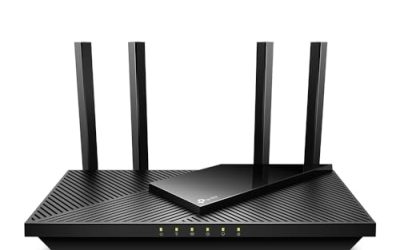
- Dual-band AX3000 Wi-Fi 6 router
- OFDMA and MU-MIMO
- USB 3.0 port
- EasyMesh compatible
A busy flat that needs modern Wi-Fi 6 without a gaming-focused design.
Confirm it is still sold before buying, and check that your internet plan and devices can use Wi-Fi 6, since older gear will not see the full benefit.
The Archer AX55 is the sensible middle of this list, a dual-band Wi-Fi 6 router that brings MU-MIMO and OFDMA to a household with a realistic mix of phones, laptops, and a console. Its AX3000 figure splits into fast 5 GHz and steady 2.4 GHz bands, while four high-performance antennas and beamforming aim the signal at connected devices rather than spraying it evenly. A USB 3.0 port adds storage or printer sharing, and EasyMesh support leaves a mesh upgrade open if coverage falls short later.
Watch out for: Confirm it is still sold before buying, and check that your internet plan and devices can use Wi-Fi 6, since older gear will not see the full benefit.
ASUS RT-AX82U
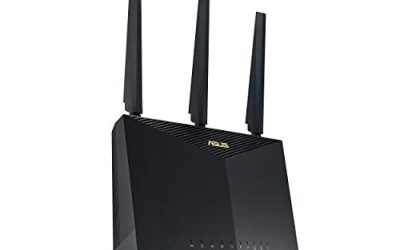
- Best for: Gamers who want one wired device prioritized while phones and streams stay connected.
- AX5400 dual-band Wi-Fi 6 gaming router
- MU-MIMO
- Dedicated gaming port
- Mobile Game Mode
Gamers who want one wired device prioritized while phones and streams stay connected.
Confirm it is still sold before buying, and buy the new listing under this ASIN rather than the renewed version sold under a different ASIN.
The RT-AX82U is built for evenings when a match matters, pairing AX5400 dual-band Wi-Fi 6 with a dedicated gaming port that gives one wired device priority over the rest of the network. Mobile Game Mode trims latency for phones with a tap in the ASUS Router app, and MU-MIMO keeps the remaining devices moving while the game runs. Aura RGB lighting marks it out as a gaming router, while AiMesh support and lifetime AiProtection Pro security cover the practical side of a household network.
Watch out for: Confirm it is still sold before buying, and buy the new listing under this ASIN rather than the renewed version sold under a different ASIN.
NETGEAR Nighthawk RAX50
- Best for: Large homes where several people stream, game, and call from different rooms.
- 6-stream AX5400 dual-band Wi-Fi 6 router
- MU-MIMO and Beamforming+
- OFDMA and 1024-QAM
- Smart Connect with one Wi-Fi name
Large homes where several people stream, game, and call from different rooms.
Confirm it is still sold before buying, and check which processor variant the listing offers, since the page shows more than one configuration under this model name.
The Nighthawk RAX50 suits a larger home where distance is the problem, with a six-stream AX5400 design and coverage quoted at 2,500 square feet on its Amazon listing. MU-MIMO and Beamforming+ work together to hold connections across rooms, while Smart Connect steers devices onto one network name instead of making you pick bands by hand. Four gigabit LAN ports and a USB 3.0 port cover wired PCs and shared storage, and the Nighthawk app handles setup and parental controls without a desktop.
Watch out for: Confirm it is still sold before buying, and check which processor variant the listing offers, since the page shows more than one configuration under this model name.
TP-Link Archer A8
- Best for: Smaller homes on an older plan that need multi-device handling at a modest step up.
- AC1900 dual-band Wi-Fi 5 router
- High speed MU-MIMO
- Beamforming
- Full gigabit Ethernet ports
Smaller homes on an older plan that need multi-device handling at a modest step up.
Confirm it is still sold before buying, and remember it is Wi-Fi 5, so it cannot offer OFDMA or the wider channels of the Wi-Fi 6 picks above.
The Archer A8 is the entry point here, a dual-band Wi-Fi 5 router that still carries real MU-MIMO for homes whose internet plan and devices do not need Wi-Fi 6 yet. Its AC1900 figure combines a fast 5 GHz band with a steady 2.4 GHz band, and beamforming focuses the signal on active devices. Full gigabit ports wire a PC or console, guest Wi-Fi keeps visitors off the main network, and OneMesh compatibility leaves room to extend coverage with a matching extender later.
Watch out for: Confirm it is still sold before buying, and remember it is Wi-Fi 5, so it cannot offer OFDMA or the wider channels of the Wi-Fi 6 picks above.
Which One Fits Your Situation
A flat full of gamers and streamers
Pick the ASUS RT-AX82U when one match or stream must stay steady while the rest of the house stays online. Its dedicated gaming port gives a wired PC or console priority, Mobile Game Mode helps phones, and MU-MIMO keeps the remaining devices from queuing behind the game. The AX5400 figure leaves headroom for several simultaneous streams.
A large house with distant rooms
Pick the NETGEAR Nighthawk RAX50 when coverage is the limiting factor rather than raw speed. Six streams and Beamforming+ hold connections across rooms, Smart Connect removes band juggling, and the quoted 2,500 square feet of coverage fits a multi-room layout. Four wired ports still cover a PC and a console near the router.
A modest plan and older devices
Pick the TP-Link Archer A8 when the internet plan is modest and most devices predate Wi-Fi 6. Its AC1900 MU-MIMO design serves several devices at once without charging for wireless features the household cannot use, and OneMesh leaves a cheap coverage upgrade open if a dead corner ever appears later.
One router to grow with
Pick the TP-Link Archer AX55 when you want Wi-Fi 6 today and options tomorrow. MU-MIMO and OFDMA handle a growing device count, the USB 3.0 port covers sharing, and EasyMesh support means a single extender can easily fix coverage instead of forcing a whole new router when you move.
Common Mistakes
- Buying on the speed class alone while ignoring how many MU-MIMO streams the router actually offers
- Assuming every Wi-Fi 6 router includes MU-MIMO, when some listings never name it at all
- Forgetting to count gigabit LAN ports, then discovering the gaming PC and console cannot both plug in
- Placing the router behind a TV cabinet or in a corner, where walls and metal block the streams it was bought for
- Skipping the mesh question at purchase time and replacing a working router later instead of adding one node
Frequently Asked Questions
What does MU-MIMO actually do?
MU-MIMO lets a router send separate spatial streams to several compatible devices at the same time, instead of serving each device in turn. On a busy network that means a streaming TV, a gaming console, and two phones can all receive data in the same moment, which keeps each of them responsive even when the household is fully online.
Do my devices need to support MU-MIMO to benefit?
Only devices with MU-MIMO support receive their own simultaneous stream, while older devices still connect normally and share the remaining capacity. A mixed household still gains, because the MU-MIMO devices stop queuing behind each other, which frees airtime for everything else on the network.
Is Wi-Fi 6 required for MU-MIMO?
No, MU-MIMO arrived with Wi-Fi 5, and routers such as the Archer A8 in this guide offer it on the older standard. Wi-Fi 6 adds OFDMA and wider channels, which improve efficiency further, but a Wi-Fi 5 router with MU-MIMO already serves several devices at once.
Can a MIMO router replace a mesh system?
A strong MIMO router covers many homes on its own, yet it cannot bend signals through thick walls or across long floor plans the way extra nodes can. If dead corners persist after moving the router to a central spot, adding a compatible mesh node beats buying a more powerful single router.
FAQ
What does MU-MIMO actually do?
Do my devices need to support MU-MIMO to benefit?
Is Wi-Fi 6 required for MU-MIMO?
Can a MIMO router replace a mesh system?
More from Amazon
Programs that pair well with the guide above. Offers and eligibility are set by Amazon and may change.
Free shipping on eligible items, Prime Video and more. Eligible new members can start with a free trial.
Start a Prime free trialAd-free music streaming. Eligible new subscribers can start with a free trial.
Try Music Unlimited freeA Prime membership for ages 18-24 with a trial period. Eligibility is set by Amazon.
See Prime for Young AdultsAudiobooks and podcasts to listen to on the go. Eligible new members can start with a free trial.
Try Audible freeAs an Amazon Associate we earn from qualifying purchases.