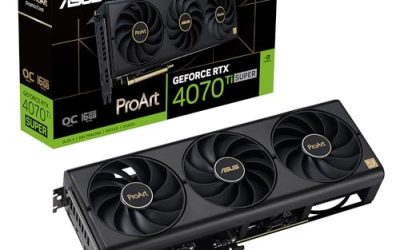
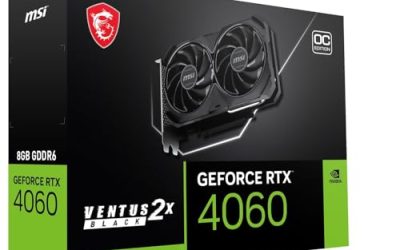
Key takeaways
- Best graphics cards under 300 dollars: five budget GPUs for smooth 1080p gaming, from the 12GB Intel Arc B580 to the RTX 5060, RX 9060 XT, RTX 4060 and RX 7600.
As an Amazon Associate, we earn from qualifying purchases made through links on this page, at no extra cost to you.


Three hundred dollars is the line where a graphics card stops being a compromise and starts being a real gaming upgrade. Below that line you can still buy a current-generation card with modern upscaling, hardware ray tracing and enough memory for high settings at 1080p — but only if you pick carefully. The wrong card in this tier leaves you with too little memory for new releases, a cooler that belongs in a larger case, or a board that leans on a feature your motherboard does not support.
This guide covers five graphics cards that fit the under-three-hundred-dollar tier: two current-generation cards from Nvidia and AMD, Intel’s memory-rich Battlemage card, and two proven last-generation options that still make sense when their street pricing sits inside the tier. Every card below is a desktop graphics card sold on Amazon US, aimed squarely at 1080p gaming with some headroom for lighter 1440p play. There are no cut-down laptop chips, no workstation cards dressed up as gaming hardware, and no used or refurbished listings here.
One honest note before the picks: street pricing in this tier has been volatile through late 2026, pushed around by memory supply pressure, and a card that launched inside the tier can drift above it for weeks at a time. The verification section at the end explains how each pick was checked. Always confirm the live listing before ordering.
How to Choose a Graphics Card Under Three Hundred Dollars
Start with video memory, because it is the limit you will feel first. Most cards in this tier carry eight gigabytes, enough for high settings at 1080p in the large majority of current games. A smaller number offer twelve gigabytes, and that extra memory is genuinely useful: texture-heavy new releases get more room, and the card stays viable for longer as games keep asking for more. If you play recent single-player releases at high texture settings, favour the card with more memory. If you mostly play esports titles and older games, eight gigabytes is plenty.
Next, match the card to your monitor. All five picks here are 1080p-first cards: smooth at high settings, usable at 1440p with medium settings and upscaling, and none of them a 4K gaming card. If your monitor is 1080p with a high refresh rate, you are exactly the buyer this tier is built for.
Upscaling support is the third thing to weigh. Nvidia cards offer DLSS, AMD cards offer FSR, and Intel cards offer XeSS — all three render at a lower internal resolution and reconstruct a sharper image, buying real frame rate headroom. DLSS is the most widely supported and pairs with Nvidia’s mature drivers and NVENC encoder for streaming, while FSR works across brands. If you stream, record, or use CUDA-accelerated creative software, the Nvidia options carry extra weight. If raw frame rate per dollar is your only measure, the AMD and Intel cards argue strongly for themselves.
Compatibility checks come before ordering, not after. Intel’s Arc cards want Resizable BAR enabled in your motherboard firmware to reach full performance, so check that your board supports it first. Every card here needs a single eight-pin power connector, and most want a supply in the four-hundred-and-fifty to six-hundred-and-fifty watt range. Measure your case too: the single-fan card in this guide fits almost anywhere, while dual-fan models need more length.
1. SPARKLE Intel Arc B580 TITAN OC 12GB
Key specs: Intel Arc B580, Battlemage BGM-G21 GPU, 2,560 shading units, 12GB GDDR6, 192-bit memory interface, 456 GB/s bandwidth, boost clock up to 2,740 MHz, HDMI 2.1 and DisplayPort 2.1, PCIe 4.0 x8, single eight-pin power connector.
The SPARKLE Arc B580 TITAN OC is the pick that makes this tier interesting, because it breaks the eight-gigabyte pattern every other card here follows. Twelve gigabytes of memory on a card inside the three-hundred-dollar tier is unusual: texture-heavy games that push eight-gigabyte cards into stuttering have room to breathe, and lighter 1440p gaming becomes realistic. In raw raster performance it trades blows with last generation’s mid-range cards, and Intel’s driver updates through 2026 have steadily closed the gaps early Battlemage reviews flagged. There are conditions: the card wants Resizable BAR enabled on your motherboard, runs on a PCIe x8 link that costs a little on older PCIe 3.0 boards, and older DirectX 9 and 11 titles can still show driver quirks. For a modern system with a board that supports Resizable BAR, none of that outweighs the memory advantage.
Best for: 1080p high settings with headroom, and the most future-proof memory capacity in this tier.
Pros:
– Twelve gigabytes of VRAM, the most memory of any card in this guide
– Strong 1080p performance with light 1440p capability
– Modern DisplayPort 2.1 and HDMI 2.1 outputs
Cons:
– Needs Resizable BAR enabled for full performance
– Older games can still show driver quirks
2. ZOTAC Gaming GeForce RTX 5060 Solo 8GB
Key specs: Nvidia GeForce RTX 5060, Blackwell GB206 GPU, 3,840 CUDA cores, 8GB GDDR7, 128-bit memory interface, 448 GB/s bandwidth, boost clock up to 2,497 MHz, 145W board power, single eight-pin power connector, single-fan design.
The ZOTAC RTX 5060 Solo is the smallest card in this guide and in some ways the most practical. A single-fan card that draws one hundred and forty-five watts and needs only one eight-pin connector fits into compact cases and older prebuilt systems that larger cards cannot enter. It is also the cheapest way into Nvidia’s current Blackwell generation: DLSS 4 with Multi Frame Generation, the mature NVENC encoder for streaming and recording, and driver support that covers new releases on day one. The limits are familiar: eight gigabytes of GDDR7 is fast — the highest bandwidth of any eight-gigabyte card here — but the newest texture-heavy releases can push past it at high settings, and the PCIe x8 link trims a little performance on older PCIe 3.0 boards. At 1080p high settings and esports refresh rates, it is a polished, efficient option that asks very little of the rest of your system.
Best for: Compact builds, streaming and recording, and buyers who want Nvidia’s DLSS and driver ecosystem.
Pros:
– DLSS 4 with Multi Frame Generation and mature NVENC encoding
– Tiny single-fan design fits small cases and prebuilt systems
– Low power draw with a single eight-pin connector
Cons:
– Eight gigabytes of memory can run short in new texture-heavy games
– Single fan runs warmer under sustained load than dual-fan cards
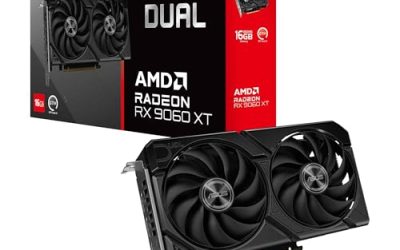
3. ASUS Dual Radeon RX 9060 XT 8GB
Key specs: AMD Radeon RX 9060 XT, RDNA 4 Navi 44 XT GPU, 2,048 stream processors, 8GB GDDR6, 128-bit memory interface, 322 GB/s bandwidth, boost clock up to 3,130 MHz, FSR 4 upscaling, full PCIe x16 link, dual-fan Axial-tech cooler.
The ASUS Dual RX 9060 XT is the fastest raster card in this tier at 1080p, and the gap is not small: independent testing has put it roughly a fifth ahead of the Arc B580 in rasterised games, and ahead of the RTX 5060 in titles that do not lean on ray tracing or upscaling. That speed comes from AMD’s RDNA 4 architecture, which brings FSR 4 upscaling and a full PCIe x16 link — making this the safest pick in the guide for an older PCIe 3.0 motherboard, where the x8 cards lose a little performance. The trade-off is memory bandwidth: eight gigabytes of GDDR6 across a 128-bit bus gives this card the lowest bandwidth figure in the guide, and ray tracing trails the Nvidia options. For pure 1080p raster gaming — the use case this tier is built around — it is the strongest performer you can buy inside it.
Best for: Maximum 1080p frame rates, and upgrading an older PC with a PCIe 3.0 board.
Pros:
– Fastest raster performance in this tier at 1080p
– Full PCIe x16 link, no penalty on older motherboards
– FSR 4 upscaling and a high boost clock
Cons:
– Eight gigabytes of GDDR6 with the lowest bandwidth here
– Ray tracing trails the Nvidia cards
4. ASUS Dual GeForce RTX 4060 V2 OC 8GB
Key specs: Nvidia GeForce RTX 4060, Ada Lovelace AD107 GPU, 3,072 CUDA cores, 8GB GDDR6, 128-bit memory interface, boost clock up to 2,535 MHz in OC mode, DLSS 3 with Frame Generation, 115W board power, dual Axial-tech fans with 0dB technology, two-slot design.
The RTX 4060 is last generation’s card, and in this tier that is a strength rather than a weakness. It is the most efficient card in the guide at one hundred and fifteen watts: it runs cool, runs quiet, and slots into prebuilt systems and compact cases with modest power supplies where hungrier cards would demand an upgrade. The ASUS Dual V2 OC adds a dual-fan cooler that stops completely at idle, so the card is silent during desktop work, and DLSS 3 with Frame Generation smooths frame rates beyond what the raw specifications suggest. Performance sits a step behind the current-generation cards above, and eight gigabytes is again the ceiling — this is a 1080p-first card, not a high-settings 1440p card — but for buyers upgrading an older system it is one of the easiest recommendations in the guide.
Best for: Quiet, efficient 1080p gaming and upgrading prebuilt PCs with modest power supplies.
Pros:
– Lowest power draw in the guide at one hundred and fifteen watts
– Silent at idle thanks to 0dB fan-stop technology
– DLSS 3 Frame Generation smooths supported games
Cons:
– Last-generation chip, a step behind the RTX 5060
– Eight gigabytes of memory limits high-texture play
5. ASRock AMD Radeon RX 7600 Challenger 8GB
Key specs: AMD Radeon RX 7600, RDNA 3 GPU, 8GB GDDR6, 128-bit memory interface, boost clock up to 2,695 MHz, PCIe 4.0, dual-fan cooler with 0dB silent cooling, HDMI 2.1 and DisplayPort 1.4.
The ASRock RX 7600 Challenger is the lowest-cost modern card in this guide, and it earns its place by being honest about what it is: a clean, efficient 1080p card with current RDNA 3 architecture, FSR support and a quiet dual-fan cooler, without any pretence of doing more. In esports titles and older games it is fast enough for high refresh rates, and in modern games at 1080p high settings it holds its own, especially with FSR switched on, while the 0dB mode keeps the fans off at idle. It is the weakest card of the five in raw speed and should not be expected to stretch to 1440p, but when the budget is genuinely tight it delivers a modern feature set at the lowest entry point in the guide — the right card for a first build, a child’s PC, or a second machine where value matters more than maximum settings.
Best for: The lowest-cost modern 1080p build, esports titles, and first-time builders on a tight budget.
Pros:
– Lowest entry point of any modern card in this guide
– Current RDNA 3 architecture with FSR support
– Quiet dual-fan cooler with 0dB silent mode
Cons:
– Weakest raw performance of the five picks
– Strictly a 1080p card, not suited to 1440p
Video Memory: Why Eight Gigabytes Is the Line
Almost every card in this tier carries eight gigabytes of video memory, and that number is the single biggest limit on how long these cards stay useful. Modern games load textures, geometry and lighting data into video memory, and when a game wants more than the card holds, performance falls off a cliff: stuttering, hitching and texture pop-in replace smooth frame rates. Recent releases have already started asking for more than eight gigabytes at high texture settings, even at 1080p, which is why the twelve-gigabyte Arc B580 stands out in this guide.
That does not make the eight-gigabyte cards bad buys. At 1080p with high rather than ultra textures, and with upscaling enabled, they run the large majority of current games smoothly. If you play the newest single-player releases at high texture settings, favour the twelve-gigabyte card; if you play esports titles, older games, or modern games at balanced settings, eight gigabytes is fine.
Power, Size and Compatibility Checks
A graphics card that does not fit or cannot be powered is not a bargain, so run these checks before ordering. First, the power supply: the RTX 4060 and RX 7600 are the lightest draws here and work with modest units, while the Arc B580 and RTX 5060 want more headroom — a supply in the four-hundred-and-fifty to six-hundred-and-fifty watt range covers the whole guide depending on your CPU and the rest of the system. Every card here uses a single eight-pin PCIe power connector, which most supplies from the last decade provide.
Second, the case. The ZOTAC RTX 5060 Solo is a single-fan card that fits almost any case, including compact and prebuilt systems. The dual-fan cards need more length — measure from the rear bracket to the nearest obstruction and compare with the card’s listed length. All five are two-slot designs, so thickness is rarely the problem; length is.
Third, the motherboard. The Arc B580 needs Resizable BAR enabled to reach its full speed, and the RTX 5060 uses a PCIe x8 link that costs a little performance on PCIe 3.0 boards — the RX 9060 XT’s full x16 link is the exception. If your board is more than a few years old, check its firmware options and PCIe version before choosing.
Frequently Asked Questions
Can a graphics card under three hundred dollars run modern games?
Yes, at 1080p. All five cards in this guide run current games at high settings with smooth frame rates, especially with upscaling enabled. They are not 4K cards, and they need settings lowered at 1440p, but at their intended resolution they are genuine gaming hardware, not stopgaps.
Is eight gigabytes of video memory enough in 2026?
For most 1080p gaming, yes, with sensible texture settings. The newest releases can exceed eight gigabytes at ultra textures, which is why this guide includes a twelve-gigabyte option. If you play the latest single-player games at maximum textures, choose the card with more memory.
Should I buy a last-generation card like the RTX 4060 or RX 7600?
If the listing sits inside the tier, yes. Both cards are efficient, quiet and well supported, and their lower power draw makes them the easiest upgrades for older systems. Current-generation cards are faster, but the last-generation options remain good value when priced inside the tier.
Which Card Should You Buy?
If you want the most memory and the longest useful life in this tier, buy the SPARKLE Arc B580 TITAN OC — twelve gigabytes changes what the card can do, provided your board supports Resizable BAR. If you stream, record, or want Nvidia’s ecosystem in the smallest possible package, buy the ZOTAC RTX 5060 Solo. If raw 1080p frame rate is all that matters, buy the ASUS Dual RX 9060 XT. If you are upgrading a prebuilt PC and want the quietest, easiest install, buy the ASUS Dual RTX 4060 V2 OC. And if the budget is tight and you need a modern card at the lowest entry point, buy the ASRock RX 7600 Challenger. Whichever you choose, confirm the live listing before ordering, because street pricing in this tier moves.
Verification
Amazon blocks live product-page loads for AI agents, so no ASIN in this article was verified by opening an Amazon product page directly. Each ASIN was instead corroborated through independent sources. The SPARKLE Arc B580 TITAN OC, ZOTAC RTX 5060 Solo and ASUS Dual RX 9060 XT ASINs come from the Amazon links in PC Guide’s under-three-hundred-dollar roundup, updated in late November 2026. The SPARKLE card’s ASIN is additionally confirmed by an earlier published guide on this same site listing the identical card under the identical ASIN. The ASUS Dual RTX 4060 V2 OC ASIN appears under the same product name in two earlier published roundups, and the ASRock RX 7600 Challenger ASIN appears in an earlier published budget graphics card roundup.
Two caveats need the reader’s attention. First, street pricing in this tier has been volatile through late 2026: independent roundups published in recent weeks report that the RTX 5060 and the RX 9060 XT eight-gigabyte models have at times been listed above this tier, while the Arc B580 has most consistently been found inside it. All five cards launched at or inside the tier, and the roundup sources cited above still list them as under-tier picks as of late November 2026 — but listings move, so check the live listing before ordering, and if a card is listed above the tier, wait for a sale or choose another pick. Second, the ZOTAC RTX 5060 Solo and ASUS Dual RX 9060 XT ASINs rest on a single corroborating source each, so confirming the exact model name on the listing matters more for those two.
FAQ
Which Card Should You Buy?
More from Amazon
Programs that pair well with the guide above. Offers and eligibility are set by Amazon and may change.
Free shipping on eligible items, Prime Video and more. Eligible new members can start with a free trial.
Start a Prime free trialAd-free music streaming. Eligible new subscribers can start with a free trial.
Try Music Unlimited freeA Prime membership for ages 18-24 with a trial period. Eligibility is set by Amazon.
See Prime for Young AdultsAudiobooks and podcasts to listen to on the go. Eligible new members can start with a free trial.
Try Audible freeAs an Amazon Associate we earn from qualifying purchases.