Our Short List of 3
All 3 Picks at a Glance
| Product | Specs | Action |
|---|---|---|
 1. Sapphire Pulse RX 7900 XT | Check price on Amazon | |
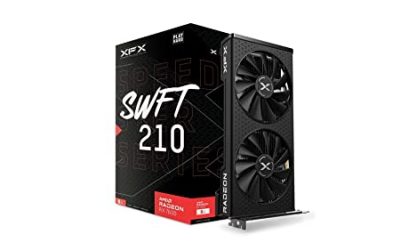
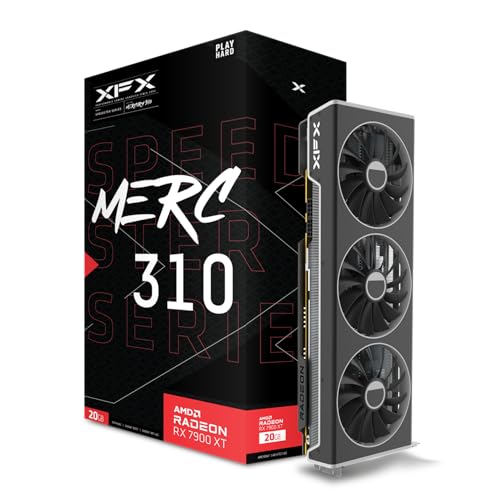 2. XFX Speedster MERC310 Ultra RX 7900 XT | Check price on Amazon | |
 3. XFX Speedster MERC310 Black RX 7900 XTX | Check price on Amazon |
Our Top Picks
The graphics card decides what your games look like and how smoothly they run. It renders every frame, shades every surface, and pushes pixels to your monitor, so it carries more of the gaming load than any other part in the PC. A strong card turns a stuttering slideshow into a fluid game, lets you raise detail settings without fear, and opens the door to high refresh rates and high resolutions that a weaker card cannot reach.
The cards in this guide sit at the high end of the current market. All three are built for 1440p and 4K gaming, with large memory buffers that hold the heavy textures of modern titles. They use AMD RDNA 3 architecture, with 20GB or 24GB of GDDR6 memory, wide memory buses, and triple-fan cooling. If you play at 1080p on a modest monitor, these cards are more than you need. If you play at 1440p or 4K, or you want headroom for the next few years of releases, they are the class of card to look at.
At a Glance
- 1. Sapphire Pulse RX 7900 XT — 20GB GDDR6, boost up to 2450 MHz
- 2. XFX Speedster MERC310 Ultra RX 7900 XT — 20GB GDDR6, boost up to 2535 MHz
- 3. XFX Speedster MERC310 Black RX 7900 XTX — 24GB GDDR6, boost up to 2615 MHz
How to Choose a Graphics Card for Gaming
Begin with your monitor
The monitor sets the target. A 1080p monitor at 60 Hz needs far less graphics power than a 1440p monitor at 165 Hz, and a 4K monitor needs more still. The cards in this guide are aimed at 1440p high-refresh play and 4K at 60 frames per second, which is where their large memory buffers and wide buses earn their keep. If your monitor is 1080p, a mid-range card will serve you well and leave budget for other upgrades. If you plan to move to 1440p or 4K soon, buying into this class now avoids a second upgrade later.
Memory size matters more than it used to
Modern games ship with huge texture packs, and the card must hold those textures in its own memory to avoid stutter. A 20GB buffer handles current 4K titles with room to spare, and a 24GB buffer goes further, giving headroom for the heaviest games and for content work on the side. The two 7900 XT cards here carry 20GB on a 320-bit bus, while the 7900 XTX carries 24GB on a 384-bit bus. Wider buses move data faster, so the XTX has an edge in memory bandwidth as well as capacity. When comparing cards, look at memory size and bus width together, not one alone.
Check the power supply
High-end cards draw serious power. The 7900 XT class wants a quality 750 W power supply and two 8-pin connectors, and the XTX class wants the same or more. Check the wattage and the connectors on your current power supply before you buy, and look at its age: an old unit that has run for years may not deliver its rated power cleanly any more. A good power supply is the cheapest insurance for an expensive card, and it is far better to upgrade it now than to chase instability later.
Measure the case
Triple-fan cards are long. The Sapphire Pulse measures around 17 inches in some listings, and the XFX MERC310 cards are similarly long and heavy. Open your case and measure the space from the back plate to the nearest obstruction, usually a drive cage or a front fan, and check the card thickness in slots: these cards take close to three slots. A card that does not fit is a return and a delay, so measure first. A support bracket is also worth having, since a heavy card can sag over time and strain the slot.
Cooling and noise
All three cards use triple-fan coolers with large heatsinks, which keep temperatures in check during long sessions. Fan design matters: larger fans can spin slower for the same airflow, which keeps noise down. The Sapphire Pulse keeps the design simple and compact for its class, while the XFX MERC310 cards use a triple-fan setup with a brushed metal backplate. In a well-ventilated case, any of the three will run quietly enough for most players. In a cramped case with poor airflow, even the best cooler struggles, so case airflow is part of the decision.
Raster strength versus ray tracing
AMD RDNA 3 cards are very strong in traditional raster rendering, the workhorse of most games, and they handle ray tracing well enough for many titles, though NVIDIA cards still lead in the heaviest ray-traced scenes. If you play mostly competitive and open-world games with raster rendering, the cards here are excellent. If ray tracing at maximum settings is your priority, weigh that before you buy. Upscaling helps either way: AMD FSR frame generation is built into a growing list of games and can lift frame rates sharply at 4K, and the large memory buffers here make frame generation a non-issue on the memory side.
1. Sapphire Pulse RX 7900 XT
The Sapphire Pulse RX 7900 XT is a 20GB GDDR6 graphics card built on AMD RDNA 3, with a boost clock up to 2450 MHz and a 320-bit memory bus. It carries 5,120 stream processors and a 315 W board power figure, fed by two 8-pin connectors. Two HDMI and two DisplayPort outputs cover multi-monitor setups, and the card fits a 2.7-slot space in the case. Its model number is 11323-02-20G, the detail to confirm on the listing.
The Pulse is the straightforward pick in this class. Sapphire keeps the design simple and compact for a card of this size, with a dual-fan layout that stays quiet under load and a clean look that fits most builds. The 20GB memory buffer is the largest in its tier, which makes it a strong choice for 4K gaming with heavy textures, and FSR 3 frame generation is built into a growing list of games. For a player moving to 4K at 60 frames per second, the Pulse is the native 4K pick of this guide: its memory and bandwidth handle the heaviest scenes without the stutter that smaller buffers show.
Its trade-offs are power and size. At 315 W it wants a quality 750 W class power supply, and its length will not fit the smallest cases, so measure before you buy. But for a standard mid-tower with a solid power supply, the Pulse delivers high-end 4K play in a simple, well-built package, and its 20GB buffer gives it staying power as games grow heavier.
2. XFX Speedster MERC310 Ultra RX 7900 XT
The XFX Speedster MERC310 Ultra RX 7900 XT is a 20GB GDDR6 card with a boost clock up to 2535 MHz, the highest boost of the two 7900 XT cards in this guide. Its MERC triple-fan cooling system keeps temperatures in check during long sessions, and its model number is RX-79TMERCU9. Like the Pulse, it uses AMD RDNA 3 with a 320-bit memory bus, and it wants a 750 W class power supply with two 8-pin connectors.
The Ultra is the tuned-up version of the 7900 XT. Its higher boost clock gives it a small edge in frame rates over the stock-clocked Pulse, and its triple-fan cooler has more thermal headroom, which helps in warm cases or long sessions. The card is long and heavy at over two kilograms, so a support bracket is a sensible addition, and its length needs the same case measurement as the other cards here. For a player who wants the strongest 7900 XT in this guide and does not mind the size, the Ultra is the pick.
Note that one independent tracker showed this exact listing as unavailable on Amazon as of 2026-11-26, so confirm the listing is live and the model number matches RX-79TMERCU9 before you buy. Availability on Amazon can change quickly, and the listing should be checked at the time of purchase.
3. XFX Speedster MERC310 Black RX 7900 XTX
The XFX Speedster MERC310 Black RX 7900 XTX is the strongest card in this guide. It carries 24GB of GDDR6 memory on a 384-bit bus, with 6,144 stream processors and a boost clock up to 2615 MHz. Its model number is RX-79XMERCB9. The XTX chip is the full Navi 31 GPU, where the XT uses a cut-down version, so the Black sits a clear tier above the two 7900 XT cards in raw rendering power, memory capacity, and memory bandwidth.
The MERC triple-fan cooler and brushed metal backplate give the Black a premium look, and its cooling keeps the card steady under the heaviest loads. At 24GB, its memory buffer is the largest in this guide, which suits 4K gaming with maximum textures, high-resolution content work, and any game that leans hard on video memory. It is the card for a player who wants the top of the RDNA 3 stack without stepping to a newer generation.
Its demands match its power: a quality 750 W or stronger power supply, two 8-pin connectors, a full-size case with room for a long, heavy triple-fan card, and good airflow. One Amazon crawl of this listing noted no featured buying options at the time, so confirm the listing is live and the model number matches RX-79XMERCB9 before you buy. When it is in stock, it is the most capable card in this guide by a clear margin.
Which One Is Right for You
All three cards play modern games at 1440p and 4K, so the choice comes down to how much headroom you want and how much case and power you have. The Sapphire Pulse RX 7900 XT is the balanced pick: 20GB of memory, a 2450 MHz boost, a simpler and more compact design for its class, and enough power for native 4K at 60 frames per second. It suits a player who wants high-end play without the largest, heaviest card.
The XFX Speedster MERC310 Ultra RX 7900 XT is the stronger 7900 XT: a 2535 MHz boost and a triple-fan cooler with more thermal headroom. It suits a player who wants the best 7900 XT in this guide and has the case space for a long card. The XFX Speedster MERC310 Black RX 7900 XTX is the flagship: 24GB of memory, a 384-bit bus, 6,144 stream processors, and a 2615 MHz boost. It suits a player who wants the top of the RDNA 3 stack, plays at 4K with maximum settings, or runs content work alongside gaming.
If your monitor is 1440p, any of the three will serve you for years, and the Pulse is the sensible middle. If your monitor is 4K, the XTX earns its place with memory and bandwidth to spare. And whichever card you choose, pair it with a quality 750 W power supply, measure the case, and give it airflow: the card can only perform as well as the system around it allows.
Frequently Asked Questions
How much video memory do I need for 4K gaming?
Current 4K titles run well with 16GB, and 20GB gives comfortable headroom for heavy textures and future releases. The two 7900 XT cards here carry 20GB, and the 7900 XTX carries 24GB, so all three sit above the level where memory becomes the limit. A card with a small memory buffer can stutter at 4K even when its chip is quick, which is why memory size matters as much as raw speed.
What power supply do I need for these cards?
A quality 750 W power supply with two 8-pin connectors is the baseline for the 7900 XT class, and the XTX class wants the same or more. Check the wattage, the connectors, and the age of your current unit before you buy. A power supply that has run for many years may not deliver its rated power cleanly, and a fresh, well-built unit is the cheapest insurance for a high-end card.
Will these cards fit in my case?
These are long, triple-fan cards that take close to three slots, so measure first. Check the distance from the back plate to the nearest obstruction, usually a drive cage or a front fan, and check the slot thickness. A support bracket helps with the weight of the XFX cards in particular, since a heavy card can sag and strain the slot over time.
Do these cards handle ray tracing?
AMD RDNA 3 cards handle ray tracing well in many titles, and they are very strong in traditional raster rendering, which is still the workhorse of most games. NVIDIA cards lead in the heaviest ray-traced scenes, so if maximum ray tracing is your priority, weigh that before you buy. For most players, the raster strength and large memory buffers here matter more day to day.
What is FSR and does it help?
FSR is AMD upscaling and frame generation technology, built into a growing list of games. It renders frames at a lower resolution and rebuilds them, lifting frame rates sharply at 4K. The large memory buffers on the cards in this guide make frame generation a non-issue on the memory side, so FSR is a real benefit here, especially at 4K where it can turn a borderline frame rate into a smooth one.
Bottom Line
The best PC graphics card for gaming is the one that matches your monitor, your case, and your power supply. The Sapphire Pulse RX 7900 XT is the balanced high-end pick, with 20GB of memory and native 4K strength. The XFX Speedster MERC310 Ultra RX 7900 XT is the stronger 7900 XT, with a higher boost clock and a triple-fan cooler. The XFX Speedster MERC310 Black RX 7900 XTX is the flagship, with 24GB of memory and the full Navi 31 chip. Measure your case, check your power supply, and pick the card whose headroom matches the games you play.
Disclosure: As an Amazon Associate, this site earns from qualifying purchases.
FAQ
How much video memory do I need for 4K gaming?
What power supply do I need for these cards?
Will these cards fit in my case?
Do these cards handle ray tracing?
What is FSR and does it help?
More from Amazon
Programs that pair well with the guide above. Offers and eligibility are set by Amazon and may change.
Free shipping on eligible items, Prime Video and more. Eligible new members can start with a free trial.
Start a Prime free trialAd-free music streaming. Eligible new subscribers can start with a free trial.
Try Music Unlimited freeA Prime membership for ages 18-24 with a trial period. Eligibility is set by Amazon.
See Prime for Young AdultsAudiobooks and podcasts to listen to on the go. Eligible new members can start with a free trial.
Try Audible freeAs an Amazon Associate we earn from qualifying purchases.