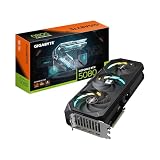
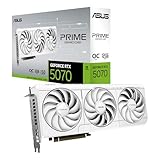
Our Top Picks
A graphics card is the largest single component most builders ever install, and in a tempered-glass case it is also the most visible one. It sits front and center, lit by case fans and caught by every glance through the side panel, so its design matters as much as any other part of the build. A card with a sculpted shroud, a clean backplate, and lighting that matches the rest of the system can turn an ordinary PC into a showpiece, while a mismatched card can clash with an otherwise careful build.


This guide is about looks first. Every card below was chosen for its design: the lighting, the color scheme, the backplate, and the overall presence inside a case. Performance is covered only as context, because a beautiful card still has to drive the games and workloads it is bought for, but the ranking here follows appearance, build finish, and how well each design fits a themed build.
How to Choose a Graphics Card for Looks
Buying a graphics card for its appearance takes a different checklist from buying one for frame rates. The points below cover the design details that decide whether a card looks great once it is installed, not just in a product photo.
RGB Lighting and How It Is Controlled
Lighting is the most obvious design feature on a modern graphics card, and the details matter. Some cards light only a logo or a thin strip along the edge, while others run addressable lighting across the shroud, around the fans, and along the side. A card with several lighting zones can show different colors in different areas, which suits builders who want gradients or matching accent colors, while a single-zone card suits a cleaner, one-color look.
Just as important is the software that controls the lighting. Most brands offer their own utility for syncing a card with a motherboard, case fans, and other components, so a card from the same brand as the motherboard or the rest of the lighting gear is often easier to coordinate. Before buying, check whether the lighting can be turned off entirely, since some builders want the option of a dark, stealthy system at night. A card that looks good with its lighting on and off is the safest choice.
Backplate Design
The backplate is the side of the card that faces upward in a standard case layout, which makes it one of the most visible surfaces in the whole build. A plain metal plate looks tidy, but a backplate with an engraved pattern, a cutout, or a second material adds real character. White backplates suit white builds, brushed or matte black plates suit dark builds, and illustrated or patterned plates suit themed systems.
A backplate also has a practical job: it stiffens the card and helps prevent sag over time, which matters for the long, heavy triple-fan designs that dominate this guide. A card that includes a support bracket in the box earns extra credit, since a sagging card ruins the clean horizontal lines of a build faster than almost anything else.
Color Matching the Rest of the Build
Mixing too many accent colors is the most common mistake. A build with a red card, blue fans, and green lighting looks busy rather than striking. Pick one accent color, repeat it in two or three places, and let the card carry the rest of the design.
Size, Fit, and Presence
The longest and thickest cards make the strongest visual statement, but they also demand the most from a case. Triple-fan cards in this guide run long and occupy close to three slots, so measure the case clearance before buying and confirm the power supply has the right connector and enough capacity for the card. A card that fills the case from front to back looks deliberate; a card that leaves a large empty gap can look lost unless the build is planned around it.
Cable routing matters too. A card with its power connector on the top edge keeps cables tidy, while a connector on the end can leave cables crossing the shroud. Routing the power cable cleanly behind the card and out of sight makes the whole build look more finished.
Build Quality and Finish
The finish of the shroud is something you notice every day. Matte textures resist fingerprints and look calm under bright lighting, while glossy accents catch the light and draw the eye. Metal shrouds and backplates feel more premium than plastic, and they tend to hold their appearance longer. Small details such as the fan hub design, the shape of the shroud cutouts, and the quality of the printed branding all add up, so it is worth looking at close-up photos of a card rather than only the front product shot.
1. Sapphire Pure AMD Radeon RX 9070 XT Gaming OC
Best all-white graphics card.
The Sapphire Pure RX 9070 XT Gaming OC is the cleanest-looking white card in this guide, and it is the natural centerpiece for an all-white build. The shroud, the fans, and the backplate are all finished in white, with no dark panel breaking up the look, so the card reads as a single sculpted object rather than a collection of parts. In a white case with white fans and light cables, it blends in beautifully; in a dark case, it becomes a bright focal point that draws the eye straight to the center of the system.
Under the styling sits AMD RDNA 4 hardware with 16GB of GDDR6 memory on a 256-bit interface, plus two HDMI and two DisplayPort outputs for multi-monitor setups. The factory Gaming OC tuning gives the card a higher clock than the reference design, and the triple-fan cooler keeps the white shroud from becoming a heat trap. Sapphire keeps the branding restrained, with a small logo and clean lines instead of large printed graphics, which suits builders who want the color to do the talking.
The Pure is also one of the most versatile cards here for builders who change their minds. Its white finish works with almost any accent color, so a builder can start with a plain white system and add a single accent later, through lighting or cables, without the card clashing.
Key specs:
- GPU: AMD Radeon RX 9070 XT, RDNA 4 architecture
- Memory: 16GB GDDR6, 256-bit interface
- Outputs: 2x HDMI, 2x DisplayPort
- Cooling: Triple-fan design
- Finish: All-white shroud, fans, and backplate
- Model: 11348-02-20G
View on Amazon: https://www.amazon.com/dp/B0DRPRKYR6
2. PNY GeForce RTX 5080 Epic-X ARGB OC Triple Fan
Best ARGB light show.
If the goal is a card that puts on a light show, the PNY RTX 5080 Epic-X ARGB OC is the most lighting-focused pick in this guide. Its Epic-X ARGB Lighting 2.0 system spreads more than 40 customizable LEDs across three lighting zones, wrapping the triple-fan cooler in rings of color that can be tuned through PNY VelocityX software. The effect is visible from across the room, and because the zones can be set independently, the card can run a gradient, a single solid color, or a pattern that matches the rest of the system.
The card itself is a full-size triple-fan design built on NVIDIA Blackwell architecture, with 16GB of GDDR7 memory on a 256-bit interface and a factory overclock that lifts the boost clock to 2775 MHz. It carries 10,752 CUDA cores, three DisplayPort 2.1b outputs and one HDMI 2.1b output, and a 2.99-slot cooler with a large heatsink surface. A support bracket is included in the box, which helps keep the long card level inside the case and preserves the clean lines of the build.
What makes the Epic-X stand out among RGB cards is how integrated the lighting feels. The light rings sit inside the fan housings rather than being stuck on as an afterthought, so the glow comes from within the cooler itself and the card looks complete even with the lighting set to a single subtle color.
Key specs:
- GPU: NVIDIA GeForce RTX 5080, Blackwell architecture
- Memory: 16GB GDDR7, 256-bit interface
- Boost clock: 2775 MHz
- CUDA cores: 10,752
- Outputs: 3x DisplayPort 2.1b, 1x HDMI 2.1b
- Lighting: Epic-X ARGB Lighting 2.0, three zones, 40-plus LEDs
- Cooling: Triple-fan design, 2.99-slot
- Extras: Support bracket included, VelocityX software control
View on Amazon: https://www.amazon.com/dp/B0DTJFZ4YS
3. Sapphire Nitro+ AMD Radeon RX 9070 XT Gaming OC
Best premium dark design with aRGB accents.
The Sapphire Nitro+ RX 9070 XT Gaming OC is the flagship of Sapphire’s lineup, and its design shows it. The dark metallic shroud has a sculpted, angular look with a visible heatsink and a full-length backplate, while a strip of aRGB lighting integrated into the shroud adds a touch of color that can be customized through Sapphire TriXX software. The lighting can run dynamic effects or a rainbow pattern, or it can be switched off entirely for a dark, understated build, which makes the card flexible for builders who want lighting as an option rather than a permanent feature.
Inside, the card uses AMD RDNA 4 architecture with 16GB of GDDR6 memory on a 256-bit interface, 4,096 stream processors, and a factory overclock that lifts the boost clock to 3060 MHz. It offers two HDMI and two DisplayPort 2.1a outputs, and the triple-fan cooler uses AeroCurve fan blades designed to move air efficiently while keeping noise down. The card draws up to 330W, so a 750W power supply is the recommended minimum, and its three-slot cooler gives it real presence inside a case.
The Nitro+ suits builders who want a premium dark build with one controlled accent. The black and gunmetal finish pairs naturally with dark cases and motherboards, and the aRGB strip can pick up whatever accent color the rest of the system uses. It is a card that looks expensive without shouting, and that restraint is exactly what makes it one of the best looking cards available.
Key specs:
- GPU: AMD Radeon RX 9070 XT, RDNA 4 architecture
- Memory: 16GB GDDR6, 256-bit interface
- Boost clock: Up to 3060 MHz
- Stream processors: 4,096
- Outputs: 2x HDMI, 2x DisplayPort 2.1a
- Lighting: aRGB strip in the shroud, TriXX software control
- Cooling: Triple-fan AeroCurve design, 3-slot
- Recommended power supply: 750W
- Model: 11348-01-20G
View on Amazon: https://www.amazon.com/dp/B0DRPPXB5X
4. GIGABYTE AORUS GeForce RTX 5080 Master ICE 16G
Best white showpiece with an LCD display.
The GIGABYTE AORUS RTX 5080 Master ICE is the most dramatic card in this guide, and the one most likely to stop someone mid-sentence when they see it through a case window. The entire card is finished in ice white, from the triple-fan WINDFORCE cooler to the metal backplate, and the shroud carries RGB Halo lighting that rings the fans in color. The signature feature is the LCD Edge View display on the side of the card, a small screen that can show system information or custom graphics, turning the side of the card into a display of its own.
The hardware behind the styling is NVIDIA Blackwell architecture with 16GB of GDDR7 memory on a 256-bit interface, a boost clock of 2805 MHz, and 10,752 CUDA cores. It provides three DisplayPort 2.1a outputs and one HDMI 2.1b output, and the card measures 360 mm long, so it needs a roomy case and a clear run of space from the front of the chassis. An anti-sag bracket is included, which matters for a card of this size, and the metal backplate adds rigidity as well as a clean finished look from above.
The Master ICE is the pick for builders who want their graphics card to be the single defining feature of the system. In a white case it looks like it was made for the build, and the LCD display gives the system a focal point that no amount of case lighting can match.
Key specs:
- GPU: NVIDIA GeForce RTX 5080, Blackwell architecture
- Memory: 16GB GDDR7, 256-bit interface
- Boost clock: 2805 MHz
- CUDA cores: 10,752
- Outputs: 3x DisplayPort 2.1a, 1x HDMI 2.1b
- Lighting: RGB Halo around the fans
- Display: LCD Edge View on the side of the card
- Cooling: WINDFORCE triple-fan design
- Length: 360 mm
- Extras: Metal backplate, anti-sag bracket included
- Model: GV-N5080AORUSM ICE-16GD
View on Amazon: https://www.amazon.com/dp/B0DT9YQ2Q1
Best Looking Graphics Cards Compared
Size is the other deciding factor. The AORUS Master ICE is the longest card here at 360 mm and needs the roomiest case, while the other three are also large triple-fan designs that need careful measurement. Whichever card is chosen, the build looks best when the card color is repeated at least once elsewhere in the system, whether in the case, the fans, or the cables.
Frequently Asked Questions
What makes a graphics card look good?
A good-looking graphics card combines a clean shroud design, a finished backplate, and lighting or color that matches the rest of the build. The most visible surfaces are the side of the card and the backplate, since those face outward in a standard case, so a card that looks good from those angles will look good in daily use. Build quality matters too: metal finishes, tidy branding, and well-shaped fan housings all add to the impression.
Do white graphics cards cost more than black ones?
White versions of a card sometimes carry a small premium over the black version of the same model, because white finishes are produced in smaller numbers and need extra care in manufacturing. The difference is usually modest, and for builders committed to a white theme, the visual match is generally worth it. Availability can also be tighter for white models, so it is worth checking stock before planning a build around one.
Is RGB lighting on a graphics card worth it?
RGB lighting is worth it when the rest of the system is lit as well, since a single lit component in a dark case can look out of place. Cards with several lighting zones offer more control, and cards whose lighting can be switched off give the most flexibility. For builders who prefer a dark, quiet system, a card with subtle lighting or none at all is the better choice.
Can I mount a graphics card vertically to show it off?
Yes, many cases support vertical GPU mounting with a riser cable, and it puts the fan side of the card on full display instead of the backplate. Vertical mounting suits cards with detailed shrouds and fan lighting, such as the RGB cards in this guide, but it needs a case with enough clearance and good airflow, since the card sits closer to the side panel.
Does a graphics card backplate matter for looks?
Yes, the backplate is one of the most visible parts of a card in a standard horizontal mount, since it faces upward toward the case window. A backplate with an engraved pattern, a matching color, or a second material looks far better than a bare circuit board, and it also stiffens the card against sag. Cards with illustrated or patterned backplates can even carry the theme of a build on their own.
Final Thoughts
The best looking graphics card is the one that fits the build it goes into. An all-white card like the Sapphire Pure or the AORUS Master ICE turns a white system into a coherent showpiece, while the PNY Epic-X ARGB OC gives a dark build a bright centerpiece and the Sapphire Nitro+ adds a single controlled accent to a premium dark system. Each card here was chosen for its design first, and each one brings a different kind of visual character to the case.
Before buying, measure the case, confirm the power supply, and decide on the color theme for the whole system rather than the card alone. A graphics card is the most visible component in most builds, so choosing one that matches the case, the lighting, and the cables is the simplest way to make the entire PC look like it was planned as a whole. Pick the design that fits the vision, and the build will look intentional from every angle.
Disclosure: As an Amazon Associate, we earn from qualifying purchases.
FAQ
What makes a graphics card look good?
Do white graphics cards cost more than black ones?
Is RGB lighting on a graphics card worth it?
Can I mount a graphics card vertically to show it off?
Does a graphics card backplate matter for looks?
More from Amazon
Programs that pair well with the guide above. Offers and eligibility are set by Amazon and may change.
Free shipping on eligible items, Prime Video and more. Eligible new members can start with a free trial.
Start a Prime free trialAd-free music streaming. Eligible new subscribers can start with a free trial.
Try Music Unlimited freeA Prime membership for ages 18-24 with a trial period. Eligibility is set by Amazon.
See Prime for Young AdultsAudiobooks and podcasts to listen to on the go. Eligible new members can start with a free trial.
Try Audible freeAs an Amazon Associate we earn from qualifying purchases.