Our Top Picks

As an Amazon Associate we earn from qualifying purchases.
Choosing a graphics card starts with the resolution you play at, because that single decision sets the performance tier you actually need. A card that is well matched to a 1080p monitor works very differently from one built to drive a 1440p panel at high refresh rates, and the specifications on the box tell you which job each card is designed for. Memory capacity, memory type, boost clock, cooling design and display outputs are the numbers that separate one tier from the next, and they are a far more reliable guide than any single headline figure.

This roundup is organised by performance tier rather than by any other measure. It covers three desktop graphics cards that sit in two clear tiers: two 8GB cards aimed squarely at 1080p gaming, and one 12GB card built for 1440p play with ray tracing headroom. Every card below is a standard desktop model on a PCI Express interface, every card uses GDDR6 or GDDR6X memory, and every specification quoted comes from the manufacturer’s own product listing. Read the tier descriptions first, decide which resolution describes your monitor, and the right section of this guide follows from there.
Disclosure: This article contains affiliate links. If you buy through these links, we may earn a commission at no additional cost to you.
How to Choose a Graphics Card by Tier
Start with resolution. At 1080p, the graphics processor does the heavy lifting and an 8GB memory buffer is the common specification across current cards in this tier. At 1440p, the pixel count rises sharply, texture data grows with it, and a 12GB buffer on a wider memory configuration becomes the specification that keeps settings high without the card running out of room. Matching the card to the panel is the whole decision; everything else is refinement.
Read the memory specification properly. Capacity is only half of the line. GDDR6X transfers data faster than GDDR6, which matters more as resolution climbs, and the boost clock printed in the product information tells you the operating speed the cooler is designed to sustain. Compare cards inside the same tier on these numbers rather than across tiers, where the figures describe different jobs.
Check the physical fit before anything else. Card length, slot width and weight vary a great deal between models in this roundup, from a compact dual-fan card under eight inches long to a 2.5-slot design that needs a larger case. Measure the clearance inside your case, confirm the slot width your motherboard layout can spare, and check that your power supply matches the card manufacturer’s recommendation for the tier you are buying into.
Count the display outputs. A card with one HDMI output and three DisplayPort outputs suits a multi-monitor desk, while a card with fewer outputs may limit a second screen later. HDMI 2.1a and DisplayPort 1.4a are the connection standards on the 1440p card in this guide, and both matter if a high-refresh monitor joins the setup in the future.
Consider the feature set of the architecture. The NVIDIA cards below are built on the Ada Lovelace architecture with DLSS 3, which uses AI-generated frames to raise frame rates in supported games, while the AMD card is built on RDNA 3. Neither feature set changes the tier logic above, but if your favourite games support one upscaling ecosystem, that support is a legitimate tiebreaker between two cards in the same tier.
XFX Speedster SWFT210 Radeon RX 7600 — the 1080p Tier in RDNA 3 Form
The XFX Speedster SWFT210 is built around the AMD Radeon RX 7600 graphics processor, the entry point of the RDNA 3 desktop line and a chip specified for Full HD gaming. Its product information lists 8GB of GDDR6 memory and a boost clock of up to 2655 MHz, the highest clock figure in this roundup, delivered through XFX’s SWFT dual-fan cooling solution. Two fans on a card of this tier keep the design compact while still moving enough air for sustained gaming loads, and the card’s listed weight of 900 grams reflects a full-size heatsink rather than a minimal single-fan cooler.
On the connection side, the SWFT210 carries one HDMI output and three DisplayPort outputs, which is a generous arrangement for a card in the 1080p tier and makes a two or three screen desk straightforward. The maximum display resolution in its product information is 7680 by 4320, the standard ceiling for this generation of outputs, and the card connects over a PCI Express interface like every other model in this guide. A three-year manufacturer warranty is listed in its product details, which is worth noting when comparing cards within the same tier.
In tier terms, this is the card for a player whose monitor is a 1080p panel and whose priority is high frame rates at that resolution. The 8GB GDDR6 buffer matches the texture demands of Full HD gaming, the RDNA 3 architecture brings AMD’s current feature set to the tier, and the 2655 MHz boost clock gives the card its performance character. Players planning a move to a 1440p monitor in the near term should read the next tier instead, because memory capacity, not clock speed, is the specification that decides how a card ages when resolution rises.
- Product page: https://www.amazon.com/dp/B0C59RVD98
- Graphics processor: AMD Radeon RX 7600, RDNA 3 architecture
- Memory: 8GB GDDR6
- Boost clock: up to 2655 MHz
- Cooling: SWFT dual-fan solution, 2 fans
- Outputs: HDMI and 3x DisplayPort
MSI GeForce RTX 4060 Ventus 2X Black 8G OC — the Compact 1080p Tier
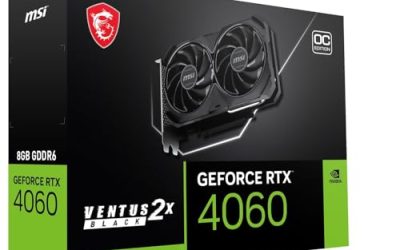
The MSI GeForce RTX 4060 Ventus 2X Black 8G OC takes the same 1080p tier assignment as the XFX card above and delivers it in the most compact physical package in this roundup. Its product information lists the NVIDIA GeForce RTX 4060 graphics coprocessor on the Ada Lovelace architecture, 8GB of GDDR6 memory on a 128-bit interface, and a memory clock speed figure of 2505 MHz. The card measures 7.83 inches long by 4.72 inches wide and weighs 546 grams, which makes it the natural candidate in this guide for a small case where a longer card simply does not fit.
Two fans handle cooling, and the maximum display resolution in the product information is again 7680 by 4320. The listing describes the card as equipped for gaming and creative tasks, with the architecture delivering ray tracing and AI-accelerated performance through DLSS 3. That DLSS 3 support is the clearest point of difference between this card and the AMD model in the same tier: in games that support frame generation, the RTX 4060 can lean on that feature, while in games that do not, the two cards compete on their base specifications of memory, clock and cooling.
The Ventus 2X Black also carries an OC designation in its model name, marking it as a factory-tuned variant of the RTX 4060 specification. For a builder working in a compact case, the combination here is specific: an 8GB 1080p-tier card, a sub-eight-inch length, a dual-fan cooler and the NVIDIA feature set. If your case has room for a longer card and your games favour the AMD ecosystem, the XFX model above is the same tier in a different shape; if the build is small and your library includes DLSS 3 titles, this MSI card is the tier’s compact answer.
- Product page: https://www.amazon.com/dp/B0C7W8GZMJ
- Graphics processor: NVIDIA GeForce RTX 4060, Ada Lovelace architecture
- Memory: 8GB GDDR6, 128-bit interface
- Memory clock speed: 2505 MHz as listed
- Size and weight: 7.83 x 4.72 inches, 546 grams
- Cooling: 2 fans
ASUS Dual GeForce RTX 4070 EVO OC Edition — the 1440p Tier
The ASUS Dual GeForce RTX 4070 EVO OC Edition is the step up in this roundup, a card specified for the 1440p tier. Its product information lists the NVIDIA GeForce RTX 4070 with 12GB of GDDR6X memory, a combination that changes two specifications at once compared with the 1080p tier: the buffer grows from 8GB to 12GB, and the memory type moves to the faster GDDR6X standard. The memory speed figure in its technical details is 2520 MHz, with an engine clock of 2550 MHz in OC mode and 2520 MHz boost in default mode, as printed in the manufacturer’s comparison data on the listing.
ASUS builds this card in a 2.5-slot design measuring 8.9 by 4.9 by 2 inches, or 227.2 by 123.24 by 49.6 millimetres in the manufacturer’s dimension line. The cooler uses Axial-tech fans with dual ball bearings and 0dB technology, which stops the fans under light load, and the design brief on the listing is broad compatibility rather than maximum size. Outputs are one native HDMI 2.1a and three native DisplayPort 1.4a connections with HDCP 2.3 support, matching the multi-monitor and high-refresh requirements of a 1440p desk.
The feature set follows the tier. DLSS 3 and RTX ray tracing are the headline technologies named in the product description, and at 1440p both carry more weight than they do at 1080p, because the higher pixel count is exactly where upscaling and frame generation earn their place. For a player whose monitor is a 1440p panel, or whose next monitor will be, this is the card in the guide whose specifications are written for that resolution: 12GB of GDDR6X, a 2.5-slot dual-fan cooler, and the full Ada Lovelace feature set in a card that still fits cases that cannot take the largest designs in the class.
- Product page: https://www.amazon.com/dp/B0CQRX9HPK
- Graphics processor: NVIDIA GeForce RTX 4070, Ada Lovelace architecture
- Memory: 12GB GDDR6X
- Engine clock: 2550 MHz OC mode, 2520 MHz boost default mode
- Design: 2.5-slot, Axial-tech dual fans, 0dB technology
- Outputs: 1x HDMI 2.1a, 3x DisplayPort 1.4a
Comparison Table
| Product | Tier | Memory | Clock figure listed | Cooling | Outputs |
|---|---|---|---|---|---|
| XFX Speedster SWFT210 Radeon RX 7600 | 1080p | 8GB GDDR6 | Boost up to 2655 MHz | Dual fan | HDMI, 3x DisplayPort |
| MSI GeForce RTX 4060 Ventus 2X Black 8G OC | 1080p, compact | 8GB GDDR6 | 2505 MHz memory clock | 2 fans | HDMI, DisplayPort |
| ASUS Dual GeForce RTX 4070 EVO OC Edition | 1440p | 12GB GDDR6X | 2550 MHz OC engine clock | Axial-tech dual fan, 2.5-slot | HDMI 2.1a, 3x DisplayPort 1.4a |
Frequently Asked Questions
How much memory does a graphics card need for 1080p gaming?
The two 1080p-tier cards in this guide both carry 8GB of GDDR6, which is the standard specification at this tier. Memory demand is set mainly by resolution and texture settings, so a card matched to a 1080p panel works within that buffer by design.
When does the 1440p tier become the right choice?
When the monitor itself is a 1440p panel, or when one is firmly planned. The ASUS RTX 4070 EVO in this guide pairs 12GB of GDDR6X with its processor, and that larger, faster buffer is the specification written for the higher pixel count.
Does card size really matter?
Yes, and it is the easiest specification to check before ordering. The cards in this guide range from the 7.83-inch MSI Ventus 2X to the 2.5-slot ASUS Dual design. Measure your case clearance and spare slot width, then compare those figures with the dimensions in each product section.
What is the difference between GDDR6 and GDDR6X?
GDDR6X is the faster memory standard of the two. In this roundup it appears on the 1440p-tier card, where the higher resolution places the greatest demand on memory throughput, while both 1080p-tier cards use GDDR6.
What does DLSS 3 add to the NVIDIA cards here?
DLSS 3 is NVIDIA’s AI-based performance feature for the Ada Lovelace architecture, described in the listings as delivering AI-accelerated performance alongside ray tracing. It applies to supported games, so it works as a tiebreaker inside a tier rather than a reason to change tiers.
Conclusion
Read this roundup as a ladder with two rungs. The first rung is 1080p, covered by the XFX Speedster SWFT210 Radeon RX 7600 with its 2655 MHz boost clock and triple DisplayPort outputs, and by the MSI GeForce RTX 4060 Ventus 2X Black 8G OC, which packages the same tier into the shortest and lightest card here and adds the DLSS 3 feature set. The second rung is 1440p, where the ASUS Dual GeForce RTX 4070 EVO OC Edition brings 12GB of GDDR6X memory, a 2.5-slot Axial-tech cooler and HDMI 2.1a outputs. Decide your resolution first, confirm the physical fit second, and the specifications in each section will point to the card that matches your build.
More from Amazon
Programs that pair well with the guide above. Offers and eligibility are set by Amazon and may change.
Free shipping on eligible items, Prime Video and more. Eligible new members can start with a free trial.
Start a Prime free trialAd-free music streaming. Eligible new subscribers can start with a free trial.
Try Music Unlimited freeA Prime membership for ages 18-24 with a trial period. Eligibility is set by Amazon.
See Prime for Young AdultsAudiobooks and podcasts to listen to on the go. Eligible new members can start with a free trial.
Try Audible freeAs an Amazon Associate we earn from qualifying purchases.