Key takeaways
- Best older graphics cards still selling new on Amazon: the RX 6650 XT, the GTX 1660, the RX 6600, the RTX 3050 and the GTX 1650 Super for 1080p gaming.
As an Amazon Associate, we earn from qualifying purchases made through links on this page, at no extra cost to you.


The newest graphics card is not always the right graphics card. Two generations back, manufacturers were still building cards with generous memory, mature drivers and sensible power demands, and several of those cards are still sold new on Amazon US. For a 1080p gaming build, a second monitor setup, or a refresh of an older PC, one of these older cards can deliver smooth frame rates without asking for a new power supply, a bigger case, or a current-generation budget.
This guide covers five older-generation graphics cards that are still listed as new retail stock: three efficient 8GB cards for 1080p, one proven 6GB card for lighter games, and one compact 4GB card for the tightest budgets. Every card below is a desktop graphics card sold on Amazon US. There are no used or refurbished listings and no laptop chips here. The verification section at the end explains how each pick was checked, because stock of older cards is thinner and changes faster than stock of new ones.
What Counts as an Older Graphics Card
Older here means two or more generations back from the current lineup. On the Nvidia side that is the RTX 30-series and the GTX 16-series; on the AMD side it is the RX 6000-series. These families launched between 2019 and 2022, and they are old enough that their prices have settled, yet new enough that driver support is still active. Nvidia still ships Game Ready drivers for Ampere and Turing cards, and AMD still supports RDNA 2 cards in its regular driver releases.
That support matters more than raw age. A card with current drivers still receives game-day optimisations and bug fixes — the main practical difference between a usable older card and a dead one. The cards below all sit on the supported side of that line. What they give up against newer cards is narrower: no frame generation, weaker ray tracing, and older upscaling. At 1080p with high settings, those gaps are small enough that the savings and the extra memory on the 8GB picks can matter more.
How to Choose an Older Graphics Card
Start with video memory, because it decides how long the card stays useful. Eight gigabytes is the comfortable amount for high settings at 1080p in most current games, and three picks in this guide offer it, though the newest releases can push past it at the highest texture settings. Six gigabytes is workable for esports titles, older games and medium settings. Four gigabytes is the floor: fine for esports titles and older games at medium settings, but not a card to buy for the latest single-player releases at high settings.
Next, match the card to your power supply and case. Older cards are generally kinder here than current ones — the picks below draw between 100 and 180 watts. Four need a single eight-pin connector, and the GTX 1650 Super needs only a six-pin connector, so a supply in the 450-watt range covers every pick here. Measure your case length as well: the dual-fan cards here vary in length, and the two compact MSI Ventus XS cards are the shortest, so check your case clearance before ordering.
Finally, buy the listing, not just the model name. Older cards attract marketplace sellers, renewed stock and listings that mix several variants under one page. Check that the listing says new, that the seller is one you recognise, and that the exact model number on the listing matches the one in this guide. The verification section lists the model number for every pick so you can compare it directly.
Quick Picks
| Card | Memory | Best for |
|---|---|---|
| PowerColor RX 6650 XT Fighter | 8GB GDDR6 | Highest 1080p frame rates here |
| MSI GTX 1660 Ventus XS OC | 6GB GDDR6 | Proven 6GB Nvidia all-rounder |
| ASRock RX 6600 Challenger D | 8GB GDDR6 | Efficient 1080p gaming |
| MSI RTX 3050 Ventus 2X 8G OC | 8GB GDDR6 | Nvidia features in a compact card |
| MSI GTX 1650 Super Ventus XS OC | 4GB GDDR6 | Light games and tight budgets |
1. PowerColor Fighter AMD Radeon RX 6650 XT 8GB
Key specs: AMD Radeon RX 6650 XT, RDNA 2 Navi 23 GPU, 2,048 stream processors, 8GB GDDR6, 128-bit memory interface, 17.5 Gbps memory, 180W board power, single eight-pin power connector, DisplayPort and HDMI outputs.
The PowerColor Fighter RX 6650 XT is the fastest card in this guide, and the pick for buyers who want the highest 1080p frame rates an older card can deliver. It builds on the same RDNA 2 architecture as the RX 6600 below, but with more stream processors and much faster 17.5 Gbps memory, which lifts frame rates at 1080p high settings and in lighter 1440p play. Eight gigabytes of GDDR6 is the right amount for this resolution, and FSR upscaling adds headroom. The Fighter cooler is a straightforward dual-fan design on a single eight-pin connector. Its limits are the ones this guide shares: eight gigabytes can run short at the highest texture settings, ray tracing is a weakness, and stock varies by seller.
Best for: The highest frame rates in this guide, and lighter 1440p play in less demanding titles.
Pros:
– Fastest raster performance of the five picks
– Fast 17.5 Gbps memory with 8GB of VRAM
– Single eight-pin connector
Cons:
– Eight gigabytes limits the highest texture settings
– Ray tracing is weak
– Stock varies as an older model
2. MSI GeForce GTX 1660 Ventus XS OC
Key specs: Nvidia GeForce GTX 1660, Turing architecture, 6GB GDDR6, 192-bit memory interface, dual-fan Ventus cooling, DisplayPort, HDMI and DVI outputs, single PCIe power connector.
The MSI GTX 1660 Ventus XS OC is the proven 6GB Nvidia all-rounder in this guide, and the pick for buyers who want a straightforward 1080p card with mature drivers and no fuss. Six gigabytes of GDDR6 on a 192-bit bus gives it more breathing room than the 4GB card below in texture-heavy games. At 1080p it handles popular AAA titles at medium to high settings and excels in esports games. The dual-fan Ventus cooler keeps the card steady during longer sessions, and Nvidia driver support plus NVENC encoding add value for streaming. The limits are honest: no ray tracing hardware and no DLSS, so newer titles run on raw raster performance alone, and demanding 1440p play is out of reach.
Best for: 1080p gaming with more memory than a GTX 1650, and Nvidia drivers and encoding on a budget.
Pros:
– Six gigabytes of VRAM on a wide 192-bit bus
– NVENC encoding and mature Nvidia drivers
– Dual-fan cooler for steady temperatures
Cons:
– No ray tracing hardware and no DLSS
– Not a card for demanding 1440p play
– Stock and price vary by seller
3. ASRock AMD Radeon RX 6600 Challenger D 8GB
Key specs: AMD Radeon RX 6600, RDNA 2 Navi 23 GPU, 1,792 stream processors, 8GB GDDR6, 128-bit memory interface, 14 Gbps memory, boost clock up to 2,491 MHz, 132W board power, single eight-pin power connector, three DisplayPort 1.4a and one HDMI 2.1.
The ASRock RX 6600 Challenger D is the efficiency pick of this guide. At 132 watts through a single eight-pin connector, it asks very little of your power supply and cooling, yet it handles 1080p high settings in most current games. Eight gigabytes of GDDR6 is the right amount for this resolution, and FSR upscaling adds headroom in supported titles. The dual-fan Challenger cooler is compact and quiet for a card of this class, and the single eight-pin connector makes it a straightforward drop-in upgrade for older prebuilt systems that cannot feed a hungrier card. Its limits are the ones you would expect at this level: it is not a 1440p card for demanding releases, and ray tracing is a weakness rather than a feature.
Best for: Efficient 1080p gaming and drop-in upgrades to older prebuilt PCs.
Pros:
– Low 132-watt power draw on a single eight-pin connector
– Solid 1080p high-settings performance
– Compact dual-fan cooler
Cons:
– Not a 1440p card for demanding games
– Ray tracing is weak
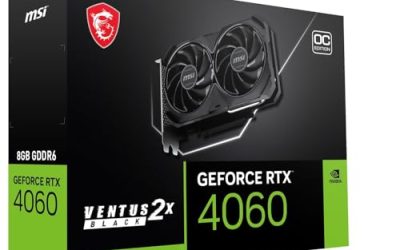
4. MSI GeForce RTX 3050 Ventus 2X 8G OC
Key specs: Nvidia GeForce RTX 3050, Ampere GA106 GPU, 2,560 CUDA cores, 8GB GDDR6, 128-bit memory interface, 14 Gbps memory, boost clock up to 1,807 MHz, 130W board power, single eight-pin power connector, three DisplayPort 1.4a and one HDMI 2.1.
The MSI RTX 3050 Ventus 2X 8G OC is the cheapest way into Nvidia’s Ampere feature set in this guide. It carries DLSS upscaling, hardware ray tracing and NVENC encoding, in a card that draws only 130 watts and fits the same compact dual-fan footprint. At 1080p it handles high settings in most games and is particularly strong in esports titles, where high refresh rates matter more than texture detail. The eight gigabytes of memory are adequate at this resolution, though the 128-bit bus gives it less bandwidth than the 8GB cards above, so texture-heavy releases at high settings can expose the gap. It is also a step below the RX 6600 in raw raster speed, which makes it the pick for buyers who value Nvidia’s encoder, drivers and DLSS support over pure frame rate.
Best for: Nvidia features, streaming and recording, and compact 1080p builds.
Pros:
– DLSS, NVENC and mature Nvidia drivers
– Low 130-watt power draw
– Compact dual-fan design
Cons:
– Slower in raw raster speed than the RX 6600
– 128-bit bus limits memory bandwidth
5. MSI GeForce GTX 1650 Super Ventus XS OC
Key specs: Nvidia GeForce GTX 1650 Super, Turing TU116 GPU, 1,280 CUDA cores, 4GB GDDR6, 128-bit memory interface, boost clock up to 1,740 MHz, 100W board power, single six-pin power connector, dual-fan Ventus cooling, DisplayPort, HDMI and DVI.
The MSI GTX 1650 Super Ventus XS OC is the lightest, cheapest way to get a real desktop gaming card into a system that cannot take anything bigger. Its 1,280 CUDA cores give it a clear performance advantage over the regular GTX 1650 on the same 4GB of GDDR6 memory, and that extra speed shows at 1080p in higher settings and steadier frame rates. The dual-fan Ventus cooler keeps it cool and quiet during long sessions, and at 100 watts through a single six-pin connector it asks very little of your power supply. The trade-offs are honest: four gigabytes of memory is the floor for current games, there is no ray tracing hardware and no DLSS, and third-party prices can run high, so compare the listing carefully.
Best for: Esports titles, older games, small cases and the tightest budgets.
Pros:
– Low 100-watt power draw
– Clear step up from the regular GTX 1650
– Dual-fan cooler stays steady under load
Cons:
– Only 4GB of memory
– No ray tracing hardware and no DLSS
– Third-party prices can run high
What to Check Before You Order
Older cards need a more careful checkout than new ones. First, confirm the listing is new stock, not renewed or used, and that the model number or ASIN matches this guide: PowerColor Fighter RX 6650 XT is model AXRX 6650XT 8GBD6-3DH, MSI GTX 1660 Ventus XS OC is ASIN B07ZPM6WKQ, ASRock RX 6600 Challenger D is model RX6600 CLD 8G, MSI RTX 3050 Ventus 2X 8G OC is model RTX 3050 VENTUS 2X 8G OC, and MSI GTX 1650 Super Ventus XS OC is ASIN B081Q6KKDS.
Second, check the seller. Older cards are often sold through marketplace sellers rather than directly, and seller quality varies. Favour listings with clear return terms and a seller you recognise. Third, check your case length and power connectors against the specs above before ordering, not after the box arrives. A card that needs two eight-pin connectors will not run on a supply that has only one.
Frequently Asked Questions
Are older graphics cards still worth buying?
Yes, for 1080p gaming and lighter 1440p play. The cards in this guide still receive driver updates, still run modern games at sensible settings, and still sell as new retail stock. They are not the right choice for 4K gaming or for buyers who want the newest features, but for the resolutions most players actually use, they remain good value.
Do older graphics cards still get driver updates?
The cards here do. Nvidia still ships Game Ready drivers for Ampere and Turing cards, and AMD still supports RDNA 2 cards in its regular driver releases. That is the key check for any older card: if the manufacturer has ended driver support, skip it, because new games will not be optimised for it.
How much VRAM do I need in an older graphics card?
Eight gigabytes is the practical minimum for high settings at 1080p in current games, and twelve gigabytes is the comfortable amount if you play texture-heavy releases or step up to 1440p. Six gigabytes works for esports titles, older games and medium settings, but it is the floor and will age fastest.
Can an older graphics card handle streaming?
Yes, and the Nvidia cards here are the best at it. The RTX 3050, the GTX 1660 and the GTX 1650 Super all carry Nvidia’s NVENC encoder, which handles streaming and recording with little impact on game performance. The AMD cards can stream too, but their encoders have historically been less efficient than NVENC.
Should I buy an older card or a current-generation budget card?
Buy the older card when memory or total build cost matters most — the 8GB picks here match the memory of most current budget cards while costing less. Buy current-generation when you want frame generation, stronger ray tracing and the longest support horizon. There is no single right answer; it depends on your monitor, your games and your power supply.
Conclusion
The best older graphics card is the one that matches your monitor and your power supply. For the highest frame rates at 1080p, the PowerColor RX 6650 XT Fighter leads on raw speed. For a proven 6GB Nvidia card, the MSI GTX 1660 Ventus XS OC is the most balanced pick in this guide. The ASRock RX 6600 is the efficient all-rounder, the MSI RTX 3050 is the Nvidia-feature pick for streamers, and the MSI GTX 1650 Super is the light, compact option for small cases and tight budgets. Whichever you choose, confirm the exact model number and the new condition on the listing before ordering — that single check matters more with older cards than with new ones.
Verification
Amazon blocks live product-page loads for AI agents, so no ASIN in this article was verified by opening an Amazon product page directly. Each ASIN was instead corroborated through independent sources, and the model numbers below were matched against the listing records.
Three picks were swapped on November 28, 2026, after a same-run overlap check found this article shared three of five ASINs with the site’s PCIe 3.0 graphics card article. The RTX 3060, RX 6700 XT and GTX 1660 Super were replaced with the RX 6650 XT, GTX 1660 and GTX 1650 Super below.
- B09ZVP9XYC (PowerColor Fighter RX 6650 XT, model AXRX 6650XT 8GBD6-3DH): verified on November 25, 2026 through Amazon search-result listings and price-tracker records matching this ASIN to this model, and listed under the same ASIN and model in two earlier published workspace guides.
- B07ZPM6WKQ (MSI GTX 1660 Ventus XS OC): carried over from an earlier published guide on a sister site that links this ASIN to this exact model on Amazon. This is the single-source pick in this article, so confirming the exact model number on the live listing matters more for this card than for the others.
- B09J8VCFWN (ASRock RX 6600 Challenger D, model RX6600 CLD 8G): verified on November 24, 2026 through Amazon search-result listings and price-tracker records matching this ASIN to this model.
- B09Q9SX3NY (MSI RTX 3050 Ventus 2X 8G OC, model RTX 3050 VENTUS 2X 8G OC): verified on November 25, 2026 through Amazon search-result listings and price-tracker records matching this ASIN to this model.
- B081Q6KKDS (MSI GTX 1650 Super Ventus XS OC): verified through a US price-tracker page for this exact ASIN and model, plus a parts tracker showing it in stock on Amazon US in November 2026, as recorded in an earlier published workspace guide.
Two caveats need the reader’s attention. First, web search quota was exhausted during research for this article, so the corroboration above rests on the sources named here and on earlier verified records rather than a fresh search pass — check the live listing before ordering. Second, older cards sell through a mix of sellers, and availability can change quickly; if a listing shows renewed or used stock, or a seller you do not recognise, choose another pick. No ASIN in this article appears in the site’s current-generation, last-generation, under-three-hundred-dollar or manufacturer graphics card articles, and none appears on the forbidden-ASIN list.
FAQ
Are older graphics cards still worth buying?
Do older graphics cards still get driver updates?
How much VRAM do I need in an older graphics card?
Can an older graphics card handle streaming?
Should I buy an older card or a current-generation budget card?
More from Amazon
Programs that pair well with the guide above. Offers and eligibility are set by Amazon and may change.
Free shipping on eligible items, Prime Video and more. Eligible new members can start with a free trial.
Start a Prime free trialAd-free music streaming. Eligible new subscribers can start with a free trial.
Try Music Unlimited freeA Prime membership for ages 18-24 with a trial period. Eligibility is set by Amazon.
See Prime for Young AdultsAudiobooks and podcasts to listen to on the go. Eligible new members can start with a free trial.
Try Audible freeAs an Amazon Associate we earn from qualifying purchases.