Our Top Picks
A cheap mining graphics card forces a trade-off that a gaming card never does. A miner does not need the fastest frame rates or the newest ray tracing features, but it does need enough video memory to load the mining algorithm, a memory bus wide enough to keep data moving, and a cooler that can run for hours without throttling. The cheapest card often fails on one of those three points, so the real decision is which low-cost card clears the practical minimums for a small rig.

This guide fits beginners building a first one-card or two-card rig, hobbyists adding a card to a spare PC, and anyone who wants to test mining without committing to an expensive flagship. It also fits shoppers who already own a mining frame and need a card that fits their power supply and cooling setup. Every pick below comes from its Amazon product title and listing details, with video memory, boost clock, core count and model number taken from those listings.
Quick Picks
As an Amazon Associate we earn from qualifying purchases.
| Product | Best for | Key spec from title |
|---|---|---|
| ASUS Dual GeForce RTX 3060 V2 OC Edition | A small rig that needs the most VRAM for the money | 12GB GDDR6, 1867MHz boost clock |
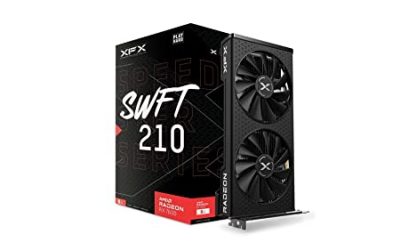
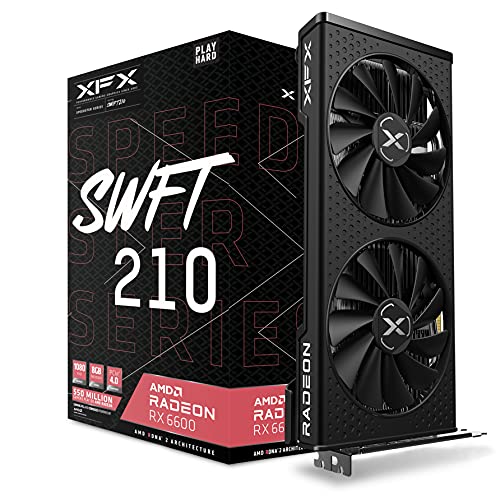
| XFX Speedster SWFT 210 Radeon RX 6600 CORE | A low-cost single-card setup with a simple dual-fan cooler | 8GB GDDR6, boost up to 2491MHz |
| MSI GeForce RTX 4060 Ventus 2X Black 8G OC | A compact dual-fan card for a tight case or small frame | 8GB GDDR6, 128-bit, 2505MHz Extreme Performance |
How to Choose
Start with video memory
Video memory decides whether a card can run a mining algorithm at all, and is the first spec to check on any cheap mining card. Algorithms that build a large dataset in memory need the whole dataset to fit in VRAM, so a card with too little memory cannot start the workload, no matter how fast its core is. A 12GB card gives far more headroom than an 8GB card, which matters as requirements grow. Before buying, read the VRAM figure in the listing title and compare it with the coin’s memory requirement. A card that barely fits today can become unusable after one algorithm update, so treat VRAM as a floor, not a detail.
Check the memory bus and bandwidth
The memory bus width shapes how quickly data moves between a mining card’s cores and VRAM, and it often matters more than the headline boost clock. A wider bus carries more data per cycle, which keeps the cores fed during memory-heavy mining work. Two cards with the same amount of VRAM can behave very differently if one uses a 128-bit bus and the other uses a 192-bit bus, so the bus figure belongs next to the VRAM figure on every shortlist. Listings usually state bus width alongside memory type, so confirm both numbers from the same listing before deciding. A narrow bus on a cheap card is a common reason a bargain pick underperforms in a rig.
Look at cooling and card size
A mining card runs at a steady load for long stretches, so its cooler and its physical size deserve as much attention as its chip. A dual-fan design with a solid heatsink holds temperatures steadier than a single-fan blower, and a card that fits the case or frame without blocking airflow keeps the whole rig cooler. Check the card length and slot width in the listing, then measure the space in the frame or case before ordering. Also look at how the fans are arranged, since a card that vents heat into a crowded rig can raise the temperature of its neighbours. Good cooling protects the card and keeps it running at its listed boost clock for longer.
Match the card to the power supply
Every mining card draws power from the PCIe slot and one or more power connectors, and the power supply must cover that draw with room to spare. A card that needs an 8-pin connector will not run on a supply that only offers a 6-pin plug, so the connector type in the listing matters as much as the wattage rating. Add up the draw of every card in the planned rig, then leave headroom for the motherboard, storage and fans. A supply run near its limit runs hot and ages fast, and it can shut the rig down under load. Confirm the connector layout on the listing and count the available plugs on the supply before buying.
The 3 Best Options
ASUS Dual GeForce RTX 3060 V2 OC Edition
The ASUS Dual GeForce RTX 3060 V2 OC Edition fits a small rig where video memory is the priority and the budget only stretches to one card. Its 12GB of GDDR6 gives it the largest memory pool of the three picks here, which makes it the most flexible choice when an algorithm needs more room than an 8GB card can offer. The dual-fan cooler keeps the card compact enough for a standard frame, and the factory overclocked boost clock gives it a small edge over a stock-clocked card of the same chip.
Specs
- 12GB GDDR6 video memory
- Boost clock up to 1867MHz in OC mode
- 3584 CUDA cores
- Model number DUAL-RTX3060-O12G-V2
- Dual-fan cooling design
Best for: A first mining rig where 12GB of VRAM matters more than having the newest chip.
Watch out for: Confirm the listing is the V2 model DUAL-RTX3060-O12G-V2, since an earlier V1 version of this card carries a different model number.
XFX Speedster SWFT 210 Radeon RX 6600 CORE
The XFX Speedster SWFT 210 Radeon RX 6600 CORE fits a buyer who wants the lowest entry cost and a straightforward card with no extra features to pay for. Its 8GB of GDDR6 suits algorithms that fit inside that memory size, and its boost clock of up to 2491MHz keeps the core moving through memory-bound work. The dual-fan Speedster cooler is a simple design that suits an open frame, where airflow around the card is already good and a compact card is easy to place.
Specs
- 8GB GDDR6 video memory
- Boost clock up to 2491MHz
- Model number RX-66XL8LFDQ
- Speedster SWFT 210 dual-fan cooling design
- Radeon RX 6600 CORE graphics processor
Best for: A low-cost single-card test rig where the buyer wants to try mining before spending more.
Watch out for: Check that the coin planned for mining fits inside 8GB of VRAM, since this card has less memory headroom than the 12GB pick in this guide.
MSI GeForce RTX 4060 Ventus 2X Black 8G OC
The MSI GeForce RTX 4060 Ventus 2X Black 8G OC fits a compact rig where a newer, more efficient chip matters and the case or frame has limited room. Its dual-fan Ventus 2X cooler keeps the card short enough for tight builds, and its 128-bit memory bus pairs with 8GB of GDDR6 for algorithms that run within that memory size. The factory overclocked Extreme Performance boost clock of 2505MHz gives it a small lift over a stock-clocked card of the same model.
Specs
- 8GB GDDR6 video memory
- 128-bit memory bus
- Extreme Performance boost clock of 2505MHz
- Model number V516-004R
- Ventus 2X dual-fan cooling design
Best for: A small or compact mining setup where a newer dual-fan card and a short card length matter most.
Watch out for: Verify the listing model number V516-004R before ordering, since other RTX 4060 Ventus listings carry different model numbers and memory configurations.
Which One Fits Your Situation
You want the most VRAM for the money
Pick the ASUS Dual GeForce RTX 3060 V2 OC Edition. Its 12GB of GDDR6 is the largest memory pool in this guide, and that extra room matters most when an algorithm needs more memory than an 8GB card holds. A rig built around this card stays usable across more algorithms, and the dual-fan cooler fits a standard frame without demanding extra space. Choose it when memory headroom matters more than the newest chip.
You want the lowest cost to start mining
Pick the XFX Speedster SWFT 210 Radeon RX 6600 CORE. It is the simplest card here, with a straightforward dual-fan cooler and a boost clock of up to 2491MHz, and suits a buyer testing mining with one card before committing further. It works best in an open frame with good airflow and for algorithms that fit inside 8GB of VRAM. Choose it when the goal is the cheapest working start rather than the longest usable life.
You have a compact case or frame
Pick the MSI GeForce RTX 4060 Ventus 2X Black 8G OC. Its Ventus 2X dual-fan design keeps the card short, which helps in a tight case or a crowded frame where a longer card would block airflow or simply not fit. The 2505MHz Extreme Performance boost clock and 8GB of GDDR6 suit algorithms that run inside that memory size. Choose it when card length and a newer chip matter more than maximum VRAM.
You plan to add a second card later
Pick the ASUS Dual GeForce RTX 3060 V2 OC Edition again, since its 12GB of memory makes it the safest card to standardise on across a two-card rig. Running two cards with the same memory size avoids the situation where one card can run an algorithm and the other cannot. Before adding the second card, confirm the power supply has enough connectors and headroom for both cards plus the rest of the system.
Common Mistakes
- Buying a card with too little VRAM for the planned algorithm, then finding the workload will not start at all.
- Ignoring the memory bus width and judging a card only by its boost clock or core count.
- Choosing a card that is too long or too wide for the frame, then blocking airflow to the neighbouring card.
- Forgetting to count power connectors and buying a card the power supply cannot plug into.
- Ordering a different model number or revision than the one researched, such as a V1 card instead of the V2 version.
Frequently Asked Questions
How much VRAM does a cheap mining card need?
It depends on the algorithm, but more VRAM gives more options. A 12GB card like the ASUS Dual RTX 3060 V2 in this guide fits algorithms that an 8GB card cannot load, while an 8GB card suits algorithms designed to run inside that limit. Before buying, check the memory requirement of the coin planned for mining and choose a card that clears it with room to spare.
Is a gaming graphics card good for mining?
A gaming card can mine when its VRAM and memory bus suit the algorithm, and the three cards here are gaming cards chosen for mining-relevant specs. What matters is not the gaming label but the memory size, bus width, cooling and power draw. A gaming card with too little VRAM will still fail at mining, so judge it by the listing specs rather than its gaming performance.
Does a higher boost clock mean better mining?
Not on its own. Mining work is usually limited by memory speed and bus width rather than core clock, so a card with a high boost clock and a narrow bus can still fall behind a slower card with a wider bus. Use the boost clock as a tiebreaker between cards with similar memory specs, and check VRAM and bus width first when comparing cheap mining cards.
Should a beginner buy a used mining card instead?
A used card can cost less, but it carries risks a new card does not, such as worn fans, unknown history and no clear warranty path. A new card from Amazon has a known model number and a clear return route, which matters for a first rig. Beginners buying used should budget for replacement fans and test the card thoroughly before adding it to a rig.
FAQ
How much VRAM does a cheap mining card need?
Is a gaming graphics card good for mining?
Does a higher boost clock mean better mining?
Should a beginner buy a used mining card instead?
More from Amazon
Programs that pair well with the guide above. Offers and eligibility are set by Amazon and may change.
Free shipping on eligible items, Prime Video and more. Eligible new members can start with a free trial.
Start a Prime free trialAd-free music streaming. Eligible new subscribers can start with a free trial.
Try Music Unlimited freeA Prime membership for ages 18-24 with a trial period. Eligibility is set by Amazon.
See Prime for Young AdultsAudiobooks and podcasts to listen to on the go. Eligible new members can start with a free trial.
Try Audible freeAs an Amazon Associate we earn from qualifying purchases.