Our Top Picks
 GIGABYTE GeForce RTX 3050 WINDFORCE OC V2 6GStandard7.5 x 4.4 x 0.1 inches0.88 poundsCheck on Amazon
Buying an affordable graphics card in late 2026 means sorting through three GPU generations that all promise smooth 1080p gaming, while their memory sizes, power demands and feature sets differ in ways that matter once the card is installed. The real decision is which trade-offs you can live with: a newer architecture with frame generation, a faster factory overclock, or the lowest possible power draw for an older power supply.

This guide is for gamers building or upgrading a desktop for 1080p play without moving into mid-range pricing. The picks below come from current Amazon listings: an ASUS Dual GeForce RTX 4060 EVO OC with a 2535 MHz boost clock in OC mode, two Radeon RX 7600 cards from XFX and ASRock with boost clocks up to 2655 MHz and 2695 MHz, and a compact GIGABYTE RTX 3050 with 6GB of memory for entry-level builds.
Quick Picks
As an Amazon Associate we earn from qualifying purchases
| Product | Best for | Key spec from title |
|---|---|---|
| ASUS Dual GeForce RTX 4060 EVO OC Edition 8GB GDDR6 | Ray tracing and DLSS 3 at 1080p | 8GB GDDR6 with a 2535 MHz boost clock in OC mode |
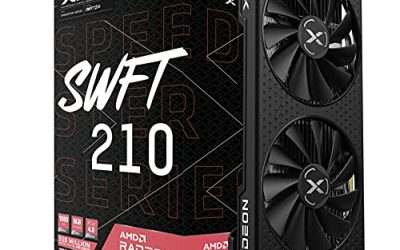
| XFX Speedster SWFT210 Radeon RX 7600 8GB GDDR6 | Straightforward 1080p raster gaming | 8GB GDDR6 with a boost clock up to 2655 MHz |
| ASRock Radeon RX 7600 Challenger 8GB OC | Quiet builds that want fan-stop cooling | Boost clock up to 2695 MHz with 0dB silent cooling |
| GIGABYTE GeForce RTX 3050 WINDFORCE OC V2 6G | Entry-level builds and small power supplies | 6GB GDDR6 on a 96-bit memory interface |
How to Choose
Match VRAM and memory bandwidth to your resolution
Video memory decides how much texture data the card can hold at once, and at this tier the split is between 8GB cards and one 6GB card. For 1080p gaming, 8GB of GDDR6 gives modern titles comfortable headroom for high texture settings, while 6GB asks you to lower textures in the most demanding releases. Bus width matters alongside capacity: the 128-bit interfaces on the RTX 4060 and RX 7600 cards move data faster than the 96-bit interface on the RTX 3050, which shows up when memory-heavy effects pile on. If you plan to keep the card for several years, the larger and wider memory systems age more gracefully.
Check the feature set behind the GPU name
Two cards with similar frame rates can offer very different extras. The GeForce RTX 4060 supports DLSS 3 with frame generation, which can lift smoothness in supported games, and NVIDIA’s ray tracing cores handle lighting effects well at 1080p. The Radeon RX 7600 cards rely on AMD’s RDNA 3 architecture with its own ray tracing and AI accelerators, plus AV1 video encoding that streamers and clip recorders appreciate. The older RTX 3050 supports DLSS and ray tracing too, but from an earlier generation of both. Decide which features your games actually use before paying for a badge on the box.
Confirm power connector and power supply headroom
An affordable card should drop into the PC you already own, so check what your power supply can feed. The ASUS RTX 4060 EVO OC and the ASRock RX 7600 Challenger each need a single 8-pin power connector and list a 550W recommended power supply, which most mid-range builds already have. The GIGABYTE RTX 3050 WINDFORCE OC V2 is far lighter on power, with a maximum consumption of 70W in its listing data, so it suits older systems and prebuilt desktops with modest supplies. Look at the connector your supply actually offers before ordering, because adapters add cost and clutter.
Measure your case and pick a cooler style
Card length and slot width vary more than buyers expect in this price range. The GIGABYTE RTX 3050 is a compact 191 mm card, while the ASRock RX 7600 Challenger stretches to 269.2 mm and needs real clearance in smaller cases. The ASUS Dual RTX 4060 sits between them at 227.2 mm but takes up 2.5 slots, which can crowd a nearby expansion card. Cooling style matters too: both the ASUS and ASRock cards stop their fans completely at low temperatures for a silent desktop, while the XFX SWFT210 uses a plain dual-fan design without lighting or extras.
The 4 Best Options
ASUS Dual GeForce RTX 4060 EVO OC Edition 8GB GDDR6
The ASUS Dual RTX 4060 EVO OC is the pick for players who want modern NVIDIA features without leaving the affordable tier. Its listing highlights DLSS 3, a boost clock of 2535 MHz in OC mode, and two Axial-tech fans with 0dB technology that stop at low temperatures. At 227.2 mm long it fits most mid-tower cases, and the Dual BIOS gives a small safety net for firmware-level tweaks. For 1080p gaming with ray tracing switched on in supported titles, this is the most feature-complete card in the group.
Specs
- Graphics coprocessor: NVIDIA GeForce RTX 4060
- Video memory: 8GB GDDR6, 128-bit interface, 17 Gbps memory speed
- Boost clock: 2535 MHz in OC mode, 2505 MHz in default mode
- Interface: PCI Express 4.0
- Outputs: 1x HDMI 2.1a, 3x DisplayPort 1.4a
- Maximum digital resolution: 7680 x 4320
- Cooling: two Axial-tech fans, 0dB technology, Dual BIOS
- Power: 1x 8-pin connector, 550W recommended power supply
- Dimensions: 227.2 x 123.2 x 49.6 mm, 2.5-slot design
Best for: Gamers who want DLSS 3 frame generation and ray tracing at 1080p.
Watch out for: The 2.5-slot width can block the expansion slot directly below the card.
ASIN: B0CVPDY3HN
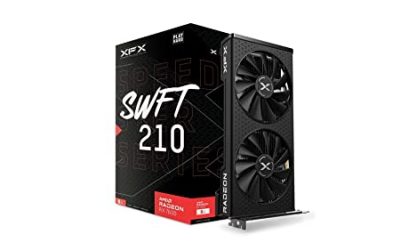
XFX Speedster SWFT210 Radeon RX 7600 8GB GDDR6
The XFX Speedster SWFT210 takes the simplest route to 1080p performance: an AMD Radeon RX 7600 on the RDNA 3 architecture, 8GB of GDDR6, and a boost clock up to 2655 MHz, cooled by XFX’s SWFT dual-fan solution. There is no lighting and no styling extras, which keeps the focus on the core hardware. One HDMI port and three DisplayPort outputs cover multi-monitor desks without adapters. If your games are mostly rasterized titles and competitive shooters where raw frame rate matters more than ray tracing effects, this card covers that ground directly.
Specs
- Chipset: AMD Radeon RX 7600, AMD RDNA 3 architecture
- Video memory: 8GB GDDR6
- Boost clock: up to 2655 MHz
- Cooling: XFX SWFT dual fan cooling solution
- Outputs: 1x HDMI, 3x DisplayPort
- Model number: RX-76PSWFTFY
Best for: Players focused on high frame rates in rasterized 1080p games.
Watch out for: Only one HDMI port, so a second HDMI display needs an adapter.
ASIN: B0C59RVD98
ASRock Radeon RX 7600 Challenger 8GB OC
ASRock’s Challenger version of the RX 7600 carries the highest factory overclock in this guide, with a boost clock up to 2695 MHz, a game clock of 2280 MHz and memory running at 18 Gbps. The listing pairs that with 0dB silent cooling, so the dual fans stop completely when temperatures are low, and a metal backplate that stiffens the board. It needs one 8-pin power connector and a 550W recommended supply. Buyers who want a quiet desktop that still plays loudly at 1080p, and who have the case length for a 269.2 mm card, get the strongest specification sheet here.
Specs
- Graphics coprocessor: AMD Radeon RX 7600, RDNA 3 architecture
- Video memory: 8GB GDDR6, 128-bit interface, 18 Gbps memory speed
- Boost clock: up to 2695 MHz; game clock 2280 MHz; base clock 1770 MHz
- Stream processors: 2048 across 32 compute units
- Interface: PCI Express 4.0, DirectX 12 Ultimate support
- Outputs: 3x DisplayPort 1.4 with DSC, 1x HDMI 2.1
- Power: 1x 8-pin connector, 550W recommended power supply
- Cooling: dual fan design, 0dB silent cooling, metal backplate
- Dimensions: 269.2 x 131.8 x 40.3 mm
Best for: Quiet builds that still want the highest factory clocks in this group.
Watch out for: At 269.2 mm long, it is the tightest fit in compact cases.
ASIN: B0C626FFG2
GIGABYTE GeForce RTX 3050 WINDFORCE OC V2 6G
The GIGABYTE RTX 3050 WINDFORCE OC V2 is the entry point of this group, built around 6GB of GDDR6 and a core clock of 1477 MHz. Its listing data puts maximum power consumption at 70W, which makes it the natural choice for older desktops and prebuilt systems whose power supplies cannot feed an 8-pin connector card. The compact 191 mm body with two WINDFORCE fans drops into small cases easily. It still brings RTX features such as DLSS and ray tracing from the Ampere generation, aimed at esports titles and older games at 1080p rather than the newest releases at high settings.
Specs
- Graphics coprocessor: NVIDIA GeForce RTX 3050
- Video memory: 6GB GDDR6, 96-bit interface
- Core clock: 1477 MHz
- CUDA cores: 2304
- Memory clock: 14000 MHz
- Interface: PCI Express 4.0
- Maximum power consumption: 70W
- Cooling: 2x WINDFORCE fans
- Dimensions: 191 x 111 x 36 mm
- Digital maximum resolution: 7680 x 4320
Best for: Older desktops and prebuilt PCs with small power supplies.
Watch out for: The 6GB memory and 96-bit bus mean lowering texture settings in demanding new games.
ASIN: B0DQK4XSC7
Which One Fits Your Situation
You play modern single-player games at 1080p
Choose the ASUS Dual RTX 4060 EVO OC. Its DLSS 3 support with frame generation helps supported titles stay smooth, and its ray tracing hardware is the strongest in this group for lighting-heavy games. The 8GB of GDDR6 matches 1080p texture demands, and the 2535 MHz boost clock in OC mode gives it headroom over reference designs. It is the pick when visual features matter as much as raw frame rates.
You mostly play competitive and esports titles
Choose the XFX Speedster SWFT210 RX 7600. Competitive games reward high, stable frame rates in rasterized rendering, which is exactly where this card’s 2655 MHz boost clock and 8GB of GDDR6 are aimed. The plain dual-fan cooler skips lighting and styling, and the three DisplayPort outputs suit high-refresh monitors. You give up NVIDIA’s frame generation, but for shooters and arena games played at low settings, that trade rarely matters.
Your PC sits on your desk and noise bothers you
Choose the ASRock RX 7600 Challenger 8GB OC. Its 0dB silent cooling stops both fans completely when temperatures are low, so browsing, video and office work stay quiet. Under load, the highest factory overclock in this guide, up to 2695 MHz, keeps 1080p performance strong. Just confirm your case fits a 269.2 mm card and that your power supply offers one 8-pin connector with 550W of capacity.
You are upgrading an old prebuilt desktop
Choose the GIGABYTE RTX 3050 WINDFORCE OC V2 6G. With maximum power consumption of 70W in its listing data, it works with the modest power supplies that prebuilt desktops usually ship with, and its 191 mm length fits cramped cases. You get a real step up from integrated graphics for esports and older titles at 1080p, without budgeting for a power supply replacement at the same time.
Common Mistakes
- Buying by GPU name alone and ignoring memory size, so a 6GB card ends up in a build meant for texture-heavy games at high settings.
- Forgetting to check for an 8-pin power connector on the existing power supply before ordering a card that needs one.
- Skipping the case measurement and discovering that a 269.2 mm card does not clear the drive cage or front radiator.
- Assuming every card with the same GPU performs identically, when factory boost clocks in these listings range from 1477 MHz to 2695 MHz.
- Planning a multi-monitor setup without counting outputs, then finding the card has only one HDMI port for a TV and a monitor.
Frequently Asked Questions
Is 8GB of VRAM enough for 1080p gaming in 2026?
For most current games at 1080p, yes. The 8GB cards in this guide pair their memory with 128-bit interfaces, which handles high texture settings at this resolution comfortably. A small number of demanding releases already reward more memory at maximum settings, so players who keep cards for many years should treat 8GB as a sensible floor rather than generous headroom, and expect to adjust a few settings over time.
Can these cards handle 1440p gaming?
They can run many games at 1440p, especially esports titles and older releases, but that is not the resolution they are built around. The RX 7600 and RTX 4060 cards manage 1440p best with upscaling features enabled and settings trimmed, while the 6GB RTX 3050 is firmly a 1080p card. If 1440p high settings are the goal from day one, a higher tier with more memory is the safer purchase.
Do I need a new power supply for an affordable graphics card?
Usually not, but check the connector before assuming. The RTX 4060 and RX 7600 picks here each need one 8-pin connector and list a 550W recommended supply, which many existing builds already meet. The GIGABYTE RTX 3050 draws a maximum of 70W according to its listing data, so it suits systems with small supplies. If your supply lacks an 8-pin lead entirely, the low-power card is the simpler upgrade.
What is the difference between the two RX 7600 cards in this guide?
Both use the same AMD GPU and 8GB of GDDR6, but the board designs differ. The ASRock Challenger runs a higher factory boost clock of up to 2695 MHz, adds 0dB fan-stop cooling and a metal backplate, and measures 269.2 mm long. The XFX SWFT210 boosts up to 2655 MHz with a plain dual-fan cooler and no extras. Choose by case space and noise preference.
FAQ
Is 8GB of VRAM enough for 1080p gaming in 2026?
Can these cards handle 1440p gaming?
Do I need a new power supply for an affordable graphics card?
What is the difference between the two RX 7600 cards in this guide?
More from Amazon
Programs that pair well with the guide above. Offers and eligibility are set by Amazon and may change.
Free shipping on eligible items, Prime Video and more. Eligible new members can start with a free trial.
Start a Prime free trialAd-free music streaming. Eligible new subscribers can start with a free trial.
Try Music Unlimited freeA Prime membership for ages 18-24 with a trial period. Eligibility is set by Amazon.
See Prime for Young AdultsAudiobooks and podcasts to listen to on the go. Eligible new members can start with a free trial.
Try Audible freeAs an Amazon Associate we earn from qualifying purchases.