Our Short List of 3

- Best for: first-time buyers who want a wired mouse with simple setup
- Brand: Logitech G
- Sensor: gaming-grade optical, adjustable 200 to 8,000 DPI
- Buttons: 6 programmable buttons
- Lighting: LIGHTSYNC RGB with color wave effects

- Best for: players with medium to large hands who prefer a palm grip
- Brand: Razer
- Sensor: 6,400 DPI optical sensor
- Buttons: 5 programmable buttons
- Switches: mechanical switches
- Best for: smaller hands and claw-grip players who want a light wired mouse
- Brand: Corsair
- Sensor: 12,000 DPI optical sensor
- Buttons: 6 programmable buttons
- Software: Corsair iCUE compatible
All 4 Picks at a Glance
| Product | Specs | Action |
|---|---|---|
| Logitech G203 LIGHTSYNC |
| Check price on Amazon |
| Razer DeathAdder Essential |
| Check price on Amazon |
| Corsair Harpoon RGB Pro |
| Check price on Amazon |
 Logitech G305 LIGHTSPEED |
| Check price on Amazon |
Our Top Picks
- Logitech G203 Wired Gaming Mouse for Laptop &One Name1.5 x 2.45 x 4.59 inches0.14 poundsCheck on Amazon
- Razer DeathAdder Essential Ergonomic Wired Gaming Mouse5.01 x 2.86 x 1.69 inches0.3 poundsCheck on Amazon
- Corsair Harpoon PRO RGB Wired Lightweight FPS/MOBA Gaming2.5"L x 4.5"W4.54 x 2.29 x 1.59 inches0.19 poundsCheck on Amazon
Pros & cons
- Up to 250 hours of play on a single AA battery
- Lightweight 3.4-ounce body aids fast, precise movement
- Built-in receiver storage keeps the dongle from getting lost
- Relies on a AA battery rather than a built-in rechargeable cell
- Endurance mode trade-off needed to stretch battery life further
Buying a first gaming mouse sounds simple until the listings start arguing with each other. One model shouts about a huge sensor number, another pushes wireless freedom, and a third looks identical to the mouse already on the desk. The real decision is narrower: pick a shape your hand can hold for hours, a sensor that tracks without drama, and controls simple enough that setup takes minutes instead of an evening of tutorials and settings menus.
This guide is for new PC players, laptop gamers, and anyone replacing a basic office mouse. The five picks come straight from current Amazon listings: the Logitech G203 LIGHTSYNC and SteelSeries Rival 3 cover wired starters, the Razer DeathAdder Essential suits larger right hands, the Corsair Harpoon RGB Pro fits smaller grips, and the Logitech G305 LIGHTSPEED adds a wireless option with a HERO sensor and long battery life.
Quick Picks
As an Amazon Associate we earn from qualifying purchases
| Product | Best for | Key spec from title |
|---|---|---|
| Logitech G203 LIGHTSYNC | First wired gaming mouse | 8,000 DPI gaming sensor |
| Razer DeathAdder Essential | Larger right hands | 6,400 DPI optical sensor |
| SteelSeries Rival 3 | Durability on a starter budget | 8,500 CPI TrueMove Core sensor |
| Corsair Harpoon RGB Pro | Smaller hands and claw grips | 12,000 DPI optical sensor |
| Logitech G305 LIGHTSPEED | Wireless without the clutter | HERO 12,000 DPI sensor |
How to Choose
Sensor range and tracking feel
A starter mouse does not need the largest sensor number on the page. What matters is a range you can actually adjust and tracking that stays steady during fast swipes. The G203 LIGHTSYNC adjusts from 200 to 8,000 DPI, the Rival 3 uses a TrueMove Core sensor rated to 8,500 CPI with true one-to-one tracking, and the G305 reaches 12,000 DPI through its HERO sensor. Most new players settle somewhere in the lower half of these ranges, so smooth, predictable tracking beats headline numbers every time.
Shape, size, and grip style
Shape decides comfort more than any sensor specification. Measure your hand and think about how you hold the mouse: palm grip spreads fingers across the whole shell, claw grip arches them, and fingertip grip steers with the fingers alone. The DeathAdder Essential uses a larger right-handed ergonomic shell, the Harpoon RGB Pro is compact and contoured for smaller hands, and the G203 keeps a classic symmetrical shape that suits most grip styles. A mouse that fits lets you play longer without adjusting your hold every few minutes.
Wired simplicity or wireless freedom
Wired models such as the G203, Rival 3, and Harpoon RGB Pro plug in and work, with no batteries to manage and no receiver to lose. That simplicity suits a fixed desk and a first setup. Wireless removes cable drag and desk clutter, and the G305 LIGHTSPEED pairs its receiver-based connection with a listed battery life of 250 hours on a single AA battery. Choose wired for zero upkeep, or wireless if the cable genuinely bothers you or the mouse travels between rooms.
Buttons, software, and switch ratings
Six programmable buttons, as on the G203, Rival 3, Harpoon RGB Pro, and G305, give beginners room to map a reload or push-to-talk key without overwhelming them. The DeathAdder Essential keeps five buttons for a simpler layout. Companion software from each brand handles sensitivity steps and lighting, while on-board memory saves settings on the mouse itself. Switch ratings also hint at lifespan: the Rival 3 lists mechanical switches rated for sixty million clicks, a useful sign for a mouse bought to last through years of play.
The 5 Best Options
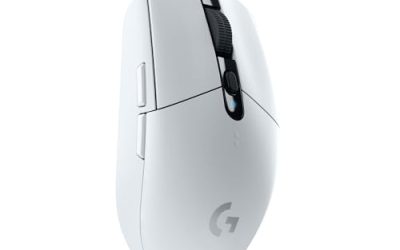
Logitech G203 LIGHTSYNC
- Best for: first-time buyers who want a wired mouse with simple setup
- Brand: Logitech G
- Sensor: gaming-grade optical, adjustable 200 to 8,000 DPI
- Buttons: 6 programmable buttons
- Lighting: LIGHTSYNC RGB with color wave effects
first-time buyers who want a wired mouse with simple setup
the symmetrical shape offers no thumb rest for palm-grip players
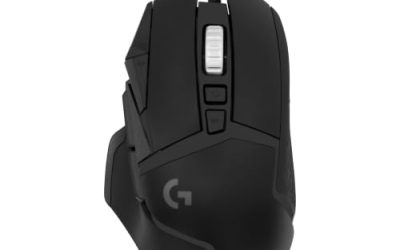
The G203 LIGHTSYNC is the straightforward starting point for a first gaming setup. Its classic six-button shape works with palm, claw, and fingertip grips, and the LIGHTSYNC RGB lighting adds color without extra hardware. The gaming-grade sensor adjusts across a wide sensitivity range, so beginners can start slow for aim control and raise it as their confidence grows. On-board memory stores the chosen settings on the mouse, which helps when switching between a desktop and a laptop. For players who want a wired mouse that simply works from the first session, this is the safe default.
Razer DeathAdder Essential
- Best for: players with medium to large hands who prefer a palm grip
- Brand: Razer
- Sensor: 6,400 DPI optical sensor
- Buttons: 5 programmable buttons
- Switches: mechanical switches
players with medium to large hands who prefer a palm grip
the larger shell can feel bulky for small hands and fingertip grips
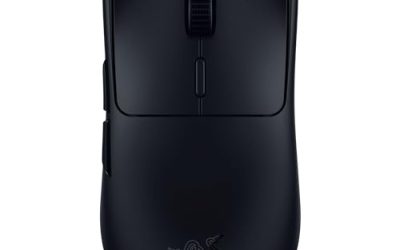
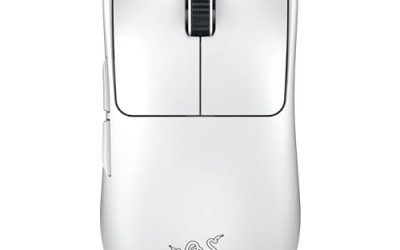
The DeathAdder Essential builds on one of the most familiar shapes in gaming, a right-handed ergonomic shell designed for comfort across long sessions. Its 6,400 DPI optical sensor covers the sensitivity range most beginners actually use, and the five programmable buttons respond through mechanical switches. Rubber side grips help the hand stay planted during quick turns, which new players will appreciate in shooters and action games. There is no complicated feature list to learn here: plug it in, set a sensitivity that feels steady, and play. Larger hands in particular will find the taller shell easy to settle into.
SteelSeries Rival 3
The Rival 3 focuses on durability and honest tracking at a starter level. Its TrueMove Core optical sensor, developed with PixArt, delivers true one-to-one tracking up to 8,500 CPI, and the split-trigger main buttons use mechanical switches rated for sixty million clicks. The shell uses high-grade polymer, weighs 77 grams without the cable, and carries three zones of Prism RGB lighting. On-board memory saves polling rate, keybinds, and five CPI profiles directly on the mouse. For a beginner who plays daily and wants hardware that holds up, the Rival 3 makes a strong case.
Specs
- Brand: SteelSeries
- Sensor: TrueMove Core optical, 100 to 8,500 CPI
- Tracking: 300 IPS, 35G acceleration
- Buttons: 6 programmable buttons, split-trigger design
- Switches: mechanical, rated for sixty million clicks
- Weight: 77 grams without cable
- Lighting: 3-zone Prism RGB
- Model number: 62513
Best for: daily players who want a durable wired mouse with onboard profiles
Watch out for: the rubber cable is stiffer than the braided cables on pricier models
ASIN: B08176SM7C
Corsair Harpoon RGB Pro
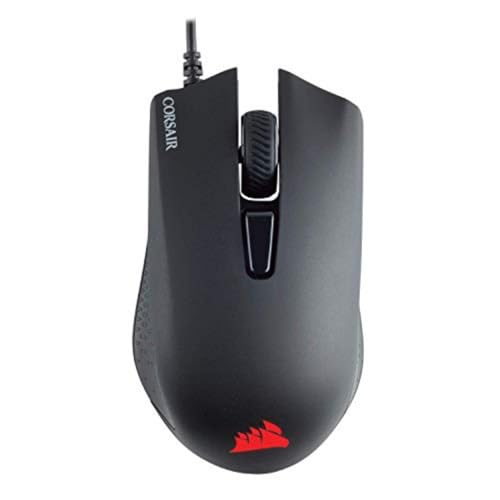
- Best for: smaller hands and claw-grip players who want a light wired mouse
- Brand: Corsair
- Sensor: 12,000 DPI optical sensor
- Buttons: 6 programmable buttons
- Software: Corsair iCUE compatible
smaller hands and claw-grip players who want a light wired mouse
the compact shell may feel cramped for large hands using a palm grip
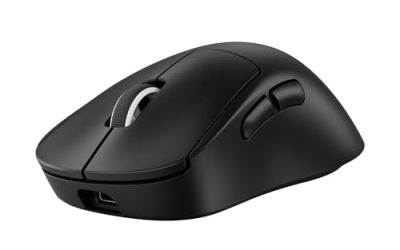
The Harpoon RGB Pro suits smaller hands that find full-size shells tiring. Its contoured shape with rubber side grips weighs just 85 grams, and the 12,000 DPI optical sensor gives plenty of sensitivity headroom for fast-paced games. Six programmable buttons can be remapped through Corsair iCUE software, which also controls the dynamic RGB backlighting and stores profiles on the mouse. The listing covers PC, Mac, and current consoles, so it can follow a starter setup as it grows. Players who use a claw grip and quick, short mouse movements will feel at home with this compact frame.
Logitech G305 LIGHTSPEED
- Best for: beginners who want wireless freedom at a desk or on a laptop
- Brand: Logitech G
- Sensor: HERO, up to 12,000 DPI
- Buttons: 6 programmable buttons
- Connection: LIGHTSPEED wireless with USB receiver
beginners who want wireless freedom at a desk or on a laptop
it uses a replaceable AA battery rather than a rechargeable cell
The G305 LIGHTSPEED is the wireless pick for starters who dislike cable drag. It uses the HERO sensor with up to 12,000 DPI, six programmable buttons, and on-board memory, all in a lightweight shell that runs on a single AA battery. Logitech lists 250 hours of battery life in performance mode, so charging routines never enter the picture; the USB receiver stores inside the mouse for travel. The shape is compact and symmetrical, suiting claw and fingertip grips on smaller to medium hands. For a clean desk or a laptop bag setup, this is the easiest upgrade here.
Which One Fits Your Situation
You are building your very first gaming setup
Start with the Logitech G203 LIGHTSYNC. It plugs in over USB, needs no battery or receiver management, and its six buttons and adjustable sensitivity cover everything a new player meets in the first months of gaming. The classic shape rarely fights any grip style, so it removes the riskiest variable while you learn what your hand actually prefers.
Your hands are large and sessions run long
Choose the Razer DeathAdder Essential. Its right-handed ergonomic shell gives a larger hand room to rest instead of hovering, and the rubber side grips keep control steady when palms warm up. The simpler five-button layout also means less to mispress while you are still building muscle memory in a new game.
You play every day and want the mouse to last
The SteelSeries Rival 3 fits heavy daily use. Mechanical switches rated for sixty million clicks and a high-grade polymer shell address the two parts that wear first, while on-board memory keeps your sensitivity and keybinds saved even if the software is not running. It is the pick for a starter who expects one mouse to serve for years.
You want a tidy desk or play from a laptop
Go with the Logitech G305 LIGHTSPEED. Wireless removes cable drag across a small desk, the receiver stores inside the mouse for travel, and the long AA battery life means it simply works week after week. Its compact symmetrical shape also suits the claw and fingertip grips common on smaller laptop workspaces.
Common Mistakes
- Chasing the highest DPI number instead of a range that feels controllable at your desk size and screen resolution.
- Ignoring hand size and grip style, then blaming aim problems on a shell that never fit properly.
- Buying a wireless mouse without checking battery type, then facing a dead mouse mid-session with no spare battery nearby.
- Mapping every programmable button on day one and forgetting the layout under pressure during real matches.
- Skipping the sensitivity settings in software, leaving the mouse on a default step that suits nobody in particular.
Frequently Asked Questions
Is a wired or wireless mouse better for a beginner?
Both work well. Wired models like the G203 and Rival 3 need no batteries and keep setup trivial, which suits a fixed desk. The wireless G305 removes cable drag and clutter, which many laptop players prefer. Pick based on your desk habits rather than performance fears, since modern gaming sensors track reliably either way.
What DPI should a new player actually use?
Start lower than you expect. Many beginners aim more steadily between 800 and 1,600 DPI, then adjust in small steps as games demand faster turns. Every mouse in this guide adjusts sensitivity through buttons or software, so treat DPI as a personal setting to tune over the first weeks, not a specification to maximize.
Does hand size really matter when choosing a mouse?
Yes, it shapes comfort more than sensor choice. A compact mouse such as the Harpoon RGB Pro suits smaller hands and claw grips, while the larger DeathAdder Essential shell supports bigger hands and palm grips. If a mouse forces your fingers to stretch or bunch, fatigue arrives quickly and control suffers in longer sessions.
How long should an entry level gaming mouse last?
A well-kept starter mouse should serve for years of regular play. Switch ratings give a rough guide: the Rival 3 lists sixty million clicks for its main buttons. Longevity also depends on clean mouse feet, a decent pad surface, and keeping drinks away from the desk, all simple habits that protect any model here.
FAQ
Is a wired or wireless mouse better for a beginner?
What DPI should a new player actually use?
Does hand size really matter when choosing a mouse?
How long should an entry level gaming mouse last?
More from Amazon
Programs that pair well with the guide above. Offers and eligibility are set by Amazon and may change.
Free shipping on eligible items, Prime Video and more. Eligible new members can start with a free trial.
Start a Prime free trialAd-free music streaming. Eligible new subscribers can start with a free trial.
Try Music Unlimited freeA Prime membership for ages 18-24 with a trial period. Eligibility is set by Amazon.
See Prime for Young AdultsAudiobooks and podcasts to listen to on the go. Eligible new members can start with a free trial.
Try Audible freeAs an Amazon Associate we earn from qualifying purchases.