Key takeaways
- VRAM Capacity: 6GB is the bare minimum for 1080p gaming in 2026, but 8GB is strongly preferable for modern titles and texture-heavy games. Prioritize 8GB cards if your budget allows, as VRAM starvation causes severe stuttering and texture pop-in that ruins immersion even when average frame rates look acceptable.
- Architecture Age: Newer architectures deliver better performance per dollar, improved power efficiency, and longer driver support windows. A current-generation card will serve you longer than a last-generation card at the same price point, which matters for resale value and game compatibility as engines evolve.
- Cooling and Noise: Dual-fan designs from reputable brands keep temperatures in check and acoustics manageable. Look for axial-tech fans or equivalent engineered airflow designs, and check for zero-RPM idle modes that eliminate coil whine and fan noise during light workloads like web browsing or video playback.
- PCIe Generation: PCIe 4.0 cards run fine in PCIe 3.0 slots with minimal performance loss, but PCIe 5.0 options offer forward compatibility with future motherboards. Do not overpay for a newer PCIe standard unless you plan to upgrade your platform within the card’s useful lifespan, as most current platforms show negligible gaming benefit from the faster interface.
- Warranty and Support: Three-year warranties from established brands like ASUS, MSI, and GIGABYTE provide peace of mind that lesser-known manufacturers cannot match. Register your card promptly after purchase, as some manufacturers require registration within a set window to unlock extended coverage terms.
Finding a capable graphics card under $500 has always meant compromise, but the landscape in 2026 is more complicated than ever. New architectures from NVIDIA and Intel have pushed last-generation mid-range cards into budget territory, while fresh entries blur the line between entry-level and genuinely competitive 1080p performers. Buyers are left weighing older 6GB options against newer 8GB alternatives, trying to parse real-world frame rates from marketing buzzwords, all while staying under that hard $500 ceiling.
Our top picks


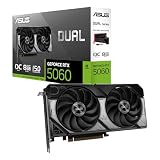
 ASUS Dual NVIDIA GeForce RTX 5060 8GB
- Product Group: Personal Computer
- Binding: Personal Computers


As an Amazon Associate we earn from qualifying purchases at no extra cost to you. Ratings are shown as listed on Amazon.
This guide cuts through the noise. We have evaluated the best graphics cards available under $500 right now, factoring in VRAM capacity, architecture generation, cooling design, warranty coverage, and actual gaming performance at 1080p and 1440p. Whether you are building a budget gaming PC from scratch or upgrading an aging rig, these are the cards worth your money in 2026.
🛒 Best Price Today on Amazon
Prime members get fast, free shipping on everything above, plus member-only deals. New members get a 30-day free trial — cancel anytime.
Watch: Best Graphics Card Under $500 — Video Review
How to Choose a Graphics Card Under $500 (2026)
- VRAM Capacity: 6GB is the bare minimum for 1080p gaming in 2026, but 8GB is strongly preferable for modern titles and texture-heavy games. Prioritize 8GB cards if your budget allows, as VRAM starvation causes severe stuttering and texture pop-in that ruins immersion even when average frame rates look acceptable.
- Architecture Age: Newer architectures deliver better performance per dollar, improved power efficiency, and longer driver support windows. A current-generation card will serve you longer than a last-generation card at the same price point, which matters for resale value and game compatibility as engines evolve.
- Cooling and Noise: Dual-fan designs from reputable brands keep temperatures in check and acoustics manageable. Look for axial-tech fans or equivalent engineered airflow designs, and check for zero-RPM idle modes that eliminate coil whine and fan noise during light workloads like web browsing or video playback.
- PCIe Generation: PCIe 4.0 cards run fine in PCIe 3.0 slots with minimal performance loss, but PCIe 5.0 options offer forward compatibility with future motherboards. Do not overpay for a newer PCIe standard unless you plan to upgrade your platform within the card’s useful lifespan, as most current platforms show negligible gaming benefit from the faster interface.
- Warranty and Support: Three-year warranties from established brands like ASUS, MSI, and GIGABYTE provide peace of mind that lesser-known manufacturers cannot match. Register your card promptly after purchase, as some manufacturers require registration within a set window to unlock extended coverage terms.
The Best Graphics Card Under $500 (2026)s Reviewed
ASUS Dual RTX 5060 OC Edition
The standout pick of this roundup, this card brings next-generation GDDR7 memory and DLSS 4 support to the sub-$500 category. PCIe 5.0 connectivity and a refined 2.5-slot axial-tech cooling design make it the most future-proof option here, delivering strong 1080p and even respectable 1440p performance for the price.
ASRock Intel Arc A580 Challenger OC
Intel’s Xe HPG architecture delivers excellent raw compute value, and the A580 pairs 8GB of GDDR6 with a capable dual-fan cooler featuring 0dB silent mode. Its driver maturity has improved substantially by 2026, making it a genuinely competitive alternative to NVIDIA’s dominance at this price, especially for budget-conscious buyers who do not need DLSS.
MSI RTX 3050 Ventus 2X 6G OC
A solid budget entry leveraging NVIDIA’s Ampere architecture with a boost clock of 1492 MHz. The 6GB framebuffer and 96-bit bus limit it compared to the 8GB options, but MSI’s Ventus cooling keeps the card compact and quiet, fitting comfortably in smaller cases where larger dual-fan or triple-fan cards simply will not fit.
ASUS Dual RTX 3050 6GB OC Edition
ASUS brings its proven axial-tech fan design and steel bracket construction to the budget tier, offering excellent build quality and a 2-slot form factor that suits compact builds. The three-year warranty adds real value at this price, though the 6GB VRAM is a constraint worth noting for buyers eyeing modern AAA titles with high-resolution texture packs.
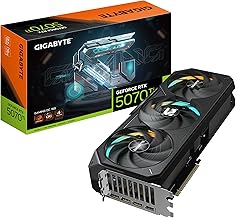
GIGABYTE RTX 3050 WINDFORCE OC V2 6G
GIGABYTE’s WINDFORCE dual-fan solution keeps this card running cool and quiet under sustained loads. The 6GB GDDR6 on a 96-bit bus positions it firmly in entry-level territory, but the overclocked factory tuning and clean power delivery make it a reliable, no-frills option for 1080p gaming at medium-to-high settings.
Frequently Asked Questions
Is the GT 1030 still viable for gaming in 2026?
The GT 1030 4GB DDR4 is strictly an entry-level card for very light esports titles and older games at low settings. It is not recommended for modern AAA gaming, but it remains a viable option for budget HTPC builds or as a stopgap display adapter when dedicated graphics are needed without external power.
Should I choose 6GB or 8GB VRAM under $500?
8GB is strongly recommended if you can find it within your budget. Modern games increasingly demand more VRAM for high-quality textures, and while 6GB cards still function at 1080p, you will need to lower texture settings more frequently, which noticeably impacts visual fidelity on titles released after 2024.
Are Intel Arc graphics cards reliable for gaming?
By 2026, Intel’s driver support has matured significantly, resolving many early stability and performance issues. The Arc A580 offers excellent value, though you should verify performance in your specific game library, as a few niche titles may still run better on NVIDIA equivalents due to optimization differences.
Will an RTX 5060 be bottlenecked by older PCIe 3.0 motherboards?
The performance impact of running a PCIe 5.0 card on a PCIe 3.0 slot is minimal for most games, typically under 2-3 percent. While you lose some theoretical bandwidth, the card’s performance is far more dependent on GPU compute and VRAM, so older motherboards are not a reason to skip a quality PCIe 5.0 card upgrade.
Final Thoughts
For most buyers in 2026, the ASUS Dual RTX 5060 OC Edition is the clear winner under $500, offering next-generation architecture, 8GB of fast GDDR7 memory, and DLSS 4 support that meaningfully extends gaming longevity. The ASRock Intel Arc A580 Challenger is the value pick for budget-focused builders who want 8GB VRAM without paying the NVIDIA premium, while the ASUS Dual RTX 3050 OC remains a sensible compact-build choice for buyers who prioritize warranty coverage and physical build quality over raw performance numbers.