Our Short List of 3

- Best for: Movie-first home-theater buyers who want 4K PRO-UHD detail and proper active-3D playback of a 3D Blu-ray collection.
- Resolution: 4K PRO-UHD
- Display technology: 3-chip 3LCD
- HDR: HDR support
- 3D: Active 3D support, for active 3D glasses (per listing bullet)

- Best for: Buyers who split time between 3D movies and console gaming and want one 4K projector that still lists 3D support.
- Resolution: 3840 x 2160 (4K UHD)
- Display technology: DLP
- Brightness: 3,200 lumens
- Contrast ratio: 10,000:1

- Best for: Dark-room movie watchers who prioritize color accuracy and lens shift at 1080p and still want 3D playback.
- Resolution: 1920 x 1080 (1080p native)
- Light source: LED
- Brightness: 2,200 lumens (as listed)
- HDR: HDR support
All 3 Picks at a Glance
| Product | Specs | Action |
|---|---|---|
| Epson Home Cinema 3800 4K PRO-UHD 3-Chip Projector with HDR |
| Check price on Amazon |
| BenQ TK700 4K Gaming Projector |
| Check price on Amazon |
| BenQ HT2060 1080p HDR LED Home Theater Projector |
| Check price on Amazon |
Key takeaways
- Only a few new projectors still play 3D Blu-rays. Compare three with 3D stated in their Amazon listings: Epson active 3D and two BenQ models, with specs.
Buying a projector for 3D in 2026 starts with an uncomfortable fact: most new models have dropped 3D playback entirely, and some that still mention 3D only mean a keystone geometry feature. If you own a shelf of 3D Blu-rays, the real decision is finding a projector whose own product listing actually states 3D content support, then matching it to your room, your screen, and the glasses system it uses. Anything else risks a big picture that plays your collection flat.
The three picks below serve different buyers: home-theater owners who want faithful active-3D playback of a disc collection, players who split the same screen between 3D films and console games, and dark-room movie watchers who value color accuracy and flexible placement over raw resolution. Each pick was chosen from the name and specifications on its Amazon product page, and only models whose listing text itself states 3D support made the cut.
Quick Picks
As an Amazon Associate we earn from qualifying purchases
| Product | Best for | Key spec from title |
|---|---|---|
| Epson Home Cinema 3800 | Movie-first 3D Blu-ray collections | 4K PRO-UHD with HDR |
| BenQ TK700 | 3D movies plus console gaming | 3,200 lumens, 16ms lag at 4K |
| BenQ HT2060 | Dark-room color accuracy | Vertical lens shift, DCI-P3 color |
How to Choose
Check That the Listing Itself States 3D Playback
Start with the product page, not the marketing around it. Plenty of current projectors carry the letters 3D somewhere in their description while offering no 3D playback at all: 3D keystone correction is a picture-geometry feature that squares up a skewed image, and it says nothing about playing a 3D Blu-ray. What qualifies a projector here is its own listing stating 3D content support, either as a named feature or in its specification bullets. If the only 3D claim you can find lives on a manufacturer page or a review site, treat the model as unverified and keep looking.
Match the Glasses System Before You Buy Glasses
3D glasses are not interchangeable. Active shutter glasses, DLP-Link glasses, and RF glasses each pair with a matching system in the projector, and a set bought for one system will not sync with another. Read what the listing itself describes: one pick below states support for active 3D glasses in its bullets, while the others name 3D among their features without spelling out a glasses system in the captured text. None of the three listings states that glasses are included, so budget for them as a separate purchase and confirm the system on the current listing before ordering.
Weigh Brightness Against Your Room
Brightness decides whether 3D looks punchy or washed out, because 3D glasses dim the image before it reaches your eyes. Compare the lumen figure printed in each listing rather than figures quoted elsewhere, and be honest about your room: a light-controlled theater can live with a lower figure, while a living room with daytime light needs more. Note that one pick here publishes no lumen figure in its captured listing text at all, so its room-light performance cannot be judged from the listing alone and deserves a closer look at the current page before you commit.
Balance Resolution, Placement, and Lag
Decide what the screen does most nights. A 4K model keeps fine detail on a large screen, while a native 1080p model can still be the smarter buy for a dark room where color and contrast carry the picture. Placement matters as much as pixels: vertical lens shift and a longer zoom range let the projector sit off-center without distorting the image. If the same screen hosts a console, check the listed input lag and refresh figures too, since a projector that feels fine for films can feel sluggish in fast games. HDR support is worth checking as well, because it shapes contrast on the 4K discs and games the projector will show most often.
The 3 Best Options
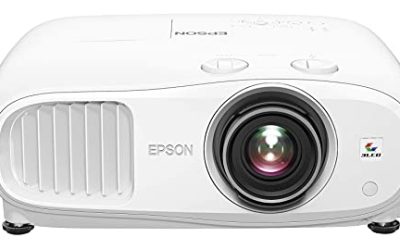
Epson Home Cinema 3800 4K PRO-UHD 3-Chip Projector with HDR
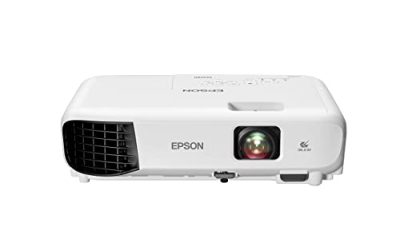
- Best for: Movie-first home-theater buyers who want 4K PRO-UHD detail and proper active-3D playback of a 3D Blu-ray collection.
- Resolution: 4K PRO-UHD
- Display technology: 3-chip 3LCD
- HDR: HDR support
- 3D: Active 3D support, for active 3D glasses (per listing bullet)
Movie-first home-theater buyers who want 4K PRO-UHD detail and proper active-3D playback of a 3D Blu-ray collection.
3D glasses are a separate purchase, and no brightness figure is published in the captured listing text, so room-light performance has to be judged from the listing’s current details at publish time.
The Epson is the purist’s pick of this short list. Its listing states active 3D support outright in its bullets, describing support for high-performance active 3D glasses that reproduce the source 3D information, which is exactly the wording a 3D Blu-ray collector wants to see. Around that, you get Epson’s 4K PRO-UHD image and 3-chip 3LCD design with HDR, a combination aimed at film detail rather than gaming tricks. It is the only pick here whose listing spells out its 3D approach in full sentences, which makes it the easiest of the three to buy glasses for with confidence.
BenQ TK700 4K Gaming Projector
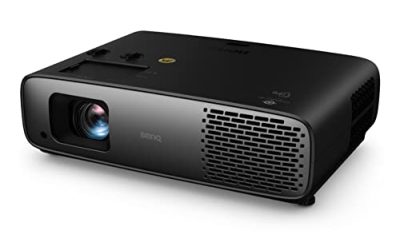
- Best for: Buyers who split time between 3D movies and console gaming and want one 4K projector that still lists 3D support.
- Resolution: 3840 x 2160 (4K UHD)
- Display technology: DLP
- Brightness: 3,200 lumens
- Contrast ratio: 10,000:1
Buyers who split time between 3D movies and console gaming and want one 4K projector that still lists 3D support.
The Amazon spec table lists a 4,000-hour light source life, the shortest here, and the listing’s captured text does not spell out which 3D glasses system it uses — check the current listing before ordering glasses.
The TK700 is the two-purpose option: a 4K gaming projector whose listing still carries 3D among its features. Its title pairs 3,200 lumens with a 16ms lag time at 4K, and the spec table adds HDR10, dual HDMI 2.0 with eARC, and a 5W chamber speaker, so it can anchor a living-room setup where films and a PS5 or Xbox share the screen. For a buyer who refuses to give up 3D discs but games just as often, it is the only pick here built for both jobs. Its DLP design and listed contrast ratio round out a spec sheet aimed squarely at mixed use.
BenQ HT2060 1080p HDR LED Home Theater Projector
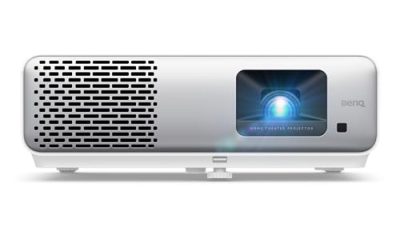
- Best for: Dark-room movie watchers who prioritize color accuracy and lens shift at 1080p and still want 3D playback.
- Resolution: 1920 x 1080 (1080p native)
- Light source: LED
- Brightness: 2,200 lumens (as listed)
- HDR: HDR support
Dark-room movie watchers who prioritize color accuracy and lens shift at 1080p and still want 3D playback.
It is 1080p native (4K input is downscaled), and current stock appears to sit with third-party sellers rather than Amazon itself, so the featured offer needs a publish-day check.
The HT2060 trades resolution for color and placement flexibility. It is native 1080p, but its title leads with DCI-P3 and Rec.709 wide color gamut coverage, vertical lens shift, and a 1.3x zoom, and it closes with the standalone 3D feature token that earned it a place here. Its LED light source and built-in 5W by 2 speakers suit a dedicated dark room where the projector stays put and films are the main event, with 3D playback kept on the menu. The 2,200 lumens listed suit that dark-room brief rather than a bright living room.
Which One Fits Your Situation
Your 3D Blu-ray Shelf Is the Whole Point
If the projector exists to serve a disc collection, start with the pick whose listing describes its 3D support in full: active 3D glasses support, stated in the bullets, alongside a 4K PRO-UHD picture built for film detail. Budget for glasses separately, and plan the room around it, because its listing publishes no brightness figure to judge daylight performance by.
One Screen for Films and a Console
If the same screen hosts a PS5 or Xbox most nights and 3D films on weekends, the 4K gaming pick is the natural fit: 3,200 lumens for a brighter room, a listed 16ms lag at 4K, and eARC for passing audio to a soundbar. Confirm its glasses system on the current listing before you order eyewear.
The Projector Cannot Sit Dead Center
A ceiling mount or shelf that sits off to one side rules out projectors that rely on digital correction alone. The pick with vertical lens shift and a 1.3x zoom lets you square the picture optically and keep full 1080p resolution, which suits a fixed dark-room installation where the projector is placed once and rarely moved again.
You Are Replacing an Older 3D Projector
Owners of an earlier 3D setup often assume their existing glasses will carry over. They may not: glasses systems differ, and two of the three listings here do not spell out which system they use in the captured text. Before reusing old eyewear, match its system against the wording on the current listing of the projector you choose.
Common Mistakes
- Reading ‘3D keystone’ as 3D playback — it is a geometry correction feature and says nothing about playing 3D content.
- Ordering glasses before checking which system the listing describes — active, DLP-Link, and RF glasses do not sync across systems.
- Assuming glasses are in the box — none of these listings states that glasses are included, so they are a separate purchase.
- Comparing brightness figures from manufacturer pages against listing figures — the two sources can differ, so judge each projector by the number its own listing prints.
- Expecting streaming apps to serve 3D versions of films — plan on a 3D Blu-ray player and 3D discs as the reliable source.
Frequently Asked Questions
Do Any of These Projectors Include 3D Glasses?
No. None of the three listings states that glasses are included. The Epson listing states support for active 3D glasses, so that system is confirmed in its own text; the two BenQ listings name 3D among their features without spelling out a glasses system in the captured text. Treat glasses as a separate purchase and verify the system on the current listing.
What Do I Need to Watch a 3D Movie at Home?
You need a 3D-capable source, which in practice means a 3D Blu-ray player and 3D Blu-ray discs, plus glasses matched to the projector’s system and a screen. Mainstream streaming services have largely dropped 3D versions of their catalogs, so a disc collection is the reliable library. Check the player’s own specifications to confirm it outputs a 3D signal.
Is 3D Keystone Correction the Same as 3D Playback?
No. Keystone correction is a geometry tool that squares up an image when the projector sits at an angle, and the ‘3D’ in that phrase does not mean the projector can play 3D films. A projector qualifies for this list only when its own listing states 3D content support as a feature, separate from any keystone wording.
Can I Reuse the 3D Glasses From My Old Setup?
Only if the system matches. Active shutter, DLP-Link, and RF glasses each sync with a matching projector system and do not work across types. One pick here confirms active glasses support in its listing; the others do not state a system in the captured text, so compare your old glasses’ system against the current listing before assuming compatibility.
FAQ
Do Any of These Projectors Include 3D Glasses?
What Do I Need to Watch a 3D Movie at Home?
Is 3D Keystone Correction the Same as 3D Playback?
Can I Reuse the 3D Glasses From My Old Setup?
More from Amazon
Programs that pair well with the guide above. Offers and eligibility are set by Amazon and may change.
Free shipping on eligible items, Prime Video and more. Eligible new members can start with a free trial.
Start a Prime free trialAd-free music streaming. Eligible new subscribers can start with a free trial.
Try Music Unlimited freeA Prime membership for ages 18-24 with a trial period. Eligibility is set by Amazon.
See Prime for Young AdultsAudiobooks and podcasts to listen to on the go. Eligible new members can start with a free trial.
Try Audible freeAs an Amazon Associate we earn from qualifying purchases.