Our Short List of 3

- Best for: Console gaming in a room with some ambient light, where colour and brightness matter as much as response time.
- True 4K 4LED gaming projector
- 3300 ANSI lumens
- 4.2ms response time at 1080p 240Hz
- DCI-P3 colour coverage
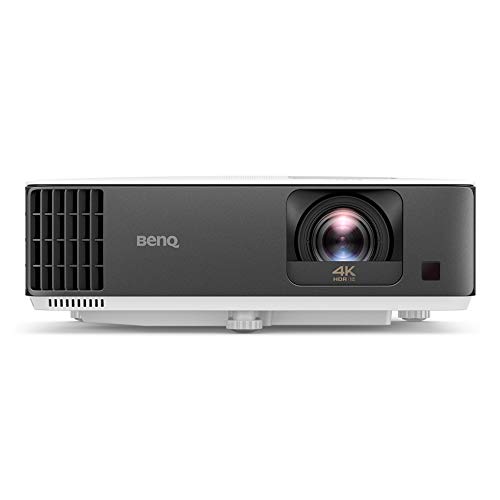
- Best for: Small rooms and short-throw setups where a standard projector would sit too far back to fill the screen.
- 4K HDR gaming projector
- 16ms low input lag at 4K 60Hz
- 4.16ms input lag at 1080p 240Hz
- 3000 lumens

- Best for: A mixed-use room where a laser light source, compact size, and strong brightness matter alongside gaming response.
- 4K UHD laser projector for home theater and gaming
- 3500 lumens
- 4.4ms input lag at 1080p 240Hz
- 17ms input lag at 4K 60Hz
All 3 Picks at a Glance
| Product | Specs | Action |
|---|---|---|
| BenQ X3100i |
| Check price on Amazon |
| BenQ TK700STi |
| Check price on Amazon |
| Optoma UHZ35 |
| Check price on Amazon |
Our Top Picks
Input lag decides whether a big-screen game feels connected to your hands. A projector can show a sharp 4K image and still feel slow if the picture takes too long to appear after you press a button or click a mouse. That delay matters most in fast shooters, fighting games, racing games, and any game where timing decides the result. A slow projector can make aiming feel heavy and dodging feel late, even when the image itself looks excellent.
The three projectors below were chosen because each one carries a published low input-lag figure for 4K gaming, not just a general gaming label. The BenQ X3100i suits a bright room and a full home cinema setup, the BenQ TK700STi suits a smaller room where the projector sits close to the screen, and the Optoma UHZ35 suits a buyer who wants a laser light source and a compact body. Each pick states its lag figure by mode, so you can see what changes when resolution and refresh rate change.
Quick Picks
As an Amazon Associate we earn from qualifying purchases
| Product | Best for | Key spec from title |
|---|---|---|
| BenQ X3100i | Bright-room console gaming with rich colour | 3300 ANSI Lumens, 4.2ms at 1080p 240Hz |
| BenQ TK700STi | Short-throw gaming in a smaller room | 16ms low input lag at 4K 60Hz, 3000 lumens |
| Optoma UHZ35 | Laser gaming with a compact setup | 3500 lumens, 4.4ms at 1080p 240Hz and 17ms at 4K 60Hz |
How to Choose
Read the lag figure with its resolution and refresh rate
A single lag number means little on its own, because the same projector can respond at very different speeds in different modes. A figure quoted at 1080p and 240Hz will look far lower than the same projector at 4K and 60Hz, and a console game running at 4K and 60Hz will use the slower figure. Look for a lag value that names both the resolution and the refresh rate, then match it to the mode you will actually use. If a listing only says low lag without naming a mode, treat that claim as incomplete and keep looking for the published table or the mode-by-mode figures.
Check whether 4K and high refresh rate can happen together
Many 4K gaming projectors accept a 4K signal at 60Hz and a lower-resolution signal at 120Hz or 240Hz, but they do not accept 4K at 120Hz. That split is normal for projectors with HDMI 2.0 inputs, and it shapes the whole buying decision. A console player who wants the sharpest image should plan around 4K at 60Hz, while a PC player who wants the fastest response should plan around 1080p at a higher refresh rate. Decide which of those two experiences matters more to you before you compare brightness, colour, or sound.
Match brightness and throw distance to the room
Brightness decides how well the image holds up with lamps on or daylight coming through curtains, while throw distance decides how far back the projector must sit to fill your screen. A short-throw model can fill a large image from close to the wall, which helps in a bedroom or a small living room, while a standard-throw model needs more depth and often suits a dedicated room better. Measure the distance from the planned projector position to the screen, check the image size that distance produces, and confirm that the brightness figure fits the amount of light in the room.
Plan for game mode, keystone, and sound from the start
Low lag usually depends on a game mode or a fast mode, and some projectors turn off keystone correction or other image processing when that mode is active. That means the projector may need to sit square to the screen, or a ceiling mount may need careful alignment, to keep the image straight without the extra processing. Sound matters too, because a built-in speaker can suit casual play while a soundbar or a home cinema system suits longer sessions. Check the speaker, the audio return channel, and the placement options before you settle on a model.
The 3 Best Options
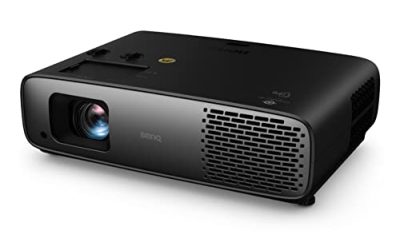
BenQ X3100i
- Best for: Console gaming in a room with some ambient light, where colour and brightness matter as much as response time.
- True 4K 4LED gaming projector
- 3300 ANSI lumens
- 4.2ms response time at 1080p 240Hz
- DCI-P3 colour coverage
Console gaming in a room with some ambient light, where colour and brightness matter as much as response time.
4K stays at 60Hz on this model, so the fastest lag figures only apply at lower resolutions.
The BenQ X3100i is the strongest all-round pick here for a console player who wants a bright 4K image, wide colour, and a published lag figure that stays low at 4K and 60Hz. BenQ lists 16ms at 4K and 60Hz, 8ms at 1440p and 120Hz, and 4.2ms at 1080p and 240Hz, so the same projector covers cinematic console play and faster PC play at a lower resolution. Its 4LED light source removes the lamp replacement routine of a lamp projector, and its vertical lens shift gives more freedom when the projector cannot sit exactly level with the screen.
Watch out for: 4K stays at 60Hz on this model, so the fastest lag figures only apply at lower resolutions.
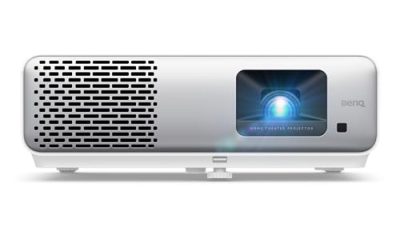
BenQ TK700STi
- Best for: Small rooms and short-throw setups where a standard projector would sit too far back to fill the screen.
- 4K HDR gaming projector
- 16ms low input lag at 4K 60Hz
- 4.16ms input lag at 1080p 240Hz
- 3000 lumens
Small rooms and short-throw setups where a standard projector would sit too far back to fill the screen.
Short-throw placement is less forgiving, so measure the throw distance carefully before you commit to a screen size.
The BenQ TK700STi is the pick for a smaller room, because its short-throw lens can produce a 100-inch image from about 6.5 feet away. BenQ lists 16ms input lag at 4K and 60Hz and 4.16ms at 1080p and 240Hz, so it keeps the same 4K lag figure as the larger X3100i while fitting a tighter space. Its game modes cover role-playing, first-person shooter, and sports titles, and its built-in streaming support lets the same projector serve as a film and television screen when the console is off. A short-throw design also keeps the projector closer to the seating area, which can simplify cable runs.
Watch out for: Short-throw placement is less forgiving, so measure the throw distance carefully before you commit to a screen size.
Optoma UHZ35
- Best for: A mixed-use room where a laser light source, compact size, and strong brightness matter alongside gaming response.
- 4K UHD laser projector for home theater and gaming
- 3500 lumens
- 4.4ms input lag at 1080p 240Hz
- 17ms input lag at 4K 60Hz
A mixed-use room where a laser light source, compact size, and strong brightness matter alongside gaming response.
The 4K lag figure is a fraction higher than the two BenQ picks, and the fastest lag figure needs the lower-resolution high-refresh mode.
The Optoma UHZ35 is the laser pick in this group, and its DuraCore laser light source suits a buyer who wants long light-source life and a compact body. Optoma lists 17ms input lag at 4K and 60Hz and 4.4ms at 1080p and 240Hz in Enhanced Gaming Mode, so its 4K figure sits just behind the two BenQ models while its high-refresh figure stays competitive. The listing pairs that gaming performance with 3500 lumens, HDR10 and HLG support, and a 1.6x zoom, which gives more placement flexibility than a fixed short-throw lens. It is a sensible choice for a mixed-use room where films and games share the same screen.
Watch out for: The 4K lag figure is a fraction higher than the two BenQ picks, and the fastest lag figure needs the lower-resolution high-refresh mode.
Which One Fits Your Situation
You play mostly on a console at 4K
Choose the BenQ X3100i if your room has some light and you want the brightest image and the widest colour of the three. Its published 16ms figure at 4K and 60Hz matches the way most console games run, and its game modes and lens shift make setup more forgiving. The Optoma UHZ35 is the next choice if you prefer a laser light source and a smaller body.
Your room is small and the projector must sit close
Choose the BenQ TK700STi, because its short-throw lens fills a large image from a short distance. Measure the distance from the lens to the screen first, then confirm the image size that distance produces. A standard-throw projector in the same room would need to sit further back, which may place it behind seating or against a wall.
You want a laser projector for films and games
Choose the Optoma UHZ35 for its DuraCore laser light source, 3500 lumens, and compact shape. Its 17ms figure at 4K and 60Hz is close to the BenQ models, and its 4.4ms figure at 1080p and 240Hz covers faster PC play. The 1.6x zoom also helps when the projector cannot sit at an exact distance from the screen.
You switch between cinematic games and fast competitive games
Choose the BenQ X3100i for its three published lag figures, which cover 4K at 60Hz, 1440p at 120Hz, and 1080p at 240Hz. That range lets you run a story-driven game at full 4K and switch to a lower resolution for a competitive match without changing hardware. Keep the game mode active in both cases, and expect the image processing to stay minimal while it is on.
Common Mistakes
- Comparing lag figures from different modes, such as one projector at 1080p and 240Hz against another at 4K and 60Hz.
- Assuming a 4K projector accepts 4K at 120Hz, when many models with HDMI 2.0 accept 4K only at 60Hz.
- Buying a standard-throw projector for a small room without measuring the distance to the screen.
- Leaving game mode off, which can add processing delay that the published low-lag figure does not include.
- Ignoring keystone limits in game mode, which can force a crooked image or a projector position that does not work.
Frequently Asked Questions
What input lag is good for gaming on a 4K projector?
A published figure around 16ms to 17ms at 4K and 60Hz is a strong result for a projector and suits most console and PC games at that resolution. Faster figures at 1080p and 240Hz suit competitive play, but they do not apply to a 4K signal. Always read the lag figure with its resolution and refresh rate, because a single number without a mode tells you little.
Why does input lag change between 4K and 1080p modes?
Higher resolutions and higher refresh rates change how much work the projector must do on each frame, and the input and processing path changes with the signal. A 4K signal at 60Hz carries far more picture data per frame than a 1080p signal, so the projector takes longer to display it. Dropping to 1080p at 120Hz or 240Hz reduces that load and lets the image appear sooner after your input.
Do I need HDMI 2.1 for a low-lag 4K projector?
No, you do not need HDMI 2.1 to get low lag at 4K and 60Hz, and all three projectors here use HDMI 2.0 inputs. HDMI 2.1 matters mainly if you want 4K at 120Hz, which none of these three models accept. If 4K at 120Hz is a firm requirement, look for a projector that names that mode in its published specifications rather than assuming any 4K gaming model supports it.
Does game mode affect picture quality on a projector?
Game mode reduces processing delay by switching off or limiting features such as keystone correction and extra image enhancement, so the picture may look slightly less processed than in a cinema mode. That trade is usually worth it for gaming, because the faster response makes controls feel direct. For films, switch back to a cinema or standard picture mode to restore the full image processing.
FAQ
What input lag is good for gaming on a 4K projector?
Why does input lag change between 4K and 1080p modes?
Do I need HDMI 2.1 for a low-lag 4K projector?
Does game mode affect picture quality on a projector?
More from Amazon
Programs that pair well with the guide above. Offers and eligibility are set by Amazon and may change.
Free shipping on eligible items, Prime Video and more. Eligible new members can start with a free trial.
Start a Prime free trialAd-free music streaming. Eligible new subscribers can start with a free trial.
Try Music Unlimited freeA Prime membership for ages 18-24 with a trial period. Eligibility is set by Amazon.
See Prime for Young AdultsAudiobooks and podcasts to listen to on the go. Eligible new members can start with a free trial.
Try Audible freeAs an Amazon Associate we earn from qualifying purchases.