Key takeaways
- Find the best AMD graphics card for your build with this Radeon RX guide to VRAM, power, cooling, size and resolution, from 1080p play to 4K gaming.
Choosing an AMD graphics card is rarely about finding the fastest chip on the shelf. The real decision is matching a Radeon to the monitor on your desk, the power supply in your case, and the games you actually play. A card built for 4K wastes its strength on a 1080p 60Hz screen, while a budget card paired with a 1440p high-refresh display leaves frames on the table. AMD’s current lineup makes that matching exercise simpler than it looks, because each tier has a clear job.
This guide is for players building a new PC, upgrading an older card, or switching to AMD for the first time. It walks through the Radeon RX 9000 series and the previous RX 7000 series, explains the specs that change real-world results, and points each kind of player at the tier that fits. Every detail below comes from AMD and board-partner listings, so you can check any claim against the product page before you buy. It also flags the traps that catch first-time buyers.
As an Amazon Associate we earn from qualifying purchases.
How to Choose
Match the card to your monitor first
Resolution and refresh rate decide the tier before anything else does. A 1080p display at 144Hz or higher is well served by the RX 9060 XT, which AMD and its partners position for smooth 1080p and entry-level 1440p play. A 1440p high-refresh monitor is the natural home of the RX 9070 and RX 9070 XT, both built around 16GB of memory and a 256-bit interface. For 4K, only the top tier makes sense, and even there upscaling is part of the plan in demanding titles. Buying above your monitor wastes money; buying below it caps every game you play. Plan for the display you expect to own next year, not only today’s screen.
Read the video memory, not just the chip name
Two cards can share a chip name and behave very differently. The RX 9060 XT ships in 8GB and 16GB versions, and the 16GB card is the safer long-term pick because newer games with high-resolution textures can exceed 8GB. Memory bus width matters too: the 9060 XT uses a 128-bit interface, while the 9070 and 9070 XT use a 256-bit interface with 20 Gbps memory, which moves data faster at higher resolutions. Check both numbers on the listing, since the model name alone never tells you which version you are looking at. A wider bus and faster memory also help at 4K, where the card moves far more data every frame than at 1080p.
Check power supply wattage and connectors
Every Radeon tier carries a recommended system power figure, and it is the number to trust. The RX 9070 XT is a 304W card with a 750W system recommendation and two 8-pin power connectors, so an older 550W unit is not enough for it. Cards in the 9060 XT class sit near 160W to 180W and commonly list a 550W to 650W recommendation, which most mid-range builds already meet. Open your case before ordering: count the PCIe cables your supply provides, confirm the connector type, and leave headroom for a high-end CPU alongside the card. Modular supplies make this check easier, since unused cables stay out of the case and airflow stays clear.
Measure the case before you order
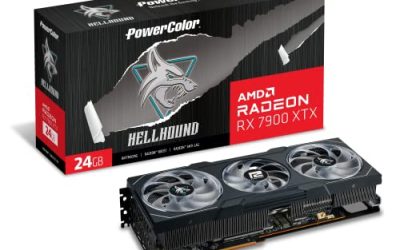
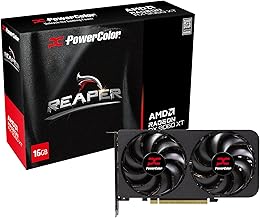
Partner cards vary widely in physical size, and a card that does not fit is a return, not an upgrade. The Sapphire Pulse RX 9070 XT measures 320mm long and occupies three slots, with a triple-fan cooler and a support bracket in the box. Smaller dual-fan designs exist in the lower tiers, but length and thickness still differ between partners selling the same chip. Compare the card’s length, height and slot width with your case’s maximum GPU clearance, check airflow around the fans, and confirm your monitor cables reach the outputs on the card’s bracket. Several triple-fan cards include a support bracket that stops cards from sagging over time.
Which One Fits Your Situation
1080p high-refresh and esports play
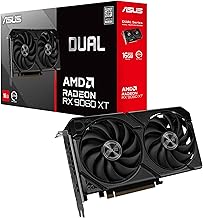
The RX 9060 XT 16GB is the tier for this job. Its 16GB of GDDR6 memory keeps texture-heavy games smooth, its power draw suits most existing mid-range supplies, and its dual-fan partner designs fit compact cases more easily than triple-fan flagships. Pick the 16GB version over the 8GB version when both are listed, since the memory is what keeps the card useful as games grow more demanding.
1440p gaming at high settings
The RX 9070 is the balanced pick for 1440p. It carries 16GB of GDDR6 memory on a 256-bit interface, supports FSR 4 upscaling on the RDNA 4 architecture, and draws less power than its XT sibling. Players who want high settings at 1440p without stepping up to flagship power and cooling will find this tier the most comfortable middle ground in the current Radeon lineup, with room to grow into a faster monitor later.
High-refresh 1440p and entry-level 4K
The RX 9070 XT leads the AMD lineup for this situation. Its 4096 stream processors, boost clock up to 2970 MHz and 16GB of 20 Gbps memory give it the headroom for high-refresh 1440p, and it can run 4K with upscaling and sensible settings in many titles. It needs a 750W system and two 8-pin connectors, plus 320mm of case clearance, so confirm fit and power before committing to the flagship tier.
Upgrading an older card without a new power supply
A lower-power Radeon is the right move when the rest of the system stays put. The RX 9060 XT class, near 160W to 180W, works with the 550W to 650W supplies found in many existing builds, and previous-generation cards such as the RX 7700 XT with 12GB of memory can also serve this role. Confirm the connector count and case length before ordering. That check takes five minutes and prevents the most common upgrade headache.
Common Mistakes
- Buying an 8GB card for 1440p because the model name matches the 16GB version, then finding the card stutters in newer games at high texture settings.
- Judging a card by VRAM capacity alone while ignoring bus width, clock speed and architecture.
- Forgetting to check power supply wattage and the number of 8-pin connectors before ordering.
- Measuring nothing and discovering a 320mm triple-fan card does not fit the case, turning an upgrade into a return.
- Comparing cards by chip name only, when partners sell the same chip with different coolers, clocks and memory sizes.
Frequently Asked Questions
How much VRAM do I need in 2026?
For 1080p play with sensible settings, 8GB still works in many games, but newer titles with high-resolution textures can exceed it and cause stutter. For 1440p, 12GB is the practical floor, and 16GB is the safer target for a card you plan to keep for several years. At 4K, 16GB is the minimum worth considering, paired with upscaling in demanding games. Texture packs and mods raise memory use further.
Is the RX 9070 XT better than the RX 9070?
The XT is the faster card, with more stream processors, a higher boost clock and a 304W board power figure against the standard 9070’s lower draw. The gap shows most at high-refresh 1440p and entry-level 4K. The standard 9070 suits players who want 16GB of memory and FSR 4 support with lower power and cooling demands, so the better card is the one that matches your monitor and power supply.
Will my current power supply work?
It depends on the tier you choose. A quality 550W to 650W unit generally covers the 9060 XT class, while the 9070 XT calls for a 750W system with two 8-pin PCIe cables. Check the recommended figure on the exact partner card’s product page, count your available connectors, and consider the CPU draw as well. If the supply is old or marginal, replacing it is simpler than troubleshooting crashes later.
Do I need PCIe 5.0 for these cards?
No. The RX 9000 series cards use a PCIe 5.0 interface, but they run in PCIe 4.0 slots with little reported performance loss at typical settings. The place to be careful is the lane count: some 8GB cards use an x8 electrical interface, which can cost performance on older PCIe 3.0 boards. A modern board with a full x16 slot avoids that concern entirely.
FAQ
How much VRAM do I need in 2026?
Is the RX 9070 XT better than the RX 9070?
Will my current power supply work?
Do I need PCIe 5.0 for these cards?
More from Amazon
Programs that pair well with the guide above. Offers and eligibility are set by Amazon and may change.
Free shipping on eligible items, Prime Video and more. Eligible new members can start with a free trial.
Start a Prime free trialAd-free music streaming. Eligible new subscribers can start with a free trial.
Try Music Unlimited freeA Prime membership for ages 18-24 with a trial period. Eligibility is set by Amazon.
See Prime for Young AdultsAudiobooks and podcasts to listen to on the go. Eligible new members can start with a free trial.
Try Audible freeAs an Amazon Associate we earn from qualifying purchases.