Our Short List of 3

- Best for: Slim office desktops that need a brand-name 1080p gaming upgrade with no extra power cable.
- GPU: NVIDIA GeForce GTX 1650, 896 CUDA cores
- Memory: 4GB GDDR5, 128-bit interface, 8 Gbps memory speed
- Boost clock: 1695 MHz
- Outputs: HDMI 2.0b x 1, DL-DVI-D x 1
- Best for: Compact living-room and home theater builds where a dual-fan cooler keeps noise down in a tight case.
- GPU: NVIDIA GeForce GTX 1650
- Memory: 4GB GDDR5, 128-bit interface
- Cooling: 2X Windforce dual fans
- Form factor: Low-profile design, model GV-N1650OC-4GL

- Best for: Single-slot slim builds where 6GB of video memory matters more than having the newest graphics chip.
- GPU: NVIDIA GeForce GTX 1060, GP106, 1280 shading units
- Memory: 6GB GDDR5, 192-bit interface
- Outputs: HDMI 2.0 x 1, DisplayPort 1.4a x 1
- Power draw: 75 W, no auxiliary power connector, powered by the PCIe bus
All 5 Picks at a Glance
| Product | Specs | Action |
|---|---|---|
| MSI GeForce GTX 1650 4GT LP OC |
| Check price on Amazon |
| Gigabyte GeForce GTX 1650 OC Low Profile 4G |
| Check price on Amazon |
| SRhonyra GTX 1060 6GB Low Profile |
| Check price on Amazon |
 SRhonyra GTX 1650 4GB Low Profile (DisplayPort and HDMI) |
| Check price on Amazon |
 SRhonyra GTX 1650 4GB Low Profile (Dual HDMI) |
| Check price on Amazon |
Key takeaways
- Find the best low profile graphics cards for slim PCs. Compare 5 half-height GPUs that fit small form factor cases and run on slot power alone.
A slim desktop or a small form factor case leaves almost no room for a graphics card, and that single constraint shapes the whole purchase. The card has to be short enough in height to sit behind a half-height bracket, short enough in length to clear the drive cage, and modest enough in power draw to run from the PCIe slot, because many slim PCs have no spare power connector and no room for a bigger supply. Get any one of those three wrong and the card simply does not fit or does not turn on.
This guide is for owners of slim office desktops, home theater PCs, and compact builds who want real graphics performance without buying a new case or a new power supply. Every card below is a genuine low-profile design with a half-height bracket, and each one was checked against its Amazon listing for form factor, memory, outputs, and power draw, so the picks reflect what the listing actually sells.
Quick Picks
As an Amazon Associate we earn from qualifying purchases.
| Product | Best for | Key spec |
|---|---|---|
| MSI GeForce GTX 1650 4GT LP OC | Slim office desktops turned into 1080p gaming PCs | 4GB GDDR5, dual-fan low-profile cooler |
| Gigabyte GeForce GTX 1650 OC Low Profile 4G | Quiet home theater and compact living-room builds | 4GB GDDR5, 2X Windforce dual fans |
| SRhonyra GTX 1060 6GB Low Profile | The most video memory in a single-slot card | 6GB GDDR5, 192-bit memory interface |
| SRhonyra GTX 1650 4GB Low Profile (DisplayPort and HDMI) | Single-slot builds with a DisplayPort monitor | 4GB GDDR5, DisplayPort 1.4 and HDMI |
| SRhonyra GTX 1650 4GB Low Profile (Dual HDMI) | Dual-monitor setups where both screens use HDMI | 4GB GDDR5, two native HDMI outputs |
How to Choose
Measure Height, Length, and Thickness Before Anything Else
Low profile describes height, not length, so a card can be short front to back and still be too tall for a slim case. Measure the vertical clearance from the PCIe slot to the case panel, then measure the length from the rear bracket to the first obstruction, which is often a drive cage or a front fan. Check thickness too: a low-profile card can still occupy two slots, and a second slot of cooler can collide with a neighboring card or a case wall. Compare all three numbers with the exact model you plan to buy, because two cards with the same GPU can differ in every dimension.
Match Power Draw to the Power Supply You Already Own
Most slim desktops ship with a small power supply and no spare PCIe power cable, which is why slot-powered cards matter so much in this category. A card that draws its power from the PCIe slot alone drops straight into an office PC, while a card that needs a 6-pin connector may be unusable in the same machine. Check the wattage on the supply label, leave headroom for the processor and drives, and confirm on the listing whether the exact model needs an extra connector, since factory-overclocked versions of the same GPU sometimes differ on this point.
Pick Outputs for the Monitors You Actually Own
A low-profile card has a narrow bracket, so it usually carries only two outputs, and the mix varies from model to model. One card may carry HDMI and DVI, another DisplayPort and HDMI, and another two HDMI ports, and that mix decides whether your monitors connect directly or need adapters. Count the monitors you plan to run, note which input each one has, and match the card to that list before ordering. Adapters add cost and clutter in a case where space is already the problem, so the right outputs on the card itself are worth real attention.
Choose the GPU and Memory for the Workload, Not the Box
The graphics chip and the amount of video memory set what the card can do, while the low-profile badge only describes its shape. Four gigabytes of memory handles 1080p play in esports titles and older games, while six gigabytes gives demanding titles more room for textures and reduces stutter when scenes get busy. A card with more memory is not automatically faster in every game, so weigh the chip, the memory, and the interface width together. For a home theater PC or an office machine, a modest chip with the right outputs beats a stronger chip that does not fit.
The 5 Best Options
MSI GeForce GTX 1650 4GT LP OC
- Best for: Slim office desktops that need a brand-name 1080p gaming upgrade with no extra power cable.
- GPU: NVIDIA GeForce GTX 1650, 896 CUDA cores
- Memory: 4GB GDDR5, 128-bit interface, 8 Gbps memory speed
- Boost clock: 1695 MHz
- Outputs: HDMI 2.0b x 1, DL-DVI-D x 1
Slim office desktops that need a brand-name 1080p gaming upgrade with no extra power cable.
Confirm the outputs before ordering, because this model carries HDMI and DVI-D, so a DisplayPort-only monitor needs an adapter.
This is the safest pick for turning a slim office desktop into a capable 1080p gaming PC. MSI builds it as a true low-profile card, with a half-height bracket that brings the height down to 69 mm, and a dual-fan cooler that spreads heat across the heatsink instead of relying on a single small fan. It draws its power from the PCIe slot alone, so it drops into prebuilt slim systems that have no spare power cable. The card suits buyers who want a known brand, a quiet dual-fan design, and a straightforward upgrade with no case or power supply changes.
Watch out for: Confirm the outputs before ordering, because this model carries HDMI and DVI-D, so a DisplayPort-only monitor needs an adapter.
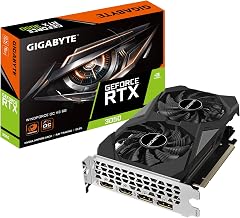
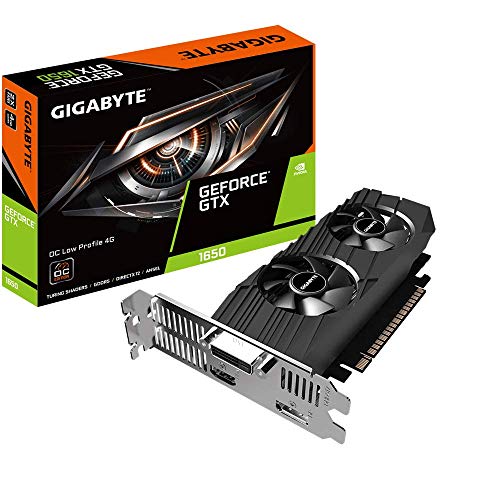
Gigabyte GeForce GTX 1650 OC Low Profile 4G
- Best for: Compact living-room and home theater builds where a dual-fan cooler keeps noise down in a tight case.
- GPU: NVIDIA GeForce GTX 1650
- Memory: 4GB GDDR5, 128-bit interface
- Cooling: 2X Windforce dual fans
- Form factor: Low-profile design, model GV-N1650OC-4GL
Compact living-room and home theater builds where a dual-fan cooler keeps noise down in a tight case.
The listing does not spell out outputs, clock speed, or dimensions, so confirm those details on the product page before ordering.
Gigabyte takes the same GTX 1650 chip and cools it with two Windforce fans, which suits compact builds where a single small fan would have to spin hard to keep up. The card is a genuine low-profile design built for slim desktops and small form factor cases, and its factory overclock gives it a small edge over stock-clocked versions of the same chip. It fits the same kind of upgrade as the MSI card: a prebuilt slim PC that needs real graphics performance without a new case, a new power supply, or a tangle of adapters.
Watch out for: The listing does not spell out outputs, clock speed, or dimensions, so confirm those details on the product page before ordering.
SRhonyra GTX 1060 6GB Low Profile
- Best for: Single-slot slim builds where 6GB of video memory matters more than having the newest graphics chip.
- GPU: NVIDIA GeForce GTX 1060, GP106, 1280 shading units
- Memory: 6GB GDDR5, 192-bit interface
- Outputs: HDMI 2.0 x 1, DisplayPort 1.4a x 1
- Power draw: 75 W, no auxiliary power connector, powered by the PCIe bus
Single-slot slim builds where 6GB of video memory matters more than having the newest graphics chip.
SRhonyra is a lesser-known marketplace brand, so confirm the seller, the warranty terms, and the return policy before ordering.
This is the pick for buyers who want the most video memory they can fit into a single slot. Six gigabytes of GDDR5 on a 192-bit interface gives demanding games more room for textures than any 4GB card in this guide, and the single-slot cooler leaves the neighboring slot free in a cramped case. The card runs entirely from PCIe slot power, so it works in slim systems with no spare connector, and it ships with a full-height bracket as well for standard cases. It suits older slim desktops that need a real step up in graphics without any power supply work.
Watch out for: SRhonyra is a lesser-known marketplace brand, so confirm the seller, the warranty terms, and the return policy before ordering.
SRhonyra GTX 1650 4GB Low Profile (DisplayPort and HDMI)
- Best for: Tiny cases with a DisplayPort monitor where a blower cooler and a single-slot design matter.
- GPU: NVIDIA GeForce GTX 1650, TU117, 896 CUDA cores
- Memory: 4GB GDDR5, 128-bit interface
- Outputs: DisplayPort 1.4 x 1, HDMI 2.0b x 1
- Power draw: 60 W maximum, no auxiliary power connector, powered by the PCIe bus
Tiny cases with a DisplayPort monitor where a blower cooler and a single-slot design matter.
SRhonyra is a lesser-known marketplace brand, so confirm the seller, the warranty terms, and the return policy before ordering.
This single-slot GTX 1650 is the pick for a compact build with a DisplayPort monitor. Its blower-style cooler pushes warm air out of the case instead of recirculating it inside, which helps in a slim chassis where airflow is already limited. At 5.7 inches long and 0.71 inches thick it fits cases that reject longer or thicker cards, and it draws only 60 W from the PCIe slot, so it runs on the small power supplies found in office desktops. The DisplayPort output supports high-resolution output while the HDMI port covers a second screen or a television.
Watch out for: SRhonyra is a lesser-known marketplace brand, so confirm the seller, the warranty terms, and the return policy before ordering.
SRhonyra GTX 1650 4GB Low Profile (Dual HDMI)
- Best for: Dual-monitor office and media setups where both screens connect over HDMI.
- GPU: NVIDIA GeForce GTX 1650, TU117, 896 CUDA cores
- Memory: 4GB GDDR5, 128-bit interface
- Outputs: HDMI 2.0b x 2
- Power draw: 60 W maximum, no auxiliary power connector, powered by the PCIe bus
Dual-monitor office and media setups where both screens connect over HDMI.
SRhonyra is a lesser-known marketplace brand, so confirm the seller, the warranty terms, and the return policy before ordering.
This version of the same GTX 1650 card exists for one specific setup: two monitors that both use HDMI. Its two native HDMI ports drive both screens without adapters or dongles, which keeps a small desk tidy and avoids the compatibility quirks that adapters sometimes introduce. Like its DisplayPort sibling it is a true single-slot card at 5.7 inches long, it draws only 60 W from the PCIe slot, and its blower cooler exhausts heat out of the case. It suits office workstations, trading desks, and media setups where two HDMI screens are the whole point of the upgrade.
Watch out for: SRhonyra is a lesser-known marketplace brand, so confirm the seller, the warranty terms, and the return policy before ordering.
Which One Fits Your Situation
Upgrading a Slim Office Desktop for Light Gaming
Pick the MSI GTX 1650 4GT LP OC. Its dual-fan cooler runs quietly in a cramped office case, its 75 W draw comes entirely from the PCIe slot, and its half-height bracket fits the slim towers that offices actually buy. It turns a machine built for spreadsheets into a competent 1080p gaming PC with no power supply swap and no case surgery.
Building a Quiet Home Theater PC
Pick the Gigabyte GTX 1650 OC Low Profile 4G. Two Windforce fans share the cooling work, so neither fan has to spin as hard as a single small fan would, and that matters in a living room where the PC sits a few feet from the couch. Its low-profile shape fits slim media cases, and its factory overclock handles video playback and light gaming with ease.
Running Two Monitors From a Tiny Case
Pick the SRhonyra GTX 1650 with dual HDMI if both screens use HDMI, or its DisplayPort and HDMI sibling if one screen uses DisplayPort. Both are single-slot cards that leave the neighboring slot free, both run on slot power alone, and both drive two screens at once. Match the card to the inputs on your monitors and the setup works with no adapters.
Squeezing the Most Memory Into a Single Slot
Pick the SRhonyra GTX 1060 6GB Low Profile. Its 6GB of GDDR5 on a 192-bit interface gives demanding games more texture headroom than any 4GB card here, and it still fits a single slot and runs on PCIe power alone. It is the right call when memory capacity, not the newest chip, is the limiting factor in the games you play.
Common Mistakes
- Buying a short card that is still full height: length and height are different measurements, and a compact card can still be too tall for a slim case.
- Assuming every low-profile card is single-slot: some low-profile cards use a dual-slot cooler, so check thickness as well as height.
- Forgetting to swap the bracket: several cards ship with a full-height bracket fitted and the half-height bracket in the box, so fit the low-profile bracket before installing.
- Ignoring the power supply: a card that needs a 6-pin connector cannot run in a slim PC that has no spare cable, no matter how well it fits.
- Expecting 1440p performance from a 4GB card: low-profile cards target 1080p play and media work, so set texture quality to match the memory on board.
Frequently Asked Questions
What does low profile actually mean for a graphics card?
Low profile means the card is short in height and mounts with a half-height bracket, so it fits slim desktops and small form factor cases that a full-height card cannot enter. It says nothing about length, so always check the length and thickness of the exact model against the clearance inside your case before ordering.
Do low profile graphics cards need a power connector?
Most of them do not. The cards in this guide draw 60 to 75 W from the PCIe slot alone and need no auxiliary cable, which is what makes them practical upgrades for slim office PCs with small power supplies. A few factory-overclocked versions of the same chips do need a 6-pin connector, so confirm that detail on the listing for the exact model.
Can a low profile card handle 1080p gaming?
Yes, within limits. A GTX 1650 or GTX 1060 low-profile card plays esports titles and older games at 1080p on medium to high settings, while newer demanding titles usually need medium or low settings to stay smooth. Four gigabytes of video memory is the main constraint, so lowering texture quality is the first adjustment when a game stutters.
Will a low profile card fit any slim PC?
Not automatically. The case must have a free PCIe x16 slot, enough vertical clearance for the half-height bracket, enough length for the card, and a power supply that can cover the card plus the rest of the system. Measure the slot, the length, and the supply label first, and check whether the card ships with the low-profile bracket fitted or in the box.
FAQ
What does low profile actually mean for a graphics card?
Do low profile graphics cards need a power connector?
Can a low profile card handle 1080p gaming?
Will a low profile card fit any slim PC?
More from Amazon
Programs that pair well with the guide above. Offers and eligibility are set by Amazon and may change.
Free shipping on eligible items, Prime Video and more. Eligible new members can start with a free trial.
Start a Prime free trialAd-free music streaming. Eligible new subscribers can start with a free trial.
Try Music Unlimited freeA Prime membership for ages 18-24 with a trial period. Eligibility is set by Amazon.
See Prime for Young AdultsAudiobooks and podcasts to listen to on the go. Eligible new members can start with a free trial.
Try Audible freeAs an Amazon Associate we earn from qualifying purchases.