Our Short List of 3

- Best for: Gamers building a 4K setup who want the largest memory pool in the Radeon lineup.
- Graphics processor: AMD Radeon RX 7900 XTX
- Memory: 24GB GDDR6
- Memory bus: 384-bit
- Boost clock: up to 2525 MHz in OC mode

- Best for: Builders who want current-generation Radeon features and a white card for a matching build.
- Graphics processor: AMD Radeon RX 9070 XT
- Memory: 16GB GDDR6
- Memory bus: 256-bit
- Boost clock: up to 2970 MHz
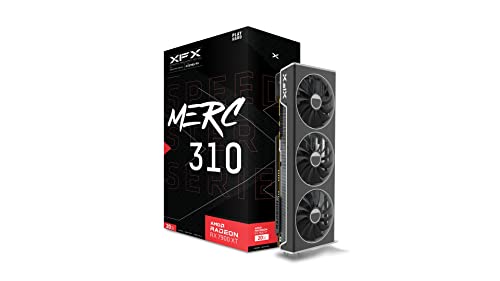
- Best for: High-end 1440p gaming and entry-level 4K gaming with a large memory pool.
- Graphics processor: AMD Radeon RX 7900 XT
- Memory: 20GB GDDR6
- Boost clock: up to 2535 MHz
- Cooling: XFX MERC triple-fan design
All 4 Picks at a Glance
| Product | Specs | Action |
|---|---|---|
| PowerColor Hellhound AMD Radeon RX 7900 XTX |
| Check price on Amazon |
| ASRock AMD Radeon RX 9070 XT Steel Legend White |
| Check price on Amazon |
| XFX Speedster MERC310 AMD Radeon RX 7900 XT |
| Check price on Amazon |
 Sapphire PULSE AMD Radeon RX 7800 XT |
| Check price on Amazon |
Our Top Picks
Choosing a Radeon graphics card comes down to matching the card to the games and the monitor already on the desk. A card that runs smoothly at 1080p can struggle at 4K, a card with limited memory can stutter in texture-heavy titles, and an oversized or power-hungry card can force a case or power-supply change. The four cards below cover the current Radeon range, from a 1440p workhorse to a flagship built for 4K, and each one is a distinct AMD graphics processor with its own memory size, cooling design, and power setup.
This guide is for PC gamers building or upgrading a desktop, for creators who need large video memory for editing and rendering work, and for buyers who want an AMD card without sorting through every partner model. Every card here was checked against its Amazon listing for a real ASIN, memory size, cooling design, and outputs, so the picks reflect what is actually listed as available rather than a specification on paper.
Quick Picks
As an Amazon Associate we earn from qualifying purchases.
| Product | Best for | Key spec |
|---|---|---|
| PowerColor Hellhound AMD Radeon RX 7900 XTX | 4K gaming with maximum memory | 24GB GDDR6, boost up to 2525 MHz |
| ASRock AMD Radeon RX 9070 XT Steel Legend White | Current-generation features and a white build | 16GB GDDR6, boost up to 2970 MHz |
| XFX Speedster MERC310 AMD Radeon RX 7900 XT | High-end 1440p and entry-level 4K gaming | 20GB GDDR6, boost up to 2535 MHz |
| Sapphire PULSE AMD Radeon RX 7800 XT | 1440p gaming in a compact dual-fan card | 16GB GDDR6, 256-bit memory bus |
How to Choose
Match the Card to the Monitor
The monitor decides how much graphics power is actually needed. A 1080p display with a standard refresh rate is served well by a mid-range card, while a 1440p display with a high refresh rate asks for considerably more, and a 4K display asks for the most of all. Buying a flagship card for a 1080p monitor wastes the extra hardware, and buying a mid-range card for a 4K monitor leads to lowered settings and choppy frame rates. Check the monitor resolution and refresh rate first, then pick the card tier that fits. A card with 16GB of memory is a sensible floor for 1440p, while 4K gaming is more comfortable with 20GB or 24GB.
Check Video Memory Before Anything Else
Video memory, or VRAM, is the first specification to compare because it limits which texture settings a card can hold. Modern games at 1440p already ask for large texture pools, and 4K titles ask for more still. A card with 16GB of GDDR6 handles most current games at 1440p without forcing texture compromises, while 20GB and 24GB cards leave room for higher resolutions and for creative work such as video editing and 3D rendering. Memory bus width matters too: a wider bus moves data between the memory and the processor faster. When two cards look similar, the one with more memory and a wider bus is usually the safer long-term choice.
Measure the Card and the Power Supply
Graphics cards vary widely in physical size and power draw, and both must fit the existing build. Triple-fan cards are long, often taking up close to 13 inches of case length and nearly three slots of thickness, so measure the space from the rear bracket to the nearest drive cage or front fan. The power supply needs the right wattage and the right connectors: the cards in this guide use two 8-pin PCIe connectors, and a high-end card needs a stronger supply than a mid-range one. Check the supply label for its wattage and available connectors before ordering, because a card that cannot be powered is a card that cannot be used.
Cooling, Noise, and Case Airflow
Cooling design decides how loud a card runs and how hot it gets during long sessions. Triple-fan cards spread heat across a larger heatsink and usually run quieter under load, while dual-fan cards are shorter and fit smaller cases but have less cooling headroom. A card with a large heatsink still needs fresh air, so the case needs at least one intake fan feeding the card and one exhaust fan removing warm air. Cards with a metal backplate also add rigidity, which helps prevent sag in long, heavy models. If the PC sits on a desk next to the user, a triple-fan design with a large heatsink is worth prioritising for quieter operation.
The 4 Best Options
PowerColor Hellhound AMD Radeon RX 7900 XTX
- Best for: Gamers building a 4K setup who want the largest memory pool in the Radeon lineup.
- Graphics processor: AMD Radeon RX 7900 XTX
- Memory: 24GB GDDR6
- Memory bus: 384-bit
- Boost clock: up to 2525 MHz in OC mode
Gamers building a 4K setup who want the largest memory pool in the Radeon lineup.
The card is long and heavy, so confirm case clearance and add a support bracket if the case has no built-in support.
The Hellhound RX 7900 XTX is the flagship of this group and the natural pick for 4K gaming. Its 24GB of GDDR6 memory on a wide 384-bit bus gives it room for the highest texture settings at 4K, and its RDNA 3 architecture handles demanding titles without forcing compromises. The triple-fan cooler is built for long sessions, and the card is aimed at gamers who want the strongest Radeon graphics processor available in this lineup and are building around a high-resolution monitor.
Watch out for: The card is long and heavy, so confirm case clearance and add a support bracket if the case has no built-in support.
ASRock AMD Radeon RX 9070 XT Steel Legend White
- Best for: Builders who want current-generation Radeon features and a white card for a matching build.
- Graphics processor: AMD Radeon RX 9070 XT
- Memory: 16GB GDDR6
- Memory bus: 256-bit
- Boost clock: up to 2970 MHz
Builders who want current-generation Radeon features and a white card for a matching build.
The card occupies nearly three slots and needs an 800W power supply, so confirm both the case space and the supply before ordering.
The Steel Legend RX 9070 XT is the current-generation card in this guide, built on AMD RDNA 4 with 64 compute units, third-generation ray tracing accelerators, and second-generation AI accelerators. Its 16GB of GDDR6 memory on a 256-bit bus suits 1440p and 4K gaming, and its boost clock of up to 2970 MHz is the highest in this group. The white shroud, white fans, and white metal backplate make it a strong fit for white-themed builds, where most graphics cards force a colour compromise.
Watch out for: The card occupies nearly three slots and needs an 800W power supply, so confirm both the case space and the supply before ordering.
XFX Speedster MERC310 AMD Radeon RX 7900 XT
- Best for: High-end 1440p gaming and entry-level 4K gaming with a large memory pool.
- Graphics processor: AMD Radeon RX 7900 XT
- Memory: 20GB GDDR6
- Boost clock: up to 2535 MHz
- Cooling: XFX MERC triple-fan design
High-end 1440p gaming and entry-level 4K gaming with a large memory pool.
The card needs a 750W power supply as a minimum, so check the supply wattage and connectors before buying.
The MERC310 RX 7900 XT sits one step below the flagship but keeps 20GB of GDDR6 memory, which is generous for 1440p gaming and enough for entry-level 4K play. Its boost clock of up to 2535 MHz and triple-fan MERC cooling give it headroom for demanding titles, and the RDNA 3 architecture covers the same feature set as the flagship card. It suits gamers who want high-end performance without moving to the largest and most power-hungry card in the lineup.
Watch out for: The card needs a 750W power supply as a minimum, so check the supply wattage and connectors before buying.
Sapphire PULSE AMD Radeon RX 7800 XT
- Best for: 1440p gaming in a mid-tower or compact case where a shorter card is needed.
- Graphics processor: AMD Radeon RX 7800 XT
- Memory: 16GB GDDR6
- Memory bus: 256-bit
- Memory clock: 19.5 Gbps effective
1440p gaming in a mid-tower or compact case where a shorter card is needed.
The dual-fan cooler has less headroom than the triple-fan cards here, so make sure the case has good intake airflow.
The PULSE RX 7800 XT is the compact card in this group, built for 1440p gaming in cases where a long triple-fan card will not fit. Its 16GB of GDDR6 memory on a 256-bit bus with a 19.5 Gbps effective memory clock handles current titles at 1440p, and its dual-fan design keeps the card to a 2.5-slot thickness. Two HDMI and two DisplayPort outputs give it flexibility for multi-monitor setups, and the RDNA 3 architecture supports the same display features as the larger cards here.
Watch out for: The dual-fan cooler has less headroom than the triple-fan cards here, so make sure the case has good intake airflow.
Which One Fits Your Situation
Building a 4K Gaming PC
Choose the PowerColor Hellhound RX 7900 XTX. Its 24GB of memory and 384-bit bus are built for 4K texture loads, and its triple-fan cooler handles long sessions at high settings. Pair it with a 4K monitor and a power supply with enough headroom, and confirm the case has room for a long card before ordering.
Upgrading a 1440p Setup
Choose the Sapphire PULSE RX 7800 XT for a straightforward 1440p upgrade, or the XFX Speedster MERC310 RX 7900 XT if the monitor has a high refresh rate or the plan includes moving to 4K later. The PULSE fits smaller cases, while the MERC310 adds memory and clock speed for more demanding titles.
Building a White-Themed PC With Current Features
Choose the ASRock RX 9070 XT Steel Legend White. It is the only white card in this guide, and its RDNA 4 architecture brings third-generation ray tracing and second-generation AI accelerators. The white shroud and backplate match white cases, motherboards, and memory without forcing a colour compromise. Its triple-fan cooler and 2.9-slot design still need a mid-tower case with room to spare.
Replacing an Older Card Without Changing the Case
Choose the Sapphire PULSE RX 7800 XT. Its dual-fan design and 2.5-slot thickness fit cases that cannot take a long triple-fan card, and its 16GB of memory is a large step up from older 8GB cards. Measure the available length first, since even compact cards vary by a few centimetres.
Common Mistakes
- Buying a flagship card for a 1080p monitor, where the extra hardware goes unused.
- Ignoring video memory and choosing a card that forces lowered texture settings at the target resolution.
- Ordering a long triple-fan card without measuring case clearance first.
- Forgetting to check that the power supply has enough wattage and two 8-pin PCIe connectors.
- Pairing a powerful card with a case that has no intake airflow, which raises temperatures and noise.
Frequently Asked Questions
Is Radeon the same as AMD graphics?
Yes. Radeon is the brand name AMD uses for its graphics cards, so every Radeon card is an AMD graphics card. The two terms describe the same products: AMD designs the graphics processor, and partner brands such as Sapphire, XFX, PowerColor, and ASRock build the finished cards around it.
How much video memory do I need for 1440p gaming?
16GB of GDDR6 is a sensible amount for 1440p gaming with current titles, since it holds large texture pools without forcing compromises. Cards with 20GB or 24GB add headroom for higher resolutions, texture-heavy games, and creative work such as video editing, where large memory pools are useful.
What power supply do I need for these cards?
The mid-range cards in this guide run on a standard gaming power supply with two 8-pin PCIe connectors, while the high-end cards ask for more: the RX 7900 XT needs a 750W supply as a minimum, and the RX 9070 XT Steel Legend needs an 800W supply. Check the supply label for wattage and connectors before ordering any card.
Do Radeon cards support ray tracing?
Yes. The RDNA 3 cards in this guide include hardware ray tracing, and the RDNA 4 RX 9070 XT adds third-generation ray tracing accelerators along with second-generation AI accelerators. Ray tracing performance varies by game and by card tier, so the higher-end cards handle it more comfortably at higher resolutions.
FAQ
Is Radeon the same as AMD graphics?
How much video memory do I need for 1440p gaming?
What power supply do I need for these cards?
Do Radeon cards support ray tracing?
More from Amazon
Programs that pair well with the guide above. Offers and eligibility are set by Amazon and may change.
Free shipping on eligible items, Prime Video and more. Eligible new members can start with a free trial.
Start a Prime free trialAd-free music streaming. Eligible new subscribers can start with a free trial.
Try Music Unlimited freeA Prime membership for ages 18-24 with a trial period. Eligibility is set by Amazon.
See Prime for Young AdultsAudiobooks and podcasts to listen to on the go. Eligible new members can start with a free trial.
Try Audible freeAs an Amazon Associate we earn from qualifying purchases.