Key takeaways
- Three budget graphics cards for 1080p gaming compared: two Intel Arc cards and a slot-powered GTX 1650, with VRAM, power, size and fit guidance.
A firm ceiling changes how you shop for a graphics card. Instead of chasing the fastest chip, you weigh memory against power draw, outputs against case space, and current features against older silicon that still plays well at 1080p. The three cards below all sit in the entry-level band, and each one answers a different constraint: the strongest 1080p option, the smallest spend on a current-generation card, and the card that drops into a prebuilt PC without touching the power supply.
This guide is written for first-time builders putting together a 1080p gaming PC, owners reviving an older desktop, and anyone upgrading a slim or office PC that cannot take a bigger card. Every card below is described from the name and specifications on its Amazon listing, so memory, outputs, size, and power draw can be compared on the same terms before you order.
Quick Picks
As an Amazon Associate we earn from qualifying purchases.
| Product | Best for | Key spec |
|---|---|---|
| ASRock Intel Arc A580 Challenger 8GB OC | 1080p players who want the strongest card in this band | 8GB GDDR6 Arc card with dual fans and 0dB silent cooling |
| ASRock Intel Arc A380 Challenger ITX 6GB OC | Compact builds and the smallest spend on a current-generation card | 6GB GDDR6 ITX card with four display outputs and AV1 encoding |
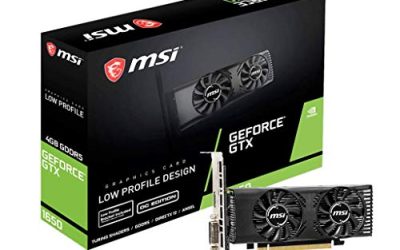
| MSI GeForce GTX 1650 4GT LP OC | Prebuilt and office-PC upgrades with no spare power connector | 4GB GDDR5 slot-powered card with a low-profile bracket included |
How to Choose
Start with video memory, not the model name
Video memory decides how high texture settings can go before a card starts swapping data with system memory and stuttering. An 8GB card holds high textures in most current releases, while a 6GB card covers medium to high settings at 1080p, and a 4GB card increasingly asks for medium textures in the newest titles. Bus width matters alongside capacity: a wider bus feeds the chip more evenly, which is why the 8GB card here pairs its memory with a 256-bit bus while the 6GB card uses a 96-bit bus. For a card you plan to keep for years, treat 8GB as the safer floor, and treat 4GB as a card for esports, older games, and lighter settings.
Match the card to your power supply before anything else
Power is the gatekeeper for most budget upgrades. One card below draws everything it needs from the motherboard slot, which makes it the only safe drop-in for office PCs and slim prebuilts with weak supplies and no spare leads. The other two need a PCIe power connector and a supply with real headroom behind it, so open the case or check the spec sheet first: count the free connectors, read the wattage on the supply label, and remember that an adapter borrowed from another lead is not the same as a native lead from the supply. A card that cannot be powered properly is not a bargain at any tier.
Match outputs and size to your case and monitors
A card is only useful if it connects to your screens and fits your case. Count the monitors first: one card below drives four displays from three DisplayPort outputs and one HDMI output, while the others cover one or two screens, so multi-monitor work points to a specific pick. Then measure the case: card length, slot width, and bracket height all matter, and a low-profile bracket is what lets a card fit a slim chassis at all. Check the outputs on the listing as well, because the same model name can hide different port layouts, and a missing DisplayPort or HDMI port only shows up when you try to plug in.
Read the generation and the listing fine print
Architecture decides which image-quality tools you get. The two Intel Arc cards bring XeSS upscaling, ray-tracing support, and AV1 hardware encoding, while the older GTX card relies on raw raster pace and driver-level upscaling in games that support it. Generation also decides how long a card stays useful: current-generation cards carry full warranties and modern media hardware, while older designs depend on remaining new stock, which shrinks every month. Read the seller and condition fields as carefully as the specifications, confirm the exact model string on the listing, and check that the listing is genuinely new stock rather than a refurbished unit or a different regional variant.
The 3 Best Options
ASRock Intel Arc A580 Challenger 8GB OC

The Arc A580 is the performance anchor of this band. Its 8GB of GDDR6 on a wide 256-bit bus gives it the raster strength to run current games at 1080p with high settings, and the dual-fan cooler with 0dB silent cooling keeps it quiet when the load is light. It also carries the modern feature set: XeSS upscaling for newer titles, ray-tracing support, and DisplayPort 2.0 outputs for current displays. It suits players building or upgrading a mainstream 1080p rig who want the strongest card this band offers and a current-generation warranty behind it.
Specs
- Intel Arc A580 graphics, Xe HPG architecture
- 8GB GDDR6 memory, 256-bit bus, 16 Gbps memory speed
- Boost clock up to 2000 MHz
- PCIe 4.0 interface
- Dual-fan cooler with 0dB silent cooling
- DisplayPort 2.0 outputs
Best for: 1080p players who want the strongest card in this band with modern features.
Watch out for: This card sits at the very top of the cap band, so confirm it still fits the cap and is new stock before ordering, and confirm a spare PCIe power connector and power-supply headroom. Intel Arc cards also need Resizable BAR enabled in the motherboard settings for full performance.
ASRock Intel Arc A380 Challenger ITX 6GB OC
The Arc A380 is the smallest spend on a current-generation card in this guide. Its 6GB of GDDR6 and factory-overclocked clock up to 2250 MHz cover 1080p gaming at medium to high settings, and the short ITX board with a single fan fits compact cases that reject full-length cards. Four display outputs and AV1 hardware encoding make it a natural fit for a small living-room PC that also handles media playback and streaming. It suits builders who want modern features and a full warranty at the lowest entry point in the band rather than the fastest chip.
Specs
- Intel Arc A380 graphics
- 6GB GDDR6 memory, 96-bit bus
- Factory-overclocked clock up to 2250 MHz
- Single-fan cooler with 0dB silent cooling
- 3x DisplayPort 2.0 and 1x HDMI 2.0b, drives up to 4 displays
- AV1 hardware encoding, 8K support
- Single 8-pin power connector, 500W power supply recommended
- PCIe 4.0 interface
Best for: Compact builds and the smallest spend on a current-generation card with modern media features.
Watch out for: Confirm the listing is new stock and still fits the cap before ordering. Intel Arc cards need Resizable BAR enabled for full performance, and older titles can behave inconsistently, so check that your games and motherboard support it.
MSI GeForce GTX 1650 4GT LP OC
The GTX 1650 LP is the prebuilt upgrader’s card. It draws 75W from the motherboard slot alone, so it drops into office PCs and slim prebuilts that have no spare power connector and no room for a bigger supply. The low-profile bracket lets it fit slim chassis, and the factory-overclocked boost up to 1695 MHz keeps frame rates steady in esports and older-engine titles at 1080p. It suits owners reviving an older desktop who need a working gaming card without opening the power-supply question at all.
Specs
- NVIDIA GeForce GTX 1650 graphics, TU117, 896 CUDA cores
- Boost clock up to 1695 MHz
- 4GB GDDR5 memory, 128-bit bus, 8 Gbps memory speed
- HDMI 2.0b and DL-DVI-D outputs
- 75W power draw, runs from the PCIe slot with no extra power connector
- 300W power supply recommended
- 168 x 69 x 37 mm, low-profile bracket included
Best for: Prebuilt and office-PC upgrades with weak power supplies and no spare power connector.
Watch out for: 4GB of memory limits texture settings in newer titles, and there is no ray-tracing hardware or DLSS on this card. Confirm the exact 4GT LP OC model and that the listing is new stock before ordering.
Which One Fits Your Situation
You are building a first 1080p gaming PC
Pick the ASRock Arc A580 Challenger. Its 8GB of memory is the safest floor for current games at 1080p, and the wide bus, dual-fan cooler, and modern feature set give the build headroom for the next few years. Budget for a power supply with a spare PCIe connector and headroom, and enable Resizable BAR in the motherboard settings before judging performance.
You are upgrading a prebuilt or office PC
Pick the MSI GTX 1650 4GT LP OC. It runs from the motherboard slot alone, so a weak supply and a missing power connector are not obstacles, and the low-profile bracket fits slim chassis that reject full-height cards. Expect solid frame rates in esports and older titles, and keep texture settings at medium in the newest releases.
You are building a small or quiet living-room PC
Pick the ASRock Arc A380 Challenger ITX. The short board and single fan fit compact cases, the four display outputs cover a TV plus a monitor, and AV1 encoding suits media playback and streaming. It is the lowest entry point in this guide, so it fits builds where the graphics card is one part of a tight overall plan.
You run several monitors for work and light play
Pick the ASRock Arc A380 Challenger ITX. Three DisplayPort outputs and one HDMI output drive up to four displays from a single card, which covers a work setup with a side monitor and a TV without a second card. If your work leans on older software, the GTX 1650 LP is the steadier fallback, since its drivers cover a longer history of applications.
Common Mistakes
- Buying on model name alone without checking memory size, bus width, and the exact variant on the listing.
- Ordering a card that needs a PCIe power connector for a prebuilt PC that has no spare lead.
- Skipping the case measurements and discovering the card is too long or too tall for the chassis.
- Assuming every listing under a familiar model name is new stock, instead of checking the seller and condition fields.
- Leaving Resizable BAR disabled on an Intel Arc build and wondering why performance falls short.
Frequently Asked Questions
Is 8GB of video memory enough for 1080p gaming?
Yes, 8GB is the safer floor for current games at 1080p with high textures. A 6GB card still covers medium to high settings in most titles, while a 4GB card increasingly asks for medium textures in the newest releases. If you plan to keep the card for years, start with 8GB; if your library leans on esports and older games, 6GB or 4GB can be enough.
Can I install one of these cards in a prebuilt PC?
The MSI GTX 1650 LP is built for exactly that: it draws all its power from the motherboard slot and fits slim cases with its low-profile bracket. The two Arc cards need a spare PCIe power connector and a supply with headroom, so check the connectors and the wattage label inside the case before ordering either of them.
Do Intel Arc cards need anything special to run well?
Yes, enable Resizable BAR in the motherboard settings, since Arc cards depend on it for full performance. Most motherboards from the last few years support it, but it is often off by default, so check the BIOS settings after installation. Also keep the graphics driver current, because Intel continues to improve compatibility with older titles.
Is a 4GB card still worth buying?
For the right machine, yes. A 4GB card covers esports, older engines, media playback, and multi-monitor work, and the slot-powered GTX 1650 fits PCs that cannot take anything bigger. It is not the pick for high textures in the newest releases, so match it to a library and a case that play to its strengths.
FAQ
Is 8GB of video memory enough for 1080p gaming?
Can I install one of these cards in a prebuilt PC?
Do Intel Arc cards need anything special to run well?
Is a 4GB card still worth buying?
More from Amazon
Programs that pair well with the guide above. Offers and eligibility are set by Amazon and may change.
Free shipping on eligible items, Prime Video and more. Eligible new members can start with a free trial.
Start a Prime free trialAd-free music streaming. Eligible new subscribers can start with a free trial.
Try Music Unlimited freeA Prime membership for ages 18-24 with a trial period. Eligibility is set by Amazon.
See Prime for Young AdultsAudiobooks and podcasts to listen to on the go. Eligible new members can start with a free trial.
Try Audible freeAs an Amazon Associate we earn from qualifying purchases.