Our Short List of 3


All 4 Picks at a Glance
| Product | Specs | Action |
|---|---|---|
| 1. TP-Link ER605 V2 — Best Wired Dual WAN Gateway for Small Offices | Check price on Amazon | |
 2. ASUS RT-AX86U Pro — Best Dual WAN Gaming Router | Check price on Amazon | |
| 3. GL.iNet GL-MT6000 Flint 2 — Best Flexible Dual WAN Router for Enthusiasts | Check price on Amazon | |
 4. Synology RT6600ax — Best Dual WAN Router With Polished Management | Check price on Amazon |
Our Top Picks
The best dual WAN routers keep you online when one internet connection drops. A dual WAN router connects to two internet sources at once, so if your main fiber or cable line goes down, the router switches to a second connection automatically. That second link can be another wired broadband line, a 5G or 4G cellular connection, or even a phone tethered over USB. For gamers, that means a ranked match does not end because the neighborhood line went down. For people working from home, it means a video call survives an outage. For a small office, it means the whole team keeps working while one provider fixes a fault.
Dual WAN routers work in two main modes. Failover mode keeps one connection active and holds the second in reserve, switching over only when the first fails. Load balancing mode spreads traffic across both connections, which can raise total throughput and let you send specific devices out through a chosen link. Most buyers should start with failover, because it is simpler and it keeps secure sessions such as banking logins, VPN tunnels, and video calls on a single public address.
This guide covers four routers that genuinely support dual WAN, not just routers with two fast ports. Each pick fills a different role: a wired gateway for a small office, a gaming router with strong Wi-Fi, an open and flexible router for enthusiasts, and a tri-band router with a polished management system. Before you buy, check that your second internet source is actually ready, because a backup link you have not tested is only a theory.
How to Choose a Dual WAN Router
Count the real WAN inputs
A router is only a dual WAN router if it can take two separate internet feeds and treat them as two WANs. Look for a dedicated WAN port plus a second port that can be reassigned as WAN, often labeled WAN or LAN. Some models add a USB port that accepts a compatible 4G or 3G modem, which counts as a useful third backup path. Do not confuse dual band Wi-Fi with dual WAN. Dual band means the router broadcasts on both the 2.4 GHz and 5 GHz bands. Dual WAN means it has two internet inputs.
Choose failover or load balancing first
Decide how you want the two links to behave before you compare speeds. Failover is the safer default for gaming and remote work, because every session stays on one connection until that connection actually fails. Load balancing can combine the capacity of two lines, but it splits traffic across two public addresses, which can log you out of banking sites, break VPN sessions, and confuse services that expect one stable address. If you choose load balancing, look for routing rules or sticky sessions that pin a device or a service to one WAN.
Check health detection, not just switching
A dual WAN router is only as good as its ability to notice a dead link. The best models probe the connection actively, for example by sending DNS queries or pinging a target address every few seconds, and they switch only after a set number of failed checks. Cheap or vague detection can leave you stuck on a line that is connected to the modem but has no internet behind it. Look for settings such as detection interval, failure threshold, and failback behavior in the manual or the setup interface.
Match the ports to your internet speeds
A gigabit WAN port caps a single wired link at gigabit speed, which is fine for most fiber and cable plans. If either of your connections is faster than gigabit, you need a 2.5 gigabit WAN port or faster on that input, or the extra speed is wasted. For wireless devices, Wi-Fi 6 is the sensible baseline in this class, and tri-band hardware helps when many devices share the network. Wired-only gateways have no Wi-Fi at all, so budget for separate access points if you choose one.
Think about VPN, VLANs, and management
Dual WAN buyers often run a home lab, a small office, or a serious gaming setup, so the extras matter. If you work remotely, check VPN server and client support, and note the difference between the number of tunnels a router allows and the encrypted throughput it can sustain. VLAN support lets you separate work, guest, and smart-home traffic. Centralized management, such as a controller platform or a clean mobile app, matters more than it seems, because dual WAN settings are fiddly and you will revisit them when a provider changes something.
Plan the backup link before you buy
A second WAN is only useful if the second connection is independent of the first. Two lines from the same provider over the same street cabinet can fail together. A better backup is a different technology, such as cable backing up fiber, or a cellular connection backing up a wired line. Test the failover after setup by unplugging the primary line during a call or a game, and time how long the switch takes.
Top Picks
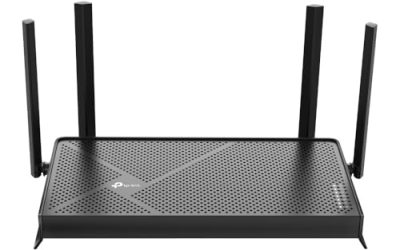
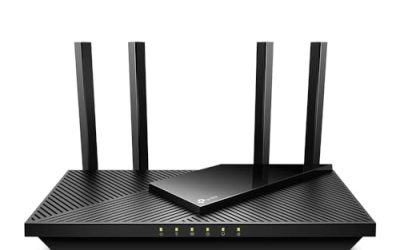
1. TP-Link ER605 V2 — Best Wired Dual WAN Gateway for Small Offices
The TP-Link ER605 V2 is a wired gigabit VPN router built around dual WAN from the start, and it is the most focused pick in this guide. It has five gigabit ports: one dedicated WAN port, two ports that can work as WAN or LAN, and two LAN ports, giving you up to three wired WAN connections plus a USB WAN port for a compatible 4G or 3G modem. That flexibility is exactly what a small office or a home lab needs, because you can run a primary fiber line, a secondary cable line, and a cellular backup through one small box.
Load balancing and failover are core features here rather than an afterthought, and the router includes an SPI firewall, DoS defense, and lightning protection. VPN support is generous for the class, with capacity for up to 20 LAN-to-LAN IPsec tunnels and up to 16 connections each for OpenVPN, L2TP, and PPTP. It also integrates with the Omada software-defined networking platform, so you can manage it alongside Omada access points and switches from one controller.
The trade-off is clear: the ER605 V2 has no built-in Wi-Fi, so it is a gateway, not a complete home router. You will need separate access points for wireless devices, which adds cost and setup time. It is also limited to gigabit ports, so it cannot carry a multi-gigabit internet plan at full speed. For a small wired office or a home lab that already has access points, those limits are acceptable, and the dedicated multi-WAN design is hard to beat.
View the TP-Link ER605 V2 on Amazon
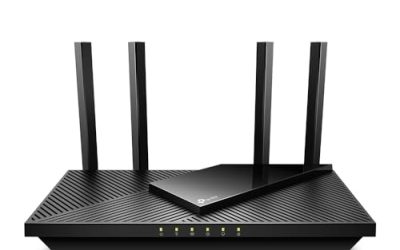
2. ASUS RT-AX86U Pro — Best Dual WAN Gaming Router
The ASUS RT-AX86U Pro is the pick for gamers who want dual WAN without giving up strong Wi-Fi. It is a dual-band Wi-Fi 6 router rated AX5700, with a 2.5 gigabit WAN or LAN port alongside a standard gigabit WAN port and four gigabit LAN ports. In the Dual WAN settings you can set the gigabit port as primary and the 2.5 gigabit port as secondary, or use a USB connection as a backup, and choose between failover and load balancing modes. The router probes the link with DNS queries or pings and switches automatically when the primary line fails, with failback once the line recovers.
Beyond dual WAN, this is a well-rounded gaming router. It has a dedicated gaming port that prioritizes a connected console or PC, adaptive quality of service for gaming traffic, a mobile game mode, and AiMesh support for extending coverage with compatible ASUS routers. Security comes from AiProtection Pro, which is subscription-free, and VPN support covers both server and client roles.
There is one honest caveat. ASUS dual WAN has a mixed reputation among owners, with reports of load balancing quirks and occasional loss of connectivity after a reboot while in Dual WAN mode, on both stock and third-party firmware. Many owners run it without trouble, but you should update the firmware, test failover right after setup, and keep a simple fallback plan. If you want the most trouble-free dual WAN experience and do not need Wi-Fi, the ER605 is the safer choice. If you want a single box that games well and can fail over to a second line, the RT-AX86U Pro is the strongest all-rounder here.
View the ASUS RT-AX86U Pro on Amazon
3. GL.iNet GL-MT6000 Flint 2 — Best Flexible Dual WAN Router for Enthusiasts
The GL.iNet GL-MT6000, sold as the Flint 2, is the enthusiast pick. It is a Wi-Fi 6 router with two 2.5 gigabit Ethernet ports that support multi-WAN, plus four gigabit LAN ports and a USB 3.0 port. The manufacturer lists multi-WAN, failover, and load balancing as supported features, so a second internet source is a first-class citizen here rather than a hidden menu option. You can feed it with two wired connections, or use the USB port for a cellular modem or phone tether as a backup path.
What sets the Flint 2 apart is openness. It runs on OpenWrt with a friendly interface on top, so advanced users can tune routing rules, run AdGuard Home for network-wide ad blocking, and shape traffic with SQM to keep latency low during heavy downloads. VPN performance is a highlight, with WireGuard speeds up to 900 Mbps and OpenVPN up to 190 Mbps according to the manufacturer, which makes it a strong choice for a remote worker who lives inside a VPN tunnel.
The Flint 2 is less polished than the ASUS or Synology options for a buyer who wants everything to work with no tinkering. Its interface is friendly by enthusiast standards, but you will still make more decisions during setup, and some advanced features assume you know basic networking. For a gamer or home-lab owner who enjoys that control, it is the most flexible dual WAN router in this guide, and its two 2.5 gigabit ports mean neither WAN link is capped at gigabit speed.
View the GL.iNet GL-MT6000 Flint 2 on Amazon
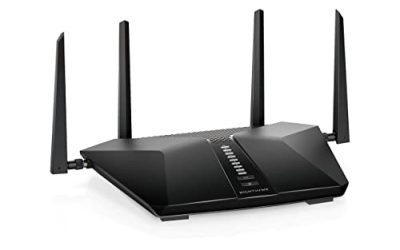
4. Synology RT6600ax — Best Dual WAN Router With Polished Management
The Synology RT6600ax is the premium pick for buyers who want dual WAN wrapped in the cleanest management experience. It is a tri-band Wi-Fi 6 router rated AX6600, with a 2.5 gigabit WAN or LAN port and a gigabit WAN port that together provide dual WAN, plus three gigabit LAN ports and a USB 3.2 port. The tri-band design gives heavy households more wireless capacity, and the 2.5 gigabit port means a multi-gigabit primary line is not wasted.
Synology Router Manager is the real reason to choose this router. It feels more like a small server operating system than a router page, with clear traffic reports, straightforward parental controls, threat prevention, and a VPN server that is easy to configure. Dual WAN setup is presented clearly, and the system handles failover and load balancing without burying the settings.
The RT6600ax costs more than the other Wi-Fi routers here, and its LAN ports are gigabit apart from the single 2.5 gigabit port, so a fully multi-gigabit wired setup needs a switch. It is also a 2021-era design, so it lacks Wi-Fi 7, which newer rivals offer. If you want the newest wireless standard, look elsewhere. If you want a tri-band dual WAN router that is pleasant to live with for years, the RT6600ax remains a strong choice.
View the Synology RT6600ax on Amazon
Comparison Table
| Router | Dual WAN Inputs | Wi-Fi | Best For |
|---|---|---|---|
| TP-Link ER605 V2 | Up to 3 wired WAN plus USB WAN | None, wired only | Small office and home lab gateway |
| ASUS RT-AX86U Pro | Gigabit WAN plus 2.5GbE WAN or LAN, plus USB | Wi-Fi 6, AX5700, dual band | Gaming with failover backup |
| GL.iNet GL-MT6000 Flint 2 | Two 2.5GbE WAN-capable ports plus USB | Wi-Fi 6, AX6000, dual band | Enthusiasts and VPN-heavy users |
| Synology RT6600ax | 2.5GbE WAN or LAN plus gigabit WAN | Wi-Fi 6, AX6600, tri-band | Polished management for busy households |
Which Dual WAN Router Should You Buy?
Choose the TP-Link ER605 V2 if you run a small office or a home lab and you already have access points, or you plan to add them. Its multi-WAN design is the most dedicated in this guide, and its VPN capacity suits site-to-site links and remote workers. Choose the ASUS RT-AX86U Pro if you want one box that covers gaming, strong Wi-Fi, and a second internet line, and you are willing to test failover after setup. Choose the GL.iNet Flint 2 if you like to tune your network, run a VPN at high speed, and want two 2.5 gigabit WAN-capable ports without paying a premium. Choose the Synology RT6600ax if you want tri-band Wi-Fi and the clearest management interface, and you are happy to pay more for a router the whole household can live with.
Whatever you choose, remember that the router is only half the system. The backup connection needs its own modem or cellular plan, its own power, and a real test. A dual WAN router that has never failed over is a promise, not a proven setup. Plug in both lines, pull the primary during a call or a game, and watch what happens.
Frequently Asked Questions
What is a dual WAN router?
A dual WAN router connects to two internet sources at the same time. It can switch to the second connection automatically if the first fails, which is called failover, or it can spread traffic across both connections, which is called load balancing. The second source can be another wired broadband line, a cellular modem, or a USB tether. Dual WAN is different from dual band Wi-Fi, which refers to the 2.4 GHz and 5 GHz wireless bands.
Is failover or load balancing better?
Failover is better for most people. It keeps all traffic on the primary connection until that connection fails, which keeps banking sessions, VPN tunnels, and video calls stable. Load balancing can raise total throughput when you have two good wired lines, but it splits sessions across two public addresses, which can log you out of secure services. Use load balancing only if you can set routing rules that pin sensitive devices or services to one WAN.
Can I use a 5G or 4G connection as the second WAN?
Yes, on routers that support it. Some dual WAN routers accept a USB cellular modem or a tethered phone as a WAN input, and some can use an Ethernet port connected to a separate 5G gateway. Check the router’s compatibility list for modems before you buy, because not every USB modem works with every router. Cellular backup is ideal when your primary line is wired, since the two technologies rarely fail for the same reason.
Will dual WAN make my internet faster?
Not automatically. In failover mode, your speed is the speed of whichever connection is active, so there is no speed gain, only reliability. In load balancing mode, total throughput can rise because traffic is spread across two lines, but a single download or stream still uses one connection at a time, so it will not exceed the speed of that line. Dual WAN is mainly a reliability feature, not a speed upgrade.
Do I need two internet plans for dual WAN?
Yes, you need two separate internet sources to get the full benefit. That usually means two paid plans, or one paid plan plus a cellular plan you already have. Running two lines from the same provider over the same street cabinet is weaker protection than mixing technologies, such as fiber plus cable, or wired plus cellular, because a single fault can still take out both lines.
Conclusion
The best dual WAN routers turn an internet outage from a crisis into a brief hiccup. The TP-Link ER605 V2 is the most dedicated multi-WAN gateway for small offices and home labs. The ASUS RT-AX86U Pro is the best all-rounder for gamers who want strong Wi-Fi with a backup line. The GL.iNet Flint 2 gives enthusiasts two 2.5 gigabit WAN-capable ports, open software, and fast VPN performance. The Synology RT6600ax pairs dual WAN with tri-band Wi-Fi and the most polished management in this group. Pick the one that matches your setup, connect a genuinely independent second line, and test the failover before you need it. That test is the difference between owning a dual WAN router and actually having backup internet.
Disclosure: As an Amazon Associate, we earn from qualifying purchases.
FAQ
Which Dual WAN Router Should You Buy?
What is a dual WAN router?
Is failover or load balancing better?
Can I use a 5G or 4G connection as the second WAN?
Will dual WAN make my internet faster?
Do I need two internet plans for dual WAN?
More from Amazon
Programs that pair well with the guide above. Offers and eligibility are set by Amazon and may change.
Free shipping on eligible items, Prime Video and more. Eligible new members can start with a free trial.
Start a Prime free trialAd-free music streaming. Eligible new subscribers can start with a free trial.
Try Music Unlimited freeA Prime membership for ages 18-24 with a trial period. Eligibility is set by Amazon.
See Prime for Young AdultsAudiobooks and podcasts to listen to on the go. Eligible new members can start with a free trial.
Try Audible freeAs an Amazon Associate we earn from qualifying purchases.