Key takeaways
- Class-leading 4K performance with ray tracing and DLSS 4.
- Massive 32GB GDDR7 on the 5090 for gaming and creative headroom.
- Excellent cooling from robust multi-fan vapor-chamber designs.
- Modern outputs with HDMI and DisplayPort 2.1 and long warranties.
The RTX 5090 sits at the very top of NVIDIA’s current graphics card stack, and for enthusiasts chasing 4K gaming at maximum settings or serious GPU-accelerated creative work, nothing else quite matches it. The lineup here gathers several premium 32GB GDDR7 versions of the 5090 from ASUS and GIGABYTE, plus an RTX 5080 for those who want flagship-class performance at a slightly saner price.
Buying at this tier is less about whether the card is fast — it obviously is — and more about which cooling design, form factor, and warranty suit your build. Below we walk through the design, real-world performance, and trade-offs so you can pick the right variant instead of just the most expensive one.
Our top picks
 ASUS ROG Astral NVIDIA GeForce RTX 5090
- Powered by the NVIDIA Blackwell architecture and DLSS…
- Quad-fan design boosts air flow and pressure by…
- Patented vapor chamber with milled heatspreader for lower…
 GIGABYTE AORUS GeForce RTX 5090 Master ICE
- NVIDIA Blackwell architecture and DLSS 4
- Powered by GeForce RTX 5090
- Integrated with 32GB GDDR7 512bit memory interface
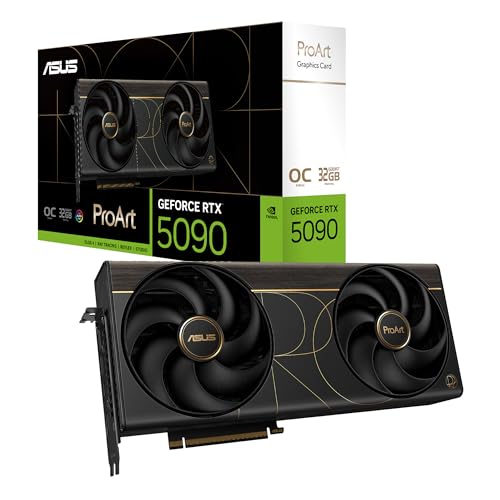 GIGABYTE GeForce RTX 5090 Gaming OC 32G
- Powered by the NVIDIA Blackwell architecture and DLSS…
- OC mode: 2512 MHz (OC mode)/ 2482 MHz…
- SFF-Ready 2.5-slot footprint balances compatibility with flagship GeForce…
| Product | Key specs | |
|---|---|---|
| ASUS ROG Astral NVIDIA GeForce RTX 5090 | Powered by the NVIDIA Blackwell architecture and DLSS… Quad-fan design boosts air flow and pressure by… Patented vapor chamber with milled heatspreader for lower… | Check price |
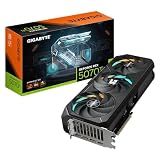
| GIGABYTE AORUS GeForce RTX 5090 Master ICE | NVIDIA Blackwell architecture and DLSS 4 Powered by GeForce RTX 5090 Integrated with 32GB GDDR7 512bit memory interface | Check price |
| GIGABYTE GeForce RTX 5090 Gaming OC 32G | Powered by the NVIDIA Blackwell architecture and DLSS… OC mode: 2512 MHz (OC mode)/ 2482 MHz… SFF-Ready 2.5-slot footprint balances compatibility with flagship GeForce… | Check price |
 ZOTAC Gaming GeForce RTX 5090 AMP Extreme ZOTAC Gaming GeForce RTX 5090 AMP Extreme | Powered by the NVIDIA Blackwell architecture and DLSS… 32GB GDDR7, 512-bit, 28 Gbps, PCIE 5.0 IceStorm 3.0 Advanced Cooling, 3x 100mm BladeLink fans,… | Check price |
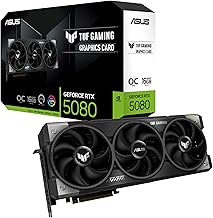
 ASUS TUF Gaming GeForce RTX™ 5080 16GB ASUS TUF Gaming GeForce RTX™ 5080 16GB | Powered by the NVIDIA Blackwell architecture and DLSS… Military-grade components deliver rock-solid power and longer lifespan… Protective PCB coating helps protect against short circuits… | Check price |
 GIGABYTE AORUS GeForce RTX 5090 Master 32G GIGABYTE AORUS GeForce RTX 5090 Master 32G | Check price | |
 GIGABYTE GeForce RTX 5070 Ti Gaming OC GIGABYTE GeForce RTX 5070 Ti Gaming OC | Powered by the NVIDIA Blackwell architecture and DLSS… Powered by GeForce RTX 5070 Ti Integrated with 16GB GDDR7 256bit memory interface | Check price |
 GIGABYTE Windforce GeForce RTX 5090 OC 32GB GIGABYTE Windforce GeForce RTX 5090 OC 32GB | Check price |
As an Amazon Associate we earn from qualifying purchases at no extra cost to you.
🎮 Get More From Your Setup — Free
Prime Gaming gives you free PC games every month, in-game loot, and a free Twitch channel sub — plus fast free shipping on all the gear above. New members get a 30-day free trial.
Watch: Rtx 50 90: Review & Buyer’s Guide — Video Review
Design & Build
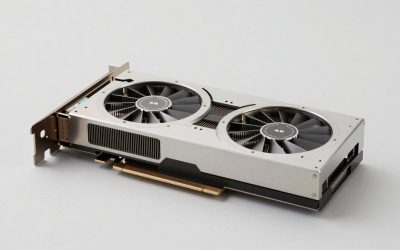
These are big, serious graphics cards. The ASUS ROG Astral RTX 5090 uses a 3.8-slot, four-fan design with a patented vapor chamber, built to keep a power-hungry GPU cool and quiet under sustained load. GIGABYTE’s AORUS Master ICE and Stealth ICE variants lean into a clean white aesthetic with the WINDFORCE cooling system, while the AORUS Master and Gaming OC models offer the same thermal muscle in more traditional finishes. Every one of these occupies multiple slots and demands a roomy case with strong airflow.
The 32GB of GDDR7 across 512-bit memory is the defining spec, giving these cards enormous headroom for 4K textures, high-resolution content creation, and memory-hungry AI workloads. Display connectivity is modern too, with HDMI and DisplayPort 2.1 outputs ready for high-refresh 4K panels. The RTX 5080 in this group is physically smaller and easier to fit, making it the friendlier choice for compact builds that still want elite performance.
Performance
At 4K, the RTX 5090 is in a league of its own. It delivers high frame rates in demanding AAA titles with ray tracing enabled, and DLSS 4 pushes those numbers higher still. Creators benefit just as much — rendering, video encoding, and AI tasks fly thanks to the massive VRAM pool and raw compute. The various 5090 models here perform within a narrow band of one another, so the meaningful differences come down to cooling, noise, and factory overclocks rather than dramatic frame-rate gaps.
The RTX 5080 with 16GB is a step down in memory and horsepower but remains a superb 4K and 1440p card that costs meaningfully less. For most gamers, it’s the more sensible buy; the 5090 is aimed squarely at those who want the absolute ceiling of performance or who lean on that 32GB buffer for professional work. Whichever you choose, budget for a high-wattage power supply and confirm your case clearance first.
Pros & Cons
- Class-leading 4K performance with ray tracing and DLSS 4.
- Massive 32GB GDDR7 on the 5090 for gaming and creative headroom.
- Excellent cooling from robust multi-fan vapor-chamber designs.
- Modern outputs with HDMI and DisplayPort 2.1 and long warranties.
- Very high price puts the 5090 out of reach for many.
- Large physical size requires a spacious, well-ventilated case.
- High power draw demands a strong PSU.
Alternatives to Consider
If the 5090’s price is hard to justify, the RTX 5080 in this lineup delivers most of the real-world gaming experience for less money and fits more builds. Gamers focused on 1440p rather than 4K can save considerably by dropping another tier without giving up high settings. And if you already own a recent high-end card, the generational jump may not warrant the cost unless you specifically need the extra VRAM for professional workloads.
Frequently Asked Questions
Is the RTX 5090 overkill for 1440p gaming?
For pure 1440p gaming, yes — a 5080 or lower delivers excellent frames for less. The 5090 shines at 4K and in creative or AI workloads.
Which 5090 cooling design is best?
All the versions here cool well. The ASUS Astral’s four-fan vapor-chamber and GIGABYTE’s WINDFORCE ICE designs run cool and quiet; pick based on case fit and aesthetics.
What power supply do I need?
Plan for a high-wattage, quality PSU with the correct connectors. Check NVIDIA’s and the card maker’s recommendations before buying.
Will it fit in my case?
These are multi-slot, long cards. Measure your case clearance carefully — the 5080 is a safer fit for smaller builds.
Verdict
The RTX 5090 is the uncompromising choice for 4K enthusiasts and creators who need its 32GB buffer, and any of the ASUS or GIGABYTE variants here deliver that performance with excellent cooling. For most people, though, the RTX 5080 is the smarter value. Match the card to your resolution, case, and power supply, and you’ll get flagship results without overspending.