Key takeaways
- Compare the best tri-band mesh routers across Wi-Fi 7, 6E and 6, with dedicated backhaul, multi-gig ports and coverage for gaming homes of every size.
As an Amazon Associate, we earn from qualifying purchases made through links on this page.
A single gaming router is the wrong tool for a house where the gaming room sits two floors or three walls away from the modem. Mesh Wi-Fi fixes coverage by spreading nodes around the home under one network name, but cheaper dual-band kits create a second problem: node-to-node relay traffic shares the same 5 GHz band as your devices, so the far node delivers a fraction of the promised speed. A tri-band mesh router adds a third radio. On Wi-Fi 6 systems it usually works as a dedicated backhaul lane between nodes. On Wi-Fi 6E and Wi-Fi 7 systems the third radio is the 6 GHz band, which gives the relay a wide, quiet channel of its own while also serving newer clients.
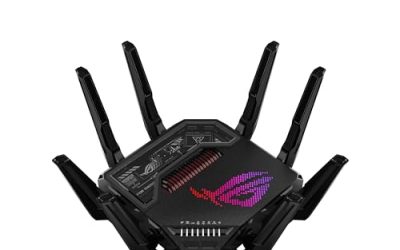
The five systems below are all genuine tri-band designs, verified against each manufacturer’s published specifications, spanning three generations: Wi-Fi 7 at the top, Wi-Fi 6E in the middle, and mature Wi-Fi 6 hardware that still makes sense where most devices predate 6 GHz. They were chosen for backhaul architecture, port speed and software terms rather than headline speed classes, because the aggregate number on a mesh box sums three bands that no single device will ever see.
Quick picks
- Best overall: NETGEAR Orbi 770 Series (RBE773)
- Best for app-first setup: Amazon eero Pro 6E
- Best for advanced control: ASUS ZenWiFi XT9
- Best for Google Home households: Google Nest Wifi Pro
- Best dedicated backhaul on Wi-Fi 6: NETGEAR Orbi RBK852
What to look for in a tri-band mesh router
A third band that does backhaul work
The defining question is what the third radio does. In a dedicated-backhaul design, one band is reserved for node-to-node traffic, so a game download hitting a satellite node does not compete with the relay carrying it. In a shared design, the 6 GHz band carries both clients and backhaul, which still works well because 6 GHz is wide and uncrowded, though a busy satellite gives up some of it to relay duty. Either approach beats dual-band, where the relay and the clients fight over the same 5 GHz channels. With Ethernet in the walls, wired backhaul removes the question entirely, and every system here supports it.
Match the generation to your devices
Wi-Fi 7 adds 320 MHz channels on 6 GHz and Multi-Link Operation, which lets a Wi-Fi 7 client hold links on two bands at once. Wi-Fi 6E opens the 6 GHz band with 160 MHz channels and suits the large base of 6E laptops and phones. Wi-Fi 6 tri-band systems have no 6 GHz radio at all, but their dedicated 5 GHz backhaul is still a strong architecture, and they remain the sensible pick for Wi-Fi 6 homes on sub-gigabit plans.
Ports decide your wired ceiling
The main unit should have a WAN port at least as fast as your internet plan, and every node benefits from spare LAN ports so a console or gaming PC can plug into the nearest satellite instead of a wireless hop. Multi-gig ports raise the ceiling on wired backhaul. A system with gigabit-only ports is fine on a gigabit plan and a hard limit on anything faster.
Coverage claims and node placement
Rated coverage assumes open-plan construction and ideal placement, so treat it as a comparison tool rather than a promise. Two nodes suit most two-storey homes; three nodes suit long floor plans, three floors, or houses with masonry interior walls. Node placement halfway between the main unit and the dead zone, in the open rather than inside furniture, matters more than the number on the box. Check for 802.11k, v and r roaming support, which stops devices clinging to a distant node as you move rooms.
Software, roaming and subscriptions
Mesh systems are managed from an app, and the software terms differ sharply. Some brands include security filtering and parental controls in the purchase; others place those features behind an ongoing subscription. If you want per-device priority or manual channel control, check before buying: the simplest systems deliberately expose few settings.
1. NETGEAR Orbi 770 Series (RBE773) — best overall

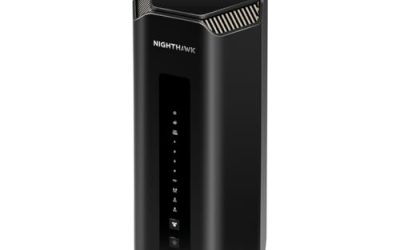
The Orbi 770 is NETGEAR’s mainstream Wi-Fi 7 mesh line, and the three-pack linked here pairs one router with two satellites. It is a tri-band BE11000 system: manufacturer-rated speeds of up to 688 Mbps on 2.4 GHz, 4,320 Mbps on 5 GHz and 5,760 Mbps on 6 GHz. The 6 GHz band carries the wireless backhaul and, through Multi-Link Operation, can also work alongside the other bands for Wi-Fi 7 clients, so the relay does not consume the 5 GHz airtime your games and streams depend on. NETGEAR rates the three-pack for coverage of up to 8,000 square feet and up to 100 connected devices.
The wired side is the strongest in this roundup. The router carries one 2.5 Gbps internet port and three 2.5 Gbps LAN ports, and each satellite carries three 2.5 Gbps LAN ports. That means a multi-gig plan is usable at the front door, wired backhaul between nodes moves at 2.5 Gbps, and a gaming PC plugged into a satellite gets a multi-gig path back to the router.
Who it’s for: larger homes on fast or multi-gig plans that want Wi-Fi 7, multi-gig ports on every unit and backhaul that keeps relay traffic off the client bands.
Limitations: there is no USB port, and the satellites cannot act as the main router unit, so placement of the router is fixed by where your internet line enters. Advanced security and parental control features sit behind the NETGEAR Armor subscription. As with every 6 GHz system, the backhaul band has shorter range through walls than 5 GHz, so node placement needs care.
2. Amazon eero Pro 6E — best for app-first setup

The eero Pro 6E is an AX5400-class tri-band Wi-Fi 6E system rated at up to 574 Mbps on 2.4 GHz, 2,402 Mbps on 5 GHz and 2,402 Mbps on the 6 GHz band. The three-pack linked here is rated for coverage of up to 6,000 square feet and more than 100 connected devices, and Amazon positions it for internet plans up to 2.5 Gbps. Each unit has one 2.5 GbE port and one gigabit Ethernet port, supports wired backhaul, and doubles as a smart home hub with built-in Thread and Zigbee radios plus Matter support.
eero’s strength is the software experience. Setup is a short guided process in the app, band steering and node handoffs are handled automatically, and the system manages channel selection without asking the owner to learn any networking vocabulary. For a household where the network has to maintain itself, that design has genuine value.
Who it’s for: households that want tri-band 6E coverage with minimal day-to-day involvement, plus smart home owners who can use the built-in Thread and Zigbee hub.
Limitations: the 6 GHz band is shared between clients and backhaul rather than reserved, so a heavily loaded satellite divides that band between the two jobs. The advanced security filtering and fuller parental controls require the eero Plus subscription. With two Ethernet ports per unit, a desk with several wired devices needs a switch, and tinkerers will find few manual settings.
3. ASUS ZenWiFi XT9 — best for advanced control

The ZenWiFi XT9 takes the older but still effective route to tri-band: three Wi-Fi 6 radios, with the second 5 GHz radio reserved as a dedicated backhaul. The AX7800 class breaks down as up to 574 Mbps on 2.4 GHz, 4,804 Mbps on the main 5 GHz band and 2,402 Mbps on the backhaul band, which uses the UNII-4 channels at the top of the 5 GHz range. Because the backhaul has its own radio, client traffic on the main 5 GHz band never waits behind relay traffic. The two-pack linked here, in the charcoal finish, is rated for coverage of up to 5,700 square feet.
Each unit carries a 2.5 Gbps WAN port, three gigabit LAN ports and a USB 3.2 port, and the system is part of ASUS’s AiMesh platform, so XT9 nodes can combine with other AiMesh-capable ASUS routers, not only identical units. AiProtection Pro network security and the parental control suite are included without a subscription for the life of the product, and the web interface exposes deep settings — channel width, roaming thresholds, per-band controls — that app-only systems hide.
Who it’s for: experienced users who want dedicated backhaul, a real web interface and included security features, plus owners of AiMesh hardware they want to fold into the network.
Limitations: this is Wi-Fi 6 hardware, so there is no 6 GHz band at all — no quiet new spectrum for clients, and no Wi-Fi 7 features such as Multi-Link Operation. The LAN ports are gigabit, which caps wired device links and wired backhaul below the 2.5 Gbps WAN speed. Colour and pack-size variants carry different listings, so confirm the configuration on the page before ordering.
4. Google Nest Wifi Pro (3-pack) — best for Google Home households
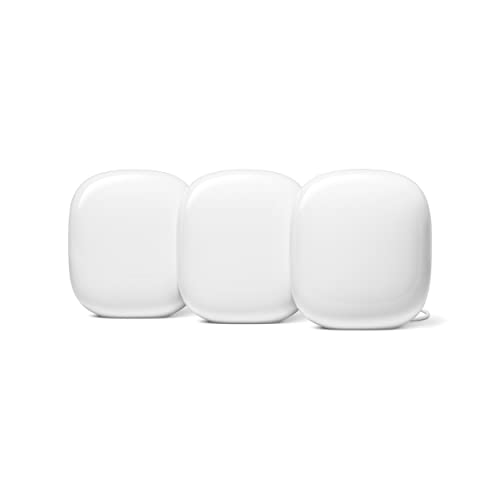
Nest Wifi Pro is Google’s tri-band Wi-Fi 6E system, rated AXE5400 with up to 574 Mbps on 2.4 GHz, 2,402 Mbps on 5 GHz and 2,402 Mbps on 6 GHz. The three-pack linked here, in the Snow finish, is rated for coverage of up to 6,600 square feet. Every unit is identical, any of them can serve as the router, and each carries two gigabit Ethernet ports. The units also act as a Thread border router and Matter hub for smart home devices, and the system is managed entirely from the Google Home app, with automatic channel management and self-diagnostics.
If the household already runs on Google Home, the network appears in the same app as everything else, guest access and device pausing are simple, and the small rounded units are designed to sit on open shelves, where mesh nodes work best.
Who it’s for: Google Home households that value simple management, built-in Matter and Thread support, and hardware that blends into a room rather than bristling with antennas.
Limitations: the gigabit ports are the hard ceiling — internet plans above the gigabit class and wired backhaul both stop at gigabit speed, which makes this the wrong pick for multi-gig fibre. The 6 GHz band is shared between clients and backhaul. Nest Wifi Pro is not compatible with earlier Google Wifi or Nest Wifi points, so an older system cannot be folded in, and there is almost no advanced configuration: no per-band network names, no manual channel selection, and no web interface.
5. NETGEAR Orbi RBK852 — best dedicated backhaul on Wi-Fi 6
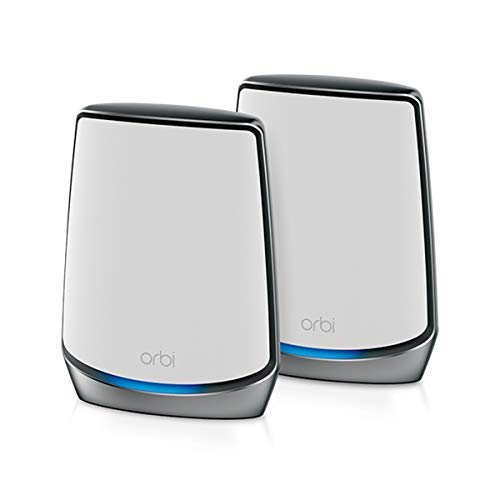
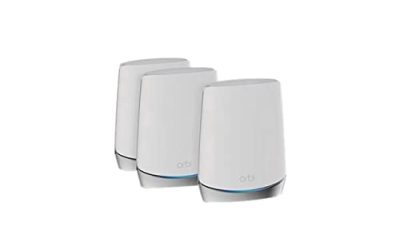
The RBK852 is the two-pack of NETGEAR’s Orbi 850 series, a tri-band Wi-Fi 6 AX6000 system. Its radio layout is the classic dedicated-backhaul design: up to 1,200 Mbps on 2.4 GHz and 2,400 Mbps on 5 GHz for your devices, plus a separate 2,400 Mbps 5 GHz link, built on a 4×4 radio, that exists only to connect the satellite back to the router. Nothing your devices do touches that backhaul band. NETGEAR rates the two-pack for up to 5,000 square feet of coverage and up to 100 devices, and each unit houses eight internal antennas.
Wired connections are generous for its generation: the router has a 2.5 Gbps WAN port and four gigabit LAN ports, and the satellite has four gigabit LAN ports, so a satellite in a gaming room can wire a PC and two consoles directly. Ethernet backhaul is also supported.
Who it’s for: homes on gigabit-class plans with no 6 GHz devices to serve, where a reserved backhaul band and plenty of LAN ports matter more than the newest generation.
Limitations: as a Wi-Fi 6 system it has no 6 GHz band and none of the Wi-Fi 7 feature set. The LAN ports are gigabit throughout. NETGEAR Armor security is subscription-based. This is also a mature platform sold alongside several newer Orbi generations, and pack sizes have separate listings, so verify the two-pack configuration before ordering.
Comparison table
| System | Wi-Fi class | Backhaul design | Fastest port | Rated coverage (linked pack) |
|---|---|---|---|---|
| NETGEAR Orbi 770 (RBE773) | Wi-Fi 7, BE11000 | 6 GHz band with Multi-Link Operation | 2.5 Gbps | Up to 8,000 sq ft, 3-pack |
| Amazon eero Pro 6E | Wi-Fi 6E, AX5400 | 6 GHz shared with clients | 2.5 Gbps | Up to 6,000 sq ft, 3-pack |
| ASUS ZenWiFi XT9 | Wi-Fi 6, AX7800 | Dedicated second 5 GHz radio (UNII-4) | 2.5 Gbps WAN | Up to 5,700 sq ft, 2-pack |
| Google Nest Wifi Pro | Wi-Fi 6E, AXE5400 | 6 GHz shared with clients | 1 Gbps | Up to 6,600 sq ft, 3-pack |
| NETGEAR Orbi RBK852 | Wi-Fi 6, AX6000 | Dedicated 5 GHz radio, 4×4 | 2.5 Gbps WAN | Up to 5,000 sq ft, 2-pack |
FAQ
What makes a mesh system tri-band?
It has three radios instead of two. Wi-Fi 6 systems pair the usual 2.4 GHz and 5 GHz radios with a second 5 GHz radio reserved for backhaul. Wi-Fi 6E and Wi-Fi 7 systems use the 6 GHz band as the third radio, which carries backhaul traffic and can also serve clients.
Is tri-band worth it for gaming?
For the gaming PC itself, a wired connection to the nearest node is still the best setup, and every system here has LAN ports for it. Tri-band earns its keep on the hop between nodes: with a dedicated or 6 GHz backhaul, the relay does not consume the same airtime your devices use, so speeds at the far node hold up better when the household is busy. It does not change latency to a game server, which is set by your connection and the server location.
Should I buy tri-band Wi-Fi 6 or wait for Wi-Fi 7 prices to settle?
Buy for the devices you own. Wi-Fi 7 features such as 320 MHz channels and Multi-Link Operation need Wi-Fi 7 clients to matter. A house full of Wi-Fi 6 and 6E devices gains little from them today, while a house with Wi-Fi 7 laptops and phones on a multi-gig plan can use them now. Backhaul architecture and port speed matter more than the generation badge.
Can I mix wired and wireless backhaul in one system?
Yes. All five systems support Ethernet backhaul per node, so you can wire the node near a network drop and let the others relay wirelessly. Wiring a node is the most effective upgrade for far-node speed, and it frees the wireless backhaul band on that link.
How many nodes does my home need?
Use the rated coverage as a ceiling, not a target. Drywall construction in an open plan can approach it; brick, concrete and foil-backed insulation cut it sharply. Two nodes cover most two-storey homes, three suit long or three-storey floor plans, and every system here accepts added nodes later.
Conclusion
Tri-band is the mesh upgrade that actually addresses the weak point of whole-home Wi-Fi: the relay between nodes. For most gaming households on fast plans, the Orbi 770 pairs a 6 GHz backhaul with multi-gig ports on every unit and is the easiest recommendation. The eero Pro 6E and Nest Wifi Pro trade raw configurability for the simplest management in the class, with the eero holding an edge on port speed and the Nest on Google Home integration. The ZenWiFi XT9 is the pick for dedicated 5 GHz backhaul and full manual control without a security subscription, and the Orbi RBK852 remains a sound option where Wi-Fi 6 is enough. Whichever system you choose, wire the gaming PC to its nearest node and wire the backhaul where the house allows — those two decisions do more for a stable connection than any speed class on the box.
More from Amazon
Programs that pair well with the guide above. Offers and eligibility are set by Amazon and may change.
Free shipping on eligible items, Prime Video and more. Eligible new members can start with a free trial.
Start a Prime free trialAd-free music streaming. Eligible new subscribers can start with a free trial.
Try Music Unlimited freeA Prime membership for ages 18-24 with a trial period. Eligibility is set by Amazon.
See Prime for Young AdultsAudiobooks and podcasts to listen to on the go. Eligible new members can start with a free trial.
Try Audible freeAs an Amazon Associate we earn from qualifying purchases.