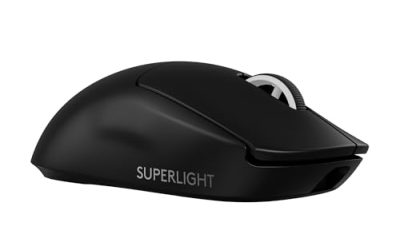
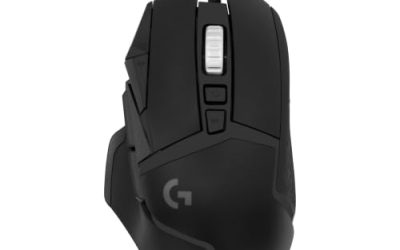
Our Short List of 3

- Best for: Players who want wireless freedom and long battery life in a compact mouse.
- Weight: 99 grams
- Sensor: HERO, up to 12,000 DPI, 400 IPS
- Connection: LIGHTSPEED wireless, 1 ms report rate
- Battery: 1 AA battery, up to 250 hours of gameplay

- Best for: Competitive players who want the lowest weight and the fastest polling rate in a wired mouse.
- Weight: 53 grams
- Sensor: HyperX 26K, up to 26,000 DPI, up to 650 IPS
- Polling rate: up to 8,000 Hz
- Cable: HyperFlex 2 paracord-style cable

- Best for: Players who want a proven honeycomb mouse with RGB lighting and a flexible cable.
- Weight: 67 grams
- Sensor: Pixart 3360, up to 12,000 DPI
- Polling rate: 1,000 Hz
- Switches: Omron, rated for 20 million clicks
All 4 Picks at a Glance
| Product | Specs | Action |
|---|---|---|
| Logitech G305 LIGHTSPEED |
| Check price on Amazon |
| HyperX Pulsefire Haste 2 |
| Check price on Amazon |
| Glorious Model O |
| Check price on Amazon |
 Logitech G203 LIGHTSYNC |
| Check price on Amazon |
Our Top Picks
Pros & cons
- Up to 250 hours of play on a single AA battery
- Lightweight 3.4-ounce body aids fast, precise movement
- Built-in receiver storage keeps the dongle from getting lost
- Relies on a AA battery rather than a built-in rechargeable cell
- Endurance mode trade-off needed to stretch battery life further
A light mouse changes how a long session feels, but the real decision is not chasing the lowest gram figure on a spec sheet. It is finding a mouse from an established brand that stays comfortable after hours of play, tracks reliably in fast games, and does not ask you to give up a solid sensor or a sensible shape just to save weight. The five mice below all come from mainstream gaming brands, and each one keeps its weight down in a different way.
This guide is for players building a first setup, students sharing one desk between study and play, and anyone replacing a heavy office mouse with something quicker. Every pick is a real listing on Amazon US, and the specifications in this guide come from those product pages. Note that the amount shown on a listing changes over time, so check the product page for the current figure before you buy.
Quick Picks
As an Amazon Associate we earn from qualifying purchases.
| Product | Best for | Key spec from title |
|---|---|---|
| Logitech G305 LIGHTSPEED | Wireless play without a cable | 99 grams, HERO 12K sensor, 12,000 DPI |
| HyperX Pulsefire Haste 2 | The lightest wired pick here | 53 grams, 8,000 Hz polling rate |
| Glorious Model O | Honeycomb shell and RGB lighting | 67 grams, Pixart 3360 sensor |
| SteelSeries Rival 3 | A right-handed ergonomic shape | 77 grams, TrueMove Core sensor, 8,500 CPI |
| Logitech G203 LIGHTSYNC | A compact wired all-rounder | 8,000 DPI, LIGHTSYNC RGB |
How to Choose
Read the Listed Weight, Not the Marketing
A mouse that weighs 53 grams feels very different from one that weighs 99 grams, even though both count as light next to a standard office mouse. The lightest mice in this guide use honeycomb shells or stripped-down bodies to cut grams, while wireless models carry a battery that adds weight back. Check whether the listed weight includes the battery and the cable, because a wireless mouse measured without its cell can look lighter than it feels in your hand. If you play fast shooters with a low sensitivity and move your arm across a large pad, every gram matters more than it does for a player who aims mostly with the wrist.
Match the Sensor to How You Actually Play
Every mouse here uses an optical sensor whose ceiling sits far above the sensitivity most players use, so the headline DPI number is rarely the deciding factor. What matters more is clean tracking at your chosen sensitivity, a polling rate of 1,000 Hz or higher, and a sensor that holds its line in flicks. The HyperX Pulsefire Haste 2 goes furthest with a sensor rated to 26,000 DPI and an 8,000 Hz polling rate, while the other four settle for ceilings between 8,000 and 12,000 DPI. Set your sensitivity once in the mouse software, store it on the mouse if onboard memory is available, and judge the sensor in your games.
Know What Mainstream Models Leave Out
Mice from mainstream brands keep their asking figure down by trimming features that flagship models treat as standard. You may get a rubber cable instead of a braided or paracord one, a sensor from an earlier generation, fewer side buttons, or no Bluetooth fallback on a wireless model. The Logitech G305, for example, connects only through its USB receiver, so losing that small receiver means losing the mouse until a replacement arrives. The SteelSeries Rival 3 ships with a plain rubber cable that can drag more than a flexible paracord. None of these trade-offs ruins a mouse, but each one should match something you are willing to live with.
Shape, Grip, and Shell Material Decide Comfort
Weight means little if the shape fights your hand. Ambidextrous mice such as the Glorious Model O, the HyperX Pulsefire Haste 2, and the Logitech G203 suit claw and fingertip grips and work for either hand, while the SteelSeries Rival 3 uses a right-handed ergonomic curve that supports the palm and thumb. Honeycomb shells cut weight and let air through, yet their holes can collect dust and feel odd to players who dislike texture under their fingers. Solid shells feel smoother and are easier to wipe clean. Measure your hand against the listed dimensions and think about whether you rest your palm, curl your fingers, or grip with your fingertips before you choose.
The 5 Best Options
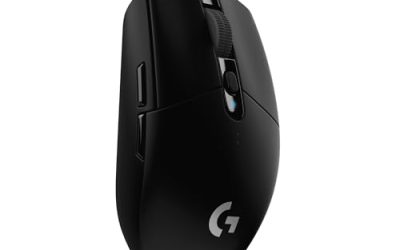
Logitech G305 LIGHTSPEED
- Best for: Players who want wireless freedom and long battery life in a compact mouse.
- Weight: 99 grams
- Sensor: HERO, up to 12,000 DPI, 400 IPS
- Connection: LIGHTSPEED wireless, 1 ms report rate
- Battery: 1 AA battery, up to 250 hours of gameplay
Players who want wireless freedom and long battery life in a compact mouse.
It connects only through its USB receiver, with no Bluetooth fallback, so keep the receiver stored inside the mouse when you travel.
The G305 is the only wireless mouse in this guide, and it earns its place by removing the cable without adding the weight that usually comes with it. At 99 grams with its battery installed, it is the heaviest pick here, yet it still feels quick because the weight sits close to the centre of a compact, symmetrical body. The HERO sensor tracks cleanly up to 12,000 DPI, the LIGHTSPEED link reports at 1 ms, and a single AA battery is rated for up to 250 hours of play. Six programmable buttons and onboard memory let you carry your setup between computers.
Watch out for: It connects only through its USB receiver, with no Bluetooth fallback, so keep the receiver stored inside the mouse when you travel.
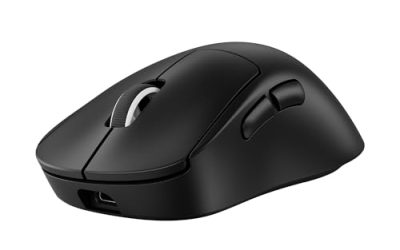
HyperX Pulsefire Haste 2
- Best for: Competitive players who want the lowest weight and the fastest polling rate in a wired mouse.
- Weight: 53 grams
- Sensor: HyperX 26K, up to 26,000 DPI, up to 650 IPS
- Polling rate: up to 8,000 Hz
- Cable: HyperFlex 2 paracord-style cable
Competitive players who want the lowest weight and the fastest polling rate in a wired mouse.
It is wired only, with no wireless option, so players who want to cut the cable entirely should look at the G305 instead.
The Pulsefire Haste 2 is the lightest mouse in this guide at 53 grams, and it reaches that figure with a solid shell rather than a honeycomb one, so there are no holes to collect dust. Its HyperX 26K sensor is rated to 26,000 DPI with tracking up to 650 IPS, and the polling rate reaches 8,000 Hz, which is the fastest here. The HyperFlex 2 cable is light and flexible, the switches are rated for 100 million clicks, and grip tape is included in the box for players who want extra hold. Six buttons are programmable through HyperX NGENUITY software.
Watch out for: It is wired only, with no wireless option, so players who want to cut the cable entirely should look at the G305 instead.
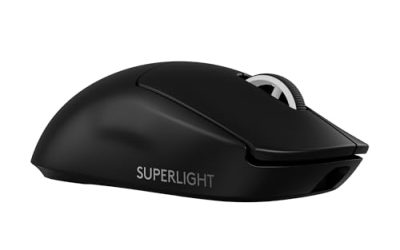
Glorious Model O
- Best for: Players who want a proven honeycomb mouse with RGB lighting and a flexible cable.
- Weight: 67 grams
- Sensor: Pixart 3360, up to 12,000 DPI
- Polling rate: 1,000 Hz
- Switches: Omron, rated for 20 million clicks
Players who want a proven honeycomb mouse with RGB lighting and a flexible cable.
The honeycomb holes can collect dust and crumbs over time, so the shell needs a wipe more often than a solid one.
The Model O is the mouse that made the honeycomb shell famous, and its 67-gram body still feels remarkably quick for a wired mouse from a mainstream brand. A Pixart 3360 sensor handles tracking up to 12,000 DPI, Omron switches are rated for 20 million clicks, and the Ascended Paracord cable stays light and flexible during fast movement. RGB lighting runs through the honeycomb shell and the side strips, and six buttons support macros through Glorious software. The ambidextrous shape suits medium and large hands, and the PTFE skates glide smoothly across cloth pads.
Watch out for: The honeycomb holes can collect dust and crumbs over time, so the shell needs a wipe more often than a solid one.
SteelSeries Rival 3
The Rival 3 takes a different route to lightness: a solid, right-handed ergonomic shell built from high-grade polymer, with no holes and no wireless hardware inside. At 77 grams it is light enough for fast shooters while still filling the hand in a way that ambidextrous mice do not. The TrueMove Core sensor offers true 1-to-1 tracking from 100 to 8,500 CPI, with 300 IPS tracking and 35G acceleration, and the mechanical switches are rated for 60 million clicks. Three-zone RGB lighting runs through the body, and six programmable buttons cover the usual binds.
Specs
- Weight: 77 grams without cable
- Sensor: SteelSeries TrueMove Core, 100 to 8,500 CPI
- Tracking: 300 IPS, 35G acceleration
- Polling rate: 1,000 Hz
- Switches: SteelSeries mechanical, rated for 60 million clicks
- Buttons: 6 programmable buttons
- Lighting: 3-zone RGB
- Cable: 1.8 m rubber cable
- Right-handed ergonomic shape
Best for: Right-handed players who want a solid ergonomic mouse with honest tracking and no honeycomb holes.
Watch out for: The rubber cable is stiffer than a paracord cable and can drag on the desk edge unless it is routed with some slack.
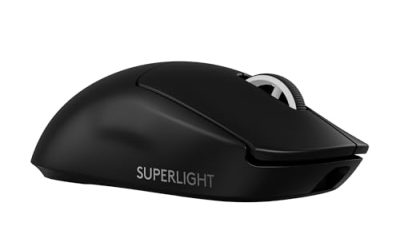
Logitech G203 LIGHTSYNC
- Best for: New players and small-handed players who want a compact wired mouse that handles every grip style.
- Sensor: gaming-grade optical, 200 to 8,000 DPI
- Buttons: 6 programmable buttons
- Lighting: LIGHTSYNC RGB, three zones
- Onboard memory for stored settings
New players and small-handed players who want a compact wired mouse that handles every grip style.
The 8,000 DPI ceiling is the lowest here, so players who run very high sensitivities should check that it covers the level they use.
The G203 is the simplest mouse in this guide, and that is its strength. Its compact, ambidextrous body fits small and medium hands, and the classic egg shape works for palm, claw, and fingertip grips without favouring one over the others. The gaming-grade optical sensor adjusts from 200 to 8,000 DPI, with up to five sensitivity presets you can cycle through on the fly, and the settings stay on the mouse thanks to onboard memory. LIGHTSYNC RGB lighting covers three zones and can be customised through Logitech G HUB, and mechanical spring button tensioning keeps the primary clicks crisp.
Watch out for: The 8,000 DPI ceiling is the lowest here, so players who run very high sensitivities should check that it covers the level they use.
Which One Fits Your Situation
You Play Fast Shooters and Want the Lightest Mouse Possible
Pick the HyperX Pulsefire Haste 2. At 53 grams it is the lightest mouse here by a clear margin, and its 8,000 Hz polling rate and 26,000 DPI sensor give it the fastest tracking hardware in the group. The solid shell avoids the dust that collects in honeycomb holes, and the flexible cable stays out of the way during flicks.
You Hate Cables but Still Want a Light Mouse
Pick the Logitech G305 LIGHTSPEED. It is the only wireless pick in this guide, and its single AA battery is rated for up to 250 hours of play, so charging is rarely on your mind. The compact symmetrical body suits claw and fingertip grips, and the receiver stows inside the mouse for travel.
You Have Larger Hands and Prefer a Solid Shell
Pick the SteelSeries Rival 3 or the Glorious Model O. The Rival 3 fills a right hand with its ergonomic curve and solid polymer body, while the Model O gives medium and large hands an ambidextrous honeycomb shape with a flexible paracord cable. Choose the Rival 3 for palm support and the Model O for a lighter, airier feel.
You Are Buying a First Gaming Mouse
Pick the Logitech G203 LIGHTSYNC. Its compact shape suits every grip style, its six programmable buttons cover the basics, and the LIGHTSYNC RGB lighting makes a first setup feel complete. The onboard memory means your settings travel with the mouse when you move between computers.
Safety Notes
Wireless mice in this guide run on replaceable or built-in cells, so treat the battery the way the listing describes it. Use the battery type the manufacturer specifies, keep a spare receiver and cable in a safe place, and unplug a wired mouse by the connector rather than yanking the cable. Keep any mouse away from liquids and direct heat, and let a damp shell dry fully before you plug it back in.
Common Mistakes
- Choosing by headline DPI alone instead of checking weight, shape, and polling rate against how you actually play.
- Picking a honeycomb shell without thinking about dust, crumbs, and how often you are willing to clean it.
- Buying a wireless mouse and then losing the small USB receiver because it was never stored inside the body.
- Ignoring the cable: a stiff rubber cable can drag and undo the benefit of a light mouse.
- Forgetting to check the listing for current availability and the current figure shown before ordering, since both change over time.
Frequently Asked Questions
What weight counts as lightweight for a gaming mouse?
Most players call anything under 100 grams lightweight, and the mice in this guide run from 53 to 99 grams. The difference between 53 and 99 grams is easy to feel during fast flicks, so players who move their whole arm across a large pad gain the most from the lightest models, while wrist aimers may barely notice the gap.
Is a wireless lightweight mouse slower than a wired one?
Not in any way that matters for most players. The Logitech G305 uses a 1 ms wireless link, which matches the 1,000 Hz polling rate of the wired mice here. A wireless mouse adds battery weight, so the lightest models in this guide are wired, but the link itself is not the bottleneck.
Do I need a high DPI sensor for competitive play?
No. Most competitive players use a sensitivity between 400 and 1,600 DPI, far below the ceiling of any mouse in this guide. A sensor rated to 8,000 DPI already covers that range with room to spare, so shape, weight, and tracking stability matter more than the headline number.
How do I keep a honeycomb mouse clean?
Wipe the shell with a dry microfibre cloth after long sessions, and use a soft brush to clear dust from the holes before it builds up. Avoid liquids and compressed air held too close to the shell, and clean the skates on the underside whenever the glide starts to feel rough.
FAQ
What weight counts as lightweight for a gaming mouse?
Is a wireless lightweight mouse slower than a wired one?
Do I need a high DPI sensor for competitive play?
How do I keep a honeycomb mouse clean?
More from Amazon
Programs that pair well with the guide above. Offers and eligibility are set by Amazon and may change.
Free shipping on eligible items, Prime Video and more. Eligible new members can start with a free trial.
Start a Prime free trialAd-free music streaming. Eligible new subscribers can start with a free trial.
Try Music Unlimited freeA Prime membership for ages 18-24 with a trial period. Eligibility is set by Amazon.
See Prime for Young AdultsAudiobooks and podcasts to listen to on the go. Eligible new members can start with a free trial.
Try Audible freeAs an Amazon Associate we earn from qualifying purchases.