Our Short List of 3

- Best for: shooter players who want the proven, pro-grade symmetrical all-rounder.
- Sensor: Logitech HERO 2 optical sensor
- DPI range: up to 44,000 DPI
- Polling rate: up to 8 kHz report rate
- Connection: LIGHTSPEED 2.4 GHz wireless, USB-C charging

- Best for: palm-grip shooter players who want flagship specs in an ergonomic shell.
- Sensor: Razer Focus Pro 30K optical sensor
- DPI range: up to 30,000 DPI
- Connection: Razer HyperSpeed wireless
- Buttons: 5 programmable buttons

- Best for: shooter players who want the original Superlight shape and sensor without the newest extras.
- Sensor: Logitech HERO 25K optical sensor
- DPI range: up to 25,600 DPI
- Connection: LIGHTSPEED 2.4 GHz wireless
- Buttons: 5 programmable buttons
All 3 Picks at a Glance
| Product | Specs | Action |
|---|---|---|
| Logitech G PRO X SUPERLIGHT 2 Wireless Gaming Mouse, 60g Pro-Grade with 5 Programmable Buttons, 44k DPI Sensor, 8kHz Report Rate, USB-C Charging for PC/Mac – Black |
| Check price on Amazon |
| Razer DeathAdder V3 Pro Wireless Gaming Mouse: 63g Lightweight – Focus Pro 30K Optical Sensor – Optical Switches Gen-3 – HyperSpeed Wireless – 5 Programmable Buttons – 90 Hr Battery – Black |
| Check price on Amazon |
| Logitech G PRO X SUPERLIGHT Wireless Gaming Mouse, Ultra-Lightweight, Hero 25K Sensor, 25,600 DPI, 5 Programmable Buttons, Long Battery Life, Compatible with PC/Mac – Black |
| Check price on Amazon |
Our Top Picks
- Logitech G Pro X Superlight 2 Lightspeed WirelessClassic1.57 x 2.5 x 4.92 inches0.1 poundsCheck on Amazon
Pros & cons
- 95-hour battery life reduces how often you need to charge
- 60-gram weight suits fast, low-effort mouse movement
- HERO 2 sensor tracks up to 44,000 DPI with no smoothing
- POWERPLAY wireless charging pad is sold separately
- Premium features add a more complex setup than basic mice
- Razer DeathAdder V3 Pro Wireless Gaming Mouse1000 Hz5.01 x 2.65 x 1.69 inches0.1 poundsCheck on Amazon
Shooter players ask more of a mouse than any other genre. A flick shot in a tactical shooter or a tracking duel in an arena game punishes every gram of extra weight, every millisecond of click delay, and every sensor hiccup during a fast swipe. That is why the decision here is not about extra buttons or lighting: it is about a light shell that stops where your hand stops, a flagship optical sensor that never spins out at high speed, fast and consistent switches, and a wireless link with high polling so the cursor reports as often as the game can use. Shape still decides who should buy what — symmetrical shells suit claw and fingertip grips, while an ergonomic shell rewards palm players who aim with longer, steadier strokes. Our top pick: Logitech G PRO X SUPERLIGHT 2 Wireless Gaming Mouse, 60g Pro-Grade with 5 Programmable Buttons, 44k DPI Sensor, 8kHz Report Rate, USB-C Charging for PC/Mac – Black. Runner-up: Razer Viper V3 Pro Wireless Esports Gaming Mouse: Symmetrical – 54g Lightweight – 8K Polling – 35K DPI Optical Sensor – Gen3 Optical Switches – 8 Programmable Buttons – 95 Hr Battery – Black.
This guide is for FPS and TPS players — tactical shooters, battle royale, arena shooters, and hero shooters — who want a mouse chosen for aim performance first. The 4 gaming mice below were chosen from the names and specifications on their Amazon product pages, with priority given to weight, sensor ceiling and tracking speed, polling rate, and switch type.
Quick Picks
As an Amazon Associate we earn from qualifying purchases.
| Product | Best for | Key spec from title |
|---|---|---|
| Logitech G PRO X SUPERLIGHT 2 Wireless Gaming Mouse – Black | Shooter players who want the proven pro-grade all-rounder | 60 g, 44K DPI HERO 2 sensor, 8 kHz report rate |
| Razer Viper V3 Pro Wireless Esports Gaming Mouse – Black | Fingertip and claw players chasing the lightest shell | 54 g, 35K DPI optical sensor, 8K polling, 95-hour battery |
| Razer DeathAdder V3 Pro Wireless Gaming Mouse – Black | Palm-grip shooter players who want an ergonomic flagship | 63 g, Focus Pro 30K optical sensor, 90-hour battery |
| Logitech G PRO X SUPERLIGHT Wireless Gaming Mouse – Black | Shooter players who want the original Superlight formula | HERO 25K sensor, 25,600 DPI, 5 programmable buttons |
How to Choose
Weight decides how fast the mouse stops
In shooters, the mouse is constantly starting and stopping: flick, stop on the head, click. A lighter shell has less momentum, so it starts moving with less effort and stops with less overshoot. The four mice here span 54 to 63 grams — the Viper V3 Pro at 54 g is the lightest, the SUPERLIGHT 2 sits at 60 g, and the DeathAdder V3 Pro carries 63 g in a larger ergonomic shell. Players who aim with the wrist and fingertips usually prefer the lightest shell they can control, while arm aimers with a palm grip often aim more steadily with a slightly larger, heavier shape. There is no universal winner; match the weight to how you actually move.
Sensor ceiling matters less than tracking behavior
Every sensor in this guide is a flagship optical unit — HERO 2 rated to 44,000 DPI in the SUPERLIGHT 2, Razer’s 35K optical sensor in the Viper V3 Pro, and the Focus Pro 30K in the DeathAdder V3 Pro. You will play at a small fraction of those numbers, typically 400–1,600 DPI. What the flagship specification signals is the engineering underneath: high maximum tracking speed, no smoothing or acceleration surprises at gaming sensitivities, and consistent behavior during the fastest swipes a shooter demands. Buy the sensor tier, not the DPI figure, and set your sensitivity by feel in an aim trainer or deathmatch.
Polling rate and switches shape click feel
A standard gaming mouse reports its position 1,000 times per second. The SUPERLIGHT 2 lists an 8 kHz report rate and the Viper V3 Pro lists 8K polling, which means position updates arrive up to eight times as often — a difference competitive players chase for smoother cursor motion on high-refresh monitors. Switches matter just as much: optical switches, like Razer’s Gen-3 units in both Razer mice here, actuate with light rather than a metal contact, which is designed for faster, more consistent clicks and resistance to double-click wear. When two mice share a sensor tier, polling and switches are often the real deciding factors for shooter play.
Wireless is the competitive default — check the battery math
All four mice here are wireless, because modern 2.4 GHz gaming links have removed the cable without adding a drawback players can feel, and a cable snagging mid-flick is a real way to lose a duel. The cost is battery management. The Viper V3 Pro lists up to 95 hours and the DeathAdder V3 Pro up to 90 hours of battery life, and both drop when you run the highest polling rates, so ranked grinders should expect to charge more often than the headline figure suggests. USB-C charging on the SUPERLIGHT 2 makes top-ups quick. Pick your polling setting with the battery in mind: many players run 1,000–2,000 Hz for everyday play and raise it for matches.
The 4 Best Options
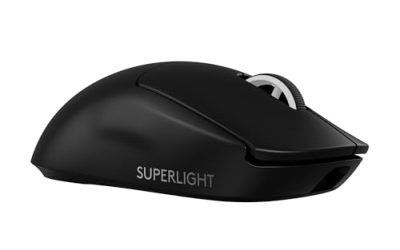
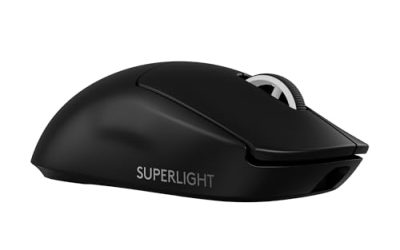
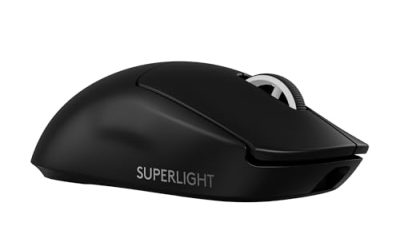
Logitech G PRO X SUPERLIGHT 2 Wireless Gaming Mouse, 60g Pro-Grade with 5 Programmable Buttons, 44k DPI Sensor, 8kHz Report Rate, USB-C Charging for PC/Mac – Black
- Best for: shooter players who want the proven, pro-grade symmetrical all-rounder.
- Sensor: Logitech HERO 2 optical sensor
- DPI range: up to 44,000 DPI
- Polling rate: up to 8 kHz report rate
- Connection: LIGHTSPEED 2.4 GHz wireless, USB-C charging
shooter players who want the proven, pro-grade symmetrical all-rounder.
there is no dedicated DPI button on top — sensitivity changes are made in G HUB or via a button assignment, which some players miss during a match.
OUR TOP PICK
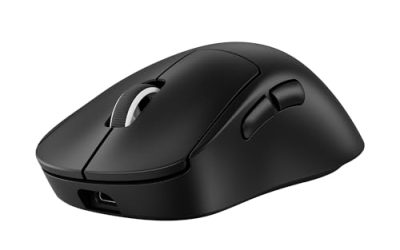
The SUPERLIGHT 2 is the default recommendation for shooter players because it makes no wrong moves: a 60-gram symmetrical shell that suits claw and fingertip grips, the HERO 2 sensor rated to 44,000 DPI, an 8 kHz report rate for high-refresh play, and USB-C charging. Logitech’s LIGHTFORCE hybrid switches pair optical actuation speed with a mechanical click feel, which answers the one complaint players had about purely optical clicks. Five programmable buttons keep the shell clean — in a shooter, the side buttons are for melee and push-to-talk, and nothing else needs to be under your thumb.
The shape is the safe, medium symmetrical form that the widest range of pro players use, and the wireless connection is Logitech’s LIGHTSPEED link. Battery life stretches across days of play between charges, and charging over USB-C means a short cable session during a break restores hours of use. If you want one mouse for tactical shooters today and whatever FPS you play next year, this is the one to build around.
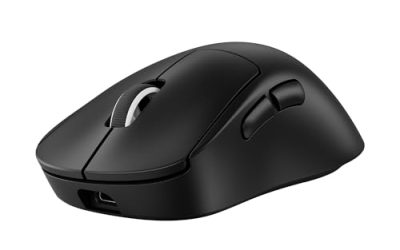
Razer Viper V3 Pro Wireless Esports Gaming Mouse: Symmetrical – 54g Lightweight – 8K Polling – 35K DPI Optical Sensor – Gen3 Optical Switches – 8 Programmable Buttons – 95 Hr Battery – Black
RUNNER-UP
At 54 grams, the Viper V3 Pro is the lightest mouse in this guide, and that single figure explains its following among fingertip and claw players in tactical shooters. The symmetrical shell is low and agile, the 35K optical sensor is Razer’s flagship tracking unit, and the mouse supports true 8K polling over its wireless connection with the included high-polling setup. Razer’s Gen-3 optical switches deliver fast, consistent clicks rated for a long service life, and the listed battery life reaches up to 95 hours at standard polling.
Eight programmable controls give a little more binding flexibility than the Logitech, including a DPI control that is reachable without opening software. The Viper V3 Pro is a specialist’s tool: players who aim with small, fast hand movements and want the mouse to disappear under their fingers will feel the difference those saved grams make across a long session.
Specs
- Sensor: Razer Focus Pro 35K optical sensor (Gen-2)
- DPI range: up to 35,000 DPI
- Polling rate: true 8K polling (8,000 Hz)
- Connection: Razer HyperSpeed wireless, HyperPolling support
- Buttons: 8 programmable buttons/controls
- Switches: Razer Optical Mouse Switches Gen-3
- Battery life: up to 95 hours
- Weight: 54 g
Best for: claw and fingertip players who want the lightest competitive shell with 8K polling.
Watch out for: battery life falls sharply at the 8K polling setting, so expect frequent charging if you run maximum polling full-time.
ASIN: B0CW25XR5R
View on Amazon
Razer DeathAdder V3 Pro Wireless Gaming Mouse: 63g Lightweight – Focus Pro 30K Optical Sensor – Optical Switches Gen-3 – HyperSpeed Wireless – 5 Programmable Buttons – 90 Hr Battery – Black
- Best for: palm-grip shooter players who want flagship specs in an ergonomic shell.
- Sensor: Razer Focus Pro 30K optical sensor
- DPI range: up to 30,000 DPI
- Connection: Razer HyperSpeed wireless
- Buttons: 5 programmable buttons
palm-grip shooter players who want flagship specs in an ergonomic shell.
the ergonomic shape is right-handed only and the shell is large — small hands and fingertip grips are better served by the Viper V3 Pro.
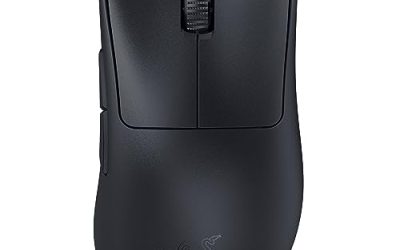
The DeathAdder V3 Pro is the ergonomic answer in a field of symmetrical mice. Its right-handed shell fills the palm and supports longer, arm-driven aiming strokes, which is why it suits palm-grip players in shooters who track targets smoothly rather than flicking with the fingertips. At 63 grams it is still firmly in the lightweight class, and the Focus Pro 30K optical sensor matches the flagship tracking standard of the other mice here.
Gen-3 optical switches keep clicks fast and consistent, HyperSpeed wireless handles the connection, and the listed battery life runs up to 90 hours. Five programmable buttons keep the layout uncluttered. If symmetrical mice have always felt like holding a bar of soap, the DeathAdder V3 Pro is the shooter flagship shaped for your hand instead.
Logitech G PRO X SUPERLIGHT Wireless Gaming Mouse, Ultra-Lightweight, Hero 25K Sensor, 25,600 DPI, 5 Programmable Buttons, Long Battery Life, Compatible with PC/Mac – Black
- Best for: shooter players who want the original Superlight shape and sensor without the newest extras.
- Sensor: Logitech HERO 25K optical sensor
- DPI range: up to 25,600 DPI
- Connection: LIGHTSPEED 2.4 GHz wireless
- Buttons: 5 programmable buttons
shooter players who want the original Superlight shape and sensor without the newest extras.
it charges over micro-USB rather than USB-C and its polling ceiling is the standard gaming rate, so high-refresh players chasing 8K should choose the SUPERLIGHT 2.
The original SUPERLIGHT is the mouse that made ultralight wireless the competitive standard, and it remains a serious shooter pick. The HERO 25K sensor tracks up to 25,600 DPI with the same no-smoothing behavior players expect from the line, the symmetrical shell is the medium shape that fits most grips, and five programmable buttons keep the layout purely functional. It uses the same LIGHTSPEED wireless connection as its successor.
Choosing between the two Logitech mice is straightforward: the SUPERLIGHT 2 adds the higher polling ceiling, USB-C charging, and hybrid switches, while the original keeps the shape and sensor performance that built its reputation. For players who do not run a high-refresh monitor or care about 8K polling, the first-generation mouse covers the fundamentals of shooter play completely.
Which One Fits Your Situation
You play tactical shooters on a high-refresh monitor
Choose the Logitech G PRO X SUPERLIGHT 2. The 8 kHz report rate, HERO 2 sensor, and 60-gram symmetrical shell are built exactly for precise, high-speed play, and USB-C charging keeps downtime short between sessions.
You aim with your fingertips and want maximum agility
Choose the Razer Viper V3 Pro. At 54 grams it is the lightest mouse here, and its low symmetrical shell, 8K polling, and Gen-3 optical switches reward fast, small movements in flick-heavy games.
You are a palm-grip player with larger hands
Choose the Razer DeathAdder V3 Pro. The ergonomic shell supports a full palm grip for long tracking strokes, while the Focus Pro 30K sensor and 90-hour battery keep it at flagship level for shooters.
You want competitive fundamentals without the newest features
Choose the original Logitech G PRO X SUPERLIGHT. The HERO 25K sensor and proven shape deliver the core shooter experience, and you give up mainly the 8K polling and USB-C charging of the newer model.
Common Mistakes
- Chasing the highest DPI setting instead of a controlled sensitivity — every sensor here performs best at ordinary gaming DPI levels.
- Running maximum polling full-time and then blaming the mouse for short battery life; high polling is a match setting, not a lifestyle.
- Picking a shape for its looks while ignoring grip style — symmetrical and ergonomic shells reward different aiming techniques.
- Using a worn cloth pad or bare desk with a flagship mouse, which hides the glide the lightweight shell was designed for.
- Copying a professional player’s sensitivity without accounting for your own DPI, mouse weight, and desk space.
Safety Notes
Competitive shooter sessions are long and repetitive, so protect the hand doing the work: keep your wrist in a neutral position, rest your forearm rather than planting your wrist bone on the desk edge, and take regular breaks to open and close your fingers and roll your shoulders. If you feel tingling or persistent ache in your hand or forearm, stop and rest rather than playing through it. Keep charging cables tidy so a wireless mouse’s cable never becomes a trip hazard, and dispose of a swollen or damaged rechargeable battery through a proper electronics recycling point — never puncture it and never throw it in household trash.
Frequently Asked Questions
Is 8K polling worth it for shooters?
It is a refinement, not a requirement. The SUPERLIGHT 2 and Viper V3 Pro both support 8K-class polling, which smooths cursor updates on high-refresh monitors, but the improvement is subtle and it costs battery life. Players on standard monitors will get full competitive performance at ordinary polling rates from any mouse in this guide.
Which grip style suits which mouse here?
Fingertip and claw players generally prefer the light, low symmetrical shells of the Viper V3 Pro and SUPERLIGHT 2. Palm players who aim with the whole arm usually prefer the DeathAdder V3 Pro’s ergonomic shell, which supports the hand through longer tracking movements common in battle royale and hero shooters.
Does sensor DPI above 30,000 actually help?
Not as a playing setting — nobody aims at 44,000 DPI. The figure signals a flagship sensor with high tracking speed and consistent behavior at the 400–1,600 DPI settings shooter players actually use. Judge these mice by sensor tier, weight, and switches rather than by the size of the DPI number.
How long do these wireless mice last between charges?
The Viper V3 Pro lists up to 95 hours and the DeathAdder V3 Pro up to 90 hours, both at standard polling; maximum polling settings shorten those figures considerably. In practice, charging during a break once or twice a week keeps any of these mice ready, and all of them can be used while charging over a cable.
FAQ
Is 8K polling worth it for shooters?
Which grip style suits which mouse here?
Does sensor DPI above 30,000 actually help?
How long do these wireless mice last between charges?
More from Amazon
Programs that pair well with the guide above. Offers and eligibility are set by Amazon and may change.
Free shipping on eligible items, Prime Video and more. Eligible new members can start with a free trial.
Start a Prime free trialAd-free music streaming. Eligible new subscribers can start with a free trial.
Try Music Unlimited freeA Prime membership for ages 18-24 with a trial period. Eligibility is set by Amazon.
See Prime for Young AdultsAudiobooks and podcasts to listen to on the go. Eligible new members can start with a free trial.
Try Audible freeAs an Amazon Associate we earn from qualifying purchases.