Our Short List of 3
All 5 Picks at a Glance
| Product | Specs | Action |
|---|---|---|
 Logitech K380 | Check price on Amazon | |
 Logitech MX Keys S | Check price on Amazon | |
 Logitech MX Keys | Check price on Amazon | |
 Logitech K780 | Check price on Amazon | |
 Arteck HB030B | Check price on Amazon |
Our Top Picks
- Arteck Universal Backlit Wireless Bluetooth Keyboard for iPad9.72 x 0.24 x 5.91 inches0.4 poundsCheck on Amazon
The best Bluetooth keyboards for Windows cut the cable without cutting corners, pairing reliably with a Windows PC, laptop, or tablet and staying connected across the room. A good Bluetooth keyboard should wake instantly, type comfortably for hours, switch between devices without a fiddly re-pairing ritual, and run for months on a charge or a set of batteries. The picks below cover the full range: compact boards for small desks and travel, full-size models with number pads for spreadsheet work, and backlit keyboards for late-night sessions.
Bluetooth has a few quirks on Windows that are worth knowing before you buy. Some keyboards pair over Bluetooth Low Energy and stay connected through sleep, while others need a USB receiver as a fallback. Multi-device switching is a real quality-of-life feature if you move between a desktop, a laptop, and a tablet. And key layout matters more than it seems: a Windows-specific layout with a proper Windows key, function-row shortcuts, and a familiar key spacing will feel right from the first day, while a Mac-first layout can leave you hunting for keys.
How to Choose
Bluetooth version and connection stability
Look for Bluetooth 5.0 or newer, which offers a more stable connection and lower latency than older versions, plus better power efficiency. A keyboard that also includes a USB receiver, such as Logitech’s Bolt or Unifying receiver, gives you a fallback if Bluetooth on your PC is flaky or already crowded with other devices. If your Windows machine has built-in Bluetooth, a Bluetooth-only board is fine; if it does not, you will need a receiver or a separate Bluetooth adapter.
Layout and key feel
Layout decides how the keyboard feels every day. Full-size boards include a number pad and are the best fit for spreadsheet and data-entry work. Tenkeyless boards drop the number pad and free up desk space for the mouse. Compact boards go further, shrinking the layout for travel. Key feel ranges from the short, quiet travel of low-profile chiclet keys to the deeper travel of mechanical switches. Low-profile keys suit fast, quiet typing in shared spaces, while mechanical keys suit people who type hard and want tactile feedback.
Multi-device switching
If you use more than one device, multi-device switching is worth prioritizing. Keyboards with Easy-Switch or a similar feature pair with up to three devices and let you jump between them with a single key press, no re-pairing needed. This is genuinely useful for people who move between a Windows desktop, a work laptop, and a tablet during the day. Check how many devices the keyboard remembers and whether switching works over Bluetooth alone or needs the receiver.
Backlighting
Backlit keys help in dim rooms and late sessions, and the best implementations adjust brightness automatically based on ambient light and turn off when your hands leave the keyboard. A keyboard without backlighting is fine for a bright office, but if you work in the evening or in a room with low light, backlighting is a feature you will notice every day. Note that backlighting shortens battery life, so boards with smart illumination that only lights up when needed last longer between charges.
Battery life and charging
Battery life varies enormously. Keyboards that run on AA or AAA batteries can last up to two years between changes, while rechargeable boards typically last days to weeks with backlighting on and months with it off. USB-C charging is the modern standard and lets you top up with the same cable as a phone or laptop. If you hate charging, a battery-powered board is the lower-maintenance choice; if you hate buying batteries, a rechargeable board with a long standby time is better.
Windows compatibility and software
Every keyboard here works with Windows out of the box, but the extras differ. Logitech’s Options+ software lets you remap keys, set application-specific shortcuts, and customize the function row on supported models. Keyboards without companion software still work fine, but you lose the ability to reassign keys and tune the backlight. Check that any companion software supports your version of Windows before relying on it.
Size, weight, and portability
A keyboard that stays on one desk can be full-size and heavy, with a palm rest and a solid frame. A keyboard that travels needs to be slim and light, with a layout that still feels complete. Compact boards around 400 grams fit in a laptop sleeve, while full-size boards are better left on the desk. Decide where the keyboard will live most of the time, and let that decide the size.
Top Picks
Logitech K380
View the Logitech K380 on Amazon
The Logitech K380 is a compact multi-device Bluetooth keyboard that has become a default recommendation for good reason: it is small, quiet, reliable, and pairs with up to three devices at once. The round, low-profile keys have a short, soft travel that suits long typing sessions without tiring your fingers, and the compact layout drops the number pad while keeping the keys full-size and well spaced. Easy-Switch keys let you jump between a Windows PC, a tablet, and a phone with one press.
It runs on two AAA batteries, with a battery life rated at up to two years, so charging is something you will rarely think about. The keyboard works with Windows, macOS, ChromeOS, Android, and iOS, and the Windows layout includes the keys you expect. At around 400 grams, it slips into a bag easily, making it a strong travel companion for a laptop or a tablet setup.
Who it is for: anyone who wants a small, quiet, dependable Bluetooth keyboard for a Windows laptop or tablet, especially people who switch between devices during the day.
Caveats: there is no backlighting, so it is not the best choice for typing in a dark room. The compact layout has no number pad, which spreadsheet-heavy users will miss, and the round keys take a short adjustment period if you are used to square keycaps.
Logitech MX Keys S
View the Logitech MX Keys S on Amazon
The Logitech MX Keys S is the full-size flagship in this guide, a low-profile wireless keyboard with smart backlighting, quiet spherically dished keys, and multi-device pairing over Bluetooth or the included Logi Bolt receiver. The keys are shaped to fit your fingertips, and the typing feel is fluid and precise, with enough travel to feel substantial without the noise of a mechanical board. Backlighting brightens as your hands approach and dims when they leave, which stretches battery life.
It connects to up to three devices and switches between them with a key press, and it works with Windows, macOS, Linux, and ChromeOS. The USB-C rechargeable battery lasts for months with backlighting off and around ten days with it on, and a quick charge gives hours of use. Logitech’s Options+ software lets you remap keys and create application-specific shortcuts, which is useful for productivity apps and creative tools.
Who it is for: people who type all day on a Windows desktop and want the most comfortable, best-equipped Bluetooth keyboard in this guide, with backlighting and deep customization.
Caveats: it is a full-size board, so it needs desk space and is not a travel keyboard. The rechargeable battery needs regular charging if you keep the backlight on, and the companion software is needed to unlock the deeper customization features.
Logitech MX Keys
View the Logitech MX Keys on Amazon
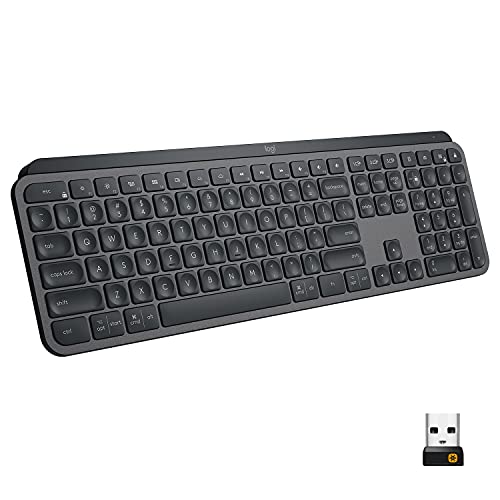
The original Logitech MX Keys is the predecessor to the MX Keys S and remains a strong full-size Bluetooth keyboard for Windows. It shares the same low-profile design, spherically dished keys, and smart backlighting that adjusts to ambient light and hand proximity. It pairs with up to three devices over Bluetooth or the Unifying receiver, and it switches between them with the Easy-Switch keys. The USB-C rechargeable battery lasts for weeks with backlighting off, and the keyboard works with Windows, macOS, Linux, iOS, and Android.
The typing experience is nearly identical to the newer model: quiet, fluid, and comfortable for long sessions, with a solid build that stays planted on the desk. The main differences from the MX Keys S are the receiver standard and a few software features, so if the original is available at a lower cost, it is a sensible way to get the same typing feel for less.
Who it is for: Windows users who want the MX Keys typing experience and full-size layout, and are happy with the original model rather than the latest revision.
Caveats: it uses the older Unifying receiver rather than the newer Bolt standard, so check compatibility if you plan to pair it with other Logitech devices. As the earlier generation, it may be harder to find in some colors and configurations, so confirm the exact listing before ordering.
Logitech K780
View the Logitech K780 on Amazon
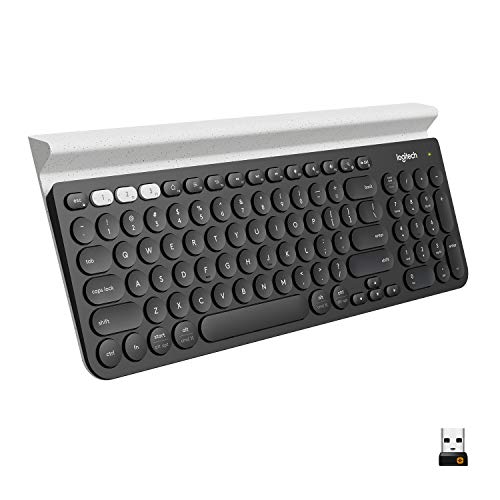
The Logitech K780 is a full-size multi-device Bluetooth keyboard with a built-in cradle that holds a phone or tablet upright, making it a natural fit for a desk where a Windows PC sits next to a mobile device. The round, low-profile keys are quiet and comfortable, and the full layout includes a number pad, which spreadsheet and data-entry users will appreciate. Easy-Switch pairs the keyboard with up to three devices, and it connects over Bluetooth or the included Unifying receiver.
Two AA batteries power the keyboard for up to two years, so it is one of the lowest-maintenance boards in this guide. The integrated device stand is genuinely useful: prop a phone in it to glance at messages while you type, or hold a tablet upright as a second screen. The keyboard works with Windows, macOS, ChromeOS, Android, and iOS, and the layout includes Windows-specific keys.
Who it is for: people with a full-size desk who want a number pad, a phone and tablet cradle, and a keyboard they can forget about for years at a time.
Caveats: the full-size frame is large and heavy, so it is a desk keyboard, not a travel one. There is no backlighting, and the round keys and wide layout take a little getting used to if you are coming from a standard rectangular keyboard. Confirm the exact color and layout variant when ordering, since several K780 listings exist under different ASINs.
Arteck HB030B
View the Arteck HB030B on Amazon
The Arteck HB030B is an ultra-slim portable Bluetooth keyboard with a seven-color backlight, built for people who want a full typing experience in a package that weighs almost nothing. The compact layout keeps the keys close together without shrinking them to an uncomfortable size, and the backlight cycles through seven colors with adjustable brightness, which is rare at this size and price. It pairs over Bluetooth 3.0 with Windows, iOS, Android, and macOS devices, and the built-in rechargeable battery is rated for up to six months of use between charges with the backlight off.
At under 200 grams and only a few millimeters thick, it fits in a laptop sleeve or a jacket pocket, making it a practical companion for a Windows tablet or a small laptop. The keyboard wakes quickly and reconnects to the last paired device without fuss, and the low-profile keys are quiet enough for a shared workspace or a library.
Who it is for: travelers, tablet users, and anyone who wants the lightest possible backlit Bluetooth keyboard for Windows on the go.
Caveats: Bluetooth 3.0 is an older standard, so pairing can be slower than on Bluetooth 5.0 boards, and the compact layout has no number pad or dedicated function row. The seven-color backlight is a single-zone effect rather than per-key lighting, and heavy backlight use shortens the time between charges.
Comparison Table
| Keyboard | Layout | Backlight | Multi-Device | Power | Connection |
|---|---|---|---|---|---|
| Logitech K380 | Compact | No | 3 devices | 2 AAA, up to 2 years | Bluetooth |
| Logitech MX Keys S | Full-size | Smart backlight | 3 devices | USB-C rechargeable | Bluetooth, Logi Bolt |
| Logitech MX Keys | Full-size | Smart backlight | 3 devices | USB-C rechargeable | Bluetooth, Unifying |
| Logitech K780 | Full-size with number pad | No | 3 devices | 2 AA, up to 2 years | Bluetooth, Unifying |
| Arteck HB030B | Compact portable | 7-color backlight | 1 device | Rechargeable, up to 6 months | Bluetooth 3.0 |
Which One Is Right for You?
For most Windows users, the choice comes down to size and backlighting. If you want a compact board for a laptop or tablet, the Logitech K380 is the safe pick: quiet, dependable, and easy to carry, with multi-device switching that just works. If you travel light and want backlighting in a pocket-size board, the Arteck HB030B is the portable alternative.
For a full-size desk setup, the MX Keys S is the best typing experience in this guide, with smart backlighting, a comfortable low-profile layout, and deep software customization. The original MX Keys offers nearly the same feel if you find it at a lower cost. The Logitech K780 is the right call when you want a number pad and a built-in cradle for your phone or tablet, and you would rather change batteries once every couple of years than plug in a charging cable.
Match the keyboard to the desk it will live on and the devices it will serve, and any of these five will give you a reliable wireless setup for Windows.
Frequently Asked Questions
Do Bluetooth keyboards work well with Windows?
Yes. Windows has built-in Bluetooth support, and every keyboard in this guide pairs directly with a Windows PC, laptop, or tablet. For the most stable connection, keep the keyboard within a few feet of the computer, keep Bluetooth drivers updated, and use the included USB receiver if the keyboard comes with one and Bluetooth feels unreliable.
Can one Bluetooth keyboard switch between a PC and a tablet?
Yes, if it supports multi-device pairing. The Logitech models in this guide pair with up to three devices and switch between them with a single key press, so you can type on a Windows desktop, then jump to a tablet without re-pairing. The Arteck HB030B pairs with one device at a time, so switching requires re-pairing.
How long do Bluetooth keyboard batteries last?
It varies by model. Battery-powered boards like the K380 and K780 are rated for up to two years on a set of AA or AAA batteries. Rechargeable boards like the MX Keys S last for weeks to months depending on backlight use, and the Arteck HB030B is rated for up to six months with the backlight off. Backlighting is the biggest drain on battery life, so boards with smart illumination last longer.
Is a Bluetooth keyboard good for gaming on Windows?
For casual gaming, yes. Modern Bluetooth keyboards have low enough latency for most games, and the models here are comfortable for long sessions. For competitive play where every millisecond counts, a wired mechanical keyboard or a 2.4 GHz wireless gaming keyboard with a dedicated receiver is usually the better choice, since Bluetooth can add a small amount of input delay.
Disclosure: As an Amazon Associate, we may earn from qualifying purchases.
FAQ
Which One Is Right for You?
Do Bluetooth keyboards work well with Windows?
Can one Bluetooth keyboard switch between a PC and a tablet?
How long do Bluetooth keyboard batteries last?
Is a Bluetooth keyboard good for gaming on Windows?
More from Amazon
Programs that pair well with the guide above. Offers and eligibility are set by Amazon and may change.
Free shipping on eligible items, Prime Video and more. Eligible new members can start with a free trial.
Start a Prime free trialAd-free music streaming. Eligible new subscribers can start with a free trial.
Try Music Unlimited freeA Prime membership for ages 18-24 with a trial period. Eligibility is set by Amazon.
See Prime for Young AdultsAudiobooks and podcasts to listen to on the go. Eligible new members can start with a free trial.
Try Audible freeAs an Amazon Associate we earn from qualifying purchases.