Our Short List of 3

- Best for: Apartments and single-floor homes that need strong coverage from one router.
- AX5400 dual-band Wi-Fi 6 router
- Wireless speed up to 5,400 Mbps
- 5 GHz band up to 4.8 Gbps with HE160
- Covers up to 2,000 sq. ft.

- Best for: Larger single-storey homes where a stated coverage figure guides the choice.
- AX5400 dual-band Wi-Fi 6 router
- Wireless speed up to 5.4 Gbps
- Coverage up to 2,500 sq. ft.
- Up to 25 devices

- Best for: Households that want mesh coverage and smart-home connectivity with almost no settings to manage.
- Dual-band Wi-Fi 6 mesh system, 3-pack
- Covers up to 4,500 sq. ft.
- Connects 75+ devices
- Supports internet plans up to a gigabit
All 4 Picks at a Glance
| Product | Specs | Action |
|---|---|---|
| TP-Link Archer AX73 |
| Check price on Amazon |
| NETGEAR Nighthawk RAX50 |
| Check price on Amazon |
| Amazon eero 6+ (3-pack) |
| Check price on Amazon |
 Google Nest Wifi Pro (3-pack) |
| Check price on Amazon |
Our Top Picks
Coverage is the one router figure that decides whether the far bedroom, the garden office or the upstairs landing actually gets a usable signal. A fast router that cannot reach the rooms where people sit is a poor buy, and a mesh kit bought for a flat wastes money that a single strong router would have saved. The honest way to shop is to start from the square footage the maker states, compare it with the size and shape of your home, and only then look at speed classes and extra features.
This guide is for renters replacing a provider-supplied router, families covering a whole floor, and anyone whose current router drops connections at the far end of the house. Every pick below is a router or mesh system whose Amazon listing or maker page states a coverage figure in square feet, chosen from the name and specifications on its Amazon listing so the coverage claim can be checked against a real floor plan.
Quick Picks
As an Amazon Associate we earn from qualifying purchases
| Product | Best for | Key spec from title |
|---|---|---|
| TP-Link Archer AX73 | Apartments and single-floor homes up to 2,000 sq. ft. | AX5400 Wi-Fi 6, covers up to 2,000 sq. ft. |
| NETGEAR Nighthawk RAX50 | Larger single-storey homes needing a stated 2,500 sq. ft. figure | AX5400 Wi-Fi 6, 2,500 sq. ft. coverage |
| TP-Link Deco X55 (3-pack) | Big homes on a budget that need mesh coverage | AX3000 Wi-Fi 6 mesh, covers up to 6,500 sq. ft. |
| Amazon eero 6+ (3-pack) | Households that want mesh setup with almost no settings to manage | Wi-Fi 6 mesh, covers up to 4,500 sq. ft. |
| Google Nest Wifi Pro (3-pack) | Google Home households with large or multi-storey homes | Wi-Fi 6E mesh, covers up to 6,600 sq. ft. |
How to Choose
Match the Stated Figure to Your Floor Plan
Start by measuring the area that needs Wi-Fi, including rooms the router must reach through walls rather than across open space. A single router rated for 2,000 square feet suits many apartments and small houses, while a home above that figure usually needs a mesh kit or a stronger standalone unit. Compare the stated figure with your plan, not with a neighbour’s house, because two homes of the same size can behave very differently once walls and floors get in the way. Treat the figure as a ceiling under good conditions, and leave headroom for the rooms furthest from the router.
Decide Between One Router and a Mesh Kit
A single router works when the home is compact, mostly open plan, and the router can sit near the centre. Mesh suits long homes, multi-storey houses and places with thick walls, because each node shortens the distance the signal must travel. Mesh also spreads the load when many devices connect from different rooms at once. The trade-off is cost and complexity: a mesh kit means more boxes, more power sockets and more nodes to place well. If one strong router already covers the plan with room to spare, adding nodes buys little beyond extra hardware to manage.
Read Walls, Floors and Placement Before Speed
Brick, concrete and metal stud walls absorb far more signal than plasterboard, and a router tucked behind a television or inside a cabinet loses range before the signal even leaves the room. Place the router in the open, roughly central, and above floor level, away from large metal objects and mirrors. A floor between the router and a device matters as much as distance, so multi-storey homes often need a node per floor rather than a faster single box. Walk the house with a phone and note where the signal fades, because that map matters more than any speed rating.
Weigh Device Load and Wired Ports
A household with phones, laptops, consoles, televisions and smart home gear needs a router that states how many devices it can handle, not just how fast one device can go. Check the device figure on the listing and compare it with a count of everything that will connect at once. Wired ports matter too: consoles, desktop PCs and televisions all run better on a cable, so count the Ethernet ports on the router or on each mesh node. A kit with three ports per node leaves room for wired gear in several rooms, while a single-port design forces a switch purchase later.
The 5 Best Options
TP-Link Archer AX73
- Best for: Apartments and single-floor homes that need strong coverage from one router.
- AX5400 dual-band Wi-Fi 6 router
- Wireless speed up to 5,400 Mbps
- 5 GHz band up to 4.8 Gbps with HE160
- Covers up to 2,000 sq. ft.
Apartments and single-floor homes that need strong coverage from one router.
Confirm it is still sold before buying. The stated coverage is a maximum under good conditions, so thick walls shrink the real reach.
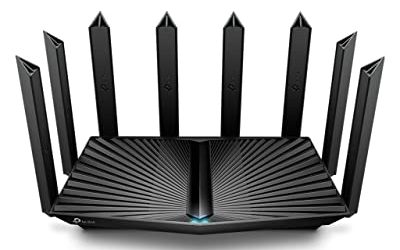
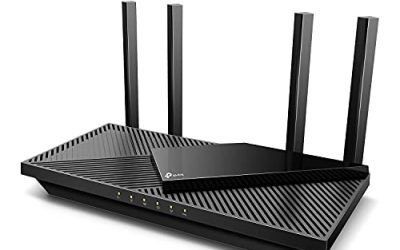
The Archer AX73 is the straightforward pick for a home that fits inside one router’s reach. Its six antennas, high-power front-end modules and beamforming concentrate the signal toward connected devices instead of spraying it in every direction, which is exactly what a long apartment or a single-floor house needs. Dual-band Wi-Fi 6 keeps phones, laptops and streaming boxes moving at once, and the USB 3.0 port gives shared storage or a printer a home on the network. OneMesh support leaves a path to add an extender later if one corner stays weak.
Watch out for: Confirm it is still sold before buying. The stated coverage is a maximum under good conditions, so thick walls shrink the real reach.
NETGEAR Nighthawk RAX50
- Best for: Larger single-storey homes where a stated coverage figure guides the choice.
- AX5400 dual-band Wi-Fi 6 router
- Wireless speed up to 5.4 Gbps
- Coverage up to 2,500 sq. ft.
- Up to 25 devices
Larger single-storey homes where a stated coverage figure guides the choice.
Confirm it is still sold before buying. A renewed version and a separate RAX54S bundle circulate under other codes, so check the model number at checkout.
The Nighthawk RAX50 earns its place because its listing prints a coverage figure outright: up to 2,500 square feet, which makes it the easiest standalone router here to match against a floor plan. Its six-stream design and AX5400 rating give it room to handle several streams and downloads at once, and the listing states support for up to 25 devices. Four gigabit LAN ports cover wired consoles and desktop PCs, while the single gigabit WAN port suits internet plans up to a gigabit. It is the pick for a larger single-storey home where one box must reach far rooms.
Watch out for: Confirm it is still sold before buying. A renewed version and a separate RAX54S bundle circulate under other codes, so check the model number at checkout.
TP-Link Deco X55 (3-pack)
The Deco X55 three-pack is the value route to whole-home coverage, with three units working as one network rated for up to 6,500 square feet. Each unit is an AX3000 Wi-Fi 6 node, so the kit suits internet plans up to a gigabit and households with many connected devices, with the listing stating capacity for up to 150 devices. Three gigabit Ethernet ports per unit mean consoles and televisions can plug in at several nodes, and Ethernet backhaul keeps the link between units steady where cabling exists. Setup runs through the Deco app, and the system works with other Deco models if the home grows.
Specs
- AX3000 dual-band Wi-Fi 6 mesh system, 3-pack
- Covers up to 6,500 sq. ft.
- Connects up to 150 devices
- 5 GHz up to 2,402 Mbps, 2.4 GHz up to 574 Mbps
- 3 Gigabit Ethernet ports per unit
- Supports Ethernet backhaul
- AI-driven mesh
Best for: Big homes on a budget that need mesh coverage across several rooms or floors.
Watch out for: Confirm it is still sold before buying. The kit is dual-band only, so it has no 6 GHz band for Wi-Fi 6E devices, and the 3-pack selection must be confirmed at checkout.
Amazon eero 6+ (3-pack)
- Best for: Households that want mesh coverage and smart-home connectivity with almost no settings to manage.
- Dual-band Wi-Fi 6 mesh system, 3-pack
- Covers up to 4,500 sq. ft.
- Connects 75+ devices
- Supports internet plans up to a gigabit
Households that want mesh coverage and smart-home connectivity with almost no settings to manage.
Confirm it is still sold before buying. The router and extender versions of eero nodes look alike but differ, so confirm the pack contains three routers at checkout.
The eero 6+ three-pack is the pick for households that want mesh coverage without learning router settings. Three units cover up to 4,500 square feet, support internet plans up to a gigabit, and connect 75 or more devices, with app-guided setup handling placement and updates. A built-in Zigbee smart home hub connects compatible devices without a separate hub box, which suits homes already running Alexa gear. Each router carries two gigabit Ethernet ports, and the system works with other eero devices, so an extra node can be added later if a new dead zone appears.
Watch out for: Confirm it is still sold before buying. The router and extender versions of eero nodes look alike but differ, so confirm the pack contains three routers at checkout.
Google Nest Wifi Pro (3-pack)
- Best for: Google Home households with large or multi-storey homes that need the widest stated coverage.
- Wi-Fi 6E tri-band mesh system, 3-pack
- Covers up to 6,600 sq. ft. (2,200 sq. ft. per router)
- 6 GHz up to 2,402 Mbps, 5 GHz up to 2,402 Mbps, 2.4 GHz up to 574 Mbps
- Two 1 Gbps Ethernet ports per router
Google Home households with large or multi-storey homes that need the widest stated coverage.
Confirm it is still sold before buying. A Snow-only 3-pack circulates under a separate ASIN, so confirm the pack contents and colour selection at checkout.
The Nest Wifi Pro three-pack is the coverage leader here, with each router rated for up to 2,200 square feet and the three-pack for up to 6,600 square feet. Tri-band Wi-Fi 6E adds a 6 GHz band alongside the usual two, which helps in homes where the 5 GHz band is crowded, and each router carries two gigabit Ethernet ports for wired gear. The system is managed through the Google Home app, and each point handles up to 100 connected devices, so a busy smart home stays within the stated capacity. It fits best in households already using Google Home, where setup and control stay in one app.
Watch out for: Confirm it is still sold before buying. A Snow-only 3-pack circulates under a separate ASIN, so confirm the pack contents and colour selection at checkout.
Which One Fits Your Situation
A Flat or Small Single-Floor Home
Choose the TP-Link Archer AX73 when one router can sit near the centre and the whole home fits inside 2,000 square feet. Its six antennas and beamforming push the signal to far rooms without extra boxes, and the USB port and OneMesh support cover the extras most flats need. The eero 6+ three-pack is the alternative if the flat has thick walls or awkward corners, because its nodes shorten every wireless hop.
A Larger Single-Storey Home
Choose the NETGEAR Nighthawk RAX50 when the floor plan runs past 2,000 square feet but still suits one strong router. Its stated 2,500 square foot figure makes the match easy to check before ordering, and the six-stream design handles several streams at once. If the far rooms still drop out after central placement, the Deco X55 three-pack is the next step rather than a second standalone router.
A Multi-Storey Home With Dead Zones
Choose the TP-Link Deco X55 three-pack when the house spans several floors and one router cannot reach them all. Its 6,500 square foot rating and three nodes put a unit on each floor, and Ethernet backhaul keeps the nodes linked where cabling exists. The Google Nest Wifi Pro three-pack suits the same layout for Google Home households, with a slightly larger stated figure and a 6 GHz band.
A Busy Smart Home
Choose the Amazon eero 6+ three-pack when the house already runs Alexa gear and the network should stay simple. Its built-in Zigbee hub removes a separate box, and app-guided setup keeps management light. The Google Nest Wifi Pro three-pack is the equivalent for Google Home households, with a higher device figure per point and tri-band Wi-Fi 6E for crowded airwaves.
Common Mistakes
- Buying on speed class alone while ignoring the stated coverage figure and the size of the home.
- Placing the router inside a cabinet, behind a television or at floor level, then blaming the hardware for weak corners.
- Choosing a single router for a long or multi-storey home, where a mesh kit would shorten every wireless hop.
- Ordering the wrong pack size or variant, such as a router-plus-extender bundle instead of three routers.
- Forgetting to count wired devices, then discovering the router has too few Ethernet ports for consoles and televisions.
Frequently Asked Questions
How much coverage do I need from a wireless router?
Measure the area that needs Wi-Fi, including rooms the signal must reach through walls, then pick a router whose stated figure clears that number with room to spare. A flat under 2,000 square feet usually suits a single strong router, while larger or multi-storey homes need mesh. Treat every stated figure as a ceiling under good conditions, because walls, floors and interference all shrink real reach.
Is a mesh system always better than a single router?
No. Mesh wins in long, multi-storey or thick-walled homes, because each node shortens the distance the signal travels. A single router is simpler and cheaper when the home is compact and the router can sit near the centre. If one strong router already covers the plan with headroom, extra nodes add boxes and sockets without improving the experience.
What does the square footage figure on a router listing mean?
It is the maker’s stated maximum coverage under favourable conditions, usually measured in open space with few obstructions. Real homes have walls, floors, mirrors and neighbouring networks that reduce it. Use the figure to compare models and to match a router to a floor plan, not as a guarantee that every corner will get full speed.
Can I add more coverage to a router later?
Most mesh systems let you add nodes, and some standalone routers support extenders or mesh partners from the same brand. Check the listing for mesh or extender support before buying, because not every model expands. Adding a node from a different brand rarely joins the same network, so staying inside one system keeps setup and roaming simple.
FAQ
How much coverage do I need from a wireless router?
Is a mesh system always better than a single router?
What does the square footage figure on a router listing mean?
Can I add more coverage to a router later?
More from Amazon
Programs that pair well with the guide above. Offers and eligibility are set by Amazon and may change.
Free shipping on eligible items, Prime Video and more. Eligible new members can start with a free trial.
Start a Prime free trialAd-free music streaming. Eligible new subscribers can start with a free trial.
Try Music Unlimited freeA Prime membership for ages 18-24 with a trial period. Eligibility is set by Amazon.
See Prime for Young AdultsAudiobooks and podcasts to listen to on the go. Eligible new members can start with a free trial.
Try Audible freeAs an Amazon Associate we earn from qualifying purchases.