Our Short List of 3

All 3 Picks at a Glance
| Product | Specs | Action |
|---|---|---|
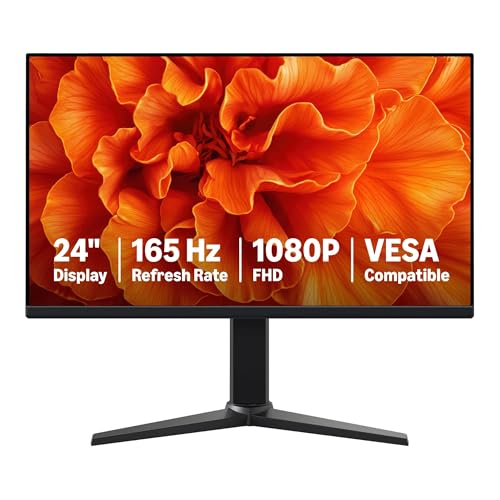
| 1. Amazon Basics 24-Inch Gaming Monitor — Best Overall Low Cost Pick | Check price on Amazon | |
| 2. KOORUI 24E3 24-Inch Gaming Monitor — Best Ultra-Budget Gaming Monitor | Check price on Amazon | |
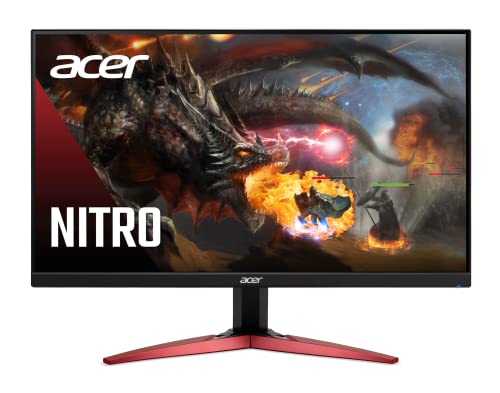
| 4. Acer Nitro KG241Y 23.8-Inch Gaming Monitor — Best for Fast Action on a Budget | Check price on Amazon |
Our Top Picks
Finding the best low cost computer monitors does not mean settling for a dim screen, washed-out colours, or a panel that stutters every time you move a window. The budget monitor market has changed a great deal in recent years. Panels that once belonged only in mid-range displays are now common in affordable models, including fast IPS screens, high refresh rates, adaptive sync, and slim bezels that look at home on any desk. The challenge is no longer finding a cheap monitor. The challenge is finding one that is cheap for the right reasons, with no hidden weakness that will annoy you every day.
This guide explains what actually matters when you shop on a tight budget, what you can safely ignore, and which models stand out right now. Every pick below is a monitor, not a television or a laptop screen, and every one is available on Amazon US. We focus on the features that affect daily use: image quality, smoothness, eye comfort, connectivity, and build quality. By the end, you should be able to match a monitor to your desk, your graphics card, and the way you actually spend time in front of a screen.
How to Choose a Low Cost Computer Monitor
A low cost monitor is a set of trade-offs. Manufacturers save money somewhere, and your job is to make sure they save it in places you will not notice. The list below covers the decisions that matter most, in roughly the order you should make them.
Start With Size and Resolution
For most desks, a 24-inch monitor with Full HD resolution, 1920 by 1080 pixels, is the sweet spot for a low cost purchase. Text stays sharp at a normal viewing distance, games run well on modest graphics cards, and the screen fits comfortably beside a laptop or a second display. A 27-inch Full HD screen can look softer because the same number of pixels is stretched over a larger area, so if you want a larger screen, look for a higher resolution if your budget and your graphics card allow it.
Measure your desk before you order. A 24-inch screen needs less depth than many people expect, but the stand still needs room. If your desk is shallow, check whether the monitor supports a VESA mount, which lets you attach it to a monitor arm and reclaim desk space. All four picks in this guide support VESA mounting, which is one reason they made the list.
Choose the Right Panel Type
Panel type shapes colour, contrast, and viewing angles more than any other single feature. IPS panels are usually the best choice for a low cost monitor because they keep colours accurate when you view the screen from the side, which matters if you share your screen, use a dual-monitor setup, or simply move around in your chair. IPS panels also tend to handle text and photo work well.
VA panels can offer deeper blacks and stronger contrast, which looks good in dark games and films, but cheaper VA panels sometimes smear fast-moving objects. TN panels are fast and inexpensive, yet their colours shift badly off-axis, so they are harder to recommend now that IPS has become so affordable. Unless you have a specific reason to choose VA, start your search with IPS.
Refresh Rate and Response Time
Refresh rate, measured in hertz, tells you how many times per second the screen updates its image. A 60 hertz screen updates sixty times per second. A 144 hertz or 165 hertz screen updates far more often, and the difference is easy to feel in games, in fast scrolling, and even when you drag windows across the desktop. For gaming, a refresh rate of 144 hertz or higher is a meaningful upgrade, and it is now available in genuinely low cost models.
Response time tells you how quickly a pixel changes colour. A lower number usually means less blur in fast motion. Manufacturers measure this in different ways, so treat the headline number as a rough guide rather than an exact promise. A monitor rated at 1 millisecond may still show some blur in practice, while a well-tuned 4 millisecond panel can look clean. Refresh rate, panel quality, and adaptive sync matter more together than any single response-time claim on a box.
Adaptive sync, sold as AMD FreeSync or NVIDIA G-Sync Compatible on many models, matches the monitor refresh rate to the frame rate from your graphics card. That reduces tearing, where the image appears split, and stuttering, where motion looks uneven. If you play games, adaptive sync is worth having, and most of the picks below include it.
Brightness, Colour, and Eye Comfort
A brightness rating around 250 to 300 nits is enough for a normal indoor room. If your desk sits beside a bright window, aim higher and look for an anti-glare coating. Colour coverage matters if you edit photos or video. A monitor that covers close to 99 percent of the sRGB colour space is a good target for general use and light creative work. You do not need professional colour accuracy for everyday gaming and browsing, but a panel with poor colour will make everything look dull.
Eye comfort is easy to overlook until you spend eight hours in front of a screen. Look for flicker-free backlighting and a low blue light mode. A height-adjustable stand helps even more, because it lets you place the top of the screen at or slightly below eye level. If a monitor only tilts, you can still fix its height with a monitor arm or a sturdy riser, so do not reject an otherwise good model for that reason alone.
Ports and Compatibility
Check the ports before you buy. Most low cost monitors include at least one HDMI port and one DisplayPort input. DisplayPort is usually the best choice for high refresh rates on a PC, while HDMI is handy for a laptop, a console, or a second device. If you plan to connect a laptop with only USB-C, you may need an adapter or a different monitor, because USB-C video input is still uncommon at the lowest prices.
Also check the cable in the box. Some monitors include only an HDMI cable, even though the fastest refresh rate needs DisplayPort. Buying a separate cable is inexpensive, but it is better to know before the monitor arrives. Confirm that your graphics card has a matching output, and that your desk has a spare power outlet.
What You Can Safely Skip
Built-in speakers are convenient, but they are rarely good in a low cost monitor, and headphones or desktop speakers will sound far better. Curved screens look striking, but at 24 inches the benefit is small, and a flat screen is easier to use for work. HDR support is often listed on budget monitors, but the effect is usually modest, so treat it as a bonus, not a reason to choose one monitor over another.
Top Picks
1. Amazon Basics 24-Inch Gaming Monitor — Best Overall Low Cost Pick
The Amazon Basics 24-inch gaming monitor is a strong example of how far budget displays have come. It uses a 24-inch IPS panel with Full HD resolution, a 165 hertz refresh rate, and a 1 millisecond response time. That combination covers the two things most buyers want from a low cost monitor: a clean, accurate image for work and smooth motion for games.
Adaptive sync helps keep fast games free of tearing, and the slim bezel design makes it a good choice for a dual-monitor setup. The screen supports VESA mounting, so you can pair it with an arm if the included stand does not suit your desk. HDMI and DisplayPort inputs cover the usual PC and console connections.
This is the pick to choose if you want one monitor that does a bit of everything without a complicated decision. It is well suited to competitive games, where the high refresh rate matters, and to everyday work, where the IPS panel keeps text and colours looking natural. It is also a sensible first monitor for a new gaming PC, because it does not demand a powerful graphics card to feel smooth at Full HD resolution.
2. KOORUI 24E3 24-Inch Gaming Monitor — Best Ultra-Budget Gaming Monitor
The KOORUI 24E3 has earned a loyal following among builders who want a fast gaming monitor without spending more than the rest of their setup allows. It pairs a 23.8-inch Full HD IPS panel with a 165 hertz refresh rate, a 1 millisecond response time, and 99 percent sRGB colour coverage. In plain terms, it is fast enough for competitive play and accurate enough for everyday work and light photo editing.
The panel is made for smooth motion, with adaptive sync support to reduce tearing when frame rates vary. The viewing angles are wide, so colours stay consistent even if you sit slightly off-centre. HDMI and DisplayPort inputs are included, and the monitor supports VESA mounting for use with an arm.
Choose the KOORUI 24E3 if gaming performance is your priority and you want the lowest sensible spend for a true high-refresh IPS screen. It is also a good second monitor for a streaming setup, where a fast, reliable display matters more than extra features. As with any budget model, check the exact variant before ordering, because the same product family has been sold in several refresh-rate versions over time.
3. AOC 24G4 24-Inch Gaming Monitor — Best for Colour and Ergonomics
The AOC 24G4 steps up the experience in two areas where budget monitors often cut corners: colour and adjustability. Its 23.8-inch Fast IPS panel runs at Full HD resolution with a 180 hertz refresh rate and a 1 millisecond response time. AOC lists wide colour coverage, including 126 percent sRGB, which helps games and video look vivid without pushing colours into an unnatural range.
The stand is a real advantage. It adjusts for height, tilt, swivel, and pivot, so you can set the screen exactly where you need it and turn it upright for reading long documents or code. That flexibility is rare at this level and makes the monitor easier to live with during long work sessions. G-Sync compatibility and adaptive sync support keep motion smooth, and HDMI and DisplayPort inputs cover standard PC connections.
Pick the AOC 24G4 if you spend long hours at your desk, care about colour, or want a monitor you can adjust without buying extra hardware. It suits mixed use especially well: gaming in the evening, office work during the day, and media in between.
4. Acer Nitro KG241Y 23.8-Inch Gaming Monitor — Best for Fast Action on a Budget
The Acer Nitro KG241Y is a straightforward gaming monitor that focuses on speed and simplicity. Its 23.8-inch Full HD VA panel runs at 165 hertz with a 1 millisecond visual response time, and AMD FreeSync Premium support helps keep frames smooth when your graphics card output varies. The ZeroFrame design gives it slim bezels, which look neat on a desk and work well in a multi-monitor arrangement.
VA panels trade a little viewing-angle consistency for deeper contrast, so dark scenes in games and films can look richer than on a basic IPS screen. The monitor includes DisplayPort and HDMI inputs, with an HDMI cable in the box, and it supports VESA mounting. The stand tilts for basic adjustment, which is typical at this level.
Choose the Acer Nitro KG241Y if you play fast-paced games, watch a lot of video, or want a proven budget gaming model from a large monitor brand. It is a practical choice for a first gaming setup, a dorm room, or a second PC where you want speed without extra complexity.
Comparison Table
| Monitor | Size and Resolution | Panel | Refresh Rate | Best For |
|---|---|---|---|---|
| Amazon Basics 24-Inch Gaming Monitor | 24 inch, Full HD | IPS | 165 hertz | Best overall low cost pick |
| KOORUI 24E3 | 23.8 inch, Full HD | IPS | 165 hertz | Ultra-budget gaming |
| AOC 24G4 | 23.8 inch, Full HD | Fast IPS | 180 hertz | Colour and ergonomics |
| Acer Nitro KG241Y | 23.8 inch, Full HD | VA | 165 hertz | Fast action and contrast |
Setting Up Your New Monitor
A good monitor still needs a sensible setup. Start by using the fastest connection your monitor and graphics card share, usually DisplayPort for high refresh rates on a PC. Then open your display settings and set the refresh rate to the highest available option, because many monitors ship at a lower default. Next, adjust brightness to suit your room rather than leaving it at maximum, which can cause eye strain. Finally, sit at arm’s length from the screen, with the top of the display at or just below eye level.
Common Mistakes to Avoid
The most common mistake is buying the largest screen you can afford without checking resolution. A large Full HD screen can look soft, while a smaller screen with the same resolution looks sharper. Another common mistake is ignoring the refresh rate setting after setup, which leaves a fast monitor running at a slow default. Do not choose a monitor for one feature alone, such as a headline response time, while ignoring panel type, ports, or stand adjustment.
Frequently Asked Questions
What size monitor is best for a low cost setup?
A 24-inch Full HD monitor is the best starting point for most people. It is sharp enough for text and games, fits on a normal desk, and leaves room in the budget for a better panel or a higher refresh rate. Move to a larger screen only if you have the desk space and the resolution to match.
Is 165 hertz worth it for a low cost monitor?
Yes, for gaming and for general smoothness. A 165 hertz screen feels noticeably more fluid than a 60 hertz screen, especially in fast games and when scrolling. You do not need a top-end graphics card to notice the benefit at Full HD resolution, and adaptive sync helps when frame rates change.
Is IPS better than VA for a budget monitor?
IPS is usually the safer choice for mixed use because colours stay accurate from wider viewing angles and text looks consistent. VA can offer deeper blacks and stronger contrast, which suits dark games and films. If you mainly work, browse, and play a mix of games, choose IPS. If you mainly watch films and play dark games in a dim room, VA is worth considering.
Do I need DisplayPort for a low cost gaming monitor?
DisplayPort is the best choice for high refresh rates on a PC, although HDMI can also support high refresh rates on many modern monitors and graphics cards. Check the specifications for your exact model and device. Use the cable and port that support the refresh rate you want, and set that rate in your display settings after connecting.
Can a low cost monitor be good for work as well as gaming?
Yes. A 24-inch IPS monitor with Full HD resolution, a high refresh rate, and good colour coverage works well for office tasks, study, browsing, and light creative work. Look for a comfortable stand, flicker-free lighting, and a low blue light mode if you spend long hours at your desk.
Conclusion
The best low cost computer monitors prove that a tight budget does not have to mean a poor screen. A 24-inch IPS panel with Full HD resolution and a refresh rate of 165 hertz or higher covers gaming, work, and everyday use for most people, and the models in this guide do that without asking you to pay for features you will never use.
If you want a single safe choice, start with the Amazon Basics 24-inch gaming monitor. If gaming speed matters most and you want to spend as little as sensible, the KOORUI 24E3 is the pick. If colour and a fully adjustable stand matter to you, the AOC 24G4 is worth the step up. And if you prefer deeper contrast and a proven gaming brand, the Acer Nitro KG241Y is a solid alternative. Whichever you choose, check the ports, set the refresh rate after setup, and give yourself a day or two to adjust to the new screen before judging it.
Disclosure: As an Amazon Associate, we earn from qualifying purchases.
FAQ
What size monitor is best for a low cost setup?
Is 165 hertz worth it for a low cost monitor?
Is IPS better than VA for a budget monitor?
Do I need DisplayPort for a low cost gaming monitor?
Can a low cost monitor be good for work as well as gaming?
More from Amazon
Programs that pair well with the guide above. Offers and eligibility are set by Amazon and may change.
Free shipping on eligible items, Prime Video and more. Eligible new members can start with a free trial.
Start a Prime free trialAd-free music streaming. Eligible new subscribers can start with a free trial.
Try Music Unlimited freeA Prime membership for ages 18-24 with a trial period. Eligibility is set by Amazon.
See Prime for Young AdultsAudiobooks and podcasts to listen to on the go. Eligible new members can start with a free trial.
Try Audible freeAs an Amazon Associate we earn from qualifying purchases.