Our Short List of 3
All 3 Picks at a Glance
| Product | Specs | Action |
|---|---|---|
 2. ASUS Dual Radeon RX 9060 XT 16GB — Best Overall Value | Check price on Amazon | |
 3. ASUS Prime GeForce RTX 5060 Ti 16GB — Best Nvidia Value | Check price on Amazon | |
 5. MSI GeForce RTX 5070 12G Ventus 2X OC — Best Ray Tracing Value | Check price on Amazon |
Our Top Picks
- ASUS Dual Radeon RX 9060 XT 16GB GDDR6RX9060XT|16GB|Black8 x 4.7 x 1.9 inches1.3 poundsCheck on Amazon

A graphics card is the single most expensive part of most gaming PCs, and it is also the part where overspending is easiest. The fastest card on the market is rarely the best value, and the cheapest card on the shelf is rarely the best value either. The sweet spot sits in between: the card that delivers the most frames, the most VRAM and the longest useful life for every unit of money spent. That is what bang for buck means, and it is the only lens this guide uses.
Every card below was chosen for value first. None of them is the flagship of its lineup. Each one earns its place by doing one job well for its tier: smooth 1080p gaming on a tight budget, high-refresh 1440p gaming without a flagship price tag, or entry-level 4K gaming with enough VRAM to stay relevant. If you want the prettiest card or the fastest card regardless of cost, this is not that guide.
Disclosure: As an Amazon Associate, we earn from qualifying purchases.
What Bang for Buck Actually Means
Value is not the same as low cost. A card that costs very little but cannot run the games you play at the settings you want is not good value; it is money spent on frustration. A card that costs a lot but lasts four years and handles every new release at your monitor’s native resolution is often better value than a cheaper card you replace after eighteen months. Judge a card through four questions, in order.
Start with your monitor, not the card
Your monitor decides how much graphics power you actually need. A 1080p monitor at 60Hz needs far less GPU than a 1440p monitor at 165Hz, and a 4K monitor needs far more than either. Buying a card built for 4K when you play on a 1080p screen wastes money on performance you will never see, while buying a 1080p card for a 1440p screen means shopping for a replacement far sooner than planned. Match the card to the resolution and refresh rate you already own.
VRAM is the value spec that matters most in 2026
For 1080p gaming in 2026, 12GB of VRAM is a comfortable floor and 16GB is better still. For 1440p gaming, 16GB is the sweet spot, and for entry-level 4K it is the minimum worth considering. That is why every card in this guide carries 12GB or 16GB of VRAM, and why the 8GB versions of otherwise good cards did not make the cut. An 8GB card can look like a bargain today and become a bottleneck tomorrow.
Upscaling and ray tracing change the value equation
Raw raster performance is only part of the story now. Upscaling rebuilds a lower-resolution image into a sharper one, and frame generation adds extra frames between rendered ones, letting a mid-range card punch above its weight in supported games. Nvidia’s DLSS 4 with Multi Frame Generation on the RTX 50 series and AMD’s FSR 4 on the RX 9000 series both do this, but support varies by game, so check the titles you play first.
Ray tracing is a similar trade-off. Nvidia holds a clear lead in ray-traced games, while AMD’s raster performance at the same tier is often stronger for the money. If you turn ray tracing on, Nvidia’s advantage is real value. If you mostly play competitive shooters where ray tracing stays off, AMD’s raster value matters more.
Check the hidden costs before you buy
A card’s value is not just the card. First, power: confirm your power supply meets the maker’s recommended wattage and has the right connectors. Some cards use a traditional 8-pin connector, while others use a 16-pin connector. Second, size: measure your case’s maximum GPU length and check the card’s thickness in slots. Third, the PCIe slot: several current cards use an x8 electrical interface, which can cost performance on an older PCIe 3.0 motherboard.
The Picks at a Glance
| Card | VRAM | Best for | Power connector |
|---|---|---|---|
| ASRock Intel Arc B580 Challenger 12GB OC | 12GB GDDR6 | Budget 1080p and entry 1440p | Single 8-pin |
| ASUS Dual Radeon RX 9060 XT 16GB | 16GB GDDR6 | Best overall value at 1440p | Single 8-pin |
| ASUS Prime GeForce RTX 5060 Ti 16GB | 16GB GDDR7 | Nvidia value with DLSS 4 | Single 8-pin |
| XFX Swift AMD Radeon RX 9070 XT | 16GB GDDR6 | High-refresh 1440p and entry 4K | Two 8-pin |
| MSI GeForce RTX 5070 12G Ventus 2X OC | 12GB GDDR7 | Ray tracing value at 1440p | 16-pin |
1. ASRock Intel Arc B580 Challenger 12GB OC — Best Budget Value
The Arc B580 is the card that made budget graphics interesting again. Intel’s Battlemage architecture pairs 12GB of GDDR6 memory on a 192-bit bus with 20 Xe2 cores and a boost clock of 2740 MHz, delivering smooth 1080p gaming and playable entry-level 1440p gaming. The 12GB of VRAM is the key number: at this tier, competing cards still ship with 8GB, and the extra memory is what keeps the B580 relevant as texture sizes grow.
The Challenger OC model from ASRock is a straightforward dual-fan design with a single 8-pin power connector, so it drops into most existing systems without a power supply upgrade. It supports DisplayPort 2.1 and HDMI 2.1a outputs, runs on a PCIe 5.0 interface, and includes Intel’s XeSS 2 AI upscaling with frame generation. The 0dB silent operation mode stops the fans under light loads.
Who should buy it: anyone building or upgrading a 1080p gaming PC on a tight budget, or anyone whose current card is several generations old. Who should skip it: players who want strong ray tracing performance, since Intel still trails Nvidia there, and anyone who relies on software built specifically around CUDA. Note that B580 stock has been uneven, so confirm availability on the listing before ordering and have a backup pick in mind.
Key specs: Intel Arc B580 GPU, 12GB GDDR6, 192-bit memory bus, 2740 MHz boost clock, 20 Xe2 cores, single 8-pin power connector, DisplayPort 2.1 and HDMI 2.1a, dual-fan cooler, PCIe 5.0.
Check the ASRock Arc B580 on Amazon
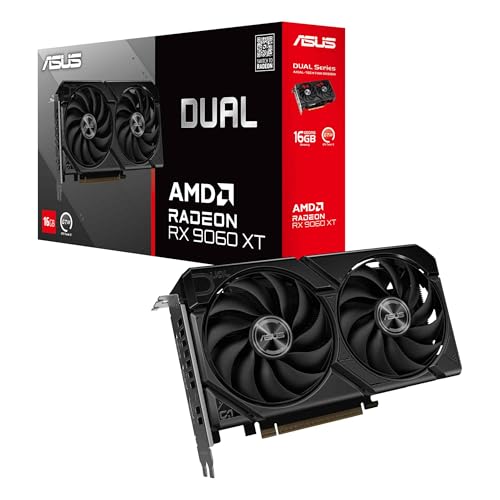
2. ASUS Dual Radeon RX 9060 XT 16GB — Best Overall Value
If this guide had to recommend one card to the most people, it would be this one. The Radeon RX 9060 XT with 16GB of GDDR6 memory is the value sweet spot of the current generation: enough VRAM for 1440p gaming with high-resolution textures, enough raster performance for high-refresh 1080p and solid 1440p frame rates, and a power draw that stays modest. AMD’s RDNA 4 architecture brings FSR 4 upscaling, and the 16GB version avoids the longevity problem that holds back the 8GB version of the same card.
The ASUS Dual model is a 2.5-slot dual-fan card with Axial-tech fans and 0dB technology that stops the fans during light gaming. It uses a PCIe 5.0 interface with HDMI 2.1b and DisplayPort 2.1a outputs, and its compact layout fits in far more cases than the triple-fan cards in this guide. The case for this card over its Nvidia rival comes down to memory and raster performance for the money: 16GB of GDDR6 at this tier means you are not choosing between texture quality and frame rate, and you are not betting that 8GB will still be enough in two years. The trade-off is ray tracing, where Nvidia pulls ahead, and upscaling support, where DLSS is broader than FSR. For players who leave ray tracing off, that trade-off is easy to accept. Best for 1440p gamers who want the best return on their money, and 1080p high-refresh players who want a card they will not need to replace soon.
Key specs: AMD Radeon RX 9060 XT GPU, 16GB GDDR6, RDNA 4 architecture, 32 compute units, PCIe 5.0, HDMI 2.1b and DisplayPort 2.1a, 2.5-slot dual-fan design, Axial-tech fans, 0dB technology.
Check the ASUS Dual RX 9060 XT on Amazon
3. ASUS Prime GeForce RTX 5060 Ti 16GB — Best Nvidia Value
The RTX 5060 Ti 16GB is the cheapest current Nvidia card with 16GB of memory, and that alone makes it an important value pick. The 8GB version of the same card is a trap: same name, same box style, far less longevity. The 16GB version is the one to buy, and this ASUS Prime model is the version to look for.
Built on Nvidia’s Blackwell architecture, the card carries 16GB of GDDR7 memory on a 128-bit bus with a boost clock of 2647 MHz. It supports DLSS 4 with Multi Frame Generation, the strongest upscaling and frame generation package available, and it delivers the best ray tracing performance at its tier. For games that support DLSS, the effective performance jumps well above what the raw specifications suggest.
The Prime design is built for small-form-factor systems, with a 2.5-slot footprint, Axial-tech fans and dual BIOS. It runs on PCIe 5.0 with HDMI and DisplayPort 2.1 outputs, and it is a practical fit for compact builds where larger cards will not go. The single 8-pin connector keeps installation simple.
Compared with the RX 9060 XT 16GB above, the choice is about ecosystem rather than raw speed. The 5060 Ti 16GB wins on ray tracing and upscaling support. The 9060 XT 16GB wins on raster performance for the money and on memory bandwidth. Neither is a wrong answer; the right one depends on the games you play and whether you value DLSS or prefer AMD’s platform.
Key specs: Nvidia GeForce RTX 5060 Ti GPU, 16GB GDDR7, 128-bit memory bus, 2647 MHz boost clock, PCIe 5.0, DLSS 4 with Multi Frame Generation, HDMI and DisplayPort 2.1, 2.5-slot design, Axial-tech fans, dual BIOS.
Check the ASUS Prime RTX 5060 Ti on Amazon
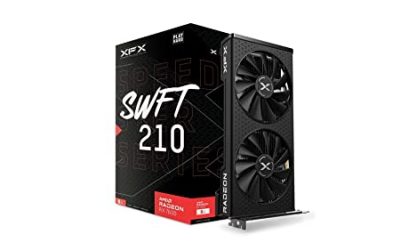
4. XFX Swift AMD Radeon RX 9070 XT — Best Value for High-Refresh 1440p and Entry 4K
Step up a tier and the RX 9070 XT is where AMD’s value story gets serious. This is a card built for high-refresh 1440p gaming and entry-level 4K, with 16GB of GDDR6 memory, 4096 stream processors and a boost clock up to 2970 MHz. It is the card to buy when 1440p at high settings is the goal and you want frame rates that stay high in demanding titles without paying flagship money.
The XFX Swift Triple Fan Gaming Edition needs a case with room to breathe, but the cooling pays off with steady clocks under sustained load. It carries one HDMI port and three DisplayPort outputs, runs on AMD’s RDNA 4 architecture with FSR 4 support, and its 16GB of VRAM handles 4K texture packs and 1440p ray tracing without forcing compromises. The value case is longevity at higher resolutions: a 1440p high-refresh monitor is a long-term investment, and a card that can drive it properly for years is worth more than a cheaper card that struggles from day one. Check case clearance before ordering, since the triple-fan shroud is wider than the dual-fan cards in this guide.
Key specs: AMD Radeon RX 9070 XT GPU, 16GB GDDR6, 4096 stream processors, boost clock up to 2970 MHz, RDNA 4 architecture, triple-fan cooler, HDMI and three DisplayPort outputs.
Check the XFX RX 9070 XT on Amazon
5. MSI GeForce RTX 5070 12G Ventus 2X OC — Best Ray Tracing Value
The RTX 5070 is the performance ceiling of the sensible mid-range, and the MSI Ventus 2X OC is the compact dual-fan version that fits most mid-tower cases. Built on Nvidia’s Blackwell architecture, it carries 12GB of GDDR7 memory running at 28Gbps on a 192-bit bus, with a boost clock up to 2542 MHz. It is the fastest card in this guide in ray-traced games, and it brings the strongest upscaling and ray tracing feature set of any card here. It measures 236mm long in a 2.5-slot design and uses a 16-pin power connector.
The value argument for the RTX 5070 is about the experience rather than the specification sheet. DLSS 4 with Multi Frame Generation transforms supported games, ray tracing runs at playable frame rates, and NVENC encoding makes it a strong choice for streamers. The 12GB of VRAM is the honest limitation: enough for 1440p high settings today, but the smallest memory capacity in this guide, and players who keep cards for many years should weigh that against the 16GB cards above.
Who should buy it: 1440p players who want the best ray tracing and upscaling available without stepping up to a much more expensive tier, streamers who value NVENC, and anyone whose software runs on CUDA. If your games are mostly competitive shooters with ray tracing off, the 16GB AMD cards above offer more memory for less money.
Key specs: Nvidia GeForce RTX 5070 GPU, 12GB GDDR7, 192-bit memory bus, 28Gbps memory speed, boost clock up to 2542 MHz, Blackwell architecture, DLSS 4, PCIe 5.0, three DisplayPort 2.1b and one HDMI 2.1b, 236mm length, 2.5-slot design, 16-pin power connector.
Check the MSI RTX 5070 on Amazon
How the Picks Compare
The five cards form a clear ladder, and the right rung depends on your monitor and your games.
For budget 1080p gaming, the Arc B580 is the value leader. Its 12GB of VRAM at its tier is unusual, and it handles 1080p high settings comfortably while offering a path into entry-level 1440p.
For most buyers, the RX 9060 XT 16GB is the centre of the ladder: 16GB of VRAM, strong raster performance, modest power draw and a compact card that fits almost any case.
The RTX 5060 Ti 16GB is the alternative for buyers who want Nvidia’s ecosystem. DLSS 4 and stronger ray tracing are genuine advantages, and the card is a strong fit for compact builds. Choose it over the 9060 XT if you play ray-traced games or use CUDA software; choose the 9060 XT if you want more raster performance for the money.
For high-refresh 1440p and entry 4K, the RX 9070 XT is the value step up. It is the card for players whose monitor demands more than a mid-range card can give, and its 16GB of VRAM means it will stay useful as games get more demanding.
The RTX 5070 is the specialist: the best ray tracing and the best upscaling, with the smallest VRAM capacity. It is the right card when those features matter most, and the wrong card when long-term memory headroom is your priority.
Frequently Asked Questions
How much VRAM do I need in a graphics card in 2026?
For 1080p gaming, 12GB is a comfortable floor. For 1440p gaming, 16GB is the sweet spot. For entry-level 4K, 16GB is the minimum worth considering. Cards with 8GB can still run many games, but they are increasingly forced to lower texture settings.
Should I buy AMD or Nvidia for the best value?
It depends on your games. AMD generally offers more raster performance and more VRAM for the money at the same tier, which makes its cards strong value for players who leave ray tracing off. Nvidia offers stronger ray tracing, broader DLSS support and CUDA, which makes its cards better value for players who use those features.
Will my current power supply work with these cards?
Check the maker’s recommended wattage for the specific card, not just the GPU family, because partner cards can draw more than reference designs. Also confirm the connector: most cards in this guide use an 8-pin connector, but the RTX 5070 uses a 16-pin connector and recommends a 650W or larger power supply.
Do I need PCIe 5.0 for these graphics cards?
No. All five cards use a PCIe 5.0 interface, but they are backward compatible with PCIe 4.0 motherboards, and the performance difference at PCIe 4.0 is small for these tiers. The one exception is older PCIe 3.0 boards, where cards with an x8 electrical interface can lose performance.
Can these cards handle streaming and content creation?
Yes, with differences. Nvidia’s NVENC encoder is the standard for streaming quality, which gives the RTX cards an edge for streamers. AMD’s cards handle streaming well too, and their 16GB of VRAM helps with video editing and 3D work. For software built around CUDA, Nvidia is the only practical choice.
Final Thoughts
Bang for buck is a discipline, not a price tag. It means buying the card your monitor needs, with enough VRAM to last, from the brand whose strengths match your games, and nothing more. The ASRock Arc B580 Challenger 12GB OC is the budget value pick. The ASUS Dual RX 9060 XT 16GB is the best overall value for most players. The ASUS Prime RTX 5060 Ti 16GB is the Nvidia value pick. The XFX Swift RX 9070 XT is the value step up for high-refresh 1440p and entry 4K. The MSI RTX 5070 Ventus 2X OC is the ray tracing value pick.
Before ordering, do three final checks on the listing for the exact model you want: confirm it is the VRAM capacity named in this guide, confirm your power supply and case fit, and confirm the listing is in stock. Availability changes quickly, and a card is only good value if you can actually buy it.
FAQ
How much VRAM do I need in a graphics card in 2026?
Should I buy AMD or Nvidia for the best value?
Will my current power supply work with these cards?
Do I need PCIe 5.0 for these graphics cards?
Can these cards handle streaming and content creation?
More from Amazon
Programs that pair well with the guide above. Offers and eligibility are set by Amazon and may change.
Free shipping on eligible items, Prime Video and more. Eligible new members can start with a free trial.
Start a Prime free trialAd-free music streaming. Eligible new subscribers can start with a free trial.
Try Music Unlimited freeA Prime membership for ages 18-24 with a trial period. Eligibility is set by Amazon.
See Prime for Young AdultsAudiobooks and podcasts to listen to on the go. Eligible new members can start with a free trial.
Try Audible freeAs an Amazon Associate we earn from qualifying purchases.