Our Short List of 3
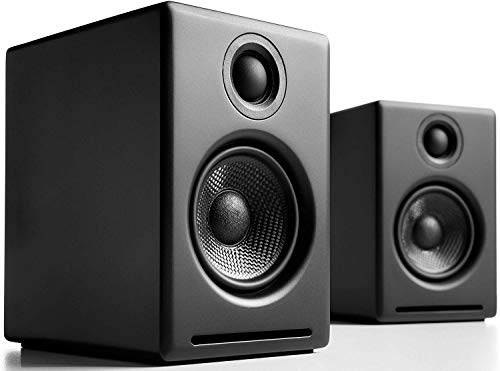
- Best for: A classic compact pair with clean USB audio for a small Mac mini desk.
- 60W powered desktop speaker pair
- Built-in 16-bit DAC with USB input
- 3.5mm auxiliary input
- 2.75-inch woofers with silk dome tweeters

- Best for: The smallest desk where a USB DAC and a subwoofer output still matter.
- 3-inch composite drivers with 3/4-inch silk dome tweeters
- 100W Class D amplifier
- Built-in USB DAC
- Subwoofer output
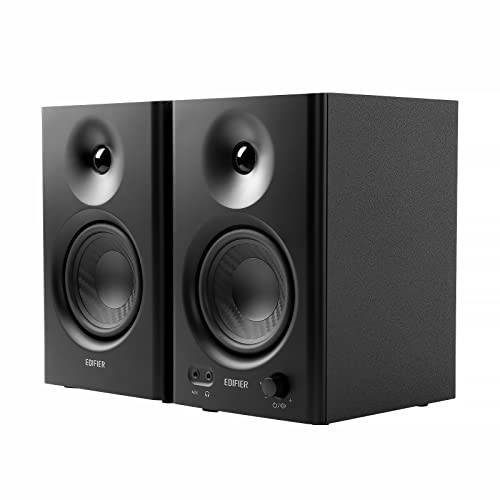
- Best for: Studio sound for music, editing and mixing beside a Mac mini.
- 4-inch active near-field studio monitors
- 1-inch silk dome tweeter with 4-inch woofer
- 42W total power output
- Monitor mode and Music mode
All 4 Picks at a Glance
| Product | Specs | Action |
|---|---|---|
| Audioengine A2+ |
| Check price on Amazon |
| Kanto YU2 |
| Check price on Amazon |
| Edifier MR4 |
| Check price on Amazon |
 Creative Pebble Pro |
| Check price on Amazon |
Our Top Picks
A Mac mini is a small, quiet box that hides under a monitor, and it needs speakers that match its size without crowding the desk. The right pair connects with one cable, sounds clear at close range and leaves room for the keyboard, the mouse and a coffee. A pair that fits the desk gets used every day, while a pair that crowds it ends up ignored. The four pairs below range from a compact USB set to studio monitors for music work.
This guide is for Mac mini owners who want better sound than the tiny speaker built into a monitor, without a tangle of cables or a pair of speakers that dwarfs the computer. It suits home offices, music desks and small rooms where the Mac mini sits beside a display. Each speaker below was picked from the name and specifications on its Amazon page, with driver size, inputs and power checked against what the listing shows, so the sound described matches the model you receive.
Quick Picks
As an Amazon Associate we earn from qualifying purchases
| Product | Best for | Key spec from title |
|---|---|---|
| Audioengine A2+ | A classic compact pair for a small desk | 60W powered, built-in DAC, 2.75-inch |
| Kanto YU2 | A tiny pair with a USB DAC and sub out | 3-inch drivers, 100W Class D, USB DAC |
| Edifier MR4 | Studio sound for music and editing | 4-inch woofers, 42W, Monitor and Music |
| Creative Pebble Pro | A small RGB pair with Bluetooth | USB-C, Bluetooth 5.3, RGB lighting |
How to Choose
Size comes first on a Mac mini desk
A Mac mini desk is usually small, so the speakers must fit beside a monitor without pushing the keyboard off the edge. Compact pairs with two- or three-inch drivers sit neatly under a display, while four-inch studio monitors need a deeper desk with room to spread out. Measure the desk before you buy, and leave space for the speakers to sit at ear level rather than flat on the surface. A pair that fits the desk will get used every day, while a pair that crowds it will end up in a drawer, so measure first and buy second.
USB audio keeps the setup to one cable
A speaker with a built-in USB DAC takes digital audio straight from the Mac mini, which keeps the signal clean and the setup to a single cable. A 3.5mm input works with any Mac, though it relies on the computer’s own audio output. Bluetooth adds phone streaming without a cable, which is handy when a friend wants to share a track. Check the inputs on the listing and pick the pair that connects the way you actually listen, since a pair with the wrong inputs needs an adapter for every device you own.
Driver size decides bass and clarity
The size of the driver shapes what you hear at low volume and at full volume alike. A two-inch cone handles speech and light music cleanly, yet it runs out of depth when a film score or a bass line arrives. A three-inch cone adds body and warmth, while a four-inch cone brings the low notes that make music feel full. When low end matters to you, choose the bigger cone or a model with a rear jack for a separate bass unit, so the sound can grow without a new pair. Small cones also distort sooner when pushed loud, so match the cone to the room.
A subwoofer output leaves room to grow
A rear jack for a bass unit is the cheapest upgrade path for a small desk system. The Kanto YU2 and the Edifier MR4 both carry one, while the compact Pebble Pro does not, so check the back of the speaker in the listing photos before you decide. Even if you never plug a bass unit in, the jack keeps the option open for the day your taste in music changes. Films and bass-heavy tracks gain the most from it, since a small pair on its own cannot reach the lowest notes.
The 4 Best Options
Audioengine A2+
- Best for: A classic compact pair with clean USB audio for a small Mac mini desk.
- 60W powered desktop speaker pair
- Built-in 16-bit DAC with USB input
- 3.5mm auxiliary input
- 2.75-inch woofers with silk dome tweeters
A classic compact pair with clean USB audio for a small Mac mini desk.
The small drivers cannot produce deep bass, so add a subwoofer if low end matters.
The A2+ is a compact powered pair with a built-in DAC and a 60W amplifier, tuned for clear sound on a small desk. Its 2.75-inch woofers and silk dome tweeters keep voices crisp and music detailed, while the USB input takes digital audio straight from the Mac mini. A 3.5mm input covers a phone or a second source, and the small cabinets sit neatly under a monitor without crowding the keyboard. The classic design has earned its place on small desks for years, and it suits a listener who wants clean sound without a learning curve.
Kanto YU2
- Best for: The smallest desk where a USB DAC and a subwoofer output still matter.
- 3-inch composite drivers with 3/4-inch silk dome tweeters
- 100W Class D amplifier
- Built-in USB DAC
- Subwoofer output
The smallest desk where a USB DAC and a subwoofer output still matter.
The tiny cabinets limit bass, so plan on the subwoofer output for music with real low end.
The YU2 is a tiny powered pair with three-inch composite drivers, silk dome tweeters and a built-in USB DAC, built for desks where every inch counts. Its Class D amplifier drives the pair cleanly, and a subwoofer output leaves room to add bass later. The USB input takes audio from the Mac mini, while an auxiliary input covers a phone or a tablet. The pair comes in several finishes, so it can match the desk as well as the computer. The tiny footprint also leaves room for a notebook and a phone stand beside the monitor.
Edifier MR4
- Best for: Studio sound for music, editing and mixing beside a Mac mini.
- 4-inch active near-field studio monitors
- 1-inch silk dome tweeter with 4-inch woofer
- 42W total power output
- Monitor mode and Music mode
Studio sound for music, editing and mixing beside a Mac mini.
The four-inch cabinets need a deeper desk than a compact pair, so measure first.
The MR4 is a four-inch powered studio monitor pair with a Monitor mode for honest mixing and a Music mode for warmer everyday listening. Its silk dome tweeter and four-inch woofer cover a wide range, and balanced TRS inputs accept a clean signal from an audio interface. A front headphone jack and auxiliary input make it easy to switch between speakers and headphones, and the MDF cabinets keep resonance low for a clean sound at a desk. The two listening modes mean one pair covers both honest mixing and relaxed everyday playback.
Creative Pebble Pro
- Best for: A small, stylish pair with Bluetooth and RGB for a Mac mini gaming desk.
- 2.0 USB-C desktop speakers
- Bluetooth 5.3 connectivity
- Customizable RGB lighting
- Clear Dialog voice processing
A small, stylish pair with Bluetooth and RGB for a Mac mini gaming desk.
The small drivers cannot match a bookshelf pair for bass or volume in a larger room.
The Pebble Pro is a small spherical pair with USB-C power, Bluetooth 5.3 and customizable RGB lighting that glows under the desk. Clear Dialog processing lifts voices in calls and videos, while BassFlex tuning adds warmth to the small drivers. A headset port on the front makes it easy to plug in headphones, and the USB audio connection keeps the setup to one cable from the Mac mini. The compact shape fits a crowded desk without a fight, and the glowing ring under each speaker adds a touch of color to a dark gaming corner without lighting the whole room.
Which One Fits Your Situation
For a small desk with a Mac mini and a monitor
Pick the Audioengine A2+ or the Kanto YU2, since both are compact pairs that sit neatly under a display. The A2+ suits a listener who wants clean USB audio and a classic design, while the YU2 suits a desk where every inch counts and a subwoofer output leaves room to grow. Either pair keeps the desk tidy, and both sit low enough to leave the monitor view clear.
For music production and editing
Pick the Edifier MR4, since its Monitor mode gives an honest sound for mixing and its Music mode warms up everyday listening. The balanced TRS inputs accept a clean signal from an audio interface, and the front headphone jack makes switching easy. It suits a desk where the Mac mini runs a DAW or a video editor, and the honest Monitor mode keeps mixes from sounding better than they are.
For gaming and video at a Mac mini desk
Pick the Creative Pebble Pro, since its Bluetooth connection, RGB lighting and headset port suit a gaming setup. The USB-C power keeps the desk to one cable, and the Clear Dialog processing keeps voices sharp in calls and cutscenes. It suits a small desk where games, video and music share the same speakers, and the headset port keeps late-night sessions private.
For a desk that may grow a subwoofer later
Pick the Kanto YU2 or the Edifier MR4, since both have a subwoofer output for adding bass without replacing the speakers. The YU2 suits a small desk that needs bass later, while the MR4 suits a music desk where a sub completes the studio sound. Either pair grows with the setup, so the speakers you buy today can still serve the desk after a bass unit joins them.
Common Mistakes
- Buying speakers that are wider than the desk, then pushing them against the wall where bass turns muddy, since a cabinet needs breathing room behind it.
- Setting speakers flat on the desk so the drivers aim at your chest, which dulls the highs and muddies voices.
- Choosing a pair with only a 3.5mm input and then needing an adapter for every other device, which adds clutter and cost to a simple desk.
- Ignoring the subwoofer output and then replacing the whole pair when bass starts to matter, even though a cheap bass unit would have solved it.
- Picking a pair by cabinet size alone, when the driver quality and the enclosure build shape the sound far more.
Frequently Asked Questions
Do Mac mini speakers need a USB DAC?
No. The Mac mini has a headphone jack, so any pair with a 3.5mm input works without extra hardware. A built-in USB DAC still helps, because it carries digital audio straight from the computer. Choose the USB version when the desk is crowded with chargers, and the simple 3.5mm version when you want the fewest parts possible.
Can small speakers fill a room with sound?
In a small room, yes, since their drivers are tuned for clear sound at close range. In a larger room they run out of power and bass, and pushing them loud makes the sound harsh. Move up to a four-inch pair when the room grows, and keep the small pair for the desk it was made for.
Is Bluetooth useful on Mac mini speakers?
Yes, for playing music from a phone without a cable, or for letting a friend share a track at your desk. It should not be the main link to the Mac mini, since a cable gives a steadier signal for editing and calls. Use Bluetooth as a handy extra input, and keep the wired connection for serious work.
Where should Mac mini speakers sit for the best sound?
Put them at ear level, angled slightly toward you, with the same distance from each side of the desk. Leave a small gap behind them so a rear port can breathe, and avoid corners that make bass uneven. A small stand under each speaker lifts it off the desk and keeps the sound clean.
FAQ
Do Mac mini speakers need a USB DAC?
Can small speakers fill a room with sound?
Is Bluetooth useful on Mac mini speakers?
Where should Mac mini speakers sit for the best sound?
More from Amazon
Programs that pair well with the guide above. Offers and eligibility are set by Amazon and may change.
Free shipping on eligible items, Prime Video and more. Eligible new members can start with a free trial.
Start a Prime free trialAd-free music streaming. Eligible new subscribers can start with a free trial.
Try Music Unlimited freeA Prime membership for ages 18-24 with a trial period. Eligibility is set by Amazon.
See Prime for Young AdultsAudiobooks and podcasts to listen to on the go. Eligible new members can start with a free trial.
Try Audible freeAs an Amazon Associate we earn from qualifying purchases.