Our Short List of 3

- Best for: Busy households where streaming, gaming, and calls happen at the same time.
- Specs:
- Wi-Fi 6E tri-band, AXE5400 rated speed
- 2,402 Mbps on 6 GHz, 2,402 Mbps on 5 GHz, 574 Mbps on 2.4 GHz
- 1.7 GHz quad-core CPU with 512 MB RAM

- Best for: Typical homes that want solid Wi-Fi 6 with room to grow into mesh.
- Specs:
- Wi-Fi 6 dual-band, AX3000 rated speed
- 2,402 Mbps on 5 GHz, 574 Mbps on 2.4 GHz
- 4 gigabit LAN ports

- Best for: Smaller homes and first-time router buyers who want a quick, painless setup.
- Specs:
- Wi-Fi 6 dual-band, AX1800 rated speed
- 1,201 Mbps on 5 GHz, 574 Mbps on 2.4 GHz
- 4 antennas with beamforming
All 4 Picks at a Glance
| Product | Specs | Action |
|---|---|---|
| TP-Link Archer AXE75 |
| Check price on Amazon |
| ASUS RT-AX57 |
| Check price on Amazon |
| TP-Link Archer AX21 |
| Check price on Amazon |
 Linksys MR7350 |
| Check price on Amazon |
Our Top Picks
- TP-Link AXE5400 Tri-Band WiFi 6E RouterWiFi 6E, Tri-Band AXE540012.91 x 10.43 x 4.72 inches1.5 poundsCheck on Amazon
A home router decides whether video calls stay smooth, streams load without buffering, and every phone, laptop, and smart device in the house stays connected at once. The old router that came free with an internet plan often struggles once a household adds a few more devices, and the fix is usually a modern consumer router rather than a faster plan. The right one matches your home size, your internet speed, and the number of devices fighting for bandwidth at the same time.
This guide is for households replacing an ageing router, renters setting up Wi-Fi in a new place, and families whose evenings now include streaming, gaming, and video calls all at once. Every router below was chosen from the name and specifications shown on its Amazon page, covering Wi-Fi 6 and Wi-Fi 6E models that suit ordinary homes rather than offices. The picks below cover the main household sizes, so you can match the router to your home.
Quick Picks
As an Amazon Associate we earn from qualifying purchases
| Product | Best for | Key spec from title |
|---|---|---|
| TP-Link Archer AXE75 | Fastest home Wi-Fi in this guide | Wi-Fi 6E tri-band AXE5400 router |
| ASUS RT-AX57 | Balanced Wi-Fi 6 for most homes | Wi-Fi 6 dual-band AX3000 router |
| TP-Link Archer AX21 | Simple setup on a modest plan | Wi-Fi 6 dual-band AX1800 router |
| Linksys MR7350 | Growing a mesh network later | Wi-Fi 6 mesh router with 1,700 sq ft coverage |
How to Choose
Match the Wi-Fi Standard to Your Plan
Wi-Fi 6 is the right baseline for most homes today, because it handles many devices at once far better than older standards, even on a modest internet plan. Wi-Fi 6E adds a 6 GHz band that gives newer phones and laptops a cleaner channel with less interference from neighbours, which helps in flats and crowded streets. If your internet plan is under a gigabit, a good Wi-Fi 6 router is usually enough, and the money saved can go toward better placement or a mesh node later. Check what your devices actually support before paying for a standard none of them can use.
Count Devices and Think About Coverage
A household with two phones and a laptop needs far less than a home with phones, tablets, a console, a smart TV, and a dozen smart devices all connected at once. Look for a router rated for at least as many devices as you own, with some headroom for guests and future gadgets, because a router that runs out of capacity starts dropping connections at the worst moments. Coverage matters just as much: a single router suits a flat or small house, while a larger home with thick walls may need a mesh-ready model that can add a second node later. Place the router centrally and out in the open for the best result.
Check Ports, Antennas, and the App
Wired ports still matter, because a desktop, a console, or a TV streamer connected by cable leaves more wireless capacity for everything else. Four gigabit LAN ports cover most homes, and a USB port is useful for sharing a drive or a printer across the network. External antennas generally give better range than internal ones, and a router with a clear setup app saves a frustrating evening of manual configuration. Look for parental controls and a guest network in the app, since both make it easier to manage who can reach your network and when.
Plan for Security and Future Upgrades
A consumer router should protect the household without constant attention, so look for WPA3 security, automatic firmware updates, and a built-in firewall that stays on by default. Mesh compatibility is worth having even if you buy only one unit now, because it lets you add a node later instead of replacing the whole router when you move to a bigger place. Check that the router supports the features your provider needs, such as a straightforward WAN setup and a bridge mode option, and confirm the warranty length so you know how long the maker stands behind it.
The 4 Best Options
TP-Link Archer AXE75
- Best for: Busy households where streaming, gaming, and calls happen at the same time.
- Specs:
- Wi-Fi 6E tri-band, AXE5400 rated speed
- 2,402 Mbps on 6 GHz, 2,402 Mbps on 5 GHz, 574 Mbps on 2.4 GHz
- 1.7 GHz quad-core CPU with 512 MB RAM
Busy households where streaming, gaming, and calls happen at the same time.
Older devices cannot use the 6 GHz band, so the extra speed only helps newer phones and laptops.
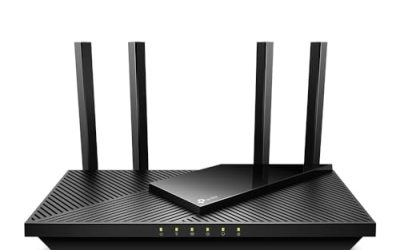
The Archer AXE75 is the fastest router in this guide, and the one to pick when several people stream, game, and video call at the same time. Its Wi-Fi 6E tri-band design adds a 6 GHz band alongside the usual 2.4 GHz and 5 GHz bands, giving newer devices a wide, quiet channel that neighbours cannot crowd. A 1.7 GHz quad-core processor keeps the network steady under load, six antennas push the signal through a home, and the USB 3.0 port lets you share a drive across the network. OneMesh support means you can add a compatible extender later without rebuilding the setup.
Watch out for: Older devices cannot use the 6 GHz band, so the extra speed only helps newer phones and laptops.
ASUS RT-AX57
- Best for: Typical homes that want solid Wi-Fi 6 with room to grow into mesh.
- Specs:
- Wi-Fi 6 dual-band, AX3000 rated speed
- 2,402 Mbps on 5 GHz, 574 Mbps on 2.4 GHz
- 4 gigabit LAN ports
Typical homes that want solid Wi-Fi 6 with room to grow into mesh.
It has no 6 GHz band, so households with many Wi-Fi 6E devices should consider the tri-band pick above.
The RT-AX57 is the balanced pick for most homes, offering Wi-Fi 6 speed and a strong feature set without the complexity of a tri-band design. Its AX3000 dual-band radio reaches 2,402 Mbps on 5 GHz and 574 Mbps on 2.4 GHz, which is plenty for a gigabit plan and a house full of devices. AiMesh compatibility lets you add another ASUS router as a mesh node later, lifetime internet security protects the network without a subscription, and parental controls help manage screen time for younger users. It is a straightforward box that does the everyday job well and stays out of the way.
Watch out for: It has no 6 GHz band, so households with many Wi-Fi 6E devices should consider the tri-band pick above.
TP-Link Archer AX21
- Best for: Smaller homes and first-time router buyers who want a quick, painless setup.
- Specs:
- Wi-Fi 6 dual-band, AX1800 rated speed
- 1,201 Mbps on 5 GHz, 574 Mbps on 2.4 GHz
- 4 antennas with beamforming
Smaller homes and first-time router buyers who want a quick, painless setup.
The AX1800 ceiling is lower than the other picks, so very busy households with many devices may outgrow it sooner.
The Archer AX21 is the simplest router here, and the right choice when the household just needs reliable Wi-Fi without learning new settings. Its AX1800 dual-band Wi-Fi 6 radio covers streaming and video calls comfortably, four antennas spread the signal through a flat or small house, and gigabit ports keep wired devices fast. EasyMesh support means a compatible extender can join later, and the setup app walks you through installation in a few steps. It also works with common voice assistants, so you can check the network or restart it with a spoken command.
Watch out for: The AX1800 ceiling is lower than the other picks, so very busy households with many devices may outgrow it sooner.
Linksys MR7350
- Best for: Homes that plan to extend coverage with mesh nodes over time.
- Specs:
- Wi-Fi 6 dual-band, AX1800 up to 1.8 Gbps
- Coverage up to 1,700 square feet, 25+ devices
- Intelligent Mesh technology, works with Velop
Homes that plan to extend coverage with mesh nodes over time.
Dual-band only, so there is no dedicated band for traffic between mesh nodes.
The Linksys MR7350 is the mesh-first pick, built for households that expect their network to grow. Its Intelligent Mesh technology lets you add Velop nodes later to cover dead spots, and the dual-band Wi-Fi 6 radio reaches up to 1.8 Gbps across roughly 1,700 square feet with support for more than 25 devices. Two external antennas and a 1.2 GHz quad-core processor keep the connection steady, while the Linksys app handles setup, guest access, and parental controls from a phone. It is the best fit when you know the house will need more coverage than one box can give.
Watch out for: Dual-band only, so there is no dedicated band for traffic between mesh nodes.
Which One Fits Your Situation
Your Household Streams and Games Every Evening
Choose the Archer AXE75, whose tri-band Wi-Fi 6E design gives busy homes the most breathing room. The 6 GHz band keeps newer devices on a quiet channel while older gear uses 5 GHz and 2.4 GHz, so a 4K stream, a game download, and a video call can run together. The quad-core processor and six antennas keep the signal strong, and the USB port lets you share files.
You Want One Good Router for a Typical Home
Pick the ASUS RT-AX57, which covers the middle ground with Wi-Fi 6 speed, lifetime security, and mesh-ready AiMesh support. It handles a gigabit plan and a house full of devices without fuss, and the parental controls are genuinely useful for families. If you move to a larger place later, adding a second ASUS router as a mesh node is far cheaper than replacing the whole network.
You Are Setting Up Wi-Fi for the First Time
Go with the Archer AX21, because its app-led setup gets you online in minutes and its AX1800 radio covers streaming, calls, and browsing on a modest plan. The four antennas cover a flat or small house well, and the gigabit ports keep a desktop or console wired and fast. It is the least intimidating router here, and it leaves the door open to EasyMesh expansion later.
Your Home Has Dead Spots You Plan to Fix
Choose the Linksys MR7350, since its Intelligent Mesh design is built around adding nodes. Start with one unit covering the main living area, then add a Velop node wherever the signal fades, and the app keeps the whole network managed as one. The 1,700 square feet of coverage and support for more than 25 devices give a single unit plenty of reach to begin with.
Common Mistakes
- Buying the fastest router available when the internet plan and the devices cannot use that speed.
- Hiding the router inside a cabinet or behind the TV, which blocks the signal before it leaves the box.
- Ignoring device count, so the router runs out of capacity once guests and smart gadgets join.
- Skipping firmware updates, which leaves known security gaps open on the home network.
- Choosing a router with no mesh support, then replacing the whole unit when the house needs more coverage.
Frequently Asked Questions
Do I need Wi-Fi 6E, or is Wi-Fi 6 enough for a home?
Wi-Fi 6 is enough for most homes, because it handles many devices at once and suits plans up to a gigabit. Wi-Fi 6E adds a 6 GHz band that gives newer devices a cleaner channel with less interference, which helps in flats and crowded neighbourhoods. For busy households, the extra band is worth it.
How many devices can a consumer router handle?
Most modern consumer routers are rated for twenty-five or more devices. The real limit depends on what the devices are doing: a dozen smart bulbs barely register, while several 4K streams and video calls at once put real strain on the network. Count every connected gadget, then choose a router with headroom above that total.
Where should I place my router for the best coverage?
Place the router centrally in the home, out in the open, and at chest height on a shelf or table. Walls, floors, and metal objects weaken the signal, so avoid tucking it inside a cabinet, behind the television, or in a far corner. Keep it away from thick concrete and from appliances that cause interference, such as microwaves.
Can I add mesh nodes to these routers later?
The Archer AXE75, Archer AX21, and MR7350 all support mesh expansion with compatible models from their own brands, and the RT-AX57 works with ASUS AiMesh. Start with one router and add a node later to cover a dead spot, rather than replacing the whole setup. Check that any node you buy is listed as compatible.
FAQ
Do I need Wi-Fi 6E, or is Wi-Fi 6 enough for a home?
How many devices can a consumer router handle?
Where should I place my router for the best coverage?
Can I add mesh nodes to these routers later?
More from Amazon
Programs that pair well with the guide above. Offers and eligibility are set by Amazon and may change.
Free shipping on eligible items, Prime Video and more. Eligible new members can start with a free trial.
Start a Prime free trialAd-free music streaming. Eligible new subscribers can start with a free trial.
Try Music Unlimited freeA Prime membership for ages 18-24 with a trial period. Eligibility is set by Amazon.
See Prime for Young AdultsAudiobooks and podcasts to listen to on the go. Eligible new members can start with a free trial.
Try Audible freeAs an Amazon Associate we earn from qualifying purchases.