Our Short List of 3
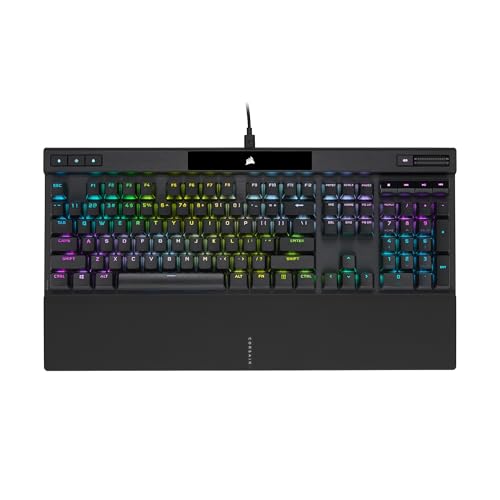
- Best for: Players who want smooth linear input and a full-size layout for long gaming sessions.
- Switches: Cherry MX Red, linear
- Keys: 104 keys, QWERTY layout
- Polling: 8,000 Hz Hyper-Polling with AXON processing
- Keycaps: PBT Double-Shot PRO keycaps

- Best for: Players who want tactile feedback for gaming and typing in one full-size board.
- Switches: Cherry MX Brown, tactile
- Keys: 104 keys, QWERTY layout
- Polling: 8,000 Hz Hyper-Polling with AXON processing
- Keycaps: PBT Double-Shot PRO keycaps

- Best for: Streamers and MMO players who want macro keys with rapid Speed switches.
- Switches: Cherry MX Speed RGB Silver, linear, 1.2 mm actuation
- Keys: 104 keys, QWERTY layout
- Macro keys: Six dedicated macro keys
- Keycaps: PBT double-shot keycap set
All 5 Picks at a Glance
| Product | Specs | Action |
|---|---|---|
| Corsair K70 RGB PRO Cherry MX Red |
| Check price on Amazon |
| Corsair K70 RGB PRO Cherry MX Brown |
| Check price on Amazon |
| Corsair K95 RGB Platinum XT Cherry MX Speed |
| Check price on Amazon |
 Corsair K70 PRO MINI Wireless Cherry MX Speed |
| Check price on Amazon |
 Das Keyboard 4 Professional Cherry MX Brown |
| Check price on Amazon |
Key takeaways
- Compare five Cherry MX keyboards for gaming, from full-size boards with Red, Brown and Speed switches to a compact wireless 60 percent model.
Choosing a Cherry MX keyboard means choosing a switch feel before you choose a brand, because Red, Brown and Speed switches change how every keypress lands in a game. A linear switch glides with no bump, a tactile switch gives a small bump at actuation, and a Speed switch reaches actuation with less travel, so the same game can feel calm, firm or urgent depending on the switch under your fingers.
This guide suits competitive players who want rapid input, typists who also game after work, streamers who need macro keys, and players with a small desk who want a compact board. Every pick below was chosen from the product names and specifications published on its Amazon page, with switch type, layout, connection and keycap material checked first.
Quick Picks
As an Amazon Associate we earn from qualifying purchases
| Product | Best for | Key spec from title |
|---|---|---|
| Corsair K70 RGB PRO Cherry MX Red | Rapid linear input in long sessions | Cherry MX Red switches, 104 keys |
| Corsair K70 RGB PRO Cherry MX Brown | Tactile feedback for gaming and typing | Cherry MX Brown switches, 104 keys |
| Corsair K95 RGB Platinum XT Cherry MX Speed | Macro keys and rapid actuation | Cherry MX Speed switches, six macro keys |
| Corsair K70 PRO MINI Wireless Cherry MX Speed | Compact wireless play on a small desk | Cherry MX Speed switches, 61 keys |
| Das Keyboard 4 Professional Cherry MX Brown | Tactile typing with a volume knob | Cherry MX Brown switches, 104 keys |
How to Choose
Switch Feel Comes First
Switch feel decides whether a keyboard suits your hands, so settle it before you compare lighting or layout. Cherry MX Red switches move in a smooth line with no bump, which suits players who hold keys down, strafe for long stretches, or double-tap the same key. Cherry MX Brown switches add a gentle bump that marks actuation without a click, which suits players who also type messages or notes between matches. Cherry MX Speed switches use a shorter actuation distance, which suits players who want each command to register with less finger travel. Match the switch to your main habit, because a lively switch can feel tiring across a long evening.
Layout Size Shapes Your Desk
Layout decides how much desk space remains for your mouse, so measure before you fall for a full-size board. A 104-key board keeps the number pad, function row and navigation cluster on dedicated keys, which suits players who bind many actions or use the number pad for items. A 60 percent board drops the number pad, function row and arrow cluster to a function layer, which frees a wide arc for low-sensitivity mouse sweeps and fits a small desk. If you play with a wide mouse arc, a compact board can change your aim more than a new switch can, while a full-size board suits a fixed desk.
Wired, Wireless, and Polling
Connection type decides how your keyboard fits your setup, so weigh cable, battery and polling together. A wired board draws power through its cable and polls at a high rate, which suits a fixed desk where the cable runs behind a monitor. A wireless board with a 2.4 GHz link gives a clean desk and freedom to move the board, while Bluetooth covers a laptop or a second device, and a wired mode keeps competitive sessions steady. Battery life changes with lighting, so a board that lasts many hours with lighting off will last far fewer hours with bright per-key lighting on. Check the listed battery figures before you choose.
Build, Lighting, and Extra Controls
Build quality decides how a keyboard feels after months of daily use, so look past the switch name. An aluminum frame resists flex when you press hard during a tense round, while PBT double-shot keycaps keep their legends clear and resist shine. Per-key RGB lighting lets you color movement keys, ability keys and groups in different shades, which helps you find binds by sight. Dedicated media keys and a volume roller let you change volume or pause audio without leaving a game, while a palm rest eases long sessions. Macro keys suit streamers and MMO players, but they add width, so skip them if your desk is already crowded.
The 5 Best Options
Corsair K70 RGB PRO Cherry MX Red
- Best for: Players who want smooth linear input and a full-size layout for long gaming sessions.
- Switches: Cherry MX Red, linear
- Keys: 104 keys, QWERTY layout
- Polling: 8,000 Hz Hyper-Polling with AXON processing
- Keycaps: PBT Double-Shot PRO keycaps
Players who want smooth linear input and a full-size layout for long gaming sessions.
The linear feel gives no bump at actuation, so confirm you like smooth switches before you commit to Red.
The Corsair K70 RGB PRO with Cherry MX Red switches suits players who want a smooth, quiet linear feel in a full-size frame. Its 104-key layout keeps the number pad and function row on dedicated keys, while the aluminum frame and PBT double-shot keycaps give the board a firm, durable feel under fast hands. Per-key RGB lighting, a tournament switch and iCUE software let you shape lighting and macros, and the detachable USB-C cable makes the board easy to move or pack away.
Corsair K70 RGB PRO Cherry MX Brown
- Best for: Players who want tactile feedback for gaming and typing in one full-size board.
- Switches: Cherry MX Brown, tactile
- Keys: 104 keys, QWERTY layout
- Polling: 8,000 Hz Hyper-Polling with AXON processing
- Keycaps: PBT Double-Shot PRO keycaps
Players who want tactile feedback for gaming and typing in one full-size board.
The tactile bump is gentle, so players who want a firm click should look at a clicky switch instead.
The Corsair K70 RGB PRO with Cherry MX Brown switches suits players who split time between games and typing. Its tactile bump marks each actuation without a click, which helps you feel commands land while keeping the board quiet enough for a shared room. The same full-size frame, aluminum build and PBT double-shot keycaps appear here, with per-key RGB lighting, dedicated media keys and a volume roller for easy audio control.
Corsair K95 RGB Platinum XT Cherry MX Speed
- Best for: Streamers and MMO players who want macro keys with rapid Speed switches.
- Switches: Cherry MX Speed RGB Silver, linear, 1.2 mm actuation
- Keys: 104 keys, QWERTY layout
- Macro keys: Six dedicated macro keys
- Keycaps: PBT double-shot keycap set
Streamers and MMO players who want macro keys with rapid Speed switches.
The macro column and wide frame need extra desk space, so measure your desk before you order.
The Corsair K95 RGB Platinum XT suits players who want macro keys, rapid actuation and a premium full-size frame in one board. Cherry MX Speed switches reach actuation with 1.2 mm of travel, which suits fast commands and repeated presses in competitive play. Six dedicated macro keys, Elgato Stream Deck software integration, a USB passthrough port and a detachable leatherette palm rest make this board a strong pick for streamers and MMO players who bind many actions.
Corsair K70 PRO MINI Wireless Cherry MX Speed
- Best for: Players who want a compact wireless board with Speed switches for a small desk.
- Switches: Cherry MX Speed, swappable, hot-swap sockets
- Layout: 60 percent, 61 keys
- Connectivity: SLIPSTREAM Wireless, Bluetooth, USB-C wired
- Polling: Up to 8,000 Hz wired with AXON processing
Players who want a compact wireless board with Speed switches for a small desk.
Arrows, function keys and the number pad live on a function layer, so confirm you are happy with layered keys.
The Corsair K70 PRO MINI Wireless suits players who want Cherry MX Speed switches in a compact board that travels well. Its 60 percent layout holds 61 keys, which frees a wide arc for mouse movement and fits a small desk, a dorm room or a bag. SLIPSTREAM Wireless, Bluetooth and USB-C wired modes cover gaming, a laptop and a wired session, while hot-swappable sockets let you change switches without soldering.
Das Keyboard 4 Professional Cherry MX Brown
- Best for: Typists who game and want a quiet tactile board with a volume knob and a USB hub.
- Switches: Cherry MX Brown, soft tactile
- Keys: 104 keys, full-size layout
- Hub: Two-port USB 3.0 hub
- Controls: Large volume knob
Typists who game and want a quiet tactile board with a volume knob and a USB hub.
This board has no per-key RGB lighting, so players who want colored lighting should choose a Corsair pick instead.
The Das Keyboard 4 Professional suits players and typists who want a calm, tactile board with no extra software to manage. Cherry MX Brown switches give a soft tactile bump that marks actuation without a click, which suits long typing sessions and late-night games in a shared home. An anodized aluminum top panel, a large volume knob and a two-port USB 3.0 hub give the board a clean, desk-friendly character that favors work and play in equal measure.
Which One Fits Your Situation
You Play Competitive Shooters Most Nights
Pick the Corsair K70 RGB PRO Cherry MX Red for smooth linear input and a full-size layout that keeps every bind on a dedicated key. Its 8,000 Hz polling and PBT double-shot keycaps suit long sessions, while the tournament switch locks the board to a calm lighting mode when you want no distractions during ranked play.
You Share a Desk With Typing Work
Pick the Corsair K70 RGB PRO Cherry MX Brown or the Das Keyboard 4 Professional, because both use tactile Brown switches that mark actuation without a click. The Corsair adds RGB lighting and media keys for lively sessions, while the Das adds a volume knob and a USB hub for a work-first desk that still handles games well.
Your Desk Is Small or You Move Often
Pick the Corsair K70 PRO MINI Wireless, because its 61-key layout frees mouse space and fits a small desk or a bag with ease. Wireless modes cover a laptop and a desktop, while the wired mode and hot-swappable sockets keep the board flexible for different games, rooms and switch feels over time.
You Stream or Run Many Macros
Pick the Corsair K95 RGB Platinum XT, because its six macro keys and Stream Deck software integration put many actions within easy reach. Cherry MX Speed switches suit rapid commands, while the palm rest and USB passthrough keep long streaming sessions comfortable, organized and connected from the first match to the last.
Common Mistakes
- Choosing a switch by name alone without weighing linear, tactile and Speed feels against your main game.
- Picking a full-size board for a small desk, then losing mouse space to the number pad.
- Ignoring the function layer on a 60 percent board, then missing arrows and function keys in play.
- Turning on bright per-key lighting and forgetting how much it shortens wireless battery life.
- Buying macro keys you will never bind, then wishing you had chosen a narrower board instead.
Frequently Asked Questions
Are Cherry MX Red switches good for gaming?
Yes, Cherry MX Red switches suit gaming well because their smooth linear travel has no bump to fight, which helps with rapid presses, strafing and double-taps. They feel quiet and even across the board, so long sessions stay comfortable. Players who want a clear actuation bump may prefer Brown switches instead.
Do Cherry MX Brown switches feel clicky?
No, Cherry MX Brown switches are tactile rather than clicky, so you feel a gentle bump at actuation without a sharp click. That bump helps you sense each keypress while keeping the board quiet enough for a shared room. They suit players who type often and want feedback without loud clicks.
Is a 60 percent keyboard hard to use for gaming?
A 60 percent keyboard takes a short adjustment, because arrows, function keys and the number pad move to a function layer. Most players adapt within a few sessions, and the extra mouse space often helps aim. If you rely on many dedicated binds, a full-size board will feel easier from the first day.
Do I need software to use these keyboards?
No, each keyboard works as a normal wired or wireless keyboard without extra software, so you can plug it in and play. Corsair iCUE software adds lighting control, macros and key remaps on the Corsair boards, while the Das Keyboard 4 Professional works with its built-in controls and hub. Install software only if you want those extra features.
FAQ
Are Cherry MX Red switches good for gaming?
Do Cherry MX Brown switches feel clicky?
Is a 60 percent keyboard hard to use for gaming?
Do I need software to use these keyboards?
More from Amazon
Programs that pair well with the guide above. Offers and eligibility are set by Amazon and may change.
Free shipping on eligible items, Prime Video and more. Eligible new members can start with a free trial.
Start a Prime free trialAd-free music streaming. Eligible new subscribers can start with a free trial.
Try Music Unlimited freeA Prime membership for ages 18-24 with a trial period. Eligibility is set by Amazon.
See Prime for Young AdultsAudiobooks and podcasts to listen to on the go. Eligible new members can start with a free trial.
Try Audible freeAs an Amazon Associate we earn from qualifying purchases.