Our Short List of 3

- Best for: Laptop users who want the monitor to act as the docking station.
- 31.5-inch IPS Black panel
- 3840 x 2160 resolution at 60Hz
- 2000:1 contrast ratio
- 400 cd/m2 brightness

- Best for: Designers, photo editors and video editors who need color they can defend to clients.
- 31.5-inch IPS panel
- 3840 x 2160 resolution at 60Hz
- 99 percent sRGB and 99 percent Rec.709
- Delta E at or below 3, factory calibration report included

- Best for: Small desks, shared benches and sit-stand setups where the screen must move out of the way.
- 31.5-inch IPS panel
- 3840 x 2160 resolution
- HDR10 support
- DCI-P3 95 percent (D65) color gamut
All 4 Picks at a Glance
| Product | Specs | Action |
|---|---|---|
| Dell UltraSharp U3223QE |
| Check price on Amazon |
| BenQ PD3205U |
| Check price on Amazon |
| LG UltraFine Ergo 32UN880-B |
| Check price on Amazon |
 Gigabyte M32U |
| Check price on Amazon |
Key takeaways
- Four 32-inch 4K monitors with 3840 x 2160 panels: a Dell USB-C hub screen, a calibrated BenQ for designers, an LG on an Ergo arm and a 144Hz Gigabyte.
The real decision with a 32-inch 4K monitor is not whether the picture looks sharp in a showroom sense; it is what the screen has to do all day. At this size, 3840 by 2160 gives enough room for two documents side by side or a full timeline, but panels split into camps: hub monitors that dock a laptop, designer panels that hold color steady, and fast panels that double for gaming after hours. Picking the wrong camp means paying for ports you never use or missing the one feature your desk actually needs.
This roundup is for laptop users who want one cable on the desk, designers and video editors who need trustworthy color, and players who want a single screen that works all day and games at night. Every pick is a 32-inch class model with a 3840 by 2160 panel as listed, chosen from the names and specifications on its Amazon product page.
Quick Picks
As an Amazon Associate we earn from qualifying purchases.
| Product | Best for | Key spec from title |
|---|---|---|
| Dell UltraSharp U3223QE | Laptop docking and office work | IPS Black panel, USB-C hub with 90W charging |
| BenQ PD3205U | Designers and video editors | 99 percent sRGB and Rec.709, calibration report included |
| LG UltraFine Ergo 32UN880-B | Small or shared desks | Ergo stand with C-clamp and full motion arm |
| Gigabyte M32U | Gaming after work hours | 144Hz refresh rate, HDMI 2.1 and KVM switch |
How to Choose
Panel type and color coverage
All four picks use IPS-family panels, but they do not aim at the same picture. IPS Black, on the Dell, doubles the contrast of a conventional IPS panel to 2000:1, which deepens blacks in documents, code editors and video. Color coverage splits the field further. The BenQ and Dell cover 99 to 100 percent of sRGB, the space that office work and web content actually use, and both reach into DCI-P3 for video projects. The Gigabyte trades some color discipline for speed. If your output is client design, print work or graded footage, put verified coverage and a calibration report first. If the screen mostly shows text and spreadsheets, contrast and brightness will matter more day to day.
Refresh rate and motion handling
Three of these screens refresh at 60Hz, which is fine for documents, browsing and video, and the Gigabyte runs at 144Hz. That gap decides how the monitor feels in motion. At 60Hz, fast camera pans in games step rather than glide, and a 1ms-class response time cannot fix a panel that only draws sixty frames each second. Players who sit down to shooters or racing titles most nights should weight refresh rate heavily. Buyers who game occasionally, or mostly play slower strategy and story titles, lose little at 60Hz and gain the stronger color and hub features elsewhere in this roundup. Match the panel to the hours you actually spend in each mode.
USB-C, hub ports and KVM switching
A monitor hub replaces the separate dock many laptop users buy. Look for USB-C that carries video, data and charging in one cable, and check the wattage: 90W keeps most work laptops charged under load, while weaker delivery can leave a demanding machine slowly draining. Ethernet on the monitor, as on the Dell, keeps a wired connection attached to the screen instead of the laptop. A KVM switch matters when two computers share one desk, letting a single keyboard and mouse follow the picture. Count the USB ports your peripherals need before choosing, because adding a hub later reintroduces the clutter the monitor was meant to remove.
Stand design and desk fit
A 32-inch class panel is a large object, roughly 28 inches wide, and the stand decides how much of your desk it consumes. A conventional base parks the screen in one spot; the LG Ergo arm clamps to the desk edge and floats the panel, freeing the surface below and making height changes easy at a sit-stand desk. Check that any stand offers height and tilt adjustment at minimum, and pivot if you read long documents or code. Also confirm your desk depth: at 4K on 32 inches, most people sit comfortably with the screen about an arm’s length away, and a shallow desk can push a big panel uncomfortably close.
The 4 Best Options
Dell UltraSharp U3223QE
- Best for: Laptop users who want the monitor to act as the docking station.
- 31.5-inch IPS Black panel
- 3840 x 2160 resolution at 60Hz
- 2000:1 contrast ratio
- 400 cd/m2 brightness
Laptop users who want the monitor to act as the docking station.
The 60Hz refresh makes it a poor fit for fast-paced gaming, and the hub features go to waste on a desktop PC that never moves.
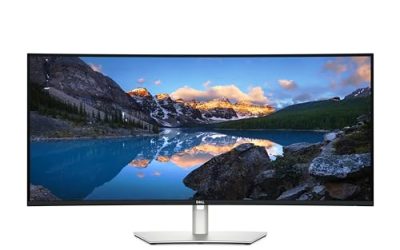
The U3223QE is built for the desk where a laptop comes and goes. Its USB-C hub carries the picture, charges at up to 90W, and adds Ethernet plus USB ports, so one cable connects the whole workstation. The IPS Black panel is the other half of the pitch: a 2000:1 contrast ratio gives darker blacks than a standard IPS screen, which helps documents, dashboards and video look less washed out. Color coverage is work-focused, with full sRGB and Rec.709 plus 98 percent DCI-P3. It refreshes at 60Hz, so it is a productivity screen first, and casual play second.
Watch out for: The 60Hz refresh makes it a poor fit for fast-paced gaming, and the hub features go to waste on a desktop PC that never moves.
BenQ PD3205U
- Best for: Designers, photo editors and video editors who need color they can defend to clients.
- 31.5-inch IPS panel
- 3840 x 2160 resolution at 60Hz
- 99 percent sRGB and 99 percent Rec.709
- Delta E at or below 3, factory calibration report included
Designers, photo editors and video editors who need color they can defend to clients.
Brightness is modest for a sunlit room, and there is no high-refresh mode for gaming after hours.
BenQ aims the PD3205U at people whose work gets judged on color. The panel is factory calibrated, ships with its own calibration report, and holds average Delta E at or below 3 across 99 percent of both sRGB and Rec.709. AQCOLOR modes and the HotKey Puck G2 make it quick to switch between color spaces and inputs without digging through menus. USB-C carries video and up to 90W of charging, and a built-in KVM lets one keyboard and mouse serve two computers. It is a 60Hz screen, so its strengths sit squarely on the work side.
Watch out for: Brightness is modest for a sunlit room, and there is no high-refresh mode for gaming after hours.
LG UltraFine Ergo 32UN880-B
- Best for: Small desks, shared benches and sit-stand setups where the screen must move out of the way.
- 31.5-inch IPS panel
- 3840 x 2160 resolution
- HDR10 support
- DCI-P3 95 percent (D65) color gamut
Small desks, shared benches and sit-stand setups where the screen must move out of the way.
The clamp needs a desk edge with enough clearance behind it, and the 60Hz panel is not aimed at competitive play.
The 32UN880-B solves a furniture problem as much as a picture one. Its Ergo stand clamps to the back edge of the desk and floats the panel on an arm that extends, retracts, swivels, pivots and adjusts for height, freeing the surface underneath and suiting sit-stand desks or shared benches. The IPS panel covers 95 percent of DCI-P3 with HDR10 support and 350 nits of typical brightness, and USB-C connects a laptop with a single cable. Built-in speakers handle calls and clips, so small desks can skip a separate sound bar or speaker set.
Watch out for: The clamp needs a desk edge with enough clearance behind it, and the 60Hz panel is not aimed at competitive play.
Gigabyte M32U
- Best for: Players who want one 4K screen for office hours and high-refresh gaming on PC and console.
- 31.5-inch SuperSpeed IPS panel
- 3840 x 2160 resolution at 144Hz
- 1ms MPRT response time
- AMD FreeSync Premium Pro
Players who want one 4K screen for office hours and high-refresh gaming on PC and console.
USB-C charging is weak compared with the hub monitors here, so a laptop may still need its own power adapter.
The M32U is the pick that treats the evening as seriously as the workday. Its SuperSpeed IPS panel runs at 144Hz with a 1ms MPRT response, and FreeSync Premium Pro keeps console and PC play smooth at 4K. Two HDMI 2.1 ports welcome current consoles, DisplayPort serves the PC, and a KVM switch plus USB-C let one keyboard and mouse move between machines. Color is respectable for a gaming panel, at 90 percent DCI-P3 with 10-bit color, and the stand adjusts for height. It gives up the deep calibration tooling of the designer models, but it is the only screen here built for high-refresh play.
Watch out for: USB-C charging is weak compared with the hub monitors here, so a laptop may still need its own power adapter.
Which One Fits Your Situation
You dock a laptop at the same desk every day
Choose the Dell U3223QE. One USB-C cable delivers the picture, up to 90W of charging, Ethernet and your USB peripherals, so arriving and leaving takes seconds. The IPS Black contrast also suits long document and spreadsheet sessions. It is the closest thing here to a complete workstation in a screen, provided your work does not depend on color certification or high-refresh gaming.
Your work is judged on color
Choose the BenQ PD3205U. The factory calibration report, Delta E at or below 3 and full sRGB and Rec.709 coverage give you a defensible starting point for client work, and the HotKey Puck G2 makes switching color modes quick. The KVM is a bonus if a second machine shares the desk. Accept the 60Hz ceiling as the trade for that color discipline.
Your desk is small, shared or height-adjustable
Choose the LG UltraFine Ergo 32UN880-B. The C-clamp arm reclaims the footprint a normal stand would occupy and lets the panel swing aside, rise for standing work or drop for a seated call. Built-in speakers remove another box from the desk. Measure the desk edge first, because the clamp needs solid material and a little room behind it.
You work by day and game by night
Choose the Gigabyte M32U. It is the only pick here that refreshes at 144Hz, and its two HDMI 2.1 ports take a console alongside the PC while the KVM keeps one keyboard and mouse in charge. Color coverage is good enough for everyday editing, though it is not a calibrated designer panel. For mixed desks, it avoids buying two screens.
Common Mistakes
- Buying a 32-inch 4K screen for a shallow desk, then sitting too close and shrinking text with scaling until the extra space is wasted.
- Assuming every USB-C port charges a laptop at full speed; the wattage differs widely between these models.
- Paying for a 144Hz panel when the computer or console feeding it cannot push frame rates anywhere near that ceiling.
- Expecting a 60Hz productivity monitor to feel smooth in fast games just because its response time figure looks low.
- Forgetting that the 32-inch class means a 31.5-inch diagonal, and measuring the desk for a size the panel never claimed.
Frequently Asked Questions
Is a 32-inch 4K monitor too big for office work?
For most desks it is not. At 3840 by 2160, a 32-inch class panel shows two full documents side by side without shrinking text below comfortable sizes, which is exactly why this size suits office work. The condition is desk depth: give the screen roughly an arm’s length of distance, and the size becomes an advantage rather than a strain.
Can one of these monitors charge my laptop over USB-C?
Yes, three of them can. The Dell U3223QE and BenQ PD3205U each deliver up to 90W over USB-C, enough for most work laptops under load, while the LG connects over USB-C as well. The Gigabyte M32U carries a much weaker charging output, so plan on keeping the laptop’s own adapter plugged in with that model.
Do I need 144Hz if I only play games occasionally?
Probably not. Occasional or slower-paced gaming looks fine at 60Hz, and the money saved buys better color or a proper hub. The 144Hz Gigabyte earns its place when fast games are a regular part of the week, because motion clarity is the one upgrade you can feel in every session rather than only on a spec sheet.
What is the difference between IPS and IPS Black?
IPS Black is a refined IPS panel that roughly doubles the contrast ratio, to 2000:1 on the Dell in this roundup. Blacks look deeper, dark scenes hold more detail, and text edges sit against a darker background. Viewing angles and color behavior stay IPS-like. It does not change refresh rate or resolution, so treat it as a picture-quality upgrade for work and video.
FAQ
Is a 32-inch 4K monitor too big for office work?
Can one of these monitors charge my laptop over USB-C?
Do I need 144Hz if I only play games occasionally?
What is the difference between IPS and IPS Black?
More from Amazon
Programs that pair well with the guide above. Offers and eligibility are set by Amazon and may change.
Free shipping on eligible items, Prime Video and more. Eligible new members can start with a free trial.
Start a Prime free trialAd-free music streaming. Eligible new subscribers can start with a free trial.
Try Music Unlimited freeA Prime membership for ages 18-24 with a trial period. Eligibility is set by Amazon.
See Prime for Young AdultsAudiobooks and podcasts to listen to on the go. Eligible new members can start with a free trial.
Try Audible freeAs an Amazon Associate we earn from qualifying purchases.