Our Short List of 3

- Best for: Gamers who want a sharp 27-inch QHD screen with fast, smooth motion.
- 27-inch QHD 2560 x 1440 Fast IPS panel
- 180Hz refresh rate and 1ms response time
- HDR10 support and NVIDIA G-Sync Compatible
- AMD FreeSync support and adjustable stand

- Best for: Competitive players who want crisp motion and strong color on a 27-inch screen.
- 27-inch QHD 2560 x 1440 Fast IPS panel
- 180Hz refresh rate and 1ms response time
- Extreme Low Motion Blur Sync and FreeSync Premium
- G-Sync Compatible, HDMI, DisplayPort, and speakers

- Best for: Players who want a large curved QHD screen for immersive single-player games.
- 32-inch QHD 2560 x 1440 curved VA panel
- 180Hz refresh rate and 1ms response time
- 1000R curve, HDR10, and AMD FreeSync
- Two HDMI ports, DisplayPort, and tilt adjustment
All 5 Picks at a Glance
| Product | Specs | Action |
|---|---|---|
| Samsung Odyssey G5 G50F |
| Check price on Amazon |
| ASUS TUF Gaming VG27AQ3A |
| Check price on Amazon |
| LG UltraGear 32GS60QC-B |
| Check price on Amazon |
 AOC Q27G2S |
| Check price on Amazon |
 Acer Nitro KG241Y Sbiip |
| Check price on Amazon |
Our Top Picks
- ASUS TUF Gaming VG27AQ3A 27 Inch 1440p 180Hz14.4" x 24.2" x 2.1"24.2 x 8.4 x 17.9 inches10.1 poundsCheck on Amazon
- LG 32GS60QC-B Ultragear 32-inch Curved Gaming Monitor QHD32 inch8.9 x 27.6 x 20 inches13 poundsCheck on Amazon
A monitor shapes every match, every movie night, and every work session, so the choice matters more than the box on the desk suggests. Resolution sets how crisp text and game worlds look, refresh rate sets how fluid motion feels, and panel type sets how colors and dark scenes render in a dim room. A weak pick can leave fast action smeared, small text fuzzy, and long sessions tiring on the eyes.
Gamers who want smooth competitive play, players who want a larger curved view, and buyers who want a solid all-round screen for games and daily use will all find a match here. The five monitors below cover QHD and Full HD, flat and curved panels, 165Hz and 180Hz refresh rates, and sizes from 23.8 inches to 32 inches. Each one brings a distinct strength, from a compact Full HD panel for tight desks to a wide curved QHD panel for immersive play.
Quick Picks
As an Amazon Associate we earn from qualifying purchases
| Product | Best for | Key spec from title |
|---|---|---|
| Samsung Odyssey G5 G50F | Sharp QHD gaming | 27-inch QHD 180Hz Fast IPS |
| ASUS TUF Gaming VG27AQ3A | Competitive motion clarity | 27-inch QHD 180Hz Fast IPS |
| LG UltraGear 32GS60QC-B | Large curved immersion | 32-inch QHD 180Hz curved VA |
| AOC Q27G2S | Balanced QHD value | 27-inch QHD 165Hz IPS |
| Acer Nitro KG241Y Sbiip | Compact Full HD play | 23.8-inch Full HD 165Hz VA |
How to Choose
Match resolution to screen size
A 27-inch QHD panel gives noticeably crisper text and game detail than a 27-inch Full HD panel, because the same area holds far more pixels. On a 24-inch screen, Full HD still looks clean and keeps frame rates easier to reach with a modest graphics card. A 32-inch screen really needs QHD to avoid soft edges and visible pixels at normal desk distance. Think about how close you sit, how much text you read, and whether your graphics card can drive QHD at high refresh rates before you settle on a size.
Weigh refresh rate and response time
Refresh rate decides how many frames the screen can show each second, and a 165Hz or 180Hz panel makes fast camera moves look far smoother than a 60Hz panel. Response time shapes how quickly pixels change color, which affects ghosting behind moving objects in dark scenes. A 1ms response figure suits competitive shooters and racing games, where edges stay cleaner during quick turns. Pair a high refresh panel with a graphics card that can feed it, or the extra speed will sit unused in demanding games.
Pick a panel for your room
IPS panels give wide viewing angles and steady color when you move your head or share the screen with a friend beside you. VA panels give deeper blacks and stronger contrast, which helps horror games and night scenes feel richer in a dark room. Curved VA panels wrap the image around your view and suit single-player adventures and movies. Flat IPS panels suit competitive play and shared desks, where color stays true from the side and the image never bends at the edges.
Check ports, stand, and eye comfort
Two HDMI ports plus a DisplayPort input cover a PC and a console without constant cable swaps, and DisplayPort is the usual route to the highest refresh rate on PC. A height-adjustable stand lets you set the screen at eye level, while tilt alone forces you to stack books or buy a separate arm. Look for flicker-free backlighting and a low blue light mode for long evening sessions, and measure your desk depth so a large curved panel still leaves room for a keyboard and mouse.
The 5 Best Options
Samsung Odyssey G5 G50F
- Best for: Gamers who want a sharp 27-inch QHD screen with fast, smooth motion.
- 27-inch QHD 2560 x 1440 Fast IPS panel
- 180Hz refresh rate and 1ms response time
- HDR10 support and NVIDIA G-Sync Compatible
- AMD FreeSync support and adjustable stand
Gamers who want a sharp 27-inch QHD screen with fast, smooth motion.
The flat panel gives less wrap-around immersion than a curved screen.
The Samsung Odyssey G5 G50F brings QHD sharpness and a 180Hz refresh rate to a 27-inch flat panel that suits both competitive play and everyday use. Its Fast IPS panel keeps colors vivid from wide angles, so a friend watching from the side still sees a clean image. HDR10 support lifts bright highlights in supported games and movies, while the adjustable stand helps you set a comfortable viewing height. FreeSync support keeps frames smooth when your graphics card output varies during busy scenes.
ASUS TUF Gaming VG27AQ3A
- Best for: Competitive players who want crisp motion and strong color on a 27-inch screen.
- 27-inch QHD 2560 x 1440 Fast IPS panel
- 180Hz refresh rate and 1ms response time
- Extreme Low Motion Blur Sync and FreeSync Premium
- G-Sync Compatible, HDMI, DisplayPort, and speakers
Competitive players who want crisp motion and strong color on a 27-inch screen.
Motion blur reduction can dim the image, so adjust brightness to suit your room.
The ASUS TUF Gaming VG27AQ3A is built for players who care about motion clarity above all else, with a 180Hz Fast IPS panel and a 1ms response time. Extreme Low Motion Blur Sync pairs backlight strobing with variable refresh, keeping fast-moving targets easier to track in shooters. Built-in speakers save desk space when you do not want a headset, and the 130 sRGB gamut figure from the listing points to rich, lively color. HDMI and DisplayPort inputs cover a PC and a console side by side.
LG UltraGear 32GS60QC-B
- Best for: Players who want a large curved QHD screen for immersive single-player games.
- 32-inch QHD 2560 x 1440 curved VA panel
- 180Hz refresh rate and 1ms response time
- 1000R curve, HDR10, and AMD FreeSync
- Two HDMI ports, DisplayPort, and tilt adjustment
Players who want a large curved QHD screen for immersive single-player games.
The 32-inch curved panel needs a deep desk and room to sit back from it.
The LG UltraGear 32GS60QC-B turns a desk into a wide curved arena, with a 32-inch QHD panel and a tight 1000R curve that wraps game worlds around your view. Its 180Hz refresh rate and 1ms response time keep racing and action scenes fluid, while the VA panel delivers deep blacks that suit night driving and dark dungeons. HDR10 support adds punch to bright skies and neon signs, and the borderless design keeps the focus on the image. Black Stabilizer, Dynamic Action Sync, and an on-screen crosshair add useful gaming tools.
AOC Q27G2S
- Best for: Buyers who want a well-rounded 27-inch QHD monitor for games and daily work.
- 27-inch QHD 2560 x 1440 IPS panel
- 165Hz refresh rate and 1ms response time
- G-Sync Compatible and height adjustable stand
- Three-year zero-bright-dot guarantee
Buyers who want a well-rounded 27-inch QHD monitor for games and daily work.
The 165Hz ceiling sits a step below the 180Hz panels in this roundup.
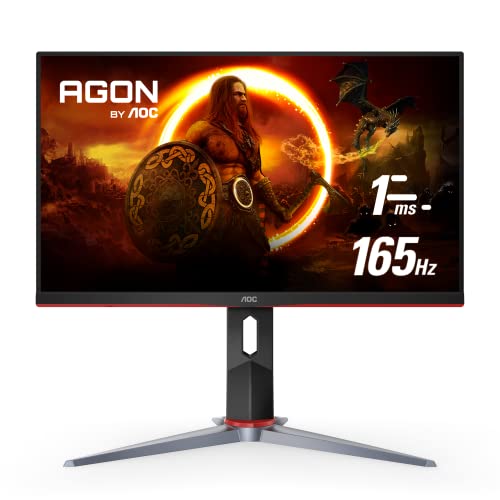
The AOC Q27G2S offers a balanced route into QHD gaming, pairing a 27-inch IPS panel with a 165Hz refresh rate and a 1ms response time. Colors stay consistent across the screen, text stays crisp for work and browsing, and G-Sync compatibility helps prevent tearing when frame rates shift. The height-adjustable stand makes it easy to set the screen at eye level without extra gear, and the minimal bezels suit a dual-screen setup. A three-year zero-bright-dot guarantee from the listing adds peace of mind for long-term use.
Acer Nitro KG241Y Sbiip
- Best for: Small desks and players who want fast Full HD play in a compact frame.
- 23.8-inch Full HD 1920 x 1080 VA panel
- 165Hz refresh rate and 1ms VRB response time
- AMD FreeSync Premium and ZeroFrame design
- One DisplayPort and two HDMI 2.0 ports
Small desks and players who want fast Full HD play in a compact frame.
Full HD on a larger screen would look softer, so keep this one at its native size.
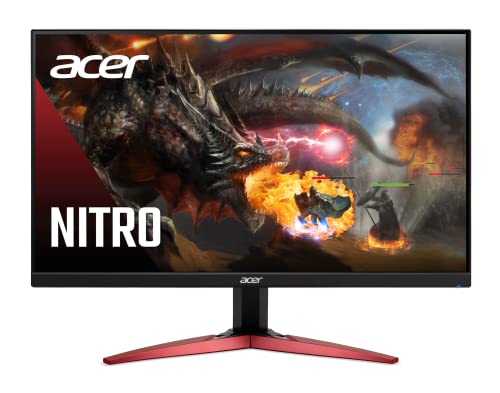
The Acer Nitro KG241Y Sbiip is the compact pick in this roundup, with a 23.8-inch Full HD VA panel that fits small desks and tight budgets for space. Its 165Hz refresh rate and 1ms VRB response time keep competitive games fluid, while FreeSync Premium support smooths out frame dips during busy fights. The ZeroFrame design keeps bezels slim, so two of these side by side form a clean dual-screen setup. One DisplayPort and two HDMI ports give room for a PC and a console without a cable shuffle.
Which One Fits Your Situation
You play fast competitive shooters
Choose the ASUS TUF Gaming VG27AQ3A or the Samsung Odyssey G5 G50F, both with 180Hz refresh rates and 1ms response times that keep targets sharp during quick flicks. Their flat IPS panels hold color steady at wide angles, and variable refresh support smooths frame dips in busy rounds. Set the refresh rate to its maximum in your graphics settings, use DisplayPort on PC, and keep the screen at eye level for long ranked sessions.
You want a big immersive screen
Pick the LG UltraGear 32GS60QC-B, whose 32-inch curved QHD panel and 1000R curve pull game worlds around your view. Deep VA blacks suit night scenes, open-world exploration, and movie nights, while the 180Hz refresh rate keeps camera pans fluid. Give it a deep desk, sit a little farther back than you would with a 27-inch panel, and let the curve do the work of filling your field of view.
Your desk is small or shared
Take the Acer Nitro KG241Y Sbiip, a 23.8-inch Full HD panel that leaves room for a keyboard, mouse, and notebook on a tight desk. Its 165Hz refresh rate still delivers fluid competitive play, and the slim ZeroFrame bezels suit a dual-screen layout later. Measure the width before you buy, keep the stand centered, and use the two HDMI ports for a PC and a console.
You need one screen for games and work
Go with the AOC Q27G2S, a 27-inch QHD IPS panel that keeps text crisp, colors steady, and motion smooth across games, documents, and video calls. The height-adjustable stand sets a healthy eye-level position for long workdays, and the minimal bezels keep the desk looking tidy. It is the most even-handed pick here when one monitor must cover play, study, and office tasks alike.
Common Mistakes
- Buying a 32-inch Full HD panel, where large pixels make text and game detail look soft at desk distance.
- Using HDMI when DisplayPort is needed to reach the highest refresh rate on your graphics card.
- Leaving the refresh rate at 60Hz in Windows or game settings after buying a 165Hz or 180Hz monitor.
- Placing a large curved monitor too close, which makes the edges feel stretched and hard to scan.
- Ignoring stand adjustment, then living with a screen that sits too low and strains your neck.
Frequently Asked Questions
Is QHD worth it over Full HD for gaming?
QHD gives crisper text, sharper distant detail, and more room for menus and maps on a 27-inch or larger screen. Full HD still looks clean on a 24-inch panel and is easier for a modest graphics card to drive at high refresh rates. Choose QHD if your graphics card can handle it and you sit close enough to notice the extra detail in games and daily work.
Does a 180Hz monitor help in competitive games?
A 180Hz panel shows motion more smoothly than a 60Hz panel, which helps you track moving targets and react to quick camera turns. The gain is clearest in fast shooters and racing games, where frames change rapidly. You still need a graphics card that can deliver high frame rates, plus the right cable and settings, to see the full benefit in every match.
Can I use one of these monitors with a console?
Yes, each monitor here has HDMI inputs that connect to a modern console, and several also offer DisplayPort for PC use. Console output may cap at a lower refresh rate than the panel maximum, depending on the game and console model. Check the console settings after connecting, set the resolution to match the panel, and use game mode if the monitor offers one.
What size monitor suits a small desk?
A 23.8-inch or 27-inch flat panel suits most small desks, leaving room for a keyboard, mouse, and speakers without crowding the workspace. A 32-inch curved panel needs more depth and width, plus space to sit back from the screen. Measure your desk, allow room for the stand base, and consider a monitor arm if the stock stand takes up too much surface.
FAQ
Is QHD worth it over Full HD for gaming?
Does a 180Hz monitor help in competitive games?
Can I use one of these monitors with a console?
What size monitor suits a small desk?
More from Amazon
Programs that pair well with the guide above. Offers and eligibility are set by Amazon and may change.
Free shipping on eligible items, Prime Video and more. Eligible new members can start with a free trial.
Start a Prime free trialAd-free music streaming. Eligible new subscribers can start with a free trial.
Try Music Unlimited freeA Prime membership for ages 18-24 with a trial period. Eligibility is set by Amazon.
See Prime for Young AdultsAudiobooks and podcasts to listen to on the go. Eligible new members can start with a free trial.
Try Audible freeAs an Amazon Associate we earn from qualifying purchases.