Our Short List of 3

- Best for: Competitive PvP players who want adjustable actuation and fast resets for strafing and bridging.
- Analog Optical Switches Gen-2
- Adjustable actuation from 0.1 mm to 4.0 mm
- Rapid Trigger and Razer Snap Tap
- 1000 Hz polling rate

- Best for: Players who want a compact wireless board with a low-profile feel and room for the mouse.
- ROG RX Red low-profile optical switches
- 65 percent compact layout with dedicated arrow keys
- Tri-mode connectivity: 2.4 GHz, Bluetooth, wired USB
- ROG SpeedNova wireless technology

- Best for: Players who want Hall effect switches, deep remapping, and a solid metal board for PvP and typing.
- Hall Effect Gateron double-rail magnetic switches
- Rapid Trigger
- Adjustable actuation
- QMK support
All 3 Picks at a Glance
| Product | Specs | Action |
|---|---|---|
| 1. Razer Huntsman V3 Pro TKL |
| Check price on Amazon |
| 2. ASUS ROG Falchion RX Low Profile |
| Check price on Amazon |
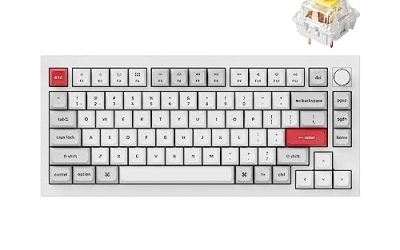
| 3. Keychron Q1 HE Wireless |
| Check price on Amazon |
Key takeaways
- Compare the best keyboards for Minecraft PvP, with Rapid Trigger switches, low latency and compact layouts that keep clicks fast and your mouse free to move.
Minecraft PvP is decided in fractions of a second. A fight turns on how fast you click, how cleanly you strafe, and whether your bridge places hold while you move, and a slow or mushy keyboard hands those moments away. The right board registers each press the instant your finger moves, resets the key as you lift, and never drops a press when several keys go down at once. That is the gap between a keyboard built for typing and one built for combat, and it is the gap this guide closes.
This guide is for competitive players who live in arenas and bed wars lobbies, for builders who switch between long creative sessions and sudden fights, and for casual players who want one board that also handles schoolwork and typing. The Razer board suits players who want the fastest analog switches, the ASUS board fits small desks and wireless play, and the Keychron board is the pick for players who want Hall effect switches with deep customization.
Quick Picks
As an Amazon Associate we earn from qualifying purchases
| Product | Best for | Key spec from title |
|---|---|---|
| Razer Huntsman V3 Pro TKL | Competitive PvP with adjustable actuation | Analog Optical Switches, Snap Tap, Rapid Trigger, Adjustable Actuation |
| ASUS ROG Falchion RX Low Profile | Small desks and wireless play | ROG RX Red Optical Switches, Tri-Mode Connectivity, 65 percent Compact |
| Keychron Q1 HE Wireless | Hall effect switches with deep customization | Hall Effect Gateron Double-Rail Magnetic Switch, Rapid Trigger, QMK |
How to Choose
Switch Speed and Rapid Trigger
Minecraft PvP rewards keys that register early and reset early. Linear switches travel smoothly from top to bottom, which suits rapid clicking in a fight, while tactile switches add a small bump that confirms each press when you place blocks in a pattern. Hall effect and analog optical switches read the position of the key instead of waiting for a metal contact, so actuation can be set shallow for combat keys and deeper for keys you press by accident. Rapid Trigger resets a key the instant it begins to rise, which keeps strafing, bridging, and repeated clicks responsive instead of waiting for the key to return to the top.
Layout and Mouse Room
The layout you pick decides how much room your mouse gets, and mouse room decides how well you aim. A 60 percent board drops the number pad, function row, and arrow keys, leaving a wide open space for the broad sweeps of low-sensitivity aiming. A 65 percent board keeps dedicated arrow keys, which helps when you navigate chat and menus without reaching for a function layer. Tenkeyless boards keep the function row and navigation cluster while dropping only the number pad, a sound middle ground for players who also type a lot. Full-size boards suit players who bind hotbar slots to the number pad, but they push the mouse further right and crowd a small desk.
Latency and Connection
Latency is the delay between pressing a key and the game seeing it, and in PvP that delay decides who lands the first hit. A wired USB connection is the safest choice, because it removes wireless interference and battery worries entirely. Modern 2.4 GHz wireless is close enough for most players when it uses a dedicated receiver, while Bluetooth adds more delay and suits typing and casual play better than ranked fights. Polling rate matters too: a board that reports key presses more often sends each input sooner. Check the connection modes on the listing before you buy, and keep a wired cable nearby for tournament nights.
Build, Keycaps, and Software
Minecraft sessions run long, and a board that wears out in a few months is a poor buy. Double-shot PBT keycaps resist shine and keep legends readable after months of daily use, while thinner ABS caps tend to go smooth and glossy where your fingers rest. An aluminum top plate keeps the board rigid when you press keys hard during a fight, and it stops the case from flexing under a heavy hand. Software matters as well: remappable keys let you bind building commands and potion shortcuts where your fingers expect them, and onboard memory stores those bindings on the board so your setup follows you to another computer. Confirm the software runs on your operating system before you buy.
The 3 Best Options
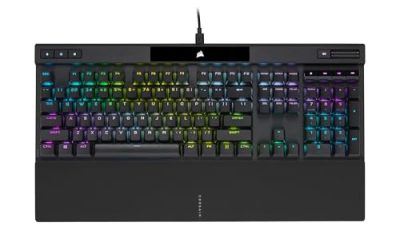
1. Razer Huntsman V3 Pro TKL
- Best for: Competitive PvP players who want adjustable actuation and fast resets for strafing and bridging.
- Analog Optical Switches Gen-2
- Adjustable actuation from 0.1 mm to 4.0 mm
- Rapid Trigger and Razer Snap Tap
- 1000 Hz polling rate
Competitive PvP players who want adjustable actuation and fast resets for strafing and bridging.
This is a wired board, and this 1000 Hz version is separate from the newer 8KHz variant, so confirm the listing matches this model before ordering.
The Huntsman V3 Pro TKL is the most combat-focused board in this guide, and its analog optical switches are the reason. Actuation adjusts from a hair trigger for fast clicking to a deeper press for keys you want to protect, and Rapid Trigger resets a key the instant it begins to rise, which keeps strafing and block placement responsive. Snap Tap prioritizes the most recent direction key, so counter-strafing feels immediate. The tenkeyless layout leaves generous mouse room, doubleshot PBT keycaps hold up to daily use, and the included wrist rest supports long sessions.
Watch out for: This is a wired board, and this 1000 Hz version is separate from the newer 8KHz variant, so confirm the listing matches this model before ordering.
2. ASUS ROG Falchion RX Low Profile
- Best for: Players who want a compact wireless board with a low-profile feel and room for the mouse.
- ROG RX Red low-profile optical switches
- 65 percent compact layout with dedicated arrow keys
- Tri-mode connectivity: 2.4 GHz, Bluetooth, wired USB
- ROG SpeedNova wireless technology
Players who want a compact wireless board with a low-profile feel and room for the mouse.
This ASIN is the White finish with Red switches, so confirm the color and switch type on the listing before ordering. Low-profile switches feel different from full-height switches, so they take a short adjustment period.
The Falchion RX Low Profile is the wireless pick for players who want a small board with a low, fast feel. Its low-profile optical switches sit closer to the case, so each press travels a short distance and your fingers move less during long fights. Tri-mode connectivity covers 2.4 GHz wireless, Bluetooth, and wired USB, and the 65 percent layout keeps arrow keys while freeing up mouse room. A touch panel handles volume and shortcuts, silicone dampening foam keeps typing quiet, and the included cover protects the board when you pack it away.
Watch out for: This ASIN is the White finish with Red switches, so confirm the color and switch type on the listing before ordering. Low-profile switches feel different from full-height switches, so they take a short adjustment period.
3. Keychron Q1 HE Wireless
- Best for: Players who want Hall effect switches, deep remapping, and a solid metal board for PvP and typing.
- Hall Effect Gateron double-rail magnetic switches
- Rapid Trigger
- Adjustable actuation
- QMK support
Players who want Hall effect switches, deep remapping, and a solid metal board for PvP and typing.
The 75 percent layout has no number pad, and the board is heavier than plastic compact boards, so it suits a fixed desk better than a travel bag.
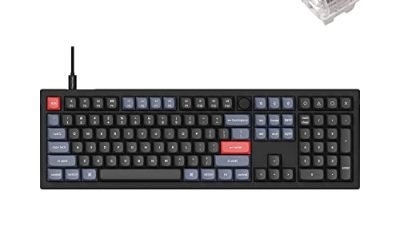
The Q1 HE Wireless brings Hall effect switches to a sturdy 75 percent board, and that combination suits players who want speed plus deep customization. Gateron double-rail magnetic switches let you set actuation per key, and Rapid Trigger resets each key as soon as it begins to rise, which helps repeated clicking and fast movement. QMK support opens full remapping, the aluminum case keeps the board planted during intense fights, and 2.4 GHz wireless, Bluetooth, and wired USB cover every setup. Hot-swappable sockets let you change switches later without soldering.
Watch out for: The 75 percent layout has no number pad, and the board is heavier than plastic compact boards, so it suits a fixed desk better than a travel bag.
Which One Fits Your Situation
You Fight in Ranked PvP and Bridge Battles
Pick the Razer Huntsman V3 Pro TKL. Adjustable actuation lets you set combat keys to a hair trigger while keeping utility keys deeper, and Rapid Trigger plus Snap Tap keep strafing and counter-strafing immediate. The tenkeyless layout leaves wide mouse room for low-sensitivity aiming, and the wrist rest supports long ranked sessions without wrist strain.
Your Desk Is Small or You Play on the Move
Pick the ASUS ROG Falchion RX Low Profile. Its 65 percent layout keeps arrow keys while freeing up far more mouse room than a tenkeyless board, and the low-profile switches keep the board slim for packing. Tri-mode wireless means no cable drag on a crowded desk, and the included cover protects the keys in a bag.
You Want One Board for PvP and Typing
Pick the Keychron Q1 HE Wireless. Hall effect switches with adjustable actuation handle fast combat clicks, while the 75 percent layout keeps a function row and arrow keys for schoolwork and daily typing. QMK remapping lets you keep one layout for fights and another for typing, and wireless plus wired modes cover a desk PC and a laptop alike.
You Want Wireless Freedom Without Losing Speed
Pick the ASUS board for pure wireless play or the Keychron board if you also want Hall effect switches. Both use a dedicated 2.4 GHz receiver for low-latency play, and both fall back to a wired cable for tournament nights. Keep the receiver close to the board, charge between sessions, and switch to Bluetooth only for typing away from your desk.
Common Mistakes
- Buying a full-size board for a small desk, then running out of mouse room in the middle of a fight.
- Choosing clicky switches for a shared room, where the noise bothers everyone nearby during late-night sessions.
- Ignoring the layout and losing the arrow keys or function row you use for chat, menus, and hotbar slots.
- Picking a board for wireless play without checking whether it uses a dedicated 2.4 GHz receiver or Bluetooth only.
- Skipping the software check and finding out too late that macros and remapping do not work on your operating system.
Frequently Asked Questions
Do I need Hall effect switches for Minecraft PvP?
No. Standard mechanical switches win plenty of fights, and many players prefer their familiar feel. Hall effect and analog optical switches add adjustable actuation and Rapid Trigger, which help fast clicking, strafing, and bridging. Treat them as an upgrade for players who want every edge, not as a requirement for enjoying PvP.
Is a 60 percent keyboard better than tenkeyless for PvP?
A 60 percent board gives your mouse the most room, which helps low-sensitivity aiming and wide sweeps. Tenkeyless boards keep the function row and navigation keys, which many players use for chat and hotbar shortcuts. The best layout is the smallest one you can use without missing keys, so try the function layer before you commit.
Does wireless add lag in Minecraft PvP?
A dedicated 2.4 GHz receiver adds so little delay that most players never notice it in a fight. Bluetooth adds more delay and is better suited to typing and casual play. For ranked matches, use the 2.4 GHz mode or a wired cable, keep the receiver close to the board, and charge the battery between sessions.
What is Rapid Trigger and does it help in Minecraft?
Rapid Trigger resets a key the moment it begins to rise, instead of waiting for it to return to the top. That makes repeated presses, strafing, and bridging faster, because the next press registers sooner. It helps most in fast PvP, where keys are pressed and released many times per second.
FAQ
Do I need Hall effect switches for Minecraft PvP?
Is a 60 percent keyboard better than tenkeyless for PvP?
Does wireless add lag in Minecraft PvP?
What is Rapid Trigger and does it help in Minecraft?
More from Amazon
Programs that pair well with the guide above. Offers and eligibility are set by Amazon and may change.
Free shipping on eligible items, Prime Video and more. Eligible new members can start with a free trial.
Start a Prime free trialAd-free music streaming. Eligible new subscribers can start with a free trial.
Try Music Unlimited freeA Prime membership for ages 18-24 with a trial period. Eligibility is set by Amazon.
See Prime for Young AdultsAudiobooks and podcasts to listen to on the go. Eligible new members can start with a free trial.
Try Audible freeAs an Amazon Associate we earn from qualifying purchases.